


Automated Faceless AI Video Workflow Explained – As a Real Story
The Marketer Who Could Not Be Everywhere At Once
On a quiet Tuesday night, Mia stared at her content calendar and felt that familiar knot in her stomach. She was a solo marketer for a fast-growing personal brand, and her founder wanted one thing:
“Short, viral faceless videos on every platform, every day.”
Instagram, Facebook, LinkedIn, Threads, TikTok, YouTube, Twitter, Pinterest – the list kept getting longer. Mia knew faceless AI videos were performing incredibly well, but creating them manually was a nightmare. She had to:
- Brainstorm ideas that might actually go viral
- Write scripts that fit 15 seconds without sounding robotic
- Generate videos with a consistent style and voice
- Upload and publish to every social media platform individually
By the time she finished one video, the day was gone. Consistency was slipping, and so was reach.
That night, while searching for a way to automate faceless AI video creation, she stumbled across an n8n workflow template built around Blotato’s API and AI agents. It promised something that sounded almost too good to be true:
From idea to published faceless AI video across multiple platforms, all on autopilot.
Discovering the n8n Faceless AI Video Template
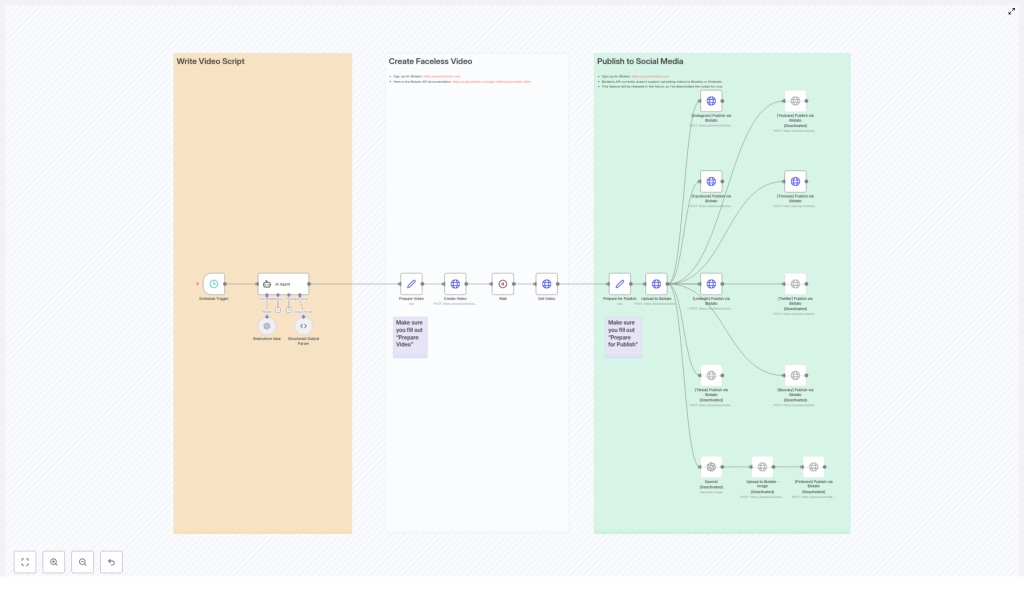
Mia opened the n8n template, and at first glance, it looked like a colorful map of her dream workflow. The nodes were visually grouped and color-coded into three main sections:
- Orange – Write Video Script
- White – Create Faceless Video
- Green – Publish to Social Media
Instead of a messy collection of automations, this template was built like a clear story of its own. It walked from brainstorming and scripting, to generating the video with Blotato’s API, then finally to publishing across social media.
For Mia, it felt like finding a production team hidden inside her browser.
Rising Pressure, Rising Automation
The next week was critical. Her founder had a campaign planned around “little known history facts about famous people.” They wanted daily short-form videos, all faceless, all on multiple platforms.
Mia decided to bet on the n8n workflow template.
Step 1 – Letting the Workflow Think for Her
The first thing she noticed was the scheduled trigger node.
Instead of manually starting anything, the workflow could be set to run at a specific time every day. Mia scheduled it for early morning, long before she even opened her laptop.
At the scheduled time, the workflow would wake up and move into the orange section: Write Video Script.
Step 2 – Brainstorming at Scale With an AI Agent
Inside the orange group, the magic began. The template used OpenAI’s GPT-4o model combined with an AI Agent to do exactly what Mia used to spend hours on.
The agent was configured to:
- Generate 50 viral faceless video ideas around a themed topic, in this case: “Little known history facts about [famous person]”
- Randomly select one of those ideas so every day felt fresh and unpredictable
- Research relevant data about that idea
- Write a concise 15-second video script and an accompanying caption
Instead of Mia sweating over ideas and word counts, the workflow handled it. On top of that, the template used structured output parsing so the AI’s response was clean, predictable, and ready for automation. No messy copy-paste, no manual formatting.
Step 3 – Getting Ready For Video Creation
Once the script and caption were generated, the workflow shifted toward production.
In the preparation step, the template bundled together:
- The final script
- Caption text
- Voice settings
- Style and animation preferences
All of this was packaged for Blotato’s video creation API. Mia only needed to configure these options once in the “Prepare Video” node. After that, every run would follow the same brand-consistent style.
The Turning Point – Letting Blotato Do the Heavy Lifting
The real turning point in Mia’s workflow came when she looked at the white section: Create Faceless Video.
Step 4 – Generating the Faceless Video With Blotato
The scripted content and settings were handed off to Blotato’s video creation API. Instead of Mia opening an editor, choosing assets, and aligning audio with visuals, the API handled everything autonomously.
The n8n workflow did not just send the request and hope for the best. It also:
- Waited for Blotato to finish generating the video
- Checked the status so it did not move ahead too early
- Fetched the final video URL once the video was ready
In practical terms, this meant Mia could be in a meeting, asleep, or working on strategy while a fully produced faceless AI video was being created in the background.
Step 5 – Preparing to Publish Everywhere
With the video URL in hand, the workflow moved into the green section: Publish to Social Media.
Before posting, the template prepared all the data needed for publishing:
- Social media account IDs
- The final caption text
- Any additional metadata required by the platforms
This happened in the “Prepare for Publish” node, where Mia had to fill in key fields like:
- Her Blotato API key
- Account IDs for Instagram, Facebook pages, LinkedIn profiles, and more
The template clearly marked where these values needed to go, so she did not have to guess. Sticky notes in the workflow even pointed to helpful resources, such as where to sign up for Blotato and how to manage usage.
From One Upload to Many Platforms
Step 6 – Upload & Publish With a Single Flow
Once everything was prepared, the final steps felt almost unfairly simple.
The workflow:
- Uploaded the video URL to the Blotato media endpoint
- Triggered simultaneous posts across multiple social media platforms supported by Blotato’s API
Instead of Mia manually logging into each platform, resizing, re-uploading, and rewriting captions, the workflow handled everything in a single automated motion.
Supported Platforms in Mia’s New Workflow
Within this template, Mia saw support for:
- Facebook (with page ID)
- Threads
- TikTok (currently disabled)
- YouTube (currently disabled)
- Twitter (currently disabled)
- Bluesky (currently disabled)
- Pinterest (currently disabled, for image posts)
The disabled nodes were not dead ends. They were hints of what was coming. As Blotato’s API evolved, Mia knew she could easily expand her reach by enabling more platforms without rebuilding her automation from scratch.
For image-based content on Pinterest, the template even allowed for optional AI-generated images, so her faceless video strategy could extend into static visual posts later.
Resolution – What Changed For Mia
Within a few days of setting up the n8n faceless AI video template, Mia’s daily routine changed dramatically.
Instead of:
- Spending hours on ideation and scripting
- Manually producing faceless videos
- Uploading and publishing to each network one by one
She now:
- Configured the workflow once with her API keys, account IDs, and style preferences
- Let the schedule trigger start the process automatically
- Reviewed results and performance while the system kept producing new content
Every morning, a new faceless AI video, built around “little known history facts about [famous person],” appeared on her brand’s social channels. The AI agent handled the research and script, Blotato’s API handled the video, and n8n orchestrated the entire journey from idea to multi-platform publication.
The tension that used to come from staring at an empty content calendar was replaced by something else entirely: a reliable, automated content engine.
How You Can Follow the Same Path
If you are a marketer, founder, or creator who wants to scale content without burning out, Mia’s story can be yours too. This n8n workflow template is built specifically for:
- Automated faceless AI video creation
- AI-powered brainstorming and scripting
- Cross-platform social media publishing
To get it running smoothly, you will need to:
- Fill in your API keys and account IDs in the “Prepare for Publish” and “Prepare Video” nodes
- Connect your Blotato account and social profiles
- Review the sticky notes for helpful links, signup info, and usage tips
From there, the template handles the rest, from idea generation with GPT-4o and AI agents, to video creation with Blotato’s API, to automated posting on your chosen social media platforms.
Start Your Own Automated Faceless Video Story
If you are ready to turn your content workflow into a story of automation and scale, now is the time to act.
Streamline your content production, automate faceless AI video creation, and maximize your social reach with Blotato and n8n.
Sign up at Blotato, connect your accounts, and customize this workflow template to fit your brand and voice.
Then plug it into your n8n instance and let the system generate and publish viral-ready faceless videos while you focus on strategy, creativity, and growth.
