


Automated Faceless AI Videos Workflow Explained
Why this n8n workflow is a game changer
Imagine waking up, checking your phone, and seeing fresh short-form videos already posted to your socials… that you didn’t have to write, edit, or upload yourself. That’s exactly what this Automated Faceless AI Videos workflow in n8n is built to do.
It pulls together AI brainstorming, scriptwriting, video generation, and automatic publishing through the Blotato API, so you can consistently push out viral-style faceless videos across multiple platforms with almost no manual effort.
If you’re trying to grow on Instagram, Facebook, LinkedIn, Threads, or other platforms, but content creation keeps eating your time, this workflow lets you hand off the repetitive parts to automation and focus on strategy instead.
What this workflow actually does
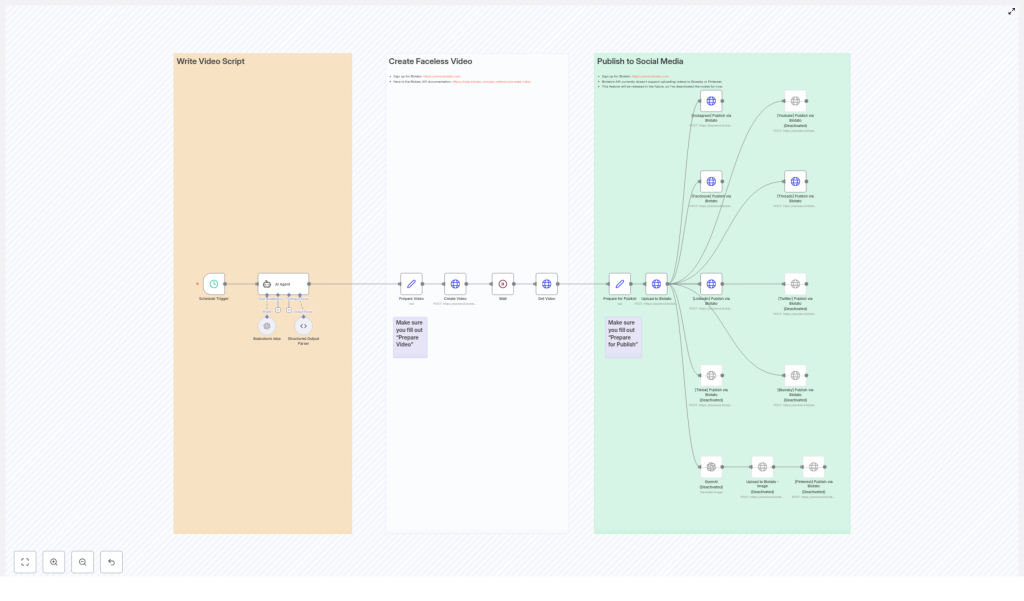
At a high level, the workflow moves through three big stages:
- Brainstorms and writes a short video script using GPT-4o
- Creates a faceless video using Blotato with your chosen style and voice
- Publishes the video to your connected social media accounts automatically
All of that runs on a schedule you define, so you can have new videos going out every day, a few times a week, or whatever rhythm fits your content plan.
When should you use this template?
This n8n template is perfect if you:
- Want to post short, faceless AI videos without being on camera
- Need a repeatable content engine that runs on autopilot
- Like the idea of testing viral-style hooks and ideas at scale
- Are already using or open to using Blotato for video generation
If you enjoy being in front of the camera and editing everything manually, you might not need this. But if you’re thinking, “I just want regular, quality content going out without babysitting the process,” then this workflow will feel like a huge relief.
Step 1 – Automated scriptwriting with GPT-4o
The first part of the workflow focuses on coming up with the idea and writing the script for your faceless video.
Schedule Trigger
Everything starts with a Schedule Trigger. You set this to run at a specific time, for example, every day at 10 AM. Once that time hits, n8n wakes up the workflow and kicks things off automatically.
Brainstorm Idea
Next, the workflow uses the GPT-4o language model to brainstorm a batch of potential video ideas. By default, it can generate 50 viral faceless video ideas around a theme you define, such as:
“Little known history facts about [famous person]”
You can tweak that theme to match your niche, whether it’s finance tips, productivity hacks, relationship advice, or anything else your audience loves.
AI Agent
Once those 50 ideas are generated, the AI Agent steps in. It:
- Randomly selects one idea from the list so each run feels fresh and unpredictable
- Researches relevant facts and statistics related to that idea
- Writes a short script for a roughly 15-second video with a strong hook at the beginning
- Creates a short 2-sentence caption that includes the hashtag
#ai
The result is a tight, punchy script that is ideal for Reels, Shorts, and other vertical short-form content.
Structured Output Parser
To keep everything clean and predictable for the rest of the workflow, a Structured Output Parser checks that the AI Agent returns data in proper JSON format. It makes sure the required fields are there, typically:
script– the spoken text for the videocaption– the short text that will be posted with the video
This step is what lets the next nodes plug that content straight into video creation without you having to manually copy and paste anything.
Step 2 – Turn the script into a faceless video
Once the script and caption are ready, the workflow moves into production mode and uses Blotato to create the actual video.
Prepare Video Node
The Prepare Video node is where you define how your video should look and sound. Here you can configure things like:
- Which Blotato template to use
- The voice that reads the script
- Caption position on screen
- Visual style and animation preferences
This node also injects the script and caption generated by the AI Agent so the video content matches what was just written.
Create Video Node
With everything prepared, the workflow sends a POST request to the Blotato API using the Create Video node. This tells Blotato to:
- Use your chosen template and settings
- Render the video based on the script
- Apply your selected style, voice, and animations
At this point, Blotato starts generating the video in the background.
Wait Node
Video rendering is not instant, so the workflow includes a Wait node. This simply pauses the workflow for a short period so Blotato has time to process and render the video. Without this delay, the next step might try to fetch the video before it is ready.
Get Video Node
After the wait period, the Get Video node checks in with the Blotato API to retrieve the final result. When the video is finished, this node pulls back the video URL that will be used for hosting and publishing.
Step 3 – Publish to social media automatically
Once the video URL is available, the workflow shifts to distribution and handles publishing across your chosen platforms.
Prepare for Publish
The Prepare for Publish node gathers everything needed for posting, including:
- Your social media account IDs
- The final video URL
- Both long and short versions of the caption if you are using different formats per platform
This is also where you make sure your configuration is correct so each platform knows which account to post to.
Upload to Blotato
Next, the workflow uses an Upload to Blotato step to host the created video. The video URL from the previous node is uploaded to Blotato, which then serves as the media hosting location for the social posts.
Social Media Publishing Nodes
Finally, the workflow uses specific social media publishing nodes to push the video live. It can automatically publish your content, along with the caption, to platforms such as:
- Threads
- Optionally TikTok, YouTube, Twitter, Bluesky (some of these may be deactivated depending on current API support)
Once set up, this means your video goes from idea to live post across multiple platforms without you logging into each account separately.
Image Generation Nodes (currently deactivated)
The template also includes Image Generation nodes that can:
- Create images from text
- Upload those images to Pinterest
Right now, these nodes are disabled, but they are there if you want to experiment later or expand beyond video content once relevant support is available.
Important setup details you should not skip
Before you hit run and expect magic, there are a couple of critical configuration steps:
- You must add your Blotato API key in the relevant node so the workflow can talk to Blotato.
- Your social media account IDs need to be correctly set inside the “Prepare for Publish” node. Without these, the workflow will not know where to post.
- Some platform integrations are currently disabled while they wait for stable API support. You can enable or adjust these as the APIs evolve.
The template also uses sticky notes inside the workflow as visual reminders so you do not miss key configuration steps, especially in:
- “Prepare Video”
- “Prepare for Publish”
Make sure to review and complete those nodes before running the workflow in production.
Why this workflow makes your life easier
Instead of spending hours every week brainstorming ideas, writing scripts, creating videos, and uploading them one by one, this n8n workflow turns the whole process into a hands-off system.
It helps you:
- Scale your content output without burning out
- Stay consistent across multiple platforms
- Experiment with viral-style faceless content using AI
- Free up time for strategy, engagement, and higher-level creative work
If you have been wanting to show up more often online but the manual work kept getting in the way, this is a practical way to let automation handle the heavy lifting.
Ready to try the Automated Faceless AI Videos template?
This workflow brings together scheduling, GPT-4o scriptwriting, Blotato video generation, and multi-platform publishing in one smooth pipeline. Once configured, it quietly works in the background, helping you grow your audience with regular, engaging faceless AI videos.
Set it up once, let it run, and watch your social presence scale with far less effort.
