


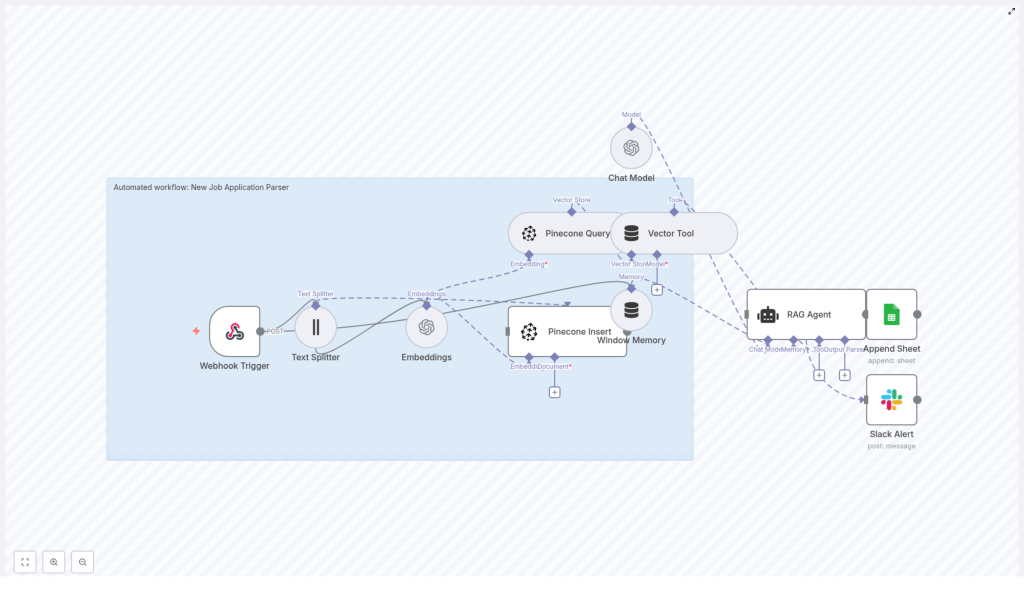
Automated Job Application Parser with n8n & RAG
Efficient handling of inbound job applications is a core requirement for any modern talent acquisition function. Manual review does not scale, introduces inconsistency, and delays engagement with high quality candidates. This article presents a production-grade n8n workflow template, “New Job Application Parser”, that automates resume parsing and enrichment using OpenAI embeddings, Pinecone vector search, and a Retrieval-Augmented Generation (RAG) agent.
The guide is written for automation engineers, operations teams, and talent tech practitioners who want a robust, explainable, and secure workflow that integrates with existing ATS, forms, and collaboration tools.
Business case for automating job application parsing
Automated parsing is not only about speed. It is about creating a consistent, queryable representation of candidate data that can be enriched and reused across hiring workflows.
Key advantages of using n8n for this use case include:
- Faster intake of applications via webhook-based ingestion from forms, ATS, or email gateways
- Standardized extraction of core candidate attributes such as skills, experience, education, and contact details
- Semantic search capabilities powered by embeddings and a vector database for contextual matching
- Operational visibility through structured logging to Google Sheets and Slack-based incident alerts
Combined with a RAG agent, this approach supports richer analysis such as fit summaries, gap detection, and context-aware Q&A on candidate profiles.
Architecture overview of the n8n workflow
The “New Job Application Parser” workflow orchestrates multiple n8n nodes and external services into a cohesive pipeline. At a high level, the workflow:
- Receives application data through an HTTP Webhook (POST)
- Splits long resume and cover letter text using a Text Splitter
- Generates OpenAI embeddings for each chunk
- Stores vectors and metadata in a Pinecone index for semantic retrieval
- Uses Pinecone queries as tools for a RAG Agent backed by an OpenAI chat model
- Persists parsed results to Google Sheets and surfaces Slack alerts on errors
The following sections explain how each component contributes to the overall design, along with configuration recommendations and best practices for deployment.
Triggering and ingesting applications
Webhook Trigger (entry point)
The workflow begins with an n8n Webhook Trigger configured to accept POST requests on a path such as:
/new-job-application-parser
Connect this endpoint to your preferred intake source:
- Applicant Tracking System (ATS) outbound webhooks
- Form providers (career site forms, landing pages)
- Email-to-webhook services that convert attachments or body content into text
The webhook payload can contain raw text, OCR-processed resume content, or structured JSON. For best results, design the payload to include both unstructured text (resume, cover letter) and structured metadata (name, email, source, document ID). This metadata will later be stored in Pinecone for filtered retrieval.
Preprocessing and embedding candidate data
Text Splitter (chunking for embeddings)
Resumes and cover letters are often lengthy and exceed typical token limits for embedding models. The Text Splitter node segments the text into overlapping chunks, for example:
chunkSize = 400overlap = 40
This strategy preserves semantic continuity while respecting model constraints and improves retrieval precision. Each chunk maintains enough context for the RAG agent to reason about skills, experience, and role alignment.
Embeddings (OpenAI)
Each text chunk is converted into a dense vector representation using an OpenAI embedding model, such as:
text-embedding-3-small
These embeddings enable semantic similarity search across candidate records. Instead of relying solely on keyword matching, the system can match on concepts like “backend engineering with Python” or “enterprise B2B sales” even if phrased differently in resumes.
Best practices for the embedding step:
- Select a model that balances cost and quality for your application volume
- Retain identifiers such as chunk index and source document reference so the full resume can be reconstructed when necessary
Vector storage and retrieval with Pinecone
Pinecone Insert (indexing candidates)
Once embeddings are generated, the workflow writes them into a Pinecone index, for example:
index name: new_job_application_parser
For each chunk, store:
- The embedding vector
- The text chunk itself
- Rich metadata, such as:
- Candidate name
- Email address
- Application source (career site, referral, agency)
- Original document or application ID
- Job requisition ID or role tag, if available
Metadata-aware indexing allows you to filter candidate records by role, date range, or source, which is critical when the same Pinecone index serves multiple pipelines or job families.
Pinecone Query & Vector Tool (context retrieval)
When the workflow needs to parse, enrich, or answer questions about a specific application, it performs a Pinecone query to retrieve the top-k most relevant chunks.
Typical configuration parameters include:
- top-k in the range of 3 to 10, depending on corpus size and desired context breadth
- Similarity threshold to filter low-relevance results
- Metadata filters to constrain retrieval to the correct role, time period, or application source
The retrieved chunks are then packaged by a Vector Tool node, which makes this context available as a tool to the RAG agent. This ensures that the downstream language model has direct access to precise candidate information instead of relying solely on the raw webhook payload.
RAG-based parsing and enrichment
Window Memory and Chat Model
To support multi-step analysis and follow-up reasoning, the workflow uses a Window Memory node. This node stores a short history of interactions for the current session, which is particularly helpful if you extend the workflow to handle multiple queries about the same candidate.
The Chat Model node (using an OpenAI chat model) serves as the core reasoning engine. It consumes:
- Incoming application data
- Retrieved context from Pinecone
- Session memory from the Window Memory node
RAG Agent configuration
The Retrieval-Augmented Generation (RAG) Agent coordinates the chat model and vector tool. It is configured with a system-level instruction such as:
Process the following data for task 'New Job Application Parser'.
You are an assistant for New Job Application Parser.
Within this framework, the RAG agent performs tasks including:
- Extracting structured fields:
- Name
- Phone number
- Skills and technologies
- Work experience and seniority indicators
- Educational background
- Summarizing candidate fit against a target job description
- Highlighting missing, ambiguous, or inconsistent information
To facilitate downstream automation, instruct the RAG agent to emit structured JSON output. For example:
{  "name": "",  "email": "",  "phone": "",  "skills": [],  "summary": "",  "fit_score": ""
}
This schema simplifies mapping to Google Sheets columns, ATS fields, or additional workflows. Adjust the schema to match your internal data model and reporting requirements.
Logging, monitoring, and alerting
Google Sheets: Append Sheet node
After the RAG agent has produced structured results, the workflow uses a Google Sheets Append node to log each processed application. Typical configuration:
- Sheet name:
Log - Defined columns that align with the JSON schema emitted by the RAG agent
This log provides a simple, shareable view for recruiters and hiring managers, and can act as a backup audit trail. For advanced teams, this sheet can also feed dashboards or be periodically ingested into a data warehouse.
Slack Alert node
Reliability is critical in high-volume hiring pipelines. The workflow includes a Slack node that sends alerts to a dedicated channel, for example:
#alerts
Whenever an error occurs in any part of the pipeline, the node posts a message with the relevant error details. This enables fast triage of issues such as:
- Webhook connectivity failures
- Credential or quota problems with OpenAI or Pinecone
- Schema mismatches when writing to Google Sheets
Payload and schema design best practices
Webhook payload design
Designing the payload from your source systems is a foundational step. Recommended fields include:
- Candidate metadata: name, email, phone (if available)
- Application metadata: source, job requisition ID, submission timestamp
- Document identifiers: resume ID, cover letter ID, or combined application ID
- Text content: full resume text, cover letter text, or pre-processed OCR output
Attach this metadata to Pinecone records as metadata fields so that you can later filter results by role, source, or time period without reprocessing the entire corpus.
Embedding strategy
- Use a compact model such as
text-embedding-3-smallfor cost-sensitive, high-volume pipelines and upgrade only if retrieval quality is insufficient. - Store chunk indices and original document references so you can reconstruct full documents or debug parsing behavior.
- Consider batching embedding requests where possible to reduce overhead and improve throughput.
Retrieval tuning
Effective retrieval is central to RAG quality. When tuning Pinecone queries:
- Experiment with top-k values in the range of 3 to 10 to balance context richness with noise
- Use metadata filters to restrict results to the relevant job or segment of your candidate pool
- Adjust similarity thresholds if you observe irrelevant chunks appearing in the context
Prompt engineering for the RAG agent
Clear and constrained instructions significantly improve output consistency. Recommended practices:
- Provide a concise system message that defines the agent’s role and the “New Job Application Parser” task
- Include explicit instructions to:
- Return JSON with a predefined schema
- Use nulls or empty strings when data is missing, instead of hallucinating values
- Summarize candidate fit in a short, recruiter-friendly paragraph
- Add a few example inputs and outputs to demonstrate desired behavior and formatting
Structured outputs not only simplify logging but also make it easier to integrate with ATS APIs, CRM updates, or further automation steps.
Security, compliance, and privacy considerations
Job applications contain personally identifiable information and often sensitive career history. Any production deployment must be designed with security and regulatory compliance in mind.
- Use HTTPS for all webhook endpoints and ensure TLS is properly configured.
- Enable encryption at rest in Pinecone and enforce strict access controls on Google Sheets.
- Limit access to n8n credentials and API keys using scoped service accounts and role-based access control.
- Define and implement data retention policies, including automated deletion or anonymization, to comply with GDPR, CCPA, and local privacy regulations.
Review your legal and security requirements before onboarding real candidate data and document your processing activities for audit readiness.
Scaling and cost optimization
As application volume grows, embedding generation and vector storage become material cost components. To manage this effectively:
- Batch embeddings where possible instead of issuing one request per chunk.
- Reuse embeddings for identical or previously processed content, especially for reapplications or duplicate submissions.
- Start with a compact embedding model and only move to larger models if you observe clear retrieval quality issues.
- Monitor Pinecone vector counts and introduce a retention policy to remove stale or irrelevant candidate data after a defined period.
Regularly review logs and metrics to identify optimization opportunities in top-k values, chunking strategy, and index design.
Troubleshooting guide
If you encounter issues when deploying or operating the workflow, use the following checklist:
- Webhook not receiving data:
- Verify that the n8n endpoint is publicly reachable and secured as required.
- Check authentication or signing configuration between the source system and n8n.
- Confirm that the source system is correctly configured to send POST requests to the specified path.
- Embeddings failing:
- Validate the OpenAI API key, model name, and region settings.
- Check for rate limit errors or quota exhaustion.
- Inspect payload sizes to ensure they do not exceed model limits.
- Pinecone insert or query errors:
- Confirm index name, region, and API key configuration.
- Verify that the vector dimension matches the embedding model used.
- Review index schema and metadata fields for consistency.
- Low quality RAG output:
- Improve system and user prompts with clearer instructions and examples.
- Increase top-k or refine metadata filters to provide better context.
- Add curated, high quality documents to the index to supplement sparse resumes.
Example implementation scenarios
This n8n template can be applied in multiple hiring contexts, including:
- High-volume career site pipelines where thousands of applications arrive via web forms
- Referral and agency submissions that need to be normalized before entering the ATS
- Pre-screening workflows that auto-fill ATS fields and generate recruiter-ready summaries
By centralizing parsing and enrichment in n8n, you gain a single, auditable automation layer that can integrate with any downstream system via APIs or native connectors.
Getting started with the template
To deploy the “New Job Application Parser” workflow in your environment:
- Clone the n8n workflow template from the provided link.
- Provision required services:
- OpenAI API key for embeddings and chat models
- Pinecone index configured with the
