


Automated Job Application Parser with n8n & RAG: Turn Hiring Chaos Into Clarity
From Inbox Overload To Insightful Hiring
Most hiring teams know the feeling: a flood of resumes and cover letters arriving from different sources, each with its own format, length, and structure. Important details hide in long paragraphs. Great candidates slip through the cracks. Manual screening eats up hours that could be spent interviewing, strategizing, and building a stronger team.
Automation offers a different path. Instead of wrestling with every application by hand, you can design a workflow that collects, understands, and organizes candidate data for you. The n8n job application parser workflow is built exactly for this purpose. It transforms unstructured resumes and cover letters into structured insights that your team can act on quickly.
This article walks you through that transformation as a journey: starting from the problem, shifting your mindset toward automation, then introducing a practical n8n template that ties together webhooks, OpenAI embeddings, Pinecone, a RAG agent, Google Sheets, and Slack. Along the way, you will see how this setup can become a stepping stone toward a fully automated, focused hiring pipeline.
Reframing The Hiring Workflow: From Manual To Meaningful
Automation is not just about saving time. It is about freeing your attention for the work that actually moves your company forward. When you stop copy-pasting details from resumes into spreadsheets, you create space for deeper conversations with candidates, sharper hiring decisions, and more strategic planning.
With n8n, you do not need to be a full-time engineer to build powerful systems. You can start small, experiment, and iterate. This job application parser template is a concrete first step that you can deploy quickly, then refine as your needs grow.
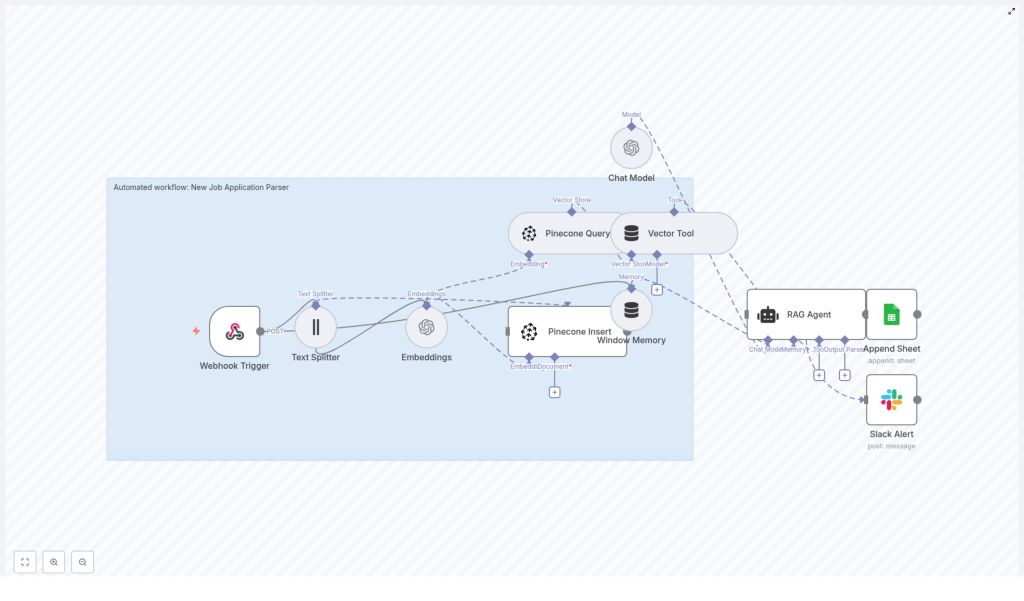
At a high level, the workflow will:
- Capture incoming applications in real time with a webhook
- Split and embed resume and cover letter text using OpenAI
- Store embeddings in a Pinecone vector index for fast semantic search
- Use a Retrieval-Augmented Generation (RAG) agent to parse and score candidates
- Log results into Google Sheets for review and reporting
- Send Slack alerts when something goes wrong so you stay in control
The result is a scalable, low-code architecture that gives your hiring team more clarity and control, with far less manual effort.
Why This n8n Architecture Unlocks Growth
As your hiring volume increases, the old way of working simply does not scale. This n8n-based architecture is designed to grow with you, while staying transparent and adaptable.
- Scalable parsing: Large resumes and cover letters are split into chunks, embedded with OpenAI, and stored in Pinecone so you can run fast semantic searches across thousands of candidates.
- Accurate extraction: A RAG agent combines stored context and language model reasoning to reliably pull out qualifications, intent, and other key signals.
- Operational visibility: Parsed results land in Google Sheets for easy review, and Slack alerts keep you informed when something needs attention.
- Low-code automation: Built in n8n, the workflow is easy to maintain, clone, and adapt to your own hiring process.
Think of this template as your automation foundation. Once it is running, you can extend it into automated routing, candidate nurturing flows, or advanced analytics, all within the same ecosystem.
The Workflow Journey: From Raw Application To Structured Insight
Let us walk through what actually happens inside the workflow, step by step. As you read, imagine how each part removes a little more manual work from your day.
1. Webhook Trigger: The Gateway For New Applications
Everything starts with an incoming POST request to the webhook path /new-job-application-parser. This endpoint receives the candidate payload, which typically includes:
- Resume text
- Cover letter text
- Metadata such as job ID, source, or timestamp
Once the payload hits the webhook, n8n triggers the workflow and passes the raw content downstream. From that moment, your automation takes over and you are no longer copy-pasting data from emails.
2. Text Splitter: Preparing Content For Embeddings
Resumes and cover letters can be long and dense. To make them more manageable for the embedding model, the workflow uses a Text Splitter node. This node breaks the text into smaller chunks so that each piece preserves local context without exceeding token limits.
A typical configuration might look like this:
- chunkSize: 400
- chunkOverlap: 40
You can tune these values based on the length and style of your incoming documents. The goal is to capture enough context in each chunk so that embeddings remain meaningful.
3. Embeddings: Turning Text Into Searchable Vectors
Once the text is split, each chunk is converted into a vector representation using OpenAI embeddings. The recommended model is:
text-embedding-3-small
These vectors encode the semantic meaning of the text, which allows you to later search by similarity instead of just keywords. This is what makes talent rediscovery and nuanced candidate matching possible at scale.
4. Pinecone Insert & Query: Building Your Candidate Memory
The workflow then stores all chunks and their embeddings in a Pinecone index. A suggested index name is:
new_job_application_parser
This index becomes your long-term, searchable memory of candidate data. Whenever you or the RAG agent needs to answer a question or perform a parsing task, the workflow queries the same Pinecone index to retrieve the most relevant chunks.
Over time, this means you are not just parsing individual resumes, you are building a searchable talent database that your team can tap into again and again.
5. Window Memory & Vector Tool: Keeping Context Alive
When applications get complex or when reviewers ask follow-up questions, context matters. The workflow uses:
- Window memory buffers to maintain conversational context across multi-part interactions
- A vector tool that exposes the Pinecone index as a lookup resource for the RAG agent
This combination allows the agent to remember what has already been discussed and to pull in the most relevant candidate data as needed. The experience feels less like a one-off script and more like an intelligent assistant that understands the bigger picture.
6. RAG Agent: Parsing, Scoring, And Summarizing Candidates
At the heart of the workflow sits the RAG (Retrieval-Augmented Generation) agent. It receives:
- The raw candidate data
- The retrieved context from Pinecone
Using a system prompt that you define, the agent runs a structured extraction routine and outputs parsed fields such as:
- Name and contact details
- Skills
- Experience summary
- Match score
- Potential red flags
Because you control the system message, you can standardize the output format and make it machine readable. This is what turns messy text into clean data you can filter, sort, and analyze.
7. Append Sheet: Building A Clear Review Queue
Next, the workflow appends the parsed output to a Google Sheet. A common configuration is:
- Sheet name:
Log
Each new candidate becomes a new row with structured columns that map directly to the fields extracted by the RAG agent. This simple spreadsheet view becomes your review queue and can easily connect to dashboards, reporting tools, or additional automations via Zapier or n8n.
8. Slack Alert (onError): Staying In Control
Automation should never feel like a black box. To keep you informed, the workflow includes an error path that sends a Slack alert when something goes wrong. The alert typically contains:
- The error message
- Basic context about the failed run
This way, your ops or hiring team can respond quickly, fix configuration issues, and keep the pipeline healthy without constantly checking logs.
Getting Ready: What You Need Before You Start
Before you import the workflow into your n8n instance, make sure you have the following in place. Treat this as your launch checklist.
- An n8n instance, either cloud or self-hosted.
- An OpenAI API key with access to embeddings (recommended model:
text-embedding-3-small). - A Pinecone account and index. You can create an index named
new_job_application_parseror adjust the node settings to match your own index. - Google Cloud OAuth credentials for Google Sheets, either a service account or OAuth client with Sheets scope.
- A Slack bot token with permission to post messages in your chosen channel.
- Environment variables or n8n credentials defined for each external service in n8n Settings > Credentials.
Key n8n Node Settings To Configure
Once your accounts and credentials are ready, review these core node settings inside n8n:
- Webhook Trigger:
Path = new-job-application-parser,HTTP method = POST - Text Splitter:
chunkSize = 400,chunkOverlap = 40(adjust based on document size) - Embeddings:
model = text-embedding-3-small - Pinecone Insert / Query:
index = new_job_application_parser - RAG Agent: a clear
systemMessageexplaining parsing rules and the required output schema - Append Sheet:
documentId = SHEET_ID,sheetName = Log, with columns mapped to your parsed output fields
These settings give you a solid baseline. As you test and learn, you can tune them for performance, cost, and accuracy.
Designing Your Prompt & Output Schema For Clarity
The quality of your results depends heavily on the clarity of your prompt and schema. The goal is to make the RAG agent output consistent, machine readable JSON, so you can easily store and analyze it.
Suggested Output Fields
Here is a simple but powerful schema you can use as a starting point:
candidate_nameemailphonesummaryskills(array)years_experiencematch_score(0-100)red_flags(array)
Example System Prompt Snippet
You can adapt this conceptual example to your own tone and requirements:
System: You are a parser for new job applications. Return EXACT JSON with fields: candidate_name, email, phone, summary, skills, years_experience, match_score, red_flags. Use the provided context and applicant text to populate fields.As you iterate, you can refine the prompt to align with your hiring criteria, seniority levels, or role specific requirements.
Testing, Validating, And Improving Your Workflow
Once everything is wired up, it is time to test. Treat testing as an opportunity to learn, not just a checkbox. Run a small batch of sample resumes and cover letters through the workflow and validate:
- Parsing accuracy: Are skills, years of experience, and contact details extracted correctly?
- Indexing quality: Can you retrieve similar candidate segments using semantic queries against Pinecone?
- Logging correctness: Does the parsed JSON map cleanly into the right Google Sheets columns?
- Error handling: Do Slack alerts fire when there is a failure or misconfiguration?
Each test run gives you feedback you can use to refine prompts, adjust chunk sizes, or tweak your schema. Over time, your workflow becomes more accurate and more aligned with how your team actually evaluates talent.
Security, Privacy, And Compliance: Building Trust Into Your Automation
Hiring data is sensitive. As you automate, it is important to design with privacy and compliance in mind from the start.
- Mask or redact sensitive personal information if required by your privacy policy or local regulations before storing vectors or logs.
- Use least privilege credentials for all third-party integrations, including Google, Pinecone, Slack, and OpenAI.
- Define clear retention policies for vector data and sheet logs so you remain compliant with GDPR or other HR data regulations.
By treating security as a core feature, you build a hiring system that is not only efficient but also trustworthy.
Scaling And Optimizing: Growing Without Losing Control
As your application volume grows, you will want to keep performance and costs under control. Here are some practical optimization ideas:
- Embeddings: Batch small chunks together where possible to reduce API overhead and cost.
- Pinecone: Choose an index dimension that matches your embedding model for optimal performance and pricing.
- RAG Agent: Cache frequent queries or introduce thresholds so you only invoke the LLM when it is truly needed.
- Monitoring: Add usage logging and cost alerts to catch unexpected spikes from large file uploads or test loops.
These adjustments help you maintain a smooth, predictable automation layer as your hiring needs evolve.
Real-World Ways To Use This Template
Once you see the parser in action, new ideas will start to appear. Here are a few common use cases to inspire your next steps:
- Initial candidate screening: Automatically score and summarize applicants for each opening, so recruiters can focus on the best fits first.
- Talent rediscovery: Use semantic search on your Pinecone index to surface past applicants who might be perfect for new roles.
- Automated triage: Route high match candidates directly to hiring managers or specific Slack channels for rapid follow up.
Each of these use cases builds on the same core workflow. You are not just adopting a single automation, you are creating a platform for ongoing improvement.
Your Next Step: Turn This Template Into Your Hiring Advantage
This n8n based job application parser is more than a technical demo. It is a practical way to reclaim time, reduce manual work, and build a more intelligent hiring pipeline. By combining OpenAI embeddings, Pinecone vector search, and a RAG agent, you get both deep extraction and fast retrieval, all wrapped in a low-code workflow that plugs into Google Sheets and Slack.
From here, you can keep building. Add role specific scoring logic, integrate with your ATS, or create automated follow up sequences. Every improvement compounds, and every manual task you automate gives you more room to focus on what matters most: finding and supporting great people.
Start Automating Today
Ready to see it in action? Import this workflow into your n8n instance, connect your API keys, and run a test batch of resumes. Watch how raw applications turn into clean, structured insights in your Google Sheet.
If you want guidance on customizing the RAG prompt, tuning the Pinecone index, or scaling this setup into production, you can reach out for support or follow our step by step resources to take this parser live.
