


Automated Keyword Rank Tracker with Google Sheets & BigQuery
From Manual Tracking To Scalable SEO Insight
If you have ever copied rankings into spreadsheets, juggled multiple SEO tools, or tried to keep several domains up to date by hand, you know how quickly keyword tracking can eat your time and energy. It is essential for any SEO strategy, yet it often becomes a repetitive task that steals focus from higher value work.
This is where automation can change everything. With a simple but powerful n8n workflow, you can turn a manual chore into a repeatable system that quietly runs in the background. By connecting Google Sheets and Google BigQuery through n8n, you can build your own automated keyword rank tracker that is transparent, flexible, and cost effective.
Instead of relying on expensive rank tracking tools, you gain a workflow that you fully control and can improve over time. This template is not just a one off script, it is a foundation you can build on as your SEO efforts and domains grow.
Shifting Your Mindset: Automation As A Growth Lever
Before diving into the technical steps, it helps to approach this workflow with the right mindset. Automation in n8n is not only about saving a few minutes each day. It is about:
- Freeing your attention from repetitive tasks so you can focus on strategy and creativity
- Building repeatable systems that scale as you add more domains and keywords
- Owning your SEO data instead of locking it into proprietary tools
- Experimenting, iterating, and continuously improving your processes
This automated keyword rank tracker is a practical example of that mindset in action. Once it is running, you will have reliable daily data, organized in Google Sheets, powered by Google BigQuery, and orchestrated by n8n. From there, you can extend it, connect it to reporting dashboards, or trigger follow up workflows based on ranking changes.
What This n8n Workflow Actually Does
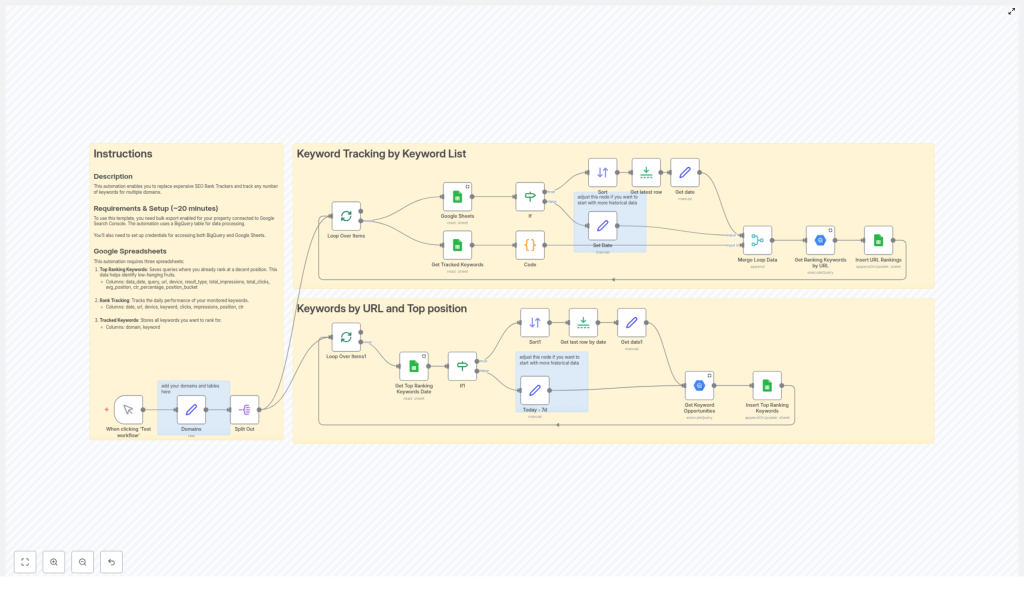
At its core, this automation template handles two powerful SEO processes for you, across one or many domains:
- Keyword tracking by keyword list – Pulls a list of keywords from Google Sheets for each domain, queries Google BigQuery for performance metrics, and writes fresh ranking data back to your sheets.
- Keywords by URL and top position – Analyzes your Google Search Console bulk export in BigQuery, finds top ranking keywords by URL, and highlights new keyword opportunities with detailed metrics.
Both processes are bundled into one n8n workflow template. You can start small with a single domain, then scale up to multiple domains and large keyword sets without changing your core setup.
The Journey Through The Workflow
1. Starting The Workflow And Defining Your Domains
The workflow begins with a simple manual trigger. In n8n, you click “Test workflow” to start the run. This gives you full control while you are experimenting, testing, or refining your setup.
Once triggered, a configured node reads your preset domains and their associated Google BigQuery tables. The workflow then splits this domain list so each domain is processed independently. This separation is what makes the template naturally scalable. As you add more domains, the workflow simply loops over them instead of needing a separate workflow for each one.
2. Tracking Keywords From Your Own Lists
The first major process in the template focuses on keywords you explicitly choose to monitor. This is ideal for target terms, priority pages, or campaigns you care deeply about.
- Loop Over Items – The workflow runs a loop that processes each domain in turn. Every domain is treated as its own item so you can maintain clean, domain specific data.
- Google Sheets Node – For each domain, n8n connects to a Google Sheet that is named after that domain. This sheet contains the list of tracked keywords you want to follow. The node reads that list and passes it along the workflow.
- Code Node – The raw keyword list is then converted into a string format that is ready for use inside SQL queries. This step prepares your keywords so they can be safely and efficiently used in BigQuery.
- Merge Loop Data – The workflow merges the domain information with the formatted keyword string. This combined data set is what the query node uses to request metrics for the right keywords under the right domain.
- Google BigQuery Node – Here is where the heavy lifting happens. The node sends a query to BigQuery to retrieve daily metrics for your tracked keywords. Typical metrics include clicks, impressions, average ranking position, and click through rate (CTR), filtered by the dates and specific keywords you track.
- Google Sheets Insert Node – Finally, the workflow writes the fresh metrics into your rank tracking sheet. You can append new rows or update existing ones, depending on how you structure your data. Over time, this sheet becomes a living history of your keyword performance.
This part of the workflow turns your Google Sheets into a dynamic keyword rank tracker that updates itself. No more copying data by hand or logging into multiple tools every morning.
3. Discovering Keyword Opportunities By URL And Position
The second major process in the template looks at your performance from a different angle. Instead of starting from a list of target keywords, it starts from your URLs and identifies which queries are already performing well or have the potential to grow.
- Loop Over Items1 – Similar to the first process, this loop walks through each domain individually so you can keep your insights clearly separated.
- Google Sheets Node – For each domain, the workflow reads the latest top ranking keywords from a dedicated Google Sheet. This sheet acts as your reference for what is currently performing well.
- If Node – To make the workflow more resilient, an If node checks whether previous data exists. If there is no historical data yet, the workflow sets a default starting date, typically 7 days ago, so you can still gather a meaningful initial dataset.
- Google BigQuery Node – Using your Google Search Console bulk export stored in BigQuery, this node extracts keyword opportunities. It pulls metrics such as impressions, clicks, and average position, then categorizes rankings into groups like Top 3 or Top 10. This makes it easier to spot quick win opportunities or pages that are close to breaking into better positions.
- Google Sheets Insert Node – The resulting keyword opportunities are written into a dedicated Google Sheet. This sheet becomes your action list, where you can prioritize optimizations, content updates, and internal linking based on real data.
By combining both processes, you get a full picture. You track the keywords you care about and also uncover queries you might not have considered yet but are already driving visibility.
What You Need To Set Everything Up
To unlock the full power of this n8n template, you will need a few components in place. Once they are configured, you will be able to run the workflow repeatedly with minimal effort.
- Google Search Console bulk export
Enable bulk export for your Google Search Console property. This sends your performance data to BigQuery on a regular basis and is the foundation for your analysis. - Google BigQuery configuration
Set up Google BigQuery to store and query your Search Console data. Make sure you know which tables correspond to which domains so you can map them correctly in n8n. - Three structured Google Sheets
Create three Google Sheets documents with a clear structure:- Top Ranking Keywords – Used to store existing ranking queries and their metrics.
- Rank Tracking – Used to collect daily performance data for the keywords you monitor over time.
- Tracked Keywords – Contains the list of keywords to track for each domain. Each domain has its own sheet named after it.
- Google credentials in n8n
Configure Google credentials in your n8n instance so the workflow can securely access both BigQuery and Google Sheets.
Once these pieces are in place, you can plug in the template, connect your credentials, and start running test workflows. From there, you can refine your sheets, queries, and schedules until the system perfectly matches your SEO needs.
Why This Automation Template Is Worth Implementing
Building this workflow in n8n is not just a technical exercise. It is a strategic move that supports long term growth for your SEO efforts and your business.
- Save costs – Replace or reduce reliance on expensive rank tracking tools with a solution built on services you already use, like Google Sheets and BigQuery.
- Customize everything – Adjust keyword lists, domains, filters, and time ranges to match your exact strategy, instead of adapting to rigid tool limitations.
- Centralize your data – Keep all key metrics in Google Sheets, where you can easily share, filter, visualize, or connect them to dashboards.
- Leverage BigQuery power – Use Google BigQuery to process large volumes of Search Console data quickly and reliably, even for multiple domains and big keyword sets.
- Scale without friction – As you add more domains or expand your keyword lists, the same workflow continues to handle the workload with minimal changes.
Most importantly, this automation frees you from manual updates and gives you consistent, trustworthy data. That consistency is what enables better decisions, faster experiments, and more focused SEO execution.
Next Steps: Experiment, Iterate, And Make It Your Own
Think of this n8n workflow template as your starting point, not your final destination. Once you have it running, you can:
- Adjust the schedule to run daily, weekly, or at custom intervals
- Add notifications when rankings change significantly
- Connect your sheets to BI tools or dashboards for visual reporting
- Extend the workflow with additional checks or automated follow up tasks
Every small improvement you make will compound over time, giving you a more automated, insight driven SEO process.
Take Action: Start Automating Your Keyword Tracking
You do not need to rebuild everything from scratch. You can start right now by loading this template into your n8n instance and connecting it to your own data. As you see the first automated reports appear in your Google Sheets, you will feel the shift from manual tracking to system driven insight.
If you need guidance while setting things up, you are not alone. Reach out to SEO automation specialists, or explore the n8n community where many users share tips, best practices, and customization ideas for workflows just like this.
