


Automated LinkedIn Posts with Google Gemini & DALL-E
Imagine Never Having to Say “I’ll Post on LinkedIn Tomorrow” Again
You know that moment when you promise yourself you will finally post something valuable on LinkedIn, then six days later you are still “thinking about ideas”? If you are a busy engineering leader, CTO, VP, or founder, LinkedIn can easily slip from “strategic channel” to “guilt-inducing tab you avoid opening.”
Now imagine your LinkedIn posts quietly writing themselves in the background, complete with smart topics, polished copy, eye-catching visuals, and SEO-friendly hashtags. All on autopilot. No more staring at a blinking cursor, no more scrambling for last-minute ideas.
That is exactly what this n8n workflow template does by combining Google Gemini, DALL-E, and LinkedIn publishing into one smooth automation. You set it up once, then let your content machine run on its own schedule.
What This n8n Workflow Actually Does
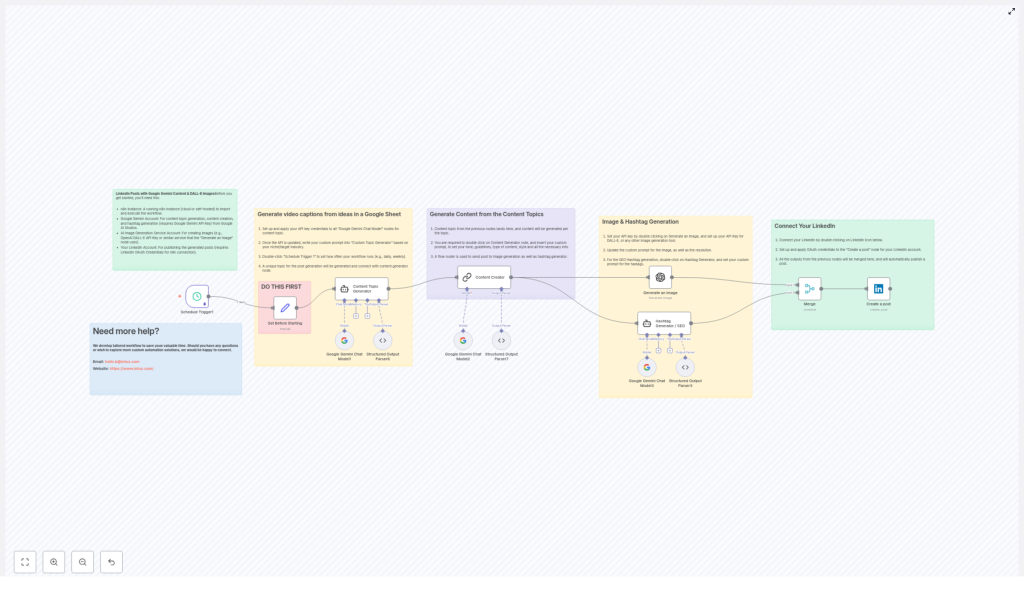
This workflow is basically your AI-powered LinkedIn content team, packed into an n8n template. It runs on a schedule, generates fresh topics, writes posts, creates images, adds hashtags, and publishes everything directly to LinkedIn.
Here is the big picture of what the automation handles for you:
- Triggers itself every few hours (or whenever you like)
- Uses Google Gemini to brainstorm strategic content topics
- Writes complete LinkedIn posts tailored for engineering leaders
- Generates matching visuals using DALL-E or another AI image tool
- Builds SEO-friendly hashtag sets for better reach
- Publishes the post to LinkedIn via OAuth, no manual clicking needed
So instead of juggling 6 different tools and 12 open tabs, you get one automated pipeline that quietly keeps your LinkedIn presence active and professional.
Inside the Workflow: Step-by-Step Automation Tour
Let us walk through the main nodes so you know exactly what happens behind the scenes when this workflow runs.
1. Scheduled Trigger – Your “Set It and Forget It” Engine
The whole thing starts with a simple timer. The workflow uses a schedule trigger that fires every 6 hours by default. You can tweak this to match your preferred posting rhythm, whether that is a few times a day or a few times a week.
Once the timer hits, n8n wakes up the workflow and kicks off the rest of the automation, no manual nudging required.
2. Content Topic Generator – Gemini as Your Strategy Partner
Next, the Content Topic Generator node calls Google Gemini to come up with a fresh, relevant topic for your audience. This is not random fluff. The prompts are tailored to engineering leadership themes like:
- MLOps
- Cloud Engineering
- DevOps
The node outputs a structured result that typically includes:
- A clear topic idea
- A short rationale explaining why it matters
- A hook that makes the post scroll-stopping for CTOs, VPs, and founders
So instead of thinking “What should I talk about today?”, you get a ready-to-use, strategically aligned topic every time the workflow runs.
3. Content Creator – Fully Written LinkedIn Posts on Autopilot
Once the topic is ready, another Google Gemini-powered node, the Content Creator, takes over. This node turns the topic into a complete LinkedIn post crafted specifically for engineering leaders.
It is configured to:
- Use a conversational yet professional tone
- Avoid forbidden phrases or problematic wording
- Vary emotional tone and structure so posts do not feel repetitive
- Keep each post unique, even across similar themes
The result is a fully formed post that sounds like a thoughtful human wrote it, not a robot that just discovered buzzwords.
4. Image Generation with DALL-E – Visuals That Match the Message
In parallel, the workflow triggers AI image creation based on the topic or post theme. Using DALL-E, or any other configured AI image generation service, it produces realistic, LinkedIn-ready graphics that align with the content.
No more digging through stock photo sites or reusing the same three images from last year. Each post gets a tailored visual that helps it stand out in the feed.
5. Hashtag Generator – Built-in SEO for LinkedIn
To boost discoverability, the Hashtag Generator node analyzes the post content and creates a strategic mix of hashtags. These include:
- Broad industry hashtags
- Specific niche or topic tags
- Audience-focused tags for roles like CTOs or founders
- Branded tags, for example
#Intuz
This means you get SEO-minded, engagement-friendly hashtags without having to manually research them every time.
6. Merging Everything and Publishing to LinkedIn
Finally, all the pieces come together. The workflow merges:
- The LinkedIn post text
- The generated image
- The hashtag set
That combined payload is then passed to the “Create a Post” node. This node connects to your LinkedIn account via OAuth and publishes the post automatically.
From trigger to live post, the process is completely hands-free. You get a consistent LinkedIn presence while you focus on actual engineering problems instead of battling content calendars.
Why This Automated LinkedIn Workflow Is Worth Setting Up
Beyond “it saves my sanity,” here are the concrete benefits you get when you plug this n8n template into your stack.
- Consistent Posting: Scheduled triggers keep your profile active, so you do not disappear from your network for weeks at a time.
- High-Quality, Unique Content: Google Gemini generates thoughtful topics and posts tailored for engineering leaders, not generic motivational quotes.
- Professional Visuals: AI-generated images give your feed a polished, modern look that stands out in a text-heavy timeline.
- SEO and Visibility Optimization: Smart hashtag generation helps your posts reach the right audience segments and boosts engagement potential.
- Serious Time Savings: From ideation to publishing, the workflow automates the entire chain, so your team can focus on high-value work instead of copy-paste tasks.
How to Get Started with This n8n Workflow Template
Ready to let automation handle the repetitive bits? Here is how to set everything up in n8n.
- Install and open n8n. Make sure your n8n instance is up and running, then import the workflow JSON file for this template (as shown in the template image or download).
- Configure your AI API keys. Add your credentials for Google Gemini and your chosen AI image generation service, such as DALL-E, in the appropriate nodes.
- Connect LinkedIn via OAuth. In the “Create a Post” node, authenticate your LinkedIn account using OAuth so the workflow can publish on your behalf.
- Adjust the schedule. Open the schedule trigger node and set the frequency that works for you, for example every 6 hours or once per day.
- Tune the prompts to your brand. In the Content Topic Generator and Content Creator nodes, you can adjust prompts, tone, or specialization to match your brand voice and target audience.
Once this is done, activate the workflow and let it run. You can always monitor executions inside n8n, tweak prompts, or adjust timing as you learn what works best for your audience.
Next Steps, Tips, and Ideas
- Review the first few automated posts to fine-tune tone, length, and style.
- Customize prompts to emphasize specific domains like MLOps, Cloud Engineering, or DevOps if you want to niche down.
- Add extra nodes in n8n if you want to log posts to a Google Sheet or Notion before publishing.
- Experiment with different hashtag strategies in the Hashtag Generator node to see what drives better reach.
Wrapping Up: Let AI Handle the Routine, You Handle the Strategy
This n8n workflow brings together Google Gemini, AI image generation with tools like DALL-E, and hashtag-driven SEO to automate LinkedIn posts from start to finish. You get consistency, quality, and efficiency without manually crafting every single update.
If you are tired of repetitive content creation tasks and want your LinkedIn feed to look like you have a full-time social media team, this workflow is a powerful solution you can deploy today.
Ready to automate your LinkedIn content strategy? Plug in this n8n template, connect your tools, and let the workflow handle the heavy lifting.
How often are you currently posting on LinkedIn, and what usually stops you from posting more? Share your experience in the comments, you are not alone in the “I’ll post tomorrow” club.
