


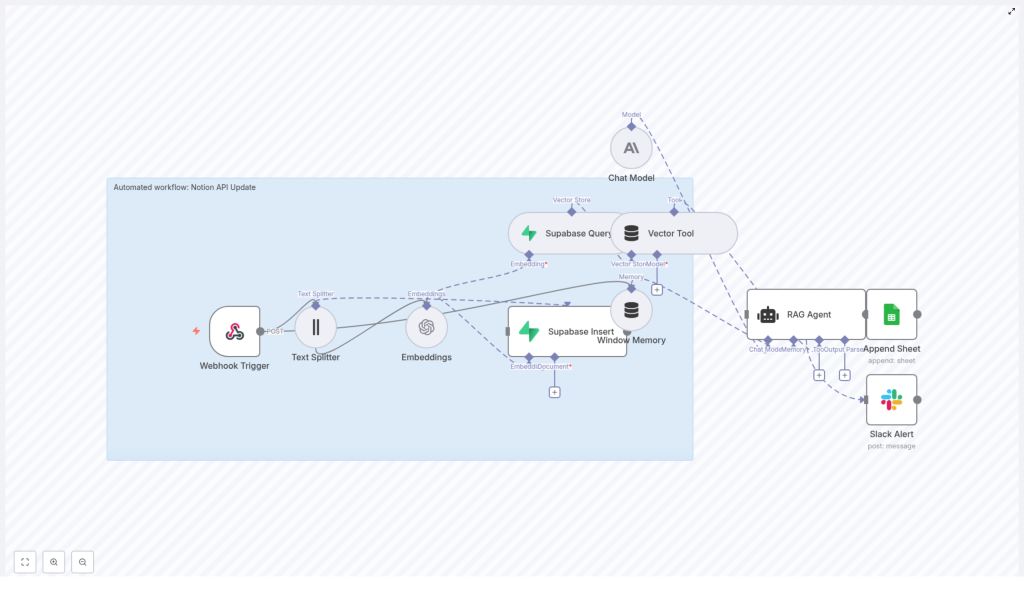
Automated Notion API Update Workflow with n8n
This guide documents an end-to-end n8n workflow template that processes Notion API updates using text embeddings, a Supabase vector store, a retrieval-augmented generation (RAG) agent, and automated logging and alerting. The goal is to convert incoming Notion changes into vectorized, searchable context for an agent, while preserving a complete audit trail and surfacing failures in real time.
1. Workflow Overview
The n8n template automates the processing of Notion API update events as follows:
- Receives Notion update payloads through an HTTP webhook.
- Splits long Notion content into overlapping text chunks.
- Generates embeddings using the OpenAI
text-embedding-3-smallmodel. - Stores the resulting vectors in a Supabase-backed vector index.
- Uses a RAG agent, powered by an Anthropic chat model, to perform summarization, inference, or validation using retrieved context.
- Appends agent outputs to a Google Sheet for auditability and review.
- Sends Slack alerts if the agent path encounters an error.
The result is a resilient, observable pipeline that turns raw Notion API updates into structured, searchable knowledge and operational signals.
2. High-Level Architecture
The workflow is composed of a sequence of n8n nodes, grouped conceptually into four stages: ingestion, vectorization, reasoning, and observability.
2.1 Ingestion
- Webhook Trigger – Receives POST requests at the
/notion-api-updatepath, containing Notion page metadata and content. - Text Splitter – Segments long Notion content into 400-character chunks with a 40-character overlap to maintain context continuity.
2.2 Vectorization and Storage
- Embeddings – Uses OpenAI
text-embedding-3-smallto generate vector representations of each chunk. - Supabase Insert – Writes embeddings and associated metadata into a Supabase table/index named
notion_api_update. - Supabase Query – Retrieves top semantic matches from the
notion_api_updateindex when the RAG agent requests context.
2.3 Reasoning and Memory
- Vector Tool – Exposes the Supabase vector store as a retriever tool to the agent.
- Window Memory – Maintains a short history of recent interactions, enabling the agent to use limited conversational or processing context across related updates.
- Chat Model (Anthropic) – Configured with Anthropic credentials, providing the underlying LLM for reasoning.
- RAG Agent – Orchestrates retrieval from the vector store, combines it with memory and system instructions, and produces structured outputs such as summaries, recommended actions, or validation results.
2.4 Observability and Error Handling
- Append Sheet (Google Sheets) – Logs the RAG agent output to a Google Sheet, including a
Statuscolumn for easy scanning and compliance checks. - Slack Alert – Executes on the workflow’s
onErrorbranch to send formatted alerts to a Slack channel (default#alerts) if the RAG agent or a downstream node fails.
3. Node-by-Node Breakdown
3.1 Webhook Trigger
Purpose: Entry point for Notion API updates.
- Method: POST
- Path:
/notion-api-update
The Webhook Trigger node should be configured to accept JSON payloads from your Notion automation or intermediary service. Typical payloads may include:
- Page ID or database item ID
- Title or name
- Block content or extracted text
- Relevant properties or metadata
Before passing data downstream, validate that the payload conforms to the expected schema. At minimum, check for required fields such as page ID and content. If you detect malformed or incomplete payloads, consider:
- Short-circuiting the workflow and returning an error response.
- Logging the invalid payload to a separate sheet or logging system.
Proper validation prevents storing unusable content and avoids unnecessary embedding and storage costs.
3.2 Text Splitter
Purpose: Normalize long Notion content into manageable, overlapping segments for embedding.
- chunkSize: 400 characters
- chunkOverlap: 40 characters
The Text Splitter node takes the raw text content from the webhook payload and divides it into 400-character segments. A 40-character overlap is applied so that context is shared between adjacent chunks. This overlap helps the RAG agent reconstruct cross-chunk meaning, which is especially important for:
- Headings and their associated paragraphs.
- Sentences that span the chunk boundary.
- Lists or code blocks where continuity matters.
Edge case to consider: very short pages or updates that result in a single chunk. In such cases, the overlap has no effect, but the node still passes a single chunk through to the Embeddings node.
3.3 Embeddings (OpenAI)
Purpose: Generate dense vector representations for each text chunk.
- Model:
text-embedding-3-small
The Embeddings node uses your configured OpenAI credentials to call the text-embedding-3-small model on each chunk. The output is a vector per chunk, which is then passed along with metadata to Supabase.
Operational considerations:
- Rate limits: If you anticipate a high volume of Notion updates, tune batch size and concurrency to respect OpenAI rate limits. Throttling or backoff strategies can be implemented at the workflow or infrastructure level.
- Cost control: Smaller models like
text-embedding-3-smallare optimized for cost and speed, which is generally suitable for indexing Notion content.
3.4 Supabase Insert & Query
Purpose: Persist embeddings and retrieve semantically relevant context.
3.4.1 Supabase Insert
- Target index/table:
notion_api_update
The Supabase Insert node writes each embedding vector into the notion_api_update index, along with identifiers and any additional metadata you choose to include (for example, page ID, chunk index, timestamp, or source URL).
Recommended configuration:
- Define a composite primary key such as
(page_id, chunk_index)to avoid duplicate entries when the same page is processed multiple times. - Ensure the vector column is indexed according to Supabase’s vector extension configuration so that similarity queries remain efficient.
3.4.2 Supabase Query
The Supabase Query node is used by the RAG agent retrieval step. It accepts a query vector and returns the top matches from the notion_api_update index. These results are then exposed to the agent via the Vector Tool.
Key parameters typically include:
- Number of neighbors (for example, top-k matches).
- Similarity metric configured at the database level (for example, cosine similarity).
While the template focuses on retrieval for the agent, you can also reuse this query configuration for standalone semantic search endpoints or internal tools.
3.5 Vector Tool and Window Memory
3.5.1 Vector Tool
Purpose: Provide a retriever interface over the Supabase vector store to the RAG agent.
The Vector Tool node connects the Supabase Query node to the agent in a tool-like fashion. When the agent determines that it needs additional context, it invokes this tool to fetch relevant chunks from the notion_api_update index.
3.5.2 Window Memory
Purpose: Maintain a bounded context window across related updates.
The Window Memory node stores recent conversation or processing history, giving the agent short-term memory across multiple invocations. This is useful when:
- The same Notion page is updated multiple times in a short period.
- You want the agent to be aware of previous summaries or decisions.
The memory window is intentionally limited so the agent does not accumulate unbounded history, which could affect performance or cost for large conversations.
3.6 Chat Model (Anthropic) and RAG Agent
3.6.1 Chat Model (Anthropic)
Purpose: Provide the underlying large language model used by the RAG agent.
The Chat Model node is configured with Anthropic credentials. This node defines the model that will receive the system prompt, user input, retrieved context, and memory.
3.6.2 RAG Agent
Purpose: Orchestrate retrieval, reasoning, and output generation.
The RAG Agent node is responsible for:
- Accepting system instructions that define behavior (for example, summarize page changes, propose actions, or validate content).
- Invoking the Vector Tool to retrieve relevant embeddings from Supabase.
- Using Window Memory to incorporate recent context.
- Producing structured outputs that downstream nodes can log or act upon.
Configuration options include:
- Prompt design: You can tune the system message to request summaries, recommended Notion property updates, or actionable items for other systems.
- Output formatting: Ensure the agent output is consistently structured if you plan to parse fields into specific columns or trigger conditional logic.
Errors in the RAG Agent node propagate to the workflow’s error path, where Slack alerts are generated.
3.7 Append Sheet (Google Sheets)
Purpose: Persist agent outputs for auditing, reporting, and manual review.
The Append Sheet node writes the RAG agent’s response to a Google Sheet. The template maps at least one key field to a column named Status, which can be used to track processing state or high-level outcomes.
Typical columns might include:
- Timestamp
- Notion page ID or title
- Agent summary or decision
Status(for example, success, needs review)
This sheet acts as an audit log, supporting compliance requirements and providing a simple interface for non-technical stakeholders to inspect agent decisions.
3.8 Slack Alert (Error Handling)
Purpose: Notify the team when the RAG agent or downstream logic fails.
- Default channel:
#alerts
The Slack Alert node is connected via the workflow’s onError path. When an error occurs, it sends a formatted message to the configured Slack channel. This message typically includes:
- Workflow name or identifier.
- Error message or stack information.
- Optional context, such as the Notion page ID being processed.
These alerts reduce mean time to recovery (MTTR) by surfacing failures quickly to the responsible team.
4. Deployment and Credentials
Before enabling this workflow in a production environment, configure the following credentials in n8n:
- OpenAI API key for the Embeddings node.
- Supabase API URL and key for the Insert and Query nodes.
- Anthropic API credentials (or equivalent chat model credentials) for the Chat Model node.
- Google Sheets OAuth2 credentials for the Append Sheet node.
- Slack API token for the Slack Alert node.
Best practices:
- Use n8n’s credentials vault to store secrets securely and avoid hardcoding API keys in node parameters.
- Separate environments (for example, staging and production) with distinct credentials and Supabase projects to prevent test data from polluting production indexes.
5. Security, Compliance, and Best Practices
To keep the Notion API update workflow secure and compliant:
- Validate webhook requests: Use signatures or shared secrets where possible to ensure that incoming requests originate from your Notion integration or trusted middleware.
- Control data retention: Implement retention policies for the Supabase vector store, such as TTL or soft delete flags, especially if embeddings contain sensitive or regulated content.
- Enforce role-based access: Restrict who can modify the n8n workflow and limit API key scopes according to the principle of least privilege.
- Encrypt data: Ensure TLS is enabled for all connections between n8n, Supabase, and external APIs, and use storage encryption where supported by your infrastructure.
6. Performance and Cost Optimization
To keep the workflow efficient as usage grows:
- Batch embedding requests: Where possible, send multiple chunks in a single Embeddings call to reduce HTTP overhead.
- Select appropriate models: Use
text-embedding-3-smallor similarly compact models to balance semantic quality with cost and latency. - Prune old vectors: Periodically remove embeddings for outdated or deleted Notion content to keep the
notion_api_updateindex lean and queries fast. - Rate-limit incoming events: If your Notion workspace generates high-frequency updates, consider queueing or rate limiting webhook events to avoid hitting provider limits.
7. Monitoring and Testing Strategy
Before running this workflow in production, test and monitor it systematically:
7.1 Testing
- Send representative sample payloads from Notion to the Webhook Trigger and verify that each downstream node behaves as expected.
- Validate the Text Splitter behavior with different content lengths, including very long pages and very short updates.
- Mock external APIs (OpenAI, Supabase, Anthropic, Google Sheets, Slack) in a staging environment to verify error paths and retries.
7.2 Monitoring
Track key metrics to detect regressions and performance issues:
- Webhook success and failure rate to confirm reliability of ingestion.
- Embedding API latency and error rate to monitor OpenAI performance and limits.
- Supabase insert and query latency to ensure vector operations stay within acceptable bounds.
- RAG agent failures and Slack alert frequency to identify prompt issues, model instability, or upstream data inconsistencies.
8. Common Use Cases
Teams typically deploy this Notion API update workflow for scenarios such as:
- Automated change summaries: Generate concise summaries of Notion page updates and store them in a central log for stakeholders.
- Actionable follow-ups: Use agent-generated suggested actions to trigger downstream workflows in project management or ticketing tools.
- Semantic knowledge search: Build a vector-based search layer over Notion content, enabling semantic queries across pages and databases.
9. Advanced Customization
Once the base template is running, you can extend it in several ways without altering the core architecture:
- Prompt tuning: Adjust the RAG agent’s system prompt to focus on specific tasks like policy validation, QA checks, or structured extraction of fields.
- <
