


Automated Resume Screening with n8n & Weaviate
Hiring at scale demands speed, consistency, and a clear audit trail. This instructional guide walks you through an n8n workflow template that automates first-pass resume screening using:
- n8n for workflow orchestration
- Cohere for text embeddings
- Weaviate as a vector database
- A RAG (Retrieval-Augmented Generation) agent for explainable scoring
- Google Sheets for logging
- Slack for alerts
You will see how resumes are captured via a webhook, split into chunks, embedded, stored in Weaviate, then evaluated by a RAG agent. Final scores and summaries are written to Google Sheets and any pipeline issues are surfaced in Slack.
Learning goals
By the end of this guide, you should be able to:
- Explain why automated resume screening is useful in high-volume hiring
- Understand each component of the n8n workflow template
- Configure the template to:
- Ingest resumes via webhook
- Split and embed text with Cohere
- Store and query vectors in Weaviate
- Use a RAG agent to score and summarize candidates
- Log results to Google Sheets and send Slack alerts
- Apply best practices for chunking, prompting, and bias mitigation
- Plan monitoring, testing, and deployment for production use
Why automate resume screening?
Manual resume review does not scale well. It is slow, inconsistent, and prone to bias or fatigue. Automating the first-pass screening with n8n and a RAG pipeline helps you:
- Increase throughput for high-volume roles
- Apply consistent criteria across all candidates
- Improve explainability using retrieval-based context from resumes
- Maintain audit logs for later review and compliance
Recruiters can then spend more time on interviews and candidate experience, while the workflow handles the repetitive early filtering.
Concepts you need to know
What is a RAG (Retrieval-Augmented Generation) agent?
A RAG agent combines two steps:
- Retrieve relevant context from a knowledge source (here, Weaviate with embedded resume chunks).
- Generate an answer or decision using a chat model that is grounded in that retrieved context.
In this template, the RAG agent uses resume chunks as evidence to score and summarize each candidate.
What is a vector store and why Weaviate?
A vector store holds numerical representations (vectors) of text so that you can perform semantic search. Weaviate is used here because it:
- Stores embeddings along with metadata (candidate ID, chunk index, resume section)
- Supports fast, semantic similarity queries
- Integrates well as a tool for RAG-style workflows
What are embeddings and why Cohere?
Embeddings convert text into vectors that capture semantic meaning. The template uses a high-quality language embedding model such as embed-english-v3.0 from Cohere to represent resume chunks in a way that supports accurate semantic search.
What is window memory in this workflow?
Window memory in n8n keeps a short history of interactions or context for the RAG agent. It helps the agent stay consistent across multiple related questions or steps in the same screening session.
Workflow architecture overview
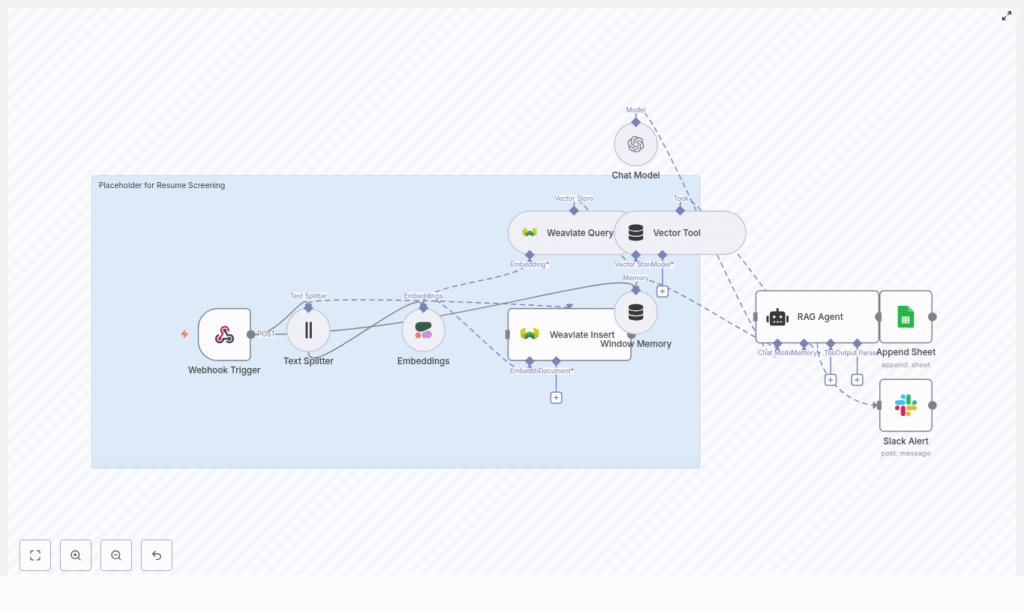
The n8n workflow template ties all components together into a single automated pipeline. At a high level, it includes:
- Webhook Trigger – Captures incoming resumes or resume text via POST.
- Text Splitter – Breaks resumes into smaller overlapping chunks.
- Embeddings (Cohere) – Converts each chunk into a dense vector.
- Weaviate Vector Store – Stores vectors and associated metadata for semantic search.
- Window Memory – Maintains short-term context for the RAG agent.
- RAG Agent (Chat Model + Tools) – Uses Weaviate as a retrieval tool and generates scores and summaries.
- Append Sheet (Google Sheets) – Logs structured screening results.
- Slack Alert – Sends notifications when errors or suspicious outputs occur.
In the next sections, you will walk through how each of these parts is configured in n8n and how they work together end to end.
Step-by-step: building the n8n resume screening workflow
Step 1: Collect resumes with a Webhook Trigger
Start by setting up the entry point of the workflow.
- Add a Webhook Trigger node in n8n.
- Configure it to accept POST requests from:
- Your ATS (Applicant Tracking System)
- Or any form or service that uploads resumes
- Ensure the incoming payload contains:
- Candidate metadata (for example, name, email, role applied for)
- Either:
- The full resume text, or
- A URL to the resume file that your workflow can fetch and parse
This node is the gateway into your automated screening pipeline.
Step 2: Preprocess and split resume text
Long resumes must be broken into smaller pieces before embedding so that retrieval remains efficient and accurate.
- Add a Text Splitter node after the webhook.
- Configure it with recommended starting values:
- Chunk size: 400 characters
- Chunk overlap: 40 characters
The overlap ensures that important information that crosses chunk boundaries is not lost. This balance keeps embedding costs manageable while preserving enough context for the RAG agent.
Step 3: Generate embeddings with Cohere
Next, convert each text chunk into an embedding.
- Add an Embeddings node configured to use a Cohere model, for example:
embed-english-v3.0
- For each chunk, store useful metadata:
- Candidate ID or unique identifier
- Chunk index (position of the chunk within the resume)
- Optional section label, such as
experienceoreducation
This metadata will later allow targeted retrieval, such as focusing only on experience-related chunks when assessing specific skills.
Step 4: Store vectors in a Weaviate index
Now you need a place to store and query these embeddings.
- Set up a Weaviate Vector Store or connect to an existing instance.
- Create or use a class/index, for example:
resume_screening
- In n8n, add a node that inserts vectors and metadata into Weaviate.
Weaviate will then provide near real-time semantic search over your resume chunks. This is what the RAG agent will query when it needs evidence to support a screening decision.
Step 5: Retrieve relevant chunks for evaluation
When you want to evaluate a candidate against specific criteria, you query Weaviate for the most relevant chunks.
- Add a Weaviate Query node.
- Formulate a query that reflects your screening question, for example:
"Does this candidate have 5+ years of Python experience?""Does this candidate have strong API and database experience?"
- Configure the node to return the top matching chunks and their metadata.
The RAG agent will treat this vector store as a tool, using the retrieved chunks as context when generating its final score and summary.
Step 6: Configure the RAG agent for scoring and summarization
With relevant chunks in hand, the next step is to guide a chat model to produce structured, explainable results.
- Add a chat model node (for example OpenAI or another LLM) and configure it as a RAG agent that:
- Uses Weaviate as a retrieval tool
- Reads from the window memory if used
- Provide a clear system prompt, for example: “You are an assistant for Resume Screening. Use retrieved resume chunks to answer hiring criteria and produce a short summary and score (1-10). Explain the reasoning with citations to chunks.”
- Ask the agent to output a structured result that includes:
- A numeric score (for example 1-10) for technical fit
- A short summary of strengths and risks
- Recommended next action (for example advance, hold, reject)
- Citations to chunk IDs or indexes used as evidence
Using a structured format makes it easier for n8n to parse and route the output to Google Sheets or other systems.
Step 7: Log results and send alerts
The final stage of the workflow handles observability and auditability.
- Append results to Google Sheets:
- Add an Append Sheet node.
- Map fields from the agent output into columns such as:
- Candidate name and email
- Role
- Score
- Summary
- Citations or chunk IDs
- Decision or recommended action
- Configure Slack alerts:
- Add a Slack node to send messages when:
- The workflow encounters an error
- The agent output appears suspicious or low confidence, if you add such checks
- Point alerts to a channel where recruiters or engineers can review issues.
- Add a Slack node to send messages when:
This combination of logging and alerts gives you both traceability and early warning when the pipeline needs human attention.
Configuration tips and best practices
Choosing a chunking strategy
Chunk size and overlap have a direct impact on retrieval quality and cost.
- Smaller chunks:
- More precise retrieval
- More vectors, higher storage and query overhead
- Larger chunks:
- Fewer vectors, lower cost
- More mixed content per chunk, sometimes less precise
For resumes, a practical range is:
- Chunk size: 300-600 characters
- Chunk overlap: 10-100 characters
Start with the recommended 400 / 40 settings and adjust based on retrieval quality and cost.
Selecting and tuning embeddings
When choosing an embedding model:
- Use a model optimized for semantic similarity in your language.
- Test a few examples to confirm that similar skills and experiences cluster together.
- Fine tune thresholds for similarity or cosine distance that determine:
- Which chunks are considered relevant
- How many chunks you pass into the RAG agent
These thresholds can significantly affect both accuracy and cost.
Prompt engineering for reliable scoring
Your system prompt should be explicit about what “good” looks like. Consider specifying:
- Which criteria to evaluate:
- Specific skills and tools
- Years of experience
- Domain or industry background
- Optional signals like leadership or communication
- The output format:
- Numeric score and its meaning
- 2-3 sentence summary
- List of cited chunk IDs
- The requirement to base every conclusion on retrieved chunks, not assumptions.
Clear prompts lead to more consistent and explainable results.
Bias mitigation strategies
Automated screening must be handled carefully to avoid amplifying bias. Some practical steps include:
- Strip unnecessary demographic information before embedding:
- Names
- Addresses
- Other personal identifiers that are not required for screening
- Use standardized evaluation rubrics and:
- Provide the agent with human-reviewed examples
- Calibrate prompts and scoring rubrics based on those examples
- Maintain detailed logs and:
- Perform periodic audits for disparate impact on different groups
Monitoring, testing, and evaluation
To ensure the screening system performs well over time, track key metrics and regularly test against human judgments.
Metrics to monitor
- Precision of pass/fail decisions at first pass
- False negatives (qualified candidates incorrectly rejected)
- Latency per screening from webhook to final log
- API costs for embeddings and chat model calls
Testing with human reviewers
Run A/B tests where you:
- Have human recruiters create shortlists for a set of roles.
- Run the same candidates through the automated workflow.
- Compare:
- Scores and decisions from the RAG agent
- Human judgments and rankings
Use these comparisons to adjust scoring thresholds, prompts, and retrieval parameters until the automated system aligns with your hiring standards.
Security, privacy, and compliance
Because resumes contain personal information, security and compliance are critical.
- Encrypt data at rest and in transit:
- Within Weaviate
- In any external storage or logging systems
- Minimize PII in embeddings:
- Keep personally identifiable information out of vector representations when possible.
- If you must store PII, ensure access controls and retention policies meet regulations such as GDPR.
- Restrict access:
- Limit who can view Google Sheets logs
- Limit who receives Slack alerts with candidate details
