

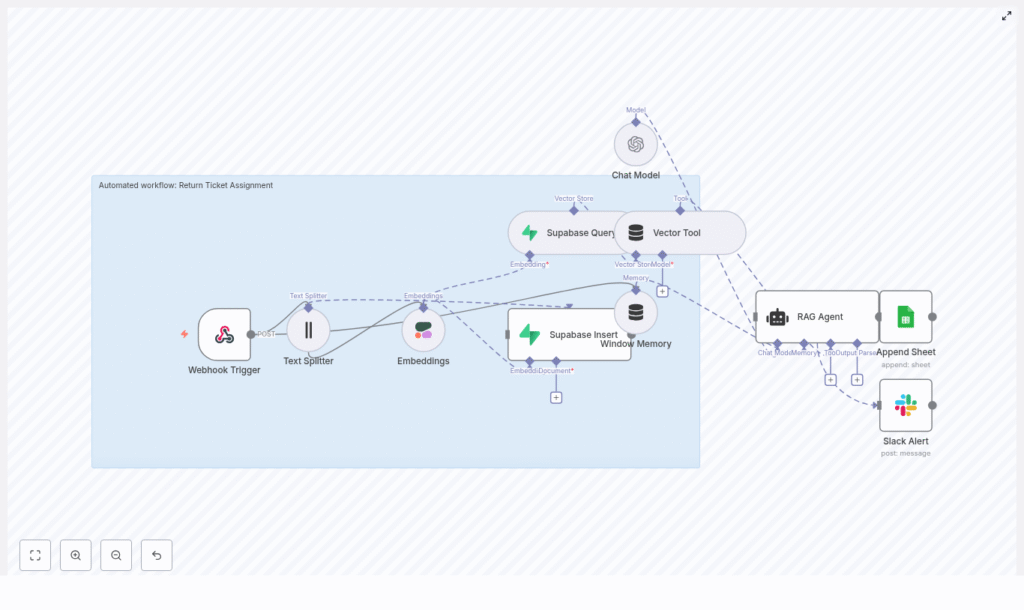
Automated Return Ticket Assignment with n8n & RAG
This guide describes how to implement an automated Return Ticket Assignment workflow in n8n using a Retrieval-Augmented Generation (RAG) pattern. The workflow combines:
- n8n for orchestration and automation
- Cohere embeddings for semantic vectorization
- Supabase as a vector store and metadata layer
- LangChain-style RAG logic (vector tools + memory)
- OpenAI as the reasoning and decision layer
- Google Sheets for logging and reporting
- Slack for error notifications
The result is a fault-tolerant, production-ready pipeline that receives return tickets, enriches them with contextual knowledge, and outputs structured assignment recommendations.
1. Use case and automation goals
1.1 Why automate return ticket assignment?
Manual triage of return tickets is slow, inconsistent, and difficult to scale. Different agents may apply different rules, and important policies or historical cases can be overlooked. An automated assignment workflow helps you:
- Reduce manual workload for support teams
- Apply consistent routing logic across all tickets
- Leverage historical tickets and knowledge base (KB) content
- Surface relevant context to agents at the point of assignment
By combining vector search for context with a reasoning agent, the workflow can ingest documents, use conversational memory, and generate accurate, explainable assignment decisions.
1.2 Target behavior of the workflow
At a high level, the workflow:
- Receives a return ticket payload via a webhook
- Optionally splits long descriptions or documents into chunks
- Generates embeddings for the chunks with Cohere
- Stores and queries vectors in Supabase
- Exposes vector search to a RAG-style agent with short-term memory
- Uses OpenAI to decide assignment and priority based on retrieved context
- Logs decisions in Google Sheets for auditing
- Notifies a Slack channel on errors or failures
2. Workflow architecture overview
The provided n8n template implements the following architecture:
- Trigger: Webhook (HTTP POST) receives ticket data
- Preprocessing: Text Splitter node chunks large input text
- Embedding: Cohere embeddings node converts text to vectors
- Storage & retrieval: Supabase Insert and Supabase Query nodes manage vector data
- RAG tooling: Vector Tool node exposes Supabase to the agent
- Memory: Window Memory node tracks recent interactions
- Reasoning: OpenAI Chat Model + RAG Agent node generates assignment decisions
- Logging: Google Sheets Append node records outputs
- Alerting: Slack node sends error alerts
Conceptually, the data flow can be summarized as:
Webhook → Text Splitter → Cohere Embeddings → Supabase (Insert/Query)
→ Vector Tool + Window Memory → OpenAI RAG Agent → Google Sheets / Slack
3. Node-by-node breakdown
3.1 Webhook Trigger
3.1.1 Purpose
The Webhook Trigger is the external entry point to the workflow. It receives ticket payloads from your ticketing system or any custom application that can send HTTP POST requests.
3.1.2 Configuration
- HTTP Method: POST
- Path:
/return-ticket-assignment - Response: Typically JSON, with an HTTP status that reflects success or failure of the assignment process
3.1.3 Expected payload structure
The template expects a JSON payload with ticket-specific fields, for example:
{  "ticket_id": "12345",  "subject": "Return request for order #987",  "description": "Customer reports damaged product...",  "customer_id": "C-001"
}
A more complete example:
{  "ticket_id": "TKT-1001",  "subject": "Return: screen cracked on arrival",  "description": "Customer states the screen was cracked when they opened the box. They attached photos. Requested return and replacement.",  "customer_tier": "gold"
}
3.1.4 Edge cases and validation
- Ensure
descriptionis present and non-empty, since it is used for embeddings. - If optional fields like
customer_tierorcustomer_idare missing, the agent will simply reason without them. - On malformed JSON, configure the workflow or upstream system to return a clear 4xx response.
3.2 Text Splitter
3.2.1 Purpose
The Text Splitter node breaks long ticket descriptions or attached document content into smaller chunks. This is important for:
- Staying within token limits of embedding models
- Preserving semantic coherence within each chunk
- Improving retrieval quality from the vector store
3.2.2 Typical configuration
- Chunk size:
400characters - Chunk overlap:
40characters
The 400/40 configuration is a practical default. You can tune it later based on your content structure and retrieval performance.
3.2.3 Input and output
- Input: Ticket
descriptionand optionally other long text fields or KB content - Output: An array of text chunks, each passed to the Embeddings node
3.3 Embeddings (Cohere)
3.3.1 Purpose
The Embeddings node converts each text chunk into a numerical vector representation. These embeddings capture semantic similarity and are used to find relevant knowledge base articles, historical tickets, or policy documents.
3.3.2 Model and credentials
- Provider: Cohere
- Model:
embed-english-v3.0 - Credentials: Configure Cohere API key in n8n credentials, not in the workflow itself
3.3.3 Input and output
- Input: Text chunks from the Text Splitter node
- Output: A vector embedding for each chunk, along with any metadata you pass through (for example
ticket_id)
3.3.4 Error handling
- Handle rate limit errors by adding retry logic or backoff in n8n if required.
- On failure, the downstream Slack node can be used to surface the error to engineering or operations.
3.4 Supabase Insert and Supabase Query
3.4.1 Purpose
Supabase acts as the vector store and metadata repository. Two node modes are typically used:
- Insert: Persist embeddings and metadata
- Query: Retrieve semantically similar items for a given ticket
3.4.2 Insert configuration
- Target table / index name:
return_ticket_assignment - Stored fields:
- Vector embedding
- Source text chunk
ticket_idor other identifiers- Timestamps or any relevant metadata (for example type of document, policy ID)
3.4.3 Query configuration
The Query node takes the embedding of the current ticket description and searches the return_ticket_assignment index for the most relevant entries. Typical parameters include:
- Number of neighbors (top-k results)
- Similarity threshold (if supported by your Supabase setup)
The query results provide the contextual documents that will be passed to the RAG agent as external knowledge.
3.4.4 Integration specifics
- Configure Supabase credentials (URL, API key) via n8n credentials.
- Ensure the vector column type and index are properly configured in Supabase for efficient similarity search.
3.5 Vector Tool and Window Memory
3.5.1 Vector Tool
The Vector Tool node exposes the Supabase vector store as a callable tool for the RAG agent. This allows the agent to:
- Invoke vector search during reasoning
- Dynamically fetch additional context if needed
The tool uses the same Supabase query configuration but is wrapped in a format that the RAG agent can call as part of its toolset.
3.5.2 Window Memory
The Window Memory node maintains short-term conversational or interaction history for the agent. It is used to:
- Keep track of recent assignment attempts or clarifications
- Prevent the agent from losing context across retries within the same workflow run
Typical configuration includes:
- Maximum number of turns or tokens retained
- Scope limited to the current ticket processing session
3.6 Chat Model (OpenAI) and RAG Agent
3.6.1 Purpose
The Chat Model node (OpenAI) combined with a RAG Agent node is the reasoning core of the workflow. It:
- Receives the original ticket payload
- Uses the Vector Tool to fetch contextual documents from Supabase
- Consults Window Memory to maintain short-term context
- Generates a structured assignment decision
3.6.2 Model and credentials
- Provider: OpenAI (Chat Model)
- Model: Any supported chat model suitable for structured output
- Credentials: OpenAI API key configured in n8n credentials
3.6.3 System prompt design
The system prompt should enforce deterministic, structured output. A sample system prompt:
You are an assistant for Return Ticket Assignment. Using the retrieved context and ticket details, decide the best assigned_team, priority (low/medium/high), and one-sentence reason. Return only valid JSON with keys: assigned_team, priority, reason.
3.6.4 Output schema
The agent is expected to return JSON in the following format:
{  "assigned_team": "Returns Team",  "priority": "medium",  "reason": "Matches damaged item policy and customer is VIP."
}
3.6.5 Edge cases
- If the agent returns non-JSON text, add validation or a follow-up parsing node.
- On model errors or timeouts, route execution to the Slack alert path and return an appropriate HTTP status from the webhook.
- For ambiguous tickets, you can instruct the agent in the prompt to choose a default team or flag for manual review.
3.7 Google Sheets Append (Logging)
3.7.1 Purpose
The Google Sheets Append node records each assignment decision for auditing, analytics, and model performance review.
3.7.2 Configuration
- Spreadsheet: Your reporting or operations sheet
- Sheet name:
Log - Columns to store:
ticket_idassigned_teampriority- Timestamp
- Raw agent output or
reason
3.7.3 Usage
Use this log to:
- Review incorrect assignments (false positives / false negatives)
- Identify patterns in misclassification
- Refine prompts, chunking, and retrieval parameters
3.8 Slack Alert on Errors
3.8.1 Purpose
The Slack node sends real-time notifications when the RAG Agent or any critical node fails. This keeps engineers and operations aware of issues such as:
- Rate limits from OpenAI or Cohere
- Supabase connectivity problems
- Unexpected payloads or parsing errors
3.8.2 Configuration
- Channel: For example
#alerts - Message content: Include ticket ID, error message, and a link to the n8n execution if available
3.8.3 Behavior
When an error occurs, the workflow:
- Sends a Slack message to the configured channel
- Can return a non-2xx HTTP status code from the webhook to signal failure to the caller
4. Configuration notes and operational guidance
4.1 Security and credentials
- API keys: Store Cohere, Supabase, OpenAI, Google Sheets, and Slack credentials in n8n’s credentials manager, not in node parameters or raw JSON.
- Webhook protection:
- Restrict access by IP allowlist from your ticketing system.
- Optionally sign requests with HMAC and verify signatures inside the workflow.
- Data privacy:
- Redact or avoid embedding highly sensitive PII.
- Use hashing or minimal metadata where possible.
4.2 Scaling considerations
- For high ticket volumes, consider batching embedding operations or using worker queues.
- Monitor

