


Automating Drone Image Crop Health With n8n & LangChain
Modern precision agriculture increasingly relies on automated AI pipelines to transform drone imagery into operational decisions. This article presents a production-grade workflow template built on n8n that coordinates drone image ingestion, text processing with LangChain, OpenAI embeddings, Supabase as a vector database, an Anthropic-powered agent, and Google Sheets for logging and reporting.
The goal is to provide automation engineers and agritech practitioners with a robust reference architecture that is modular, scalable, and explainable, while remaining practical to deploy in real-world environments.
Business case: Why automate drone-based crop health analysis?
Manual inspection of drone imagery is labor intensive, difficult to scale, and prone to inconsistent assessments between agronomists. An automated workflow offers several advantages:
- Faster detection of crop stress, disease, or nutrient deficiencies
- Standardized, repeatable evaluation criteria across fields and teams
- Reduced manual data handling so agronomists can focus on interventions
- Traceable recommendations with clear context and audit logs
The n8n workflow template described here is designed to support these objectives by combining vector search, LLM-based reasoning, and structured logging into a single, orchestrated pipeline.
Pipeline architecture and data flow
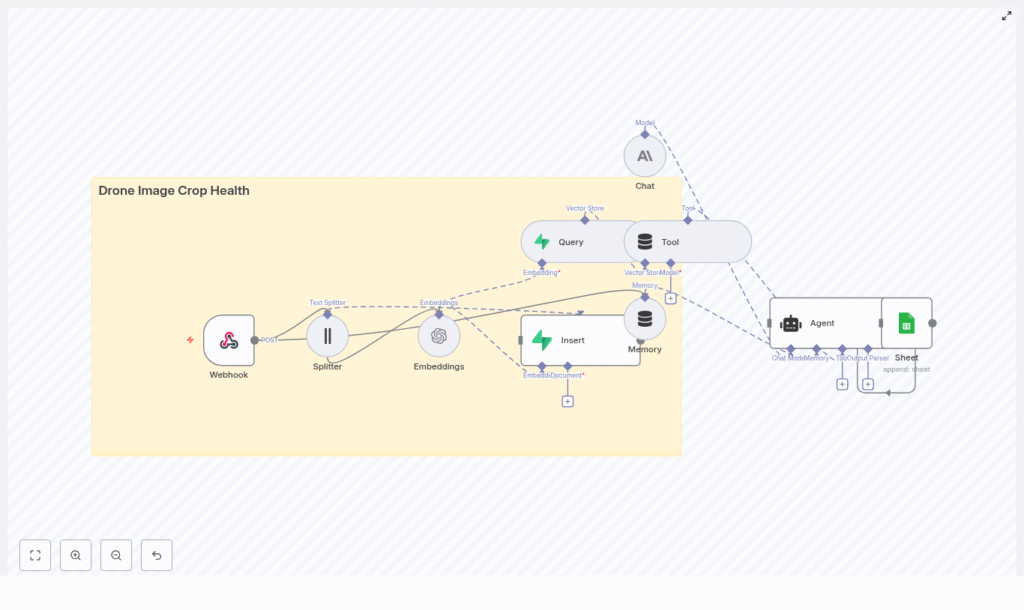
The end-to-end architecture can be summarized as:
Webhook → Text Splitter → OpenAI Embeddings → Supabase Vector Store → LangChain Agent (Anthropic) → Google Sheets
At a high level, the pipeline executes the following steps:
- A drone system or upstream ingestion service sends image metadata and analysis notes to an n8n Webhook.
- Relevant text (captions, OCR results, or metadata) is segmented into chunks optimized for embedding.
- Each chunk is converted into a vector representation using OpenAI embeddings.
- Vectors, along with associated metadata, are stored in a Supabase vector index for retrieval.
- When an agronomist or downstream system submits a query, the workflow retrieves the most similar records from Supabase.
- An Anthropic-based LangChain agent uses these retrieved contexts to generate structured recommendations.
- The agent’s outputs are appended to Google Sheets for monitoring, reporting, and integration with other tools.
This design separates ingestion, indexing, retrieval, and reasoning into clear stages, which simplifies debugging and makes it easier to scale or swap components over time.
Core n8n components and integrations
Webhook: Entry point for drone imagery events
The workflow begins with an n8n Webhook node that exposes a POST endpoint. Drone platforms or intermediate services submit JSON payloads containing image details and any preliminary analysis. A typical payload might look like:
{  "image_url": "https://s3.example.com/drone/field123/image_2025-08-01.jpg",  "coords": {"lat": 40.12, "lon": -88.23},  "timestamp": "2025-08-01T10:12:00Z",  "notes": "NDVI low in northeast quadrant"
}
Fields such as image_url, coordinates, timestamp, and NDVI-related notes are preserved as metadata and passed downstream through the workflow.
Text Splitter: Preparing content for embeddings
Before generating embeddings, the workflow uses a text splitter node to partition long descriptions, OCR output, or combined metadata into manageable segments.
In the template, the splitter is configured with:
chunkSize = 400chunkOverlap = 40
These defaults work well for short to medium-length metadata and notes. For deployments with very long OCR transcripts (for example, more than 2000 characters), you can reduce chunkOverlap to control token usage, while ensuring that each chunk still contains enough context for the model to interpret correctly.
OpenAI Embeddings: Vectorizing agronomic context
The Embeddings node uses OpenAI to convert text chunks into dense vector embeddings. The template assumes an OpenAI embeddings model such as text-embedding-3-large, authenticated via your OpenAI API key.
Recommended practices when configuring this node:
- Batch multiple chunks in a single call where possible to improve throughput for high-volume ingestion.
- Attach metadata such as
image_url,coords,timestamp, and NDVI-related attributes to each vector record. - Monitor embedding usage and costs, especially for large drone fleets or frequent flights.
By persisting rich metadata with each vector, you enable more powerful downstream filtering, mapping, and analysis.
Supabase Vector Store: Persistent similarity search
Supabase, backed by Postgres with vector extensions, serves as the vector store for this workflow. The n8n template uses two primary operations:
- Insert: Store newly generated vectors with an index name such as
drone_image_crop_health. - Query: Retrieve the top-K nearest neighbors for a given query embedding.
When inserting vectors, configure the table or index to include fields like:
image_urlcoords(latitude and longitude)timestampndviand other multispectral indicescrop_type
At query time, the workflow retrieves the most relevant records, including all associated metadata, and passes them to the agent as context. This enables the agent to reference the original imagery, geographical location, and agronomic indicators when generating recommendations.
Tool Node and Memory: Connecting LangChain to the vector store
The template uses a Tool node to expose Supabase retrieval as a tool within the LangChain agent. This allows the agent to perform vector similarity search as part of its reasoning process.
A Memory node is also configured to maintain short-term conversational context or recent workflow state. This combination enables the agent to:
- Reference the current query along with recently retrieved results
- Preserve continuity across multiple related queries
- Leverage the vector store as a structured, queryable knowledge base
Anthropic Chat & LangChain Agent: Reasoning and recommendations
The reasoning layer is implemented as a LangChain agent backed by an Anthropic chat model (or another compatible LLM). The agent receives:
- The user or system query (for example, an agronomist asking about specific conditions)
- Retrieved contexts from Supabase, including metadata and any NDVI or crop health indicators
- A structured prompt template and response schema
You can tailor the agent’s instructions to focus on tasks such as:
- Identifying potential disease, pest pressure, or nutrient deficiencies in the retrieved images
- Assigning urgency levels such as immediate, monitor, or low priority
- Producing concise intervention steps for field teams
For production deployments, keep prompts deterministic and constrained. Explicit response schemas and clear instructions significantly improve reliability and simplify downstream parsing.
Google Sheets: Logging, auditing, and reporting
The final stage of the workflow uses the Google Sheets node to append the agent’s structured outputs to a designated sheet. Typical columns include:
- Image URL
- Coordinates
- NDVI or other indices
- Agent-detected issue or risk
- Urgency or alert level
- Recommended action
- Timestamp
Storing results in Sheets provides a quick, non-technical interface for stakeholders and a simple integration point for BI tools or alerting systems.
Step-by-step implementation guide
Prerequisites
- An n8n instance (cloud-hosted or self-hosted)
- OpenAI API key for embeddings
- Supabase project with the vector extension configured
- Anthropic API key (or an alternative LLM provider supported by LangChain)
- A Google account with access to the target Google Sheet
1. Set up the Webhook endpoint
- Create a Webhook node in n8n.
- Configure the HTTP method as POST and define a path that your drone ingestion system will call.
- If the endpoint is exposed publicly, secure it with mechanisms such as HMAC signatures, secret tokens, or an API key field in the payload.
2. Configure the text splitter
- Add a text splitter node after the Webhook.
- Set
chunkSizeto approximately 400 characters andchunkOverlapto around 40 for typical metadata and short notes. - For very long OCR outputs, experiment with lower overlap values to reduce token usage while preserving semantic continuity.
3. Connect and tune the embeddings node
- Insert an OpenAI Embeddings node after the text splitter.
- Select a suitable embeddings model, such as
text-embedding-3-large. - Map the text chunks from the splitter into the embeddings input.
- Include fields such as
image_url,coords,timestamp,ndvi, andcrop_typeas metadata for each embedding.
4. Insert vectors into Supabase
- Add a Supabase node configured for vector insert operations.
- Specify an
indexNamesuch as drone_image_crop_health. - Ensure that the Supabase table includes columns for vector data and all relevant metadata fields.
- Test inserts with a small batch of records before scaling up ingestion.
5. Implement query and agent orchestration
- For query workflows, add a Supabase node configured to perform vector similarity search (top-K retrieval) based on an input query.
- Feed the retrieved items into the LangChain agent node, along with a structured prompt template.
- Design the prompt to include:
- A concise system instruction
- The retrieved contexts
- A clear response schema, typically JSON, with fields such as
alert_level,recommended_action, andconfidence_score
- Use the Tool node to expose Supabase as a retriever tool, and the Memory node to maintain short-term context if multi-turn interactions are required.
6. Configure logging and monitoring
- Attach a Google Sheets node to append each agent response as a new row.
- Log both the raw webhook payloads and the final recommendations for traceability.
- Track throughput, latency, and error rates in n8n to identify bottlenecks.
- Schedule periodic re-indexing if metadata is updated or corrected after initial ingestion.
Operational best practices
- Attach visual context: Include image thumbnails or low-resolution previews in metadata to support quick manual verification of the agent’s conclusions.
- Use numeric fields for indices: Store NDVI and multispectral indices as numeric columns in Supabase to enable structured filtering and analytics.
- Secure access: Apply role-based access control (RBAC) to your n8n instance and Supabase project to minimize unauthorized access to field data.
- Harden prompts: Test prompts extensively in a sandbox environment. Enforce strict response schemas to avoid ambiguous or unstructured outputs.
- Cost management: Monitor spending across embeddings, LLM calls, and storage. Adjust chunk sizes and retrieval K values to balance performance, accuracy, and cost.
Example agent prompt template
The following template illustrates a structured prompt for the LangChain agent:
System: You are an agronomy assistant. Analyze the following retrieved contexts from drone imagery and provide a JSON response.
User: Retrieved contexts: {{retrieved_items}}
Task: Identify likely issues, urgency level (immediate / monitor / low), and one recommended action.
Response schema: {"issue":"", "urgency":"", "confidence":0-1, "action":""}
By enforcing a predictable JSON schema, you simplify downstream parsing in n8n and ensure that outputs can be reliably stored, filtered, and used by other systems.
Conclusion and next steps
This n8n and LangChain workflow template demonstrates a practical approach to automating drone-based crop health analysis. It integrates ingestion, embedding, vector search, LLM reasoning, and logging into a cohesive pipeline that can be adapted to different crops, geographies, and operational constraints.
To adopt this pattern in your environment:
- Start with a small pilot deployment on a limited set of fields.
- Iterate on chunk sizes, retrieval K values, and prompt design to optimize accuracy.
- Once the workflow is stable, extend it with automated alerts (email or SMS), integration with farm management systems, or a geospatial dashboard that highlights hotspots on a map.
Call-to-action: If you want a ready-to-deploy n8n template or guidance on adapting this pipeline to your own drone imagery and agronomic workflows, reach out to our team or download the starter workflow to access a 30-day trial with assisted setup and tuning.
Published: 2025. Designed for agritech engineers, data scientists, and farm operations leaders implementing drone-based automation.
