


Automating Job Application Parsing with n8n & Pinecone
Hiring teams are drowning in resumes, cover letters, and emails. Manually reading every single application is slow, inconsistent, and honestly, pretty exhausting. So why not let an automation workflow do the heavy lifting for you?
In this guide, we’ll walk through a production-ready Job Application Parser built with n8n, OpenAI embeddings, Pinecone, and a RAG agent. It automatically extracts key candidate details, stores them for semantic search, and logs everything in a friendly format your team can actually use.
Think of it as a tireless assistant that reads every application, remembers the details, and neatly organizes them for you.
What this n8n Job Application Parser actually does
Let’s start with the big picture. This workflow:
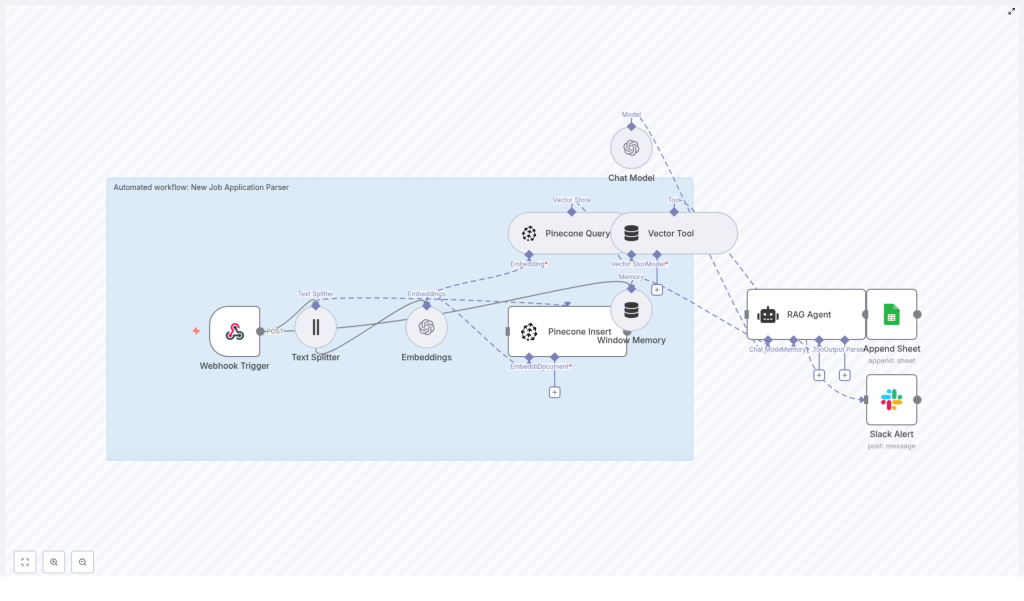
- Accepts incoming job applications through a Webhook Trigger in n8n.
- Splits long resumes or cover letters into manageable chunks with a Text Splitter.
- Uses OpenAI embeddings to convert those chunks into vectors.
- Stores and searches those vectors in Pinecone using a dedicated index.
- Uses a RAG Agent powered by an OpenAI Chat Model to summarize and extract structured candidate info.
- Logs the parsed output to Google Sheets for easy review.
- Sends a Slack alert if anything goes wrong so you’re never in the dark.
The result is an automated pipeline that turns messy, unstructured text into searchable, structured data your team can filter, analyze, and act on.
Why bother automating job application parsing?
If you’ve ever opened a folder full of resumes and felt your heart sink, this is for you.
By automating the parsing step, you:
- Speed up screening so you can respond to strong candidates before competitors do.
- Standardize evaluation with consistent fields like skills, experience, and suitability scores.
- Make search useful with semantic vector search across resumes, cover letters, and emails.
Using embeddings and Pinecone vector search, you can:
- Extract and index text from resumes, cover letters, or even email applications.
- Search semantically for specific skills, tech stacks, or experience levels.
- Log results directly to Google Sheets or your ATS, and get notified if something breaks.
In short, you get more time for real conversations with candidates and less time copy-pasting from PDFs.
What’s inside the workflow: the tech stack
Here’s the core stack that powers this job application parser:
- n8n as the workflow automation platform and orchestrator.
- Webhook Trigger to accept new applications via a POST endpoint.
- Text Splitter with
chunkSize=400andchunkOverlap=40to prepare text for embeddings. - OpenAI embeddings using
text-embedding-3-smallto generate dense vectors. - Pinecone as the vector database with an index named
new_job_application_parser. - RAG Agent combined with an OpenAI Chat Model for context-aware parsing and summarization.
- Window Memory to keep recent conversation context available to the agent.
- Google Sheets (Append Sheet) to log parsed results in a “Log” tab.
- Slack Alert to notify your team if the workflow fails or the RAG Agent throws an error.
How the architecture fits together
Let’s walk through how everything flows from a new application to a structured log entry.
- A new application arrives at the n8n Webhook Trigger via a POST request.
- Text Splitter breaks the raw text into overlapping chunks that work well for embeddings.
- Embeddings node calls OpenAI to turn each chunk into a vector.
- Pinecone Insert writes those vectors into the
new_job_application_parserindex along with metadata. - When you want to parse or query a candidate, a Pinecone Query pulls back the most relevant chunks.
- Vector Tool wraps those results so the RAG Agent can use them as external context.
- Window Memory and the Chat Model help the RAG Agent generate structured summaries and extractions.
- Append Sheet writes the agent’s output to a Google Sheet in a “Log” tab.
- If something fails along the way, a Slack Alert is triggered from the RAG Agent’s error output.
Once this is set up, new applications flow through the pipeline automatically, with all the heavy analysis handled for you.
Step-by-step: building the workflow in n8n
1. Set up the Webhook Trigger
Start with a Webhook node in n8n:
- Method:
POST - Path:
/new-job-application-parser
This is where your applicant data lands, whether it’s resume text, a cover letter, or the body of an application email.
Make sure you secure the webhook, for example by:
- Requiring an API key in the headers, or
- Using an IP allowlist so only trusted systems can call it.
2. Split long documents into chunks
Next, add a Text Splitter node. Configure it with:
chunkSize = 400chunkOverlap = 40
Chunks of around 400 characters tend to strike a good balance between:
- Preserving enough context for embeddings to be meaningful, and
- Keeping token and cost usage under control.
The 40 character overlap helps avoid cutting important entities right in the middle of a sentence, which makes retrieval and summarization more accurate.
3. Generate embeddings with OpenAI
Now add an Embeddings node and connect it to OpenAI. Use:
- Model:
text-embedding-3-small
For each chunk, the node will create a dense vector representation. Whenever possible, batch these embedding calls to:
- Reduce the total number of requests.
- Lower API overhead and cost.
4. Insert vectors into Pinecone
Attach a Pinecone Insert node and configure it in insert mode targeting your index:
- Index name:
new_job_application_parser
Alongside each vector, store useful metadata such as:
candidate_idor candidate email.source_type(for example: resume, cover_letter, email).filenameif applicable.created_attimestamp.- The original text chunk.
This metadata makes it much easier to trace results back to the original document and build downstream actions like candidate timelines or audit logs.
5. Query Pinecone and power the RAG flow
When you want to summarize a candidate or answer questions about them, you:
- Use a Pinecone Query node to fetch the most relevant chunks from the index.
- Pass those results into a Vector Tool that the RAG Agent can consume as context.
- Use Window Memory to store recent exchanges so the Chat Model has continuity.
The RAG Agent then has everything it needs: the query, the context from Pinecone, and recent conversation history.
6. Parse, summarize, and log to Google Sheets
The RAG Agent uses the OpenAI Chat Model plus the retrieved chunks to produce a structured summary of each candidate, for example:
- Name and contact details.
- Key skills and tech stack.
- Total years of experience.
- Notable roles or employers.
- A short written summary.
- A suitability score, such as 0 to 100.
Once the agent returns this data, connect it to a Google Sheets – Append Sheet node and configure:
documentIdset to your Google Sheet ID.sheetNameset toLog.
Each parsed application becomes a new row in your “Log” tab, ready for your team to filter, sort, and review.
7. Handle errors and send Slack alerts
Things go wrong sometimes, and that’s fine as long as you know when it happens.
Wire the onError output of the RAG Agent (or any critical node) to a Slack Alert node. Configure a simple message template that includes:
- The error message.
- A candidate identifier, such as email or candidate_id.
This way, your hiring team can quickly spot issues, fix them, and re-run affected applications if needed.
Key design choices and practical recommendations
Choosing chunk size and overlap
The values chunkSize=400 and chunkOverlap=40 work nicely for most resumes and cover letters. That said, you might want to tweak them based on your data:
- If your inputs are typically very short (like social profiles or brief emails), try smaller chunks.
- If you deal with complex CVs that include tables or dense formatting, consider pre-processing first to flatten bullet points and strip out visual noise.
Selecting the embedding model
The model text-embedding-3-small offers a strong balance between quality and cost, which makes it a good default for production workflows.
If your use case depends on very fine-grained semantic matching, such as differentiating between similar but distinct skill sets, you can upgrade to a larger or more advanced embedding model at a higher cost.
Designing your metadata and vector schema
A thoughtful metadata schema pays off later. Consider storing:
candidate_idor email for linking all vectors to a person.source_typeto distinguish resumes vs cover letters vs emails.filenameto help with audits or candidate support requests.created_atfor retention policies and time-based analytics.
With this information in place, you can easily filter queries, clean up old data, and build more advanced reporting.
Security, privacy, and compliance
Because you’re dealing with personal data, security and privacy are not optional.
- Keep sensitive credentials like your OpenAI key, Pinecone API key, and Google OAuth tokens encrypted and restrict access to your n8n instance.
- Redact or hash Personally Identifiable Information (PII) if you plan to store data long term. A common pattern is to keep minimal identifiers in Pinecone and store full documents in a secure object store.
- Define a clear data retention policy. For example, automatically delete vectors from Pinecone after a certain period to comply with GDPR or other local regulations.
Testing, monitoring, and observability
To keep this workflow reliable in production, you’ll want some basic testing and monitoring in place.
- Create a small set of “canonical” resumes and cover letters and use them as test fixtures. This lets you quickly confirm that parsing and summarization are consistent over time.
- Log key metrics such as:
- Embeddings generated per minute.
- Pinecone index size.
- Average query latency.
- Use Slack alerts for critical failures and optionally set up a daily health check summary for your team.
Scaling and keeping costs under control
As your candidate volume grows, you’ll want to make sure the system scales without surprising bills.
- Batch embedding calls so you send fewer requests and take advantage of bulk endpoints where available.
- Monitor your Pinecone index size and cost, and define a pruning strategy:
- Keep only the latest version of each candidate’s data, or
- Use time-to-live (TTL) for data that only needs to live for a short period.
- Cache frequent queries if your team often asks similar questions, to reduce load on the Chat Model.
Ideas for next steps and improvements
Once the basic workflow is running smoothly, you can layer on more features over time.
- Convert the agent’s free-text output into structured JSON with fields like:
nameemailskillstotal_experience_yearssummary
- Build a scoring model that ranks candidates by fit for a specific job description.
- Integrate with your ATS so new candidate records are created automatically and screening steps can be triggered without manual input.
- Add OCR preprocessing so the workflow can handle PDF resumes and image-based CVs.
Example prompt for the RAG Agent
Clear instructions to the model make a big difference. A good system message might look like this:
“You are an assistant for New Job Application Parser. Extract structured fields: name, email, phone, skills, years_experience, notable_roles, short_summary, and a suitability_score (0-100). Use the provided context only.”
Then you feed the retrieved Pinecone chunks as context and tell the model to return a JSON object. This makes it trivial for the workflow to log the results into Google Sheets or forward them to other systems.
Wrapping up
By combining n8n, OpenAI embeddings, and Pinecone, you get a powerful and cost-effective Job Application Parser that:
- Cuts down manual screening time.
- Improves consistency in how candidates are evaluated.
- Gives you a flexible foundation for ATS integrations, scoring models, and more advanced automation.
With proper error handling, privacy controls, and monitoring in place, this setup is ready for production use in real hiring pipelines.
Ready to try it? Export the n8n workflow, plug in your OpenAI and Pinecone credentials, and deploy the
