

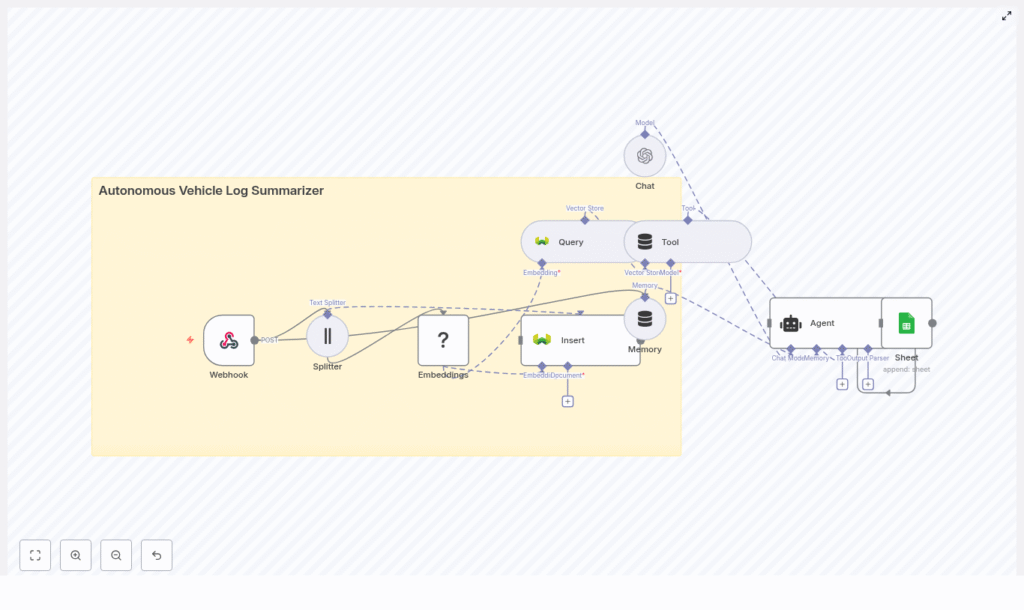
Autonomous Vehicle Log Summarizer with n8n & Weaviate
Automated and autonomous fleets generate massive volumes of telemetry and diagnostic text logs across perception, planning, control, and sensor subsystems. Turning these raw logs into concise, queryable summaries is critical for debugging, compliance, and operational visibility. This reference guide documents a production-ready n8n workflow template – Autonomous Vehicle Log Summarizer – that uses embeddings, Weaviate, and an LLM agent to ingest logs, index them semantically, generate summaries, and persist structured insights into Google Sheets.
1. Functional overview
The workflow automates the end-to-end lifecycle of autonomous vehicle log analysis. At a high level, it:
- Receives raw log payloads via an n8n Webhook node.
- Splits large log bodies into overlapping chunks suitable for embedding and LLM context.
- Generates vector embeddings using a HuggingFace embeddings model.
- Stores vectors and metadata in a Weaviate vector index named
autonomous_vehicle_log_summarizer. - Exposes the vector store as a Tool to an LLM agent for retrieval-augmented generation (RAG).
- Uses an OpenAI Chat / Agent node to produce incident summaries and structured attributes such as severity and likely cause.
- Writes final structured results to Google Sheets for reporting and downstream workflows.
The automation is designed for fleets where manual log inspection is infeasible. It supports:
- Rapid extraction of key events such as near-misses or sensor failures.
- Human-readable summaries for engineers, operations, and management.
- Semantic search across historical incidents via Weaviate.
- Integration with follow-up workflows such as ticketing or alerting.
2. System architecture
2.1 Core components
The template uses the following n8n nodes and external services:
- Webhook node – Ingestion endpoint for HTTP POST requests containing log data.
- Text Splitter node – Chunking of long logs into overlapping segments.
- HuggingFace Embeddings node – Vectorization of text chunks.
- Weaviate Insert node – Persistence of embeddings and metadata.
- Weaviate Query node – Retrieval of relevant chunks for a given query.
- Vector Store Tool node – Tool abstraction that exposes Weaviate search to the LLM agent.
- Memory node (optional) – Short-term conversational context for multi-step agent interactions.
- OpenAI Chat / Agent node – LLM-based summarization and field extraction.
- Google Sheets node – Appending summaries and structured metadata to a spreadsheet.
2.2 Data flow sequence
- Log ingestion Vehicles, edge gateways, or upstream ingestion services POST log bundles to the configured n8n webhook URL. Payloads may be JSON, plain text, or compressed bodies that you decode upstream or within the workflow.
- Preprocessing and chunking The raw log text is split into fixed-size overlapping chunks. This improves embedding quality and prevents truncation in downstream LLM calls.
- Embedding generation Each chunk is passed to the HuggingFace Embeddings node, which produces a vector representation using the selected model.
- Vector store persistence Embeddings and associated metadata (vehicle identifiers, timestamps, module tags, etc.) are inserted into Weaviate under the
autonomous_vehicle_log_summarizerindex (class). - Retrieval and RAG When a summary is requested or an automated trigger fires, the workflow queries Weaviate for relevant chunks. The Vector Store Tool exposes this retrieval capability to the agent node.
- LLM summarization The OpenAI Chat / Agent node consumes retrieved snippets as context and generates a concise incident summary plus structured fields such as severity, likely cause, and recommended actions.
- Result persistence The Google Sheets node appends the final structured output to a target sheet, making it available for audits, dashboards, and additional automation such as ticket creation or alerts.
3. Node-by-node breakdown
3.1 Webhook node – log ingestion
The Webhook node is the entry point for all log data.
- Method: Typically configured as
POST. - Payload types: JSON, raw text, or compressed data that you decode before splitting.
- Common fields:
vehicle_idsoftware_versionlog_timestamplocationor geo-regionmodule(for example, perception, control, planning)log_body(the raw text to be summarized and indexed)
If upstream systems do not provide metadata, you can enrich the payload in n8n using additional nodes before chunking. This metadata is later stored in Weaviate to enable filtered semantic queries.
3.2 Text Splitter node – log chunking
Long logs are split into overlapping character-based segments to:
- Preserve semantic continuity across events.
- Fit within model token limits for embeddings and LLM context.
- Improve retrieval granularity when querying Weaviate.
Recommended initial configuration:
- chunkSize:
400characters - chunkOverlap:
40characters
These values are a starting point. Adjust them based on:
- Typical log length and density of events.
- Token limits and performance characteristics of your embedding model.
- Desired retrieval resolution (shorter chunks for more granular search, larger chunks for more context per match).
Edge case consideration: if logs are shorter than chunkSize, the Text Splitter will typically output a single chunk. Ensure downstream nodes handle both single-chunk and multi-chunk cases without branching errors.
3.3 HuggingFace Embeddings node – vectorization
The HuggingFace Embeddings node converts each text chunk into a numerical vector suitable for similarity search.
- Model selection: Choose a HuggingFace embeddings model that balances cost, latency, and semantic quality for your use case.
- Credentials: Configure your HuggingFace credentials in n8n to allow API access where required.
- Metadata: It is recommended to store the model name and version in the metadata alongside each chunk to keep the index reproducible and auditable over time.
For early experimentation, smaller models can reduce latency and cost. For detailed root cause analysis or high-stakes incidents, higher-quality models may be justified even at higher resource consumption.
3.4 Weaviate Insert node – embedding persistence
The Weaviate Insert node writes embeddings and metadata into a Weaviate instance.
- indexName / class:
autonomous_vehicle_log_summarizer - Data stored:
- Vector embedding for each chunk.
- Chunk text.
- Metadata such as:
vehicle_idlog_timestampmodule(for example, perception, control)software_versionsource_fileor log reference.- Embedding model identifier.
This metadata enables filtered semantic search, for example:
- Restricting queries to a specific vehicle or subset of vehicles.
- Limiting search to a time range.
- Filtering by module when investigating a particular subsystem.
For large fleets, consider retention policies at the Weaviate level to manage index growth and storage costs.
3.5 Weaviate Query node & Vector Store Tool – retrieval
When an engineer initiates an investigation or when an automated process runs, the workflow queries Weaviate to retrieve the most relevant chunks for the incident under review.
- Query source: Could be a natural language question, a vehicle-specific query, or a generic request for recent incidents.
- Weaviate Query node: Performs vector similarity search, optionally with filters based on metadata (for example,
vehicle_idor time window). - Vector Store Tool node: Wraps the query capability as a Tool that the LLM agent can call during reasoning. This enables retrieval-augmented generation (RAG) where the agent dynamically fetches supporting context.
The retrieved chunks are passed to the agent as context snippets. The workflow should handle cases where:
- No relevant chunks are found (for example, return a fallback message or low-confidence summary).
- Too many chunks are retrieved (for example, limit the number of chunks or total tokens passed to the LLM).
3.6 Memory node – conversational context (optional)
A Memory node can be added to maintain short-term context across multiple agent turns. This is useful when:
- Engineers ask follow-up questions about the same incident.
- The agent needs to refine or extend previous summaries without reloading all context.
Keep memory limited to avoid unnecessary token usage and to prevent older, less relevant context from influencing new summaries.
3.7 OpenAI Chat / Agent node – summarization and extraction
The OpenAI Chat / Agent node orchestrates the LLM-based summarization and field extraction. It uses:
- The retrieved log snippets as context.
- The Vector Store Tool to fetch additional context if needed.
- A structured prompt that defines the required outputs (summary, severity, cause, actions).
Typical outputs include:
- One-sentence incident summary.
- Severity classification such as
Low,Medium, orHigh. - Likely cause as a short textual explanation.
- Recommended immediate action for operators or engineers.
To simplify downstream processing, you can instruct the agent to return a consistent format (for example, JSON or a delimited string). The template uses a clear, explicit prompt to drive consistent, concise outputs.
3.8 Google Sheets node – result storage
The final step appends the agent output and relevant metadata to a Google Sheets document.
- Operation: Typically
AppendorAdd Row. - Columns may include:
- Incident timestamp.
vehicle_id.- Summary sentence.
- Severity level.
- Likely cause.
- Recommended action.
- Link or reference to the original log or Weaviate object ID.
These rows can trigger additional automations (for example, ticket creation, notifications) or feed dashboards for fleet monitoring.
4. Configuration details and best practices
4.1 Chunking strategy
Effective chunking is crucial for high-quality retrieval.
- Use chunkSize values large enough to capture full events such as error traces or sensor dropout sequences.
- Increase chunkOverlap when events span boundaries so that each chunk contains enough context for the LLM to interpret the issue.
- Monitor LLM token usage and adjust chunk parameters to avoid exceeding context limits during summarization.
4.2 Embedding model selection
Model choice impacts accuracy, latency, and cost.
- For early-stage deployments or high-throughput pipelines, smaller HuggingFace models can be sufficient and cost-effective.
- For high-precision tasks such as detailed root cause analysis, consider more capable embeddings models even if they are more resource-intensive.
- Record the model name and version in metadata for future reproducibility and auditability.
4.3 Metadata design and filtering
Rich metadata in Weaviate is essential for accurate and targeted retrieval.
- Include fields such as:
vehicle_idmodulegeo_regionor location.software_version.- Log-level or severity if available.
- Use these fields in Weaviate filters to:
- Limit queries to specific vehicles or fleets.
- Focus on a given time window.
- Reduce hallucination risk by narrowing the search space.
4.4 Prompt design for the agent
The agent prompt should explicitly define the required outputs and format. A sample prompt used in the template is:
Analyze the following retrieved log snippets and produce:
1) One-sentence summary of the incident
2) Severity: Low/Medium/High
3) Likely cause (one line)
4) Recommended immediate action

Context snippets:
{{retrieved_snippets}}
For production use:
- Specify a strict output structure such as JSON keys or CSV-style fields.
- Constrain the maximum length for each field to keep Google Sheets rows compact.
- Remind the model to base conclusions only on provided context and to state uncertainty when context is insufficient.
4.5 Security and compliance considerations
Autonomous vehicle logs may contain sensitive telemetry or indirectly identifiable information.
- Encrypt data in transit and at rest for:
- Weaviate storage.
- Google Sheets.
- Backups and intermediate storage layers.
- Redact or hash sensitive identifiers such as VINs or driver

