


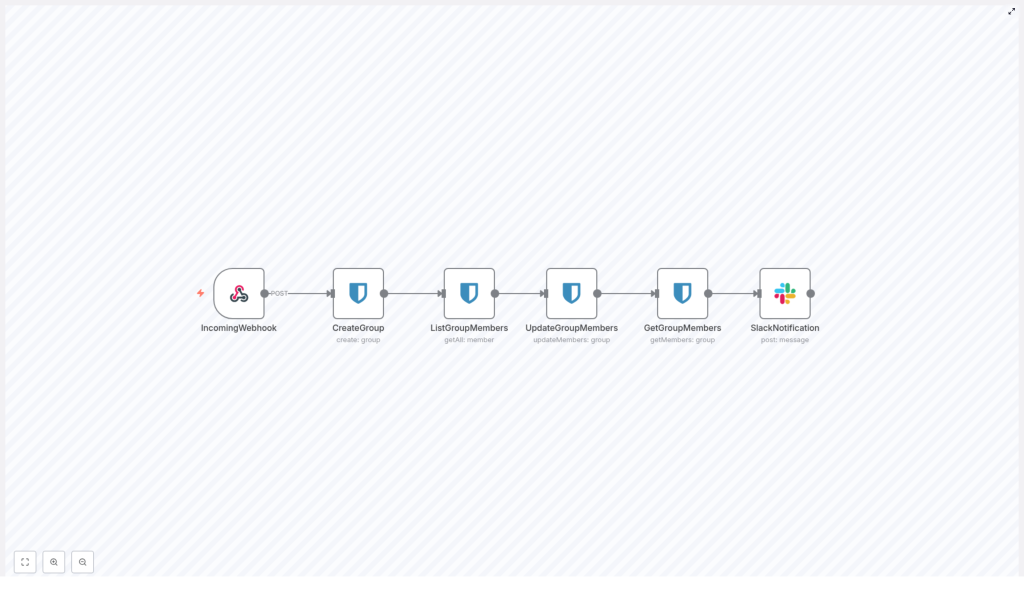
Bitwarden Group Sync Workflow in n8n
Automating Bitwarden user and group management with n8n reduces manual operations, improves consistency, and lowers the risk of configuration errors. This reference guide documents a Bitwarden group synchronization workflow template built in n8n. The workflow is triggered by a webhook, creates or manages a Bitwarden group, synchronizes members, verifies the result, and sends a Slack notification.
The content below is structured as technical documentation for engineers who want to understand, adapt, and operate this workflow in production environments.
1. Workflow Overview
This n8n workflow implements a unidirectional group synchronization pattern for Bitwarden. It is designed to be invoked by an external system (for example HR, IAM, SCIM, or a custom script) via HTTP POST.
At a high level, the workflow:
- Accepts a JSON payload via an n8n Webhook node.
- Creates a Bitwarden group with the specified name.
- Retrieves the set of members that should belong to this group.
- Updates the Bitwarden group membership to match the desired set.
- Reads back the group members to validate the update.
- Posts a summary of the operation to a Slack channel.
The template uses Bitwarden as both the target system (for the group) and the source of members. In a real-world environment you can replace the member source with an HR system, directory service, or identity provider.
2. Architecture and Data Flow
2.1 Node Sequence
The workflow is composed of the following nodes, executed from left to right:
- IncomingWebhook (n8n Webhook trigger)
- CreateGroup (Bitwarden, resource:
group, operation:create) - ListGroupMembers (Bitwarden, resource:
member, operation:getAll) - UpdateGroupMembers (Bitwarden, resource:
group, operation:updateMembers) - GetGroupMembers (Bitwarden, resource:
group, operation:getMembers) - SlackNotification (Slack, operation:
post:message)
2.2 Data Flow Summary
- The Webhook node receives a JSON body that includes a
group_nameand optionallysource_member_ids. group_nameis passed into the Bitwarden CreateGroup node via an expression.- The CreateGroup node returns a Bitwarden group object, including the group
id. - ListGroupMembers retrieves candidate members. In the template this is a Bitwarden member listing; in custom setups it may be replaced by another data source.
- The UpdateGroupMembers node receives:
groupIdfrom CreateGroup.- An array of member IDs, derived from ListGroupMembers.
- GetGroupMembers uses the same
groupIdto read back the final membership list. - SlackNotification formats a message containing the group ID and the resulting membership data and posts it to a configured Slack channel.
3. Prerequisites
- An operational n8n instance with access to the internet or to your Bitwarden and Slack endpoints.
- Configured Bitwarden credentials in n8n with sufficient scopes to:
- Create and manage groups.
- Read and update members.
- Configured Slack credentials (Slack app or bot token) with permission to post messages to the target Slack channel.
- A reliable source of Bitwarden member identifiers:
- The template uses a Bitwarden node (
memberresource,getAlloperation). - In production you may instead use LDAP, SCIM, an HR API, or another identity store.
- The template uses a Bitwarden node (
4. Webhook Contract
4.1 Endpoint
The Webhook node is configured with a path similar to:
/webhook/bitwarden-group-sync
The workflow is triggered by an HTTP POST request to the full webhook URL generated by n8n, which typically includes the base URL, the path, and the Webhook’s unique ID when in production mode.
4.2 Expected Payload
The workflow expects a JSON payload of the following shape:
{  "group_name": "documentation",  "source_member_ids": ["member-id-1", "member-id-2"]
}
group_name(string) – The name of the Bitwarden group to create or manage. In the template, the default example isdocumentation.source_member_ids(array of strings) – Optional example field representing member IDs provided directly by the caller. The template itself retrieves members via Bitwarden, but this field illustrates how external systems can pass their own IDs.
If you plan to rely solely on the Bitwarden member listing node, source_member_ids can be omitted. If you use an external identity source, you can adapt the workflow so that source_member_ids becomes the primary source of truth.
5. Node-by-Node Breakdown
5.1 IncomingWebhook
- Type: Webhook
- Method: POST
- Path:
/webhook/bitwarden-group-sync(or equivalent)
Purpose: This node is the entry point of the workflow. It receives the incoming JSON payload and exposes the data as $json for subsequent nodes.
Usage notes:
- Use this endpoint as a generic integration point for HR systems, SCIM connectors, CI/CD pipelines, or event-driven scripts.
- You can configure additional security on this node such as basic auth, header checks, or IP allowlisting at the infrastructure level.
5.2 CreateGroup (Bitwarden)
- Node type: Bitwarden
- Resource:
group - Operation:
create
Function: Creates a new Bitwarden group based on the name provided by the Webhook payload, or a default name configured in the node.
Key configuration:
- Group name:
- Static example:
documentation. - Dynamic mapping using an expression:
{{ $json["group_name"] }}
- Static example:
Output: The node returns a JSON object that includes the newly created group id. This ID is used downstream to update and verify group membership.
Edge case:
- If a group with the same name already exists, the behavior depends on Bitwarden’s API semantics and your environment. The template assumes a new group is created. To avoid duplicates, you can insert a preceding step to list groups and check for existing ones before calling
create.
5.3 ListGroupMembers (Bitwarden)
- Node type: Bitwarden
- Resource:
member - Operation:
getAll
Function: Retrieves a collection of Bitwarden member records. These are the candidate accounts that will be added to the group.
Template behavior:
- The workflow template returns all members available via the Bitwarden API.
- Each returned item typically includes a unique member identifier, which is required for group membership operations.
Production considerations:
- For large organizations, retrieving all members on every run may be inefficient or unnecessary.
- Filter members using:
- Bitwarden query parameters (if available in your n8n Bitwarden node version).
- Additional n8n nodes such as IF, Set, or Function to restrict the list to the desired subset.
5.4 UpdateGroupMembers (Bitwarden)
- Node type: Bitwarden
- Resource:
group - Operation:
updateMembers
Function: Updates the membership of the Bitwarden group created earlier. It receives the group ID and a list of member IDs and instructs Bitwarden to set the group’s members accordingly.
5.4.1 Data Mapping
The workflow uses n8n expressions to map inputs into this node:
- Group ID:
{{ $node["CreateGroup"].json["id"] }}This expression references the
idfield from the CreateGroup node output. - Member IDs:
{{ $json["id"] }}In the template, this expression refers to the current item from the ListGroupMembers node. Depending on how the node is configured and how many items it returns, you may need to aggregate these IDs into an array.
Important: The Bitwarden API expects an array of member IDs for updateMembers. If your previous node returns one item per member, you must ensure that the UpdateGroupMembers node receives a single item with a field containing an array of IDs, not multiple items with single IDs.
5.4.2 Preparing the ID Array
If your upstream node returns objects like:
[  { "id": "member-id-1", ... },  { "id": "member-id-2", ... }
]
you can use a Set or Function node before UpdateGroupMembers to transform them into:
{  "memberIds": ["member-id-1", "member-id-2"]
}
Then map this array directly into the Bitwarden node parameter that expects the member IDs array.
5.4.3 Edge Cases and Validation
- If the member list is empty, Bitwarden may interpret this as clearing all members from the group. Confirm this behavior in your environment before relying on it.
- If any provided member ID is invalid or missing required permissions, the API will typically return an error. Use n8n error handling to catch and report such issues.
5.5 GetGroupMembers (Bitwarden)
- Node type: Bitwarden
- Resource:
group - Operation:
getMembers
Function: Reads back the current membership of the target Bitwarden group. This is used for verification, auditing, and to compose the Slack notification.
Configuration:
- Group ID:
{{ $node["CreateGroup"].json["id"] }}
Output: A list of members currently associated with the group, as seen by Bitwarden after the update operation.
5.6 SlackNotification
- Node type: Slack
- Operation:
post:message
Function: Sends a message to a Slack channel (for example #general) summarizing the group synchronization result.
Template message (expression):
{{"Group members updated for group id: " + $node["CreateGroup"].json["id"] + " - Members: " + JSON.stringify($node["GetGroupMembers"].json)}}
Recommendations:
- Replace the raw JSON with a more human-readable format before sending to Slack, for example:
- Include the group name as well as the group ID.
- Provide a concise list of member emails or display names if available.
- Add links to related tickets or dashboards if your process requires it.
6. Configuration Notes & Best Practices
6.1 Secure Credential Management
- Store Bitwarden and Slack credentials in n8n’s built-in credentials manager.
- Do not hard-code API keys or tokens in node parameters or expressions.
- Use least-privilege credentials that only have the scopes required for:
- Group creation and modification.
- Member read and write operations.
- Slack channel posting.
- Rotate API keys and tokens periodically according to your security policy.
6.2 Input Validation
Before performing any API calls, validate the Webhook payload:
- Ensure
group_nameis present and not empty. - If you rely on
source_member_ids, verify that it is an array of strings.
Add an IF or Function node immediately after the Webhook to perform these checks and, if invalid, return an HTTP 400 response with a clear error message. This prevents malformed requests from creating inconsistent state in Bitwarden.
6.3 Handling Large or Frequent Updates
For large environments or frequent sync operations:
- Be aware of Bitwarden API rate limits and quotas.
- Use n8n features such as:
- Split In Batches to chunk member updates.
- Wait nodes to introduce delays between batches.
6.4 Idempotency and Existing Groups
To make the workflow safe to re-run:
- Check if a group with the specified
group_namealready exists before calling CreateGroup:- Use a Bitwarden group listing operation (if available) followed by an IF node.
- If the group exists, reuse its
idinstead of creating a new one.
- This create-or-update pattern prevents duplicate groups and simplifies rollback or replays.
6.5 Logging and Error Handling
- Enable n8n’s Error Workflow feature or add dedicated branches with IF nodes that check for failed responses from Bitwarden or Slack.
- On failure:
- Log the detailed error response (status code, message, payload
- Log the detailed error response (status code, message, payload
