


Buffer Telegram Messages to an AI Agent with n8n and Supabase
Picture this: you are trying to talk to a Telegram bot like a normal person. You type one sentence, hit send. Then another thought pops up. Send. Oh wait, one more detail. Send. Before you know it, you have fired off six short messages in a row, and the poor bot is trying to answer each one separately like an over-caffeinated goldfish.
That is exactly the kind of chaos this n8n workflow template is designed to fix. Instead of treating every tiny message as a separate question, we buffer your Telegram messages in Supabase, wait a moment for you to finish typing, then send one combined prompt to an AI agent (OpenAI + LangChain). The result: a single, coherent reply that actually understands what you meant, not what you typed in a hurry.
In this guide you will:
- See why buffering Telegram messages improves chatbot UX and AI response quality.
- Learn how n8n, Supabase, and OpenAI fit together in this workflow.
- Set up the Supabase table schema and key n8n nodes.
- Get configuration tips, security notes, and some advanced ideas to level up your bot.
Why bother buffering Telegram messages at all?
Modern messaging apps basically train us to type like we are live streaming our thoughts. That is great for humans, not so great for AI models that expect a clear, complete prompt.
When your bot replies to every tiny fragment separately, you get:
- Fragmented answers that do not fully address the whole question.
- Higher token usage, since each message triggers a separate AI call.
- A choppy user experience that feels more like spam than conversation.
By buffering messages for a short window and combining them into one conversation turn, you get:
- More coherent AI responses since the model sees the full context at once.
- Lower token usage because related text is sent in a single request.
- Simple control over the typing window (for example 5-15 seconds) so you can tune responsiveness vs. completeness.
In other words, a tiny wait buys you a big upgrade in conversation quality.
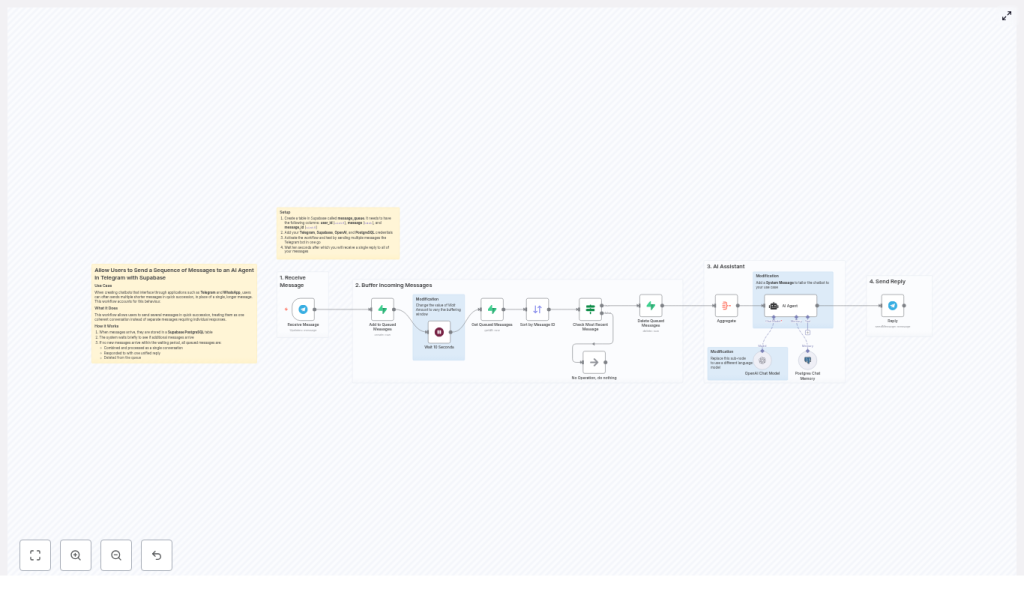
How the n8n Telegram buffer workflow works
At a high level, n8n acts as the conductor, Supabase as the message queue, and OpenAI as the brain. Here is the cast:
- Telegram Trigger node – Listens for incoming user messages.
- Supabase (Postgres) table – Stores each message in a
message_queue. - Wait node – Pauses briefly to collect rapid-fire messages.
- Get / Sort nodes – Fetch and order messages by
message_id. - Aggregate node – Joins multiple fragments into one prompt.
- OpenAI (Chat) node + LangChain agent – Generates the AI reply.
- Reply node – Sends one unified response back to Telegram.
- Delete node – Cleans up processed rows from Supabase.
The whole flow looks like this in plain language:
- Telegram sends a message to your bot.
- n8n drops it into a Supabase queue.
- n8n waits a few seconds to see if more messages arrive from the same user.
- All queued messages for that user are fetched, sorted, and combined.
- The big combined prompt goes to OpenAI via a LangChain agent.
- The AI sends back a single answer, which is delivered to the user.
- Supabase rows are deleted so the queue stays clean.
Step 1: Create the Supabase message queue table
First, you need a place to store those rapid-fire Telegram messages while the user is still typing. In Supabase (Postgres), create a table called message_queue using this schema:
CREATE TABLE message_queue (  id serial PRIMARY KEY,  user_id bigint NOT NULL,  message text NOT NULL,  message_id bigint NOT NULL,  created_at timestamp with time zone DEFAULT now()
);

CREATE INDEX ON message_queue (user_id, message_id);
A few key details:
user_idgroups messages by Telegram chat, so each user has their own queue.message_idpreserves the original order of messages from Telegram.- The index on
(user_id, message_id)keeps fetch operations fast, even when your bot is popular.
Step 2: Build the n8n workflow
1. Receive messages with the Telegram Trigger node
The workflow kicks off with a Telegram Trigger node. Configure it with your bot credentials and webhook. Whenever a user sends a message, this node outputs a message object that includes:
chat.id(used asuser_id)message_idtext(the actual message)
This is your raw material for the queue.
2. Queue the message in Supabase
Next, use a Supabase node (or a generic Postgres node configured for Supabase) to insert the message into message_queue. For each incoming Telegram message, store:
user_id– fromchat.idmessage– from the messagetextmessage_id– from Telegram’smessage_id
This effectively builds a short-lived queue of consecutive messages for each chat.
3. Add a Wait node to create the buffer window
Now comes the magic pause. Insert a Wait node after the Supabase insert. Set a delay, for example:
- 5-10 seconds for mobile users who type fast.
- Up to 15 seconds if you expect longer multi-part questions.
During this buffer window, any additional messages from the same user_id continue to be inserted into message_queue. The user experiences a small delay, but they get a single, well-formed answer instead of a dozen half-baked ones.
4. Fetch and sort the queued messages
Once the wait is over, use a Supabase or Postgres node to:
- Select all rows from
message_queuefor the currentuser_id. - Order them by
message_idso they match the original Telegram order.
You can optionally use created_at as a secondary sort key if you want a fallback for ordering.
5. Avoid race conditions with an IF node
There is a subtle edge case: what if a new message sneaks in after the Wait node started, but before you fetched the queue? To avoid processing the same batch multiple times, add an IF node that:
- Checks whether the last
message_idin the queue matches themessage_idthat triggered the workflow. - If it does match, proceed with aggregation and reply.
- If it does not match, you know another workflow run will handle the latest batch, so you can safely skip to the end.
This simple check prevents duplicate replies and other race-condition headaches.
6. Aggregate the messages into a single prompt
Now use the Aggregate node to join all message fragments into one text block. A common pattern is to:
- Concatenate the
messagefields. - Separate them with newlines or spaces, for example:
message1\nmessage2\nmessage3.
The result is a single prompt that captures the user’s entire thought process, not just the last sentence they typed.
7. Send the combined prompt to OpenAI via LangChain
With the aggregated text ready, pass it to an OpenAI (Chat) node configured with a model like gpt-4o-mini or another supported chat model.
For more context-aware bots, you can also:
- Use a LangChain agent in n8n to handle tool use and more complex logic.
- Attach a Postgres chat memory node so the AI has persistent conversation memory beyond the current buffered turn.
The AI model receives the full aggregated prompt and returns a single, coherent reply.
8. Reply on Telegram and clean up the queue
Finally, use a Telegram Reply node to send the AI-generated response back to the user as one message. No more spammy multi-replies, just a clean, thoughtful answer.
After sending the reply, run a Delete operation on message_queue to remove all processed rows for that user_id. This keeps the queue fresh and prevents old messages from leaking into future turns.
Configuration tips for a smooth experience
- Buffer window timing
The Wait node is your main UX dial. Start with 5-10 seconds and adjust based on feedback. Too short and you still get fragmented prompts. Too long and users might think the bot fell asleep. - Deduplicate repeated fragments
If users can resend the same message or if your client occasionally retries, consider adding a hash column (for example, a hash ofuser_id + message + message_id) to detect and skip duplicates before inserting. - Maintain correct ordering
Always sort bymessage_id. Keep the data type asbigintin both Supabase and n8n to avoid wonky ordering or type mismatches. Usecreated_atonly as a backup. - Manage rate limits and tokens
Aggregation usually reduces API calls and token usage, but if your bot sees heavy traffic, still monitor:- OpenAI rate limits
- Total token usage per conversation
- n8n workflow execution load
- Error handling
Add a retry or dead-letter path for:- Supabase insert or delete failures
- OpenAI API errors or timeouts
This keeps your bot from silently failing when the network has a bad day.
Security and privacy considerations
You are storing user messages in Supabase, so treat them with the respect they deserve:
- Limit retention
Use a scheduled job, background task, or a TTL-like mechanism to delete old rows frommessage_queue. The queue is meant to be short-lived, not an eternal archive. - Encrypt sensitive data
If messages can contain personal or confidential information, consider encrypting sensitive fields at rest according to your privacy policy or compliance needs. - Protect credentials
Store n8n, Supabase, and OpenAI credentials securely, restrict access, and rotate API keys regularly. A well-behaved bot does not leak secrets.
Advanced ideas to level up your Telegram bot
- Custom system prompts
Add a system message in the OpenAI prompt to control the bot’s tone, style, or length of responses. For example, make it concise, friendly, or domain-specific. - Swap language models
You are not locked into a single model. Use other OpenAI models, Azure OpenAI, or any compatible model supported by n8n, as long as it works with the chat node. - Show a “bot is typing” indicator
While the AI is thinking, you can send a Telegram “chat action” to show that the bot is typing. This makes the short wait feel intentional instead of broken. - Session memory for longer conversations
Combine the buffered prompt with a Postgres memory node so your bot remembers context across multiple turns. This is especially useful for support flows or multi-step tasks.
Troubleshooting common issues
- Messages are missing
Check your Supabase insert node and logs. Make sure:user_idandmessage_idare saved correctly.- The correct table (
message_queue) and schema are used.
- Messages are out of order
Verify that:- Your Sort node uses the correct
message_idfield. - The data type is
bigintin both n8n and Supabase.
- Your Sort node uses the correct
- Duplicate replies appear
Double check:- The IF node correctly compares the last
message_idin the queue with the triggermessage_id. - The delete operation on
message_queueonly runs once per processed batch.
- The IF node correctly compares the last
Putting it all together: from noisy chat to smooth AI replies
This pattern is deceptively simple but very powerful. By buffering Telegram messages in Supabase, then aggregating them before sending to an AI agent, you:
- Turn chaotic multi-message bursts into clean, single-turn prompts.
- Improve response quality and coherence for your Telegram bot.
- Reduce API calls and token overhead.
To get started:
- Import the n8n workflow template.
- Create the
message_queuetable in Supabase using the SQL above. - Add your Telegram, Supabase, and OpenAI credentials in n8n.
- Activate the workflow.
- Test it by sending a flurry of short messages to your bot and watch them come back as one unified reply after the buffer delay.
Call to action: Import this template into your n8n instance and connect it to a sample Telegram bot. If you want help with multi-lingual support, richer memory, or enterprise-grade retention and compliance, reach out to us or subscribe for detailed tutorials and deep dives.
