


How to Build a Car Insurance Quote Generator with n8n and Vector AI
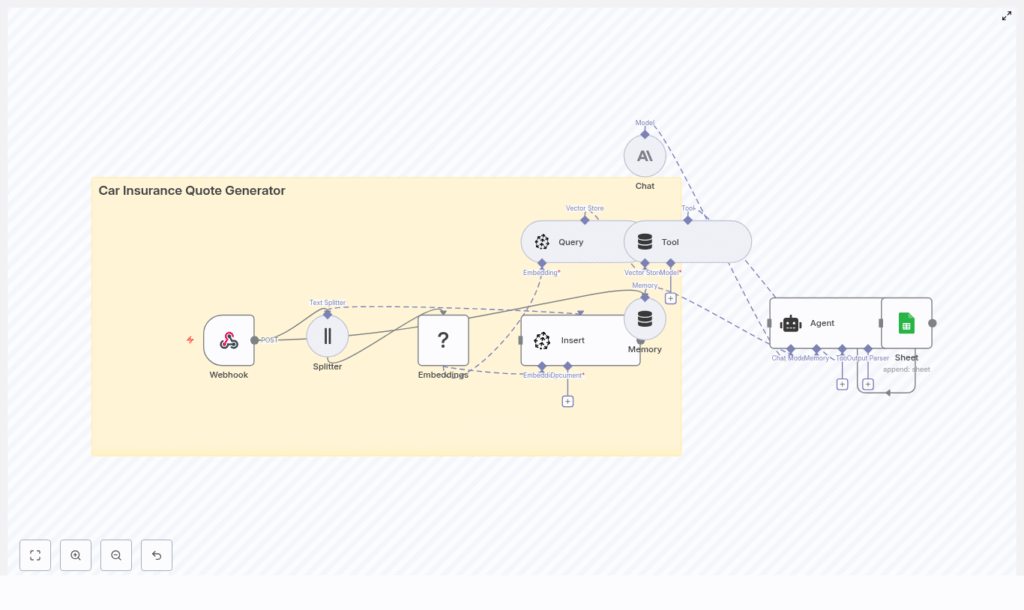
This guide describes a production-ready n8n workflow template for generating personalized car insurance quotes. It uses n8n as the orchestration layer and integrates LangChain-style components, Hugging Face embeddings, Pinecone as a vector database, Anthropic for conversational quote generation, and Google Sheets for logging and analytics.
1. Solution Overview
The workflow implements an automated car insurance quote generator that:
- Receives quote requests through a public webhook endpoint.
- Transforms and embeds relevant text into vector representations.
- Persists and retrieves contextual knowledge from Pinecone.
- Exposes the vector store to an LLM-driven Agent as a queryable tool.
- Maintains short-term conversation context using memory.
- Uses Anthropic as the chat model to generate natural language quotes.
- Logs each quote attempt to Google Sheets for audit and analysis.
The result is a scalable, explainable quote generator that can be integrated into websites, CRMs, or internal tools with minimal code.
2. Target Use Case & Benefits
2.1 Why automate car insurance quotes?
Customers expect rapid, tailored responses when requesting insurance quotes. Manual handling of these requests is slow and error-prone. This n8n-based workflow automates:
- Initial lead qualification and quote generation.
- Context-aware policy recommendations using prior data.
- Structured logging for compliance and performance tracking.
2.2 Key benefits
- Scalable knowledge storage using Pinecone vector search for product and policy data.
- Context-aware responses via embeddings, retrieval, and short-term memory.
- Low-code orchestration with n8n for configuration, monitoring, and iteration.
- Traceable audit logs in Google Sheets for compliance, QA, and reporting.
3. High-Level Architecture
The architecture is implemented as a single n8n workflow composed of the following logical components:
- Inbound interface: Webhook node (HTTP POST) for quote requests.
- Preprocessing: Text Splitter for chunking long text.
- Vectorization: Hugging Face embeddings node.
- Persistence: Pinecone Insert node to store vectors.
- Retrieval: Pinecone Query node for semantic search.
- Tool abstraction: Tool node exposing retrieval as an Agent tool.
- Conversation state: Memory buffer node for short-term context.
- LLM engine: Anthropic Chat node for natural language generation.
- Orchestration logic: Agent node that coordinates tools, memory, and chat.
- Logging: Google Sheets node to append structured quote records.
Data flows from the webhook through preprocessing, embedding, and retrieval, then into the Agent and LLM, and finally into a Sheets log. Pinecone is used both as a knowledge store and as a source of grounding context for the LLM.
4. Node-by-Node Breakdown
4.1 Webhook Node – Entry Point
Role: Accepts incoming quote requests and triggers the workflow.
Typical configuration:
- HTTP Method:
POST - Path: e.g.
/car_insurance_quote_generator - Response mode: Synchronous response with the generated quote or an acknowledgment, depending on your design.
Example request payload:
{  "name": "Jane Doe",  "vehicle": { "make": "Toyota", "model": "Camry", "year": 2018 },  "drivers": [{ "age": 34, "licenseYears": 16 }],  "coverage": "full",  "notes": "commuter, 10k miles/year"
}
The Webhook node parses the JSON body and makes it available to subsequent nodes as {{$json}}. You can map specific fields (such as vehicle or notes) into later nodes for embedding and retrieval.
4.2 Text Splitter Node – Chunking Input
Role: Split long or composite text into manageable chunks before embedding.
This node is most relevant if your workflow processes:
- Long free-form notes in the request.
- Attached policy documents or FAQs.
- Historical quote narratives you want to index.
Typical parameters:
- Chunk size: e.g.
400characters or tokens. - Chunk overlap: e.g.
40to preserve context across boundaries.
Chunking helps maintain semantic coherence in embeddings while keeping vector store operations efficient. If the incoming text is already short, you can bypass or conditionally skip this node.
4.3 Hugging Face Embeddings Node – Vectorization
Role: Convert text chunks into vector embeddings suitable for semantic search.
Key configuration points:
- Model selection: Use a sentence or document embedding model optimized for semantic similarity. Set the model name in:
- Environment variables, or
- n8n credentials / configuration to avoid hardcoding.
- Input field: Map the chunked text field (output of Text Splitter) into the embeddings node.
Each input item becomes an embedding vector. These vectors, along with any metadata, are passed to the Pinecone Insert node.
4.4 Pinecone Insert Node – Persisting Vectors
Role: Store embeddings and metadata in a Pinecone index.
Typical configuration:
- Index name: e.g.
car_insurance_quote_generator. - Namespace: Optional, for separating environments or product lines.
- Vector payload: Embedding array from the Hugging Face node.
- Metadata: Useful keys can include:
source(e.g. “knowledge_base”, “historical_quote”).customerIdor an anonymized identifier.timestampfor temporal filtering.policyTags(e.g. “comprehensive”, “liability”, “state_CA”).
Metadata enables powerful filtering at query time, such as limiting results to a specific state, product type, or recency window.
4.5 Pinecone Query Node – Semantic Retrieval
Role: Retrieve relevant documents, prior quotes, or policy snippets to guide the quote.
On each new quote request, you typically:
- Build a query text from the request, such as a combination of:
- Vehicle details.
- Driver profile.
- Coverage type.
- Free-text notes.
- Embed this query text using the same Hugging Face model.
- Send the resulting embedding to Pinecone Query.
Query configuration:
- Top K: Number of nearest neighbors to return (e.g. 5 or 10).
- Filter: Optional JSON filter using metadata fields, for example:
{  "policyTags": { "$in": ["comprehensive"] },  "state": "CA"
}
The query node returns a list of matches with vectors, scores, and metadata. These results are later exposed to the LLM as a tool output.
4.6 Tool Node – Exposing Vector Search to the Agent
Role: Wrap the Pinecone retrieval as a callable tool for the Agent.
In an Agent-style architecture, tools represent external capabilities that the LLM can invoke. Here, the Tool node:
- Takes the Pinecone Query output.
- Defines a tool interface that the Agent can call when it needs to “look up” relevant policies or prior quotes.
- Returns structured results that the Agent can reference when constructing the final quote.
This design ensures that the LLM is grounded in actual retrieved data rather than relying solely on its internal training.
4.7 Memory Node – Short-Term Conversation Context
Role: Maintain recent interaction history to support multi-turn conversations.
The Memory node stores:
- Previous user messages (follow-up questions, clarifications).
- Key decisions or selected coverage options.
Typical configuration uses a buffer that keeps the last N messages or a limited token budget. The Agent reads from and writes to this memory so that:
- Coverage choices remain consistent across turns.
- Additional drivers or vehicles added in follow-up messages are respected.
If you only support single-turn interactions, memory can be minimal, but retaining at least a short buffer is useful for user corrections and clarifications.
4.8 Anthropic Chat Node – Natural Language Generation
Role: Provide the LLM that generates the quote text and explanations.
Core configuration parameters:
- Model: Anthropic chat model of your choice.
- System / role prompt: Instructions that define:
- Voice and tone (professional, clear, compliant).
- Required fields in the quote.
- Constraints on what the model should and should not say.
- Temperature: Controls variability. Lower for more deterministic pricing explanations.
- Max tokens / response length: To avoid overly long outputs.
The Agent directs the Anthropic node to:
- Generate a structured quote.
- Provide a human-readable explanation of coverage, deductibles, and exclusions.
- List next steps for the customer or agent.
4.9 Agent Node – Orchestrating Tools, Memory, and Chat
Role: Coordinate the LLM, tools, and memory to produce the final quote.
The Agent node acts as the “brain” of the workflow. It:
- Receives the user request and any prior conversation context from memory.
- Decides when to call the vector search tool to retrieve relevant information.
- Combines:
- Webhook request data,
- Retrieved Pinecone documents,
- Memory state,
and passes them to the Anthropic Chat node.
- Produces both:
- A structured machine-readable quote (JSON-like structure).
- A human-friendly summary for display or email.
Prompts and tool descriptions should clearly instruct the Agent to ground its responses in retrieved evidence and avoid fabricating policy details.
4.10 Google Sheets Node – Logging and Analytics
Role: Persist a log of each quote attempt for auditing and analysis.
Typical configuration:
- Operation:
Appendrow. - Spreadsheet: Dedicated sheet for car insurance quotes.
- Mapped columns (examples):
timestamprequestIdor webhook execution IDcustomerNamevehicle(stringified make/model/year)recommendedPlanpriceEstimatefollowUpRequired(boolean or text)
This logging layer supports compliance, performance review, A/B testing of prompts, and manual override workflows.
5. Configuration Notes & Credentials
5.1 Credentials
- Webhook: No external credentials, but you should secure it (see security section).
- Hugging Face: API token configured in n8n credentials or environment variables.
- Pinecone: API key and environment configured in n8n credentials.
- Anthropic: API key stored securely in n8n credentials.
- Google Sheets: OAuth or service account credentials configured in n8n.
5.2 Handling large payloads
- Enable chunking only when needed to reduce unnecessary embedding calls.
- Consider truncating or summarizing extremely long notes before embedding.
5.3 Error handling patterns
- Configure retry behavior or error workflows for:
- Transient Pinecone failures.
- LLM timeouts or rate limits.
- Google Sheets API errors.
- Return a fallback response from the Webhook when critical dependencies fail, such as:
- A generic message that the quote could not be generated automatically.
- Instructions for manual follow-up.
6. Security, Privacy, and Compliance
Because the workflow processes personal and potentially sensitive information, security and data protection are essential.
- Webhook security:
- Protect the endpoint with an API key, IP allowlist, or OAuth-based authentication.
- Ensure HTTPS is enforced for all requests.
- Data encryption:
- Use TLS for data in transit.
- Rely on provider-level encryption at rest for Pinecone and Google Sheets.
- Data minimization:
- Avoid storing unnecessary PII in the vector store.
- Prefer anonymized identifiers and high-level metadata in Pinecone.
- Retention policies:
- Define how long logs and memory buffers are stored.
- Implement deletion or anonymization policies to comply with regulations.
7. Testing, Tuning, and Edge Cases
7.1 Initial dataset and tuning
- Start with a small but representative dataset of quotes and policies.
- Experiment with:
- Different embedding models.
- Chunk sizes and overlaps.
- Pinecone index configuration.
7.2 Retrieval quality
- Use Pinecone filters to constrain results by:
- Policy type (e.g. “liability”, “comprehensive”).
- State or jurisdiction.
- Product line or segment.
- Review retrieved documents to ensure they are relevant and properly grounded.
