


How One Legal Team Turned Case Law Chaos Into Clarity With n8n & LangChain
On a rainy Tuesday evening, Maya stared at the glowing screen in front of her. As a senior associate at a mid-sized litigation firm, she had spent the last three hours buried in a 120-page appellate decision. Tomorrow morning, she had to brief a partner on the key holdings, relevant citations, and how this case might reshape their strategy.
Somewhere between pages 63 and 87, Maya realized she was reading the same paragraph for the third time. The pressure was not just the volume of work. It was the feeling that important details might slip through the cracks, that a missed citation or misread holding could cost the firm time, money, or credibility.
Her firm had hundreds of similar opinions sitting in folders, PDFs, and email threads. Everyone knew they needed fast, consistent summaries of case law. No one had the time to build such a system from scratch.
That night, Maya decided something had to change.
The Problem: Case Law Everywhere, Insights Nowhere
Maya’s firm prided itself on being data-driven, but their legal research process still relied heavily on manual reading and ad hoc notes. Each new opinion meant another scramble to extract:
- Clear, consistent summaries of judgments
- Key facts and holdings that could affect active matters
- Citations and authorities worth tracking for future use
- A reliable audit trail in case any summary later needed to be reviewed
They had tried tagging documents in a DMS and building spreadsheets of important cases, but the system never scaled. Every new opinion felt like starting from zero again.
When a partner asked, “What did the court actually hold in Smith v. Jones, and which statutes did they rely on?” the answer usually involved a frantic search, a long PDF, and someone flipping between pages trying to remember where a certain passage lived.
Maya needed something better. An automated case law summarizer that could turn long, dense opinions into concise, searchable summaries without losing legal nuance.
The Discovery: A Case Law Summarizer Template Built on n8n
While researching legal-AI tools, Maya stumbled across an n8n workflow template: an automated Case Law Summarizer powered by LangChain-style agents, embeddings, and a Supabase vector store.
It promised exactly what her team needed. A production-ready pipeline that could:
- Ingest new case documents through a webhook
- Split long opinions into manageable chunks
- Generate vector embeddings for semantic search
- Store those embeddings in Supabase for fast retrieval
- Use a LangChain-style agent with OpenAI to draft structured summaries
- Log everything into Google Sheets for audit and review
She was skeptical but intrigued. Could a workflow template really handle the complexity of legal decisions? Could it preserve enough context to support follow-up questions like “What are the cited statutes?” or “Which authorities did the court rely on most heavily?”
There was only one way to find out.
The Architecture Behind Maya’s New Workflow
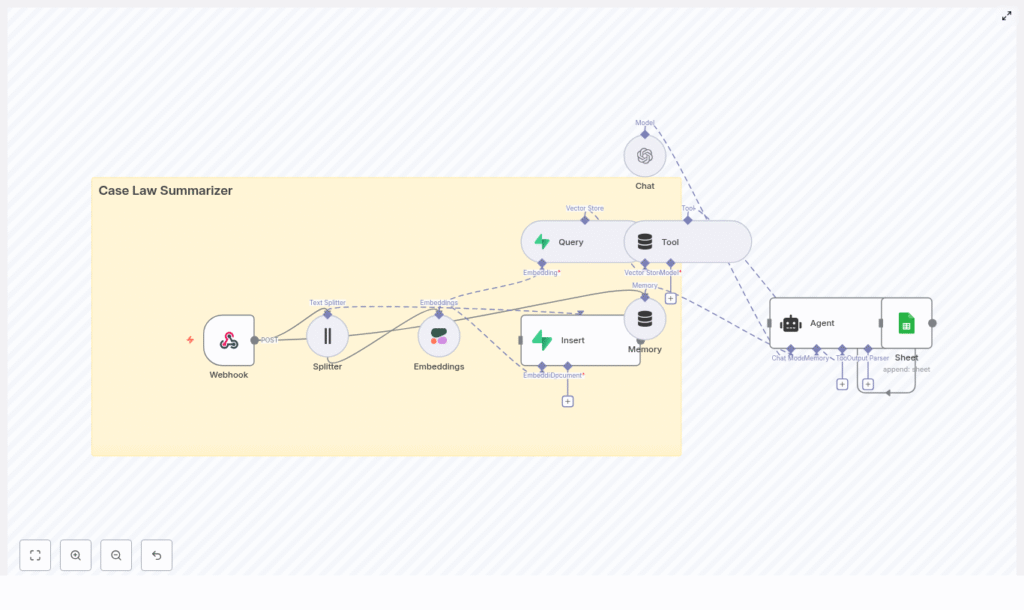
Before she deployed anything, Maya wanted to understand how the case law summarizer actually worked. The template diagram revealed a clean, modular architecture that felt less like a black box and more like a toolkit she could tune.
At a high level, the n8n workflow connected these pieces:
- Webhook (n8n) – receives new case documents or URLs
- Splitter – breaks long case texts into smaller chunks
- Embeddings (Cohere) – converts text chunks into vector embeddings
- Vector store (Supabase) – stores embeddings and metadata for fast semantic search
- Query + Tool – fetches the most relevant chunks for a given user query
- Agent (LangChain / OpenAI) – composes the final summary from retrieved context
- Memory – maintains short-term context for follow-up questions
- Google Sheets logging – keeps an append-only audit log of requests and responses
The more she read, the more she saw how each part solved a specific pain point she faced daily. This was not a generic chatbot. It was a focused legal-AI workflow designed for case law summarization and retrieval.
Rising Action: Turning a Single Case Into a Testbed
Maya decided to test the template with a single case that had been haunting her inbox: “Smith v. Jones,” a lengthy state supreme court opinion her team kept referencing but never fully summarized.
Step 1 – Ingesting the Case via Webhook
First, she configured an n8n webhook to act as the entry point for new cases. It exposed a POST endpoint where she could send the full opinion text, along with metadata like case name, court, and date.
Her initial test payload looked like this:
{  "case_name": "Smith v. Jones",  "court": "State Supreme Court",  "date": "2024-03-12",  "text": "...full opinion text..."
}
The webhook validated the input and captured the metadata, setting the stage for the rest of the pipeline. For the first time, “Smith v. Jones” was not just a PDF. It was a structured object ready for automation.
Step 2 – Splitting Long Opinions Without Losing Context
Next came the problem of length. Opinions like “Smith v. Jones” were far too long to send to a language model in one go. The template’s text splitter node solved this by breaking the opinion into chunks of around 400 characters, with an overlap of roughly 40 characters.
This overlap mattered. It preserved continuity between chunks so that key sentences spanning boundaries would still be understandable in context. Better chunks meant better embeddings and, ultimately, more accurate summaries.
Step 3 – Generating Embeddings for Semantic Search
Once the text was split, each chunk was sent to an embeddings provider. The template used Cohere, although Maya knew she could switch to OpenAI if needed.
For every chunk, the workflow generated a vector representation and stored essential metadata, including:
case_idchunk_index- character offsets for reconstruction
This step quietly transformed “Smith v. Jones” from a static document into a searchable, semantically indexed resource.
Step 4 – Persisting to a Supabase Vector Store
The embeddings and metadata were then inserted into Supabase, using Postgres with a vector extension as the underlying vector database.
To Maya, this meant something simple but powerful: she could now run semantic searches across her case corpus, instead of relying only on keyword search or manual scanning. Any future query about “Smith v. Jones” would pull the most relevant portions of the opinion, not just any text that matched a word.
The Turning Point: The First Automated Summary
With the opinion ingested, chunked, embedded, and stored, Maya was ready for the moment of truth. She opened a simple web UI connected to the workflow and typed a prompt:
“Summarize the holding and key facts of Smith v. Jones.”
Step 5 – Querying the Vector Store
Behind the scenes, the n8n workflow took her query and searched the Supabase vector store for the most relevant chunks. It used the embeddings to rank which portions of the opinion best addressed her prompt.
The top chunks were then passed to the next stage as context. No more scrolling through 120 pages. The system had already done the heavy lifting of finding the right passages.
Step 6 – Composing the Summary With an Agent and Memory
The heart of the workflow was a LangChain-style agent orchestrating an OpenAI model. The agent received:
- The case metadata
- The retrieved context chunks from Supabase
- A carefully designed system prompt
The system prompt looked something like this:
System prompt:
You are a legal summarizer. Given the case metadata and provided context chunks, produce:
1) A one-paragraph summary of the holding (2-4 sentences).
2) A bulleted list of key facts.
3) A list of cited authorities (if any).
4) A confidence score (low/medium/high).

Include chunk references in parentheses when quoting.
Maya appreciated how explicit this was. It asked for a structured output, required chunk references, and could be extended with examples for even more consistent formatting. Importantly, the instructions told the model to respond with “Not present in provided context” if a fact could not be verified from the retrieved chunks, which helped reduce hallucinations.
The agent then synthesized a concise summary, extracted holdings, listed citations, and even proposed a suggested search query for deeper research. The memory component kept track of the conversation so that when Maya followed up with, “What are the cited statutes?” the system could answer without reprocessing everything from scratch.
Step 7 – Logging for Audit and Review
Finally, the workflow appended a new row to a Google Sheet. It captured:
- The original request
- The generated summary
- Case metadata
- Timestamps and any relevant IDs
For Maya’s firm, this log quickly became an informal audit trail and a review queue. If a partner questioned a summary, they could trace it back to the original request and context.
Refining the System: Prompt Design and Configuration Tweaks
With the first few summaries working, Maya began tuning the workflow to better match her firm’s needs. She focused on three areas: prompt design, configuration, and compliance.
Prompt Design That Lawyers Can Trust
Prompt engineering turned out to be crucial for reliable legal summaries. Maya refined the system prompt to:
- Enforce concise holdings in 2 to 4 sentences
- Require bulleted key facts
- List cited authorities clearly
- Include a confidence score for quick risk assessment
She also experimented with providing example summaries inside the prompt. This helped the model keep formatting consistent across different cases and practice areas.
To limit hallucinations, she made sure the instructions clearly stated that if a fact was not supported by the retrieved chunks, the model must respond with “Not present in provided context.” That simple rule dramatically improved trust in the outputs.
Key Configuration Tips From the Field
As more cases flowed through the summarizer, Maya adjusted several technical settings:
- Chunk size and overlap – She tested different chunk sizes between 200 and 800 characters, balancing context depth with embedding cost and retrieval quality.
- Embedding model choice – While the template used Cohere for embeddings, she confirmed that OpenAI embeddings also worked well for semantic relevance.
- Vector indexing strategy – By storing metadata like
case_idandchunk_index, the team could reconstruct the original ordering of chunks whenever they needed to review exact passages. - Rate limiting and batching – For bulk ingestion of many opinions, she batched embedding requests and configured retries with backoff to handle API limits gracefully.
- Access controls – She locked down the webhook and the vector store with API keys and least-privilege roles to keep the system secure.
Staying Ethical: Privacy, Compliance, and Human Review
As the firm began to rely on the summarizer, Maya raised an important question: “What about privacy and compliance?” Even though many court opinions are public, some filings included sensitive or partially redacted information.
To stay on the right side of ethics and regulation, they implemented:
- Access logs and role-based access control for the summarizer
- Document retention policies aligned with firm standards
- Human-in-the-loop review for high-stakes matters, where an attorney always checked the AI-generated summary before it was used in client work
The n8n workflow made these controls easier to enforce, since every request and response was already logged and traceable.
Measuring Impact: Testing and Evaluation
To convince skeptical partners, Maya needed more than anecdotes. She assembled a small labeled dataset of past cases and evaluated how well the summarizer performed.
The team tracked:
- ROUGE or LU-style metrics to measure content overlap between AI summaries and attorney-written summaries
- Precision and recall for extracted citations and key facts
- User satisfaction based on attorney feedback
- Estimated time saved per case
- False hallucination rate, defined as claims not grounded in the input text
Within a few weeks, the data told a clear story. Attorneys were spending significantly less time on first-pass summaries and more time on analysis and strategy. The hallucination rate was low and dropping as prompts and configurations improved.
Keeping It Running: Operational Considerations
As usage grew, the summarizer needed to behave like any other production system in the firm. Maya started monitoring key operational signals:
- Queue depth for incoming case summaries
- Embedding API errors and retries
- Vector store size growth over time
- Per-request latency from ingestion to final summary
For scaling, she prepared a roadmap:
- Shard vector indices by jurisdiction or year to keep queries fast
- Archive older cases into a cold store with occasional reindexing
- Use caching for repeated queries on major precedents that everyone kept asking about
The beauty of the n8n-based design was that each of these changes could be implemented incrementally without rewriting the entire system.
Extending the Workflow: From One Tool to a Legal-AI Platform
Once the Case Law Summarizer proved itself, the firm began to see it as a foundation rather than a one-off tool. The modular n8n workflow made it easy to add new capabilities.
On Maya’s backlog:
- Adding OCR steps to ingest scanned PDFs that older cases often arrived in
- Running a citation extraction microservice to normalize references and build a structured database of authorities
- Integrating with the firm’s document management system so new opinions were summarized automatically upon upload
- Triggering human review flows for high-risk outputs, such as cases central to active litigation
What began as a single template had evolved into a flexible legal-AI pipeline that could grow with the firm’s needs.
A Day in the Life With the New Summarizer
Several months later, “Smith v. Jones” was no longer a dreaded PDF. It was a structured entry in the firm’s case database, complete with a concise summary, key facts, citations, and an audit trail.
A typical request/response flow now looked like this:
- A client matter team uploaded a case PDF to the n8n webhook.
- The splitter chunked the text, embeddings were computed, and everything was inserted into Supabase.
- A lawyer opened the web UI and requested a summary for “Smith v. Jones.”
- The system queried Supabase, retrieved top-k relevant chunks, and the agent synthesized a structured summary.
- The result was logged automatically to Google Sheets for future review and compliance.
What used to take hours now took minutes. Instead of wrestling with text, attorneys could focus on arguments, strategy, and client communication.
From Chaos to Clarity: What Maya Learned
Looking back, Maya realized that the real value of the Case Law Summarizer was not just speed. It was the combination of:
- Accuracy through careful prompt design and vector-based retrieval
- Auditability through structured logging and metadata
- Scalability through n8n automation and a vector store like Supabase
By blending n8n, LangChain-style agents, embeddings, and thoughtful legal prompts,
