


Build a Commodity Price Tracker with n8n
On a gray Tuesday morning, Maya stared at the dozen browser tabs open across her screen. Each one showed a different commodity dashboard – oil benchmarks, grain futures, metals indices. As the lead market analyst at a fast-growing trading firm, she was supposed to have answers in minutes.
Instead, she was copying prices into spreadsheets, hunting through email notes for context, and trying to remember why last month’s copper spike had looked suspicious. By the time she had something useful to say, the market had already moved.
That was the day she decided something had to change.
The problem: markets move faster than manual workflows
Maya’s job was not just to collect commodity prices. Her team needed to:
- Track prices automatically across multiple sources
- Preserve historical context and notes, not just numbers
- Ask intelligent questions like “What changed and why?” instead of scrolling through raw data
- Log decisions and anomalies in a structured way for reporting
Her current workflow was a patchwork of CSV exports, ad hoc scripts, and manual copy-paste into Google Sheets. Every new commodity or data source meant more maintenance. Every new question from the trading desk meant another scramble.
When a colleague mentioned an n8n workflow template for a commodity price tracker, Maya was skeptical. She was not a full-time developer. But she knew enough automation to be dangerous, and the idea of a no-code or low-code setup that could handle prices, context, and reasoning in one place felt like a lifeline.
The discovery: a production-ready n8n workflow template
Maya found a template that promised exactly what she needed:
Track commodity prices automatically, index historical data for intelligent queries, and log results to Google Sheets using a single n8n workflow.
Under the hood, the architecture used:
- n8n as the orchestrator
- LangChain components to structure the AI workflow
- Cohere embeddings to convert data into vectors
- Redis vector store for fast semantic search
- Anthropic chat for reasoning and natural language answers
- Google Sheets for logging and reporting
It was not just a script. It was a small, production-ready architecture designed for real-time commodity monitoring and historical analysis.
From chaos to structure: how the architecture works
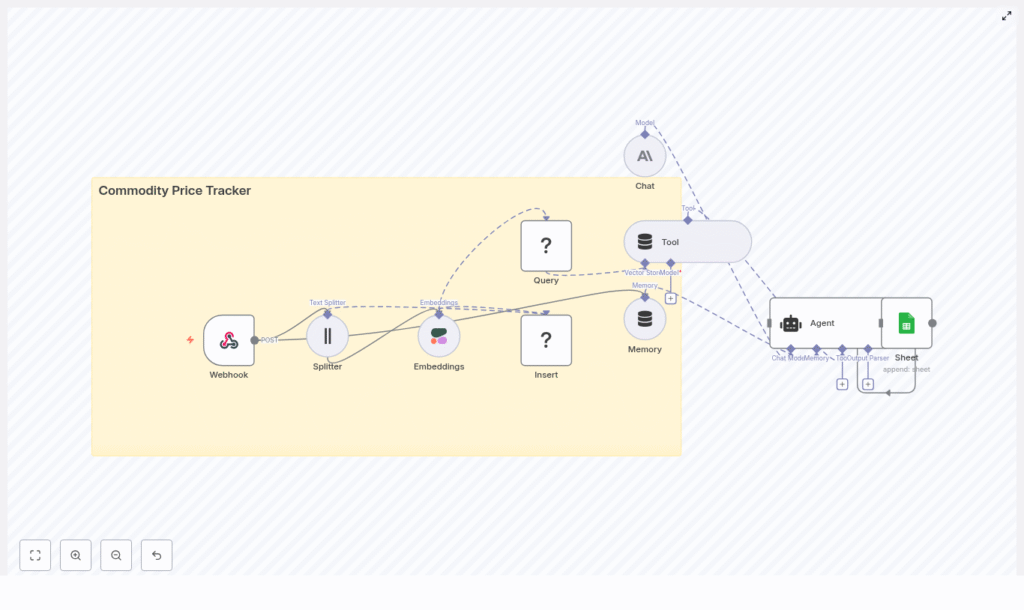
Before Maya touched a single node, she wanted to understand the flow. The template diagram showed a compact but complete pipeline that mirrored her daily work:
- Webhook to receive incoming commodity price data in formats like CSV, JSON, or HTTP POST payloads
- Text splitter to break large payloads into manageable chunks for embedding
- Cohere embeddings to convert each chunk into a dense vector representation
- Redis vector store to insert and later query those embeddings with metadata
- Query + Tool so an AI agent could retrieve related records using vector search
- Memory (window buffer) to maintain short-term conversational context
- Anthropic chat to reason over retrieved data and user questions
- Agent to orchestrate tools, memory, and model outputs and decide what to do next
- Google Sheets to log structured results for dashboards and audits
In other words, the workflow would not just store prices. It would remember context, understand questions, and write clean, structured logs.
Meet the cast: the key components in Maya’s workflow
n8n as the conductor
For Maya, n8n became the control room. Using its visual editor, she wired together a Webhook node at the entry point to accept data from external scrapers, APIs, or cron jobs. From there, each node handled a specific part of the pipeline, with n8n orchestrating the entire flow without her needing to write a full application.
Text splitter: making big payloads manageable
Some data sources sent large payloads with multiple commodities and notes. To make them usable for embeddings, she added a Text Splitter node configured to:
- Split by character
- Use a chunk size of 400
- Include an overlap of 40 characters
This way, each chunk kept enough neighboring context so that embeddings stayed meaningful, while still being efficient for API calls.
Cohere embeddings: turning prices and notes into vectors
Next, she wired a Cohere embeddings node directly after the splitter. With her Cohere API key stored securely in n8n credentials, each chunk of text or hybrid numeric-text data was transformed into a dense vector. Semantically similar records would live near each other in vector space, which later made “show me similar events” queries possible.
Redis vector store: where history becomes searchable
Maya configured a Vector Store node to connect to Redis and operate in insert mode. She created an index called commodity_price_tracker and mapped key metadata fields:
symboltimestamppricesource
This metadata would let her filter by time range, symbol, or source later, instead of sifting through raw vectors.
Anthropic chat and the agent: reasoning over the data
On top of the vector store, Maya used Anthropic chat models to interpret results. The LLM would:
- Read retrieved context from Redis
- Understand her natural language questions
- Compute things like percent change or trend summaries
- Decide what needed to be logged
To coordinate all this, she set up an Agent node that combined:
- The Tool node for vector search over Redis
- A Memory node (window buffer) to keep recent interactions
- The Anthropic Chat node for reasoning and synthesis
In the agent’s prompt template, she added explicit instructions like “compute percent change when asked about price differences” and “log anomaly details to Sheets when thresholds are exceeded.”
Google Sheets: the single source of truth for the team
Finally, every meaningful decision or processed price update passed through a Google Sheets node. Maya designed a simple schema:
- Date
- Symbol
- Price
- Percent Change
- Source
- Notes
This gave her analysts a clean table to build charts, pivot tables, and dashboards without touching the underlying automation.
The turning point: building the workflow step by step
Setting it up felt intimidating at first, but once Maya broke it into steps inside n8n, the picture became clear.
Step 1 – Creating the webhook entry point
She started with a Webhook node:
- Method: POST
- Path:
/commodity_price_tracker
Her existing scrapers and APIs were updated to send price updates directly to this URL. What used to be a scattered set of CSV dumps now flowed into a single automated pipeline.
Step 2 – Splitting incoming content
Next, she added a Text Splitter node right after the webhook. Configured with:
- Split by: character
- Chunk size: 400
- Overlap: 40
This ensured each chunk maintained context across boundaries while staying efficient for embedding calls.
Step 3 – Generating embeddings with Cohere
She then dropped in a Cohere embeddings node and connected it to the splitter’s output. With her API key stored via n8n credentials, every chunk was turned into a vector representation ready for semantic search.
Step 4 – Inserting into the Redis vector store
The Vector Store node came next, configured to:
- Operate in insert mode
- Use index name
commodity_price_tracker - Attach metadata including
symbol,timestamp,price, andsource
With this, every new price update was not just stored, but indexed with rich context for later retrieval.
Step 5 – Building query and tool nodes for interactive search
To make the system interactive, Maya added a Query node configured to run similarity search on the same Redis index. She then wrapped this query capability inside a Tool node so that the agent could call vector search whenever it needed historical context for a question or anomaly check.
Step 6 – Adding memory and chat for conversations
She connected a Memory node (buffer window) to keep track of recent user queries and important context. Then she wired in an Anthropic Chat node to handle natural language tasks like:
- Summarizing price movements over a period
- Explaining anomalies in plain language
- Parsing complex instructions from analysts
Step 7 – Orchestrating everything with an agent
The Agent node became the brain of the system. Maya configured it to:
- Call the vector search tool when past data was needed
- Use memory to keep the conversation coherent
- Follow a prompt template that explained how to handle numeric queries, compute percent changes, and decide when to log events
After a few prompt iterations, the agent started responding like a smart assistant familiar with her commodity universe, not just a generic chatbot.
Step 8 – Logging everything to Google Sheets
Finally, she connected a Google Sheets node at the end of the workflow. For each decision or processed price update, the node appended a new row with fields like:
- Date
- Symbol
- Price
- Percent Change
- Source
- Notes
That single sheet became the trusted record for her team’s dashboards and reports.
What changed for Maya: real-world use cases
Within a week, the way Maya’s team worked had shifted.
- Daily ingestion, zero manual effort
Major commodity prices like oil, gold, and wheat flowed in automatically every day. The vector store accumulated not just numbers but context-rich embeddings and notes. - Smarter questions, smarter answers
Instead of scrolling through charts, Maya could ask the agent: “Show ports with the largest month-over-month oil price increase.” The system pulled relevant records from Redis, computed changes, and responded with a synthesized answer that referenced specific dates and values. - Anomaly detection with a paper trail
When a price delta exceeded a threshold, the agent flagged it. It logged the event to Google Sheets with notes explaining the anomaly, and could optionally trigger alerts to Slack or email. The trading desk now had both real-time warnings and an auditable history.
Best practices Maya learned along the way
As the workflow matured, a few practices proved essential:
- Normalize data before embeddings
She standardized timestamps, currency formats, and symbol naming so similar records were truly comparable in the vector space. - Be selective about what goes into the vector store
Rather than stuffing every raw field into embeddings, she kept only what mattered and used metadata for details. Older raw data could live in object storage if needed. - Monitor vector store growth
She set up periodic checks to prune or shard the Redis index as it grew, keeping performance and cost under control. - Lock down access
Role-based API keys, IP allowlists for webhooks, and restricted access to the n8n instance and Redis helped protect sensitive financial data. - Test prompts and edge cases
By feeding the system malformed data, missing fields, and outlier prices, she refined prompts and logging to keep decision-making transparent and auditable.
Scaling the workflow as the firm grew
As more commodities and data sources were added, Maya had to think about scale. The template already supported good patterns, and she extended them:
- Batching webhook events during peak periods to avoid overload
- Increasing Redis resources or planning a move to a managed vector database when throughput demands rose
- Inserting message queues like Redis Streams or Kafka between ingestion and embedding to buffer and parallelize processing
The architecture held up, even as the volume of price updates multiplied.
Security, compliance, and peace of mind
With financial data in play, Maya worked with her security team to:
- Encrypt data at rest where possible
- Restrict access to the n8n instance and Redis
- Rotate API keys on a regular schedule
- Review how personally identifiable information was handled to stay aligned with regulations
The result was a workflow that was not just powerful, but also responsible and compliant.
Testing, validation, and troubleshooting
Before rolling it out fully, Maya ran a careful test suite:
- Sample payloads covering typical updates, malformed data, and extreme values
- Checks that the splitter and embedding pipeline preserved enough context
- Validation that metadata like symbol and timestamp were stored correctly and could be used for retrieval filters
When issues came up, a few patterns helped her debug quickly:
- Irrelevant embeddings? She verified input text normalization and experimented with different chunk sizes and overlaps.
- Noisy similarity results? She added metadata-based filters in Redis queries, such as limiting matches by time window or commodity symbol.
- Unexpected agent outputs? She tightened prompt instructions, clarified numeric behavior, and adjusted memory settings so relevant context stayed available longer.
The resolution: from reactive to proactive
A month after deploying the n8n commodity price tracker, Maya’s workday looked completely different.
Instead of juggling CSVs and screenshots, she watched a live Google Sheet update with clean, structured logs. Instead of fielding panicked questions from traders, she invited them to ask the agent directly for trends, anomalies, and explanations. Instead of reacting to the market, her team started anticipating it.
The core of that transformation was simple but powerful: an n8n-based workflow that automated ingestion, enabled semantic search over historical data, and logged every decision for downstream reporting.
Start your own story with the n8n template
If you see yourself in Maya’s situation, you do not need to start from scratch. You can:
- Clone the existing n8n workflow template
- Plug in your own API keys for Cohere, Redis, Anthropic, and Google Sheets
- Point your data sources to
/commodity_price_tracker - Adapt the prompt and metadata to match your commodity set and business logic
From there, you can extend the workflow with alerting channels, BI dashboards,
