


Build a Deep Research Agent with n8n & Perplexity
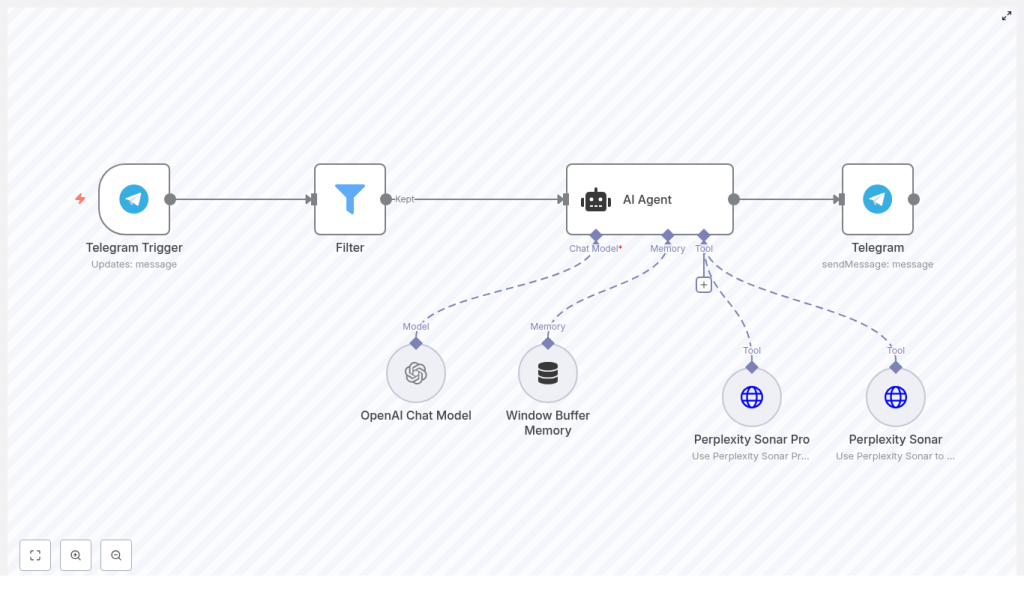
This guide explains how to implement a production-grade Deep Research Agent in n8n using Telegram, OpenAI, and Perplexity Sonar / Sonar Pro. The workflow converts Telegram messages into structured research queries, routes them through an agent-style orchestration layer, enriches responses with live web intelligence, and returns concise, cited answers back to Telegram.
The architecture is suitable for automation professionals who need on-demand research, market and competitive monitoring, or fast fact-checking directly inside a chat interface.
Solution architecture overview
At a high level, the workflow implements a LangChain-style agent pattern on top of n8n. Each node has a clearly defined responsibility:
- Telegram Trigger – receives user messages and initiates the workflow.
- Filter – enforces access control and prevents unauthorized or abusive use.
- AI Agent – orchestrates the OpenAI chat model, short-term memory, and external tools.
- Perplexity Sonar / Sonar Pro – provides real-time web lookups and multi-source synthesis.
- Telegram (sendMessage) – delivers the final, formatted answer back to the originating chat.
The design separates reasoning, memory, and web intelligence. OpenAI is used for reasoning and formatting, Perplexity handles external knowledge retrieval, and n8n coordinates the full interaction lifecycle, including access control, error handling, and delivery.
Why this pattern works for deep research
This architecture follows several best practices for building reliable research agents:
- Separation of concerns: The chat model focuses on reasoning, synthesis, and natural language output, while Perplexity handles live search and citations.
- Short-term conversational memory: A Window Buffer memory keeps recent turns for each Telegram user, which improves follow-up queries without persisting excessive history.
- Controlled exposure: The Filter node restricts access to defined users, groups, or specific command patterns, which is important for cost management and abuse prevention.
- Tool-aware prompting: The agent is explicitly instructed when to invoke Sonar vs Sonar Pro, and how to present sources.
The result is an agent that behaves like a focused research assistant, combining generative reasoning with verifiable, linkable sources.
Core workflow components in n8n
Telegram Trigger configuration
The entry point is a Telegram Trigger node that listens for messages in a bot-enabled chat.
- Create a Telegram bot with BotFather and obtain the bot token.
- Add the Telegram credentials in n8n using that token.
- Configure the Telegram Trigger node with typical settings such as:
- Webhook-enabled: yes
- Update type: message
- Session key mapping: map
chat.idto the session key so that each chat has its own memory context.
Mapping chat.id to the session key is crucial. It ensures that the Window Buffer memory later in the flow maintains a separate short-term context per user or chat, which is essential for coherent follow-up questions.
Access control with the Filter node
Before invoking any AI tools, the workflow should validate whether the incoming message is allowed to use the research agent.
Use the Filter node to implement access control logic, for example:
- Allow only specific Telegram user IDs or group IDs.
- Restrict usage to messages starting with a command prefix such as
/research. - Optionally check chat type (private vs group) or simple role-based logic.
A typical configuration is a numeric comparison against a known user ID, but you can extend this condition set as your deployment grows. This step is key to cost control and to prevent public abuse of the agent.
AI Agent node (LangChain-style orchestration)
The AI Agent node is the core of the workflow. It coordinates the language model, memory, and tools. Configure it with:
- Chat model: an OpenAI chat model such as
gpt-4o-minior an equivalent model suitable for reasoning and formatting. - Memory: Window Buffer Memory to store a limited number of recent turns per session, using the Telegram
chat.idas the key. - Tools: connections to Perplexity Sonar and Perplexity Sonar Pro for external web queries.
The effectiveness of this node depends heavily on the system prompt and tool-selection strategy. A representative system instruction might look like:
System: You are a research-focused assistant. Use Sonar for quick facts and Sonar Pro for deep, multi-source synthesis. Always include clickable citations when using a tool.Within the agent configuration, define when to call each tool. For example:
- Use Sonar for straightforward factual questions and single-entity lookups.
- Use Sonar Pro for comparative questions, multi-source synthesis, or broader research tasks.
Memory should be scoped carefully to keep context relevant and to avoid unnecessary token usage, especially in long-running chats.
Perplexity Sonar and Sonar Pro tool nodes
Perplexity provides the external web intelligence layer. In n8n, you configure Sonar and Sonar Pro as HTTP-based tool endpoints using your Perplexity API keys.
Key configuration points:
- Authentication: store Perplexity API keys in secure n8n credentials and reference them in the tool nodes.
- Query payload: pass the user’s query or the agent’s tool call arguments in the JSON body.
- max_tokens: set an appropriate response length for each tool. Sonar responses can be shorter, while Sonar Pro may require more tokens for synthesis.
Practical usage guidelines:
- Sonar: optimized for fast, single-source lookups and quick fact retrieval.
- Sonar Pro: designed for multi-source analysis and structured summaries, better suited for research-style questions.
The AI Agent node will call these tools dynamically as needed, then integrate the results into a final, human-readable answer that includes citations.
Telegram sendMessage node
Once the AI Agent has produced a final response, a Telegram (sendMessage) node sends it back to the originating chat.
Implementation details:
- Use the original
chat.idfrom the Telegram Trigger as the target chat. - Include the formatted answer from the AI Agent, including any clickable citations returned by Perplexity.
- If outputs are long, consider:
- Splitting the response into multiple messages, or
- Attaching files (for example, text or CSV) for very large summaries.
Prompting and tool usage best practices
Careful prompt design significantly improves the reliability and cost profile of the research agent. Recommended practices include:
- Keep the system prompt concise, but explicit about:
- When to use Sonar vs Sonar Pro.
- How to present citations and links.
- Expectations for brevity and clarity.
- Require sources after web lookups. For example:
If you used Sonar or Sonar Pro, list up to 3 clickable source URLs at the end of your answer. - Control Sonar Pro usage to manage cost. Instruct the model to reserve Sonar Pro for queries that include terms such as:
- “compare”
- “research”
- “market”
- “synthesize”
- Normalize incoming queries before passing them to the agent:
- Trim irrelevant tokens or command prefixes.
- Use memory to detect follow-up questions.
- Avoid repeated web calls for identical or near-identical questions within a short time window.
Error handling, monitoring, and rate limit strategy
Any production research agent must be resilient to transient failures and API rate limits. In n8n, consider the following patterns:
- Retries with backoff:
- Configure retry logic for Perplexity and OpenAI calls.
- Use exponential backoff to avoid amplifying rate-limit issues.
- Centralized logging:
- Record errors and failed calls in a persistent store or a logging system.
- Optionally send alerts to a Slack channel or similar for rapid debugging.
- Graceful user messaging:
- On failure, return a clear fallback message, for example:
Sorry, I’m having trouble fetching sources - try again in a minute.
- On failure, return a clear fallback message, for example:
Monitoring token usage, error rates, and response times over time will help you refine the configuration and prompts.
Security and privacy considerations
Because this workflow processes user queries that may contain sensitive information, apply standard security and privacy practices:
- Minimize logged data: avoid logging raw user content unless explicitly required for debugging. Redact or anonymize where possible.
- Environment-specific credentials: use separate OpenAI and Perplexity credentials for staging and production, and store them securely in n8n.
- Access control: leverage the Filter node to restrict who can access the agent, and rotate API keys regularly.
These measures reduce the risk of data exposure and help maintain compliance with internal security policies.
Scaling and cost optimization
As usage grows across teams or user groups, API costs and performance become more important. To scale efficiently:
- Introduce caching:
- Use a cache layer such as Redis for frequently repeated queries.
- Return cached responses instead of calling Perplexity again for the same question within a defined TTL.
- Throttle Sonar Pro:
- Apply heuristics to restrict Sonar Pro to long, comparative, or research-heavy queries.
- Fallback to Sonar or the base model for simple lookups.
- Tiered model usage:
- Use smaller or cheaper chat models for routine queries.
- Escalate to larger models only for complex synthesis or critical use cases.
These patterns help maintain predictable costs while preserving response quality for high-value questions.
Example research prompts
Here are sample queries that demonstrate when to use each Perplexity tool:
Quick lookup with Sonar
What is the current population of Kyoto and the main sources?
Deep synthesis with Sonar Pro
Compare the latest quarterly earnings and guidance for Company A vs Company B and list 3 supporting sources.
By guiding users on how to phrase their questions, you can further optimize tool selection and cost.
Testing, validation, and iteration
Before rolling out to a broader audience, validate the workflow thoroughly:
- Test in a private Telegram chat and probe edge cases, such as ambiguous questions, multi-step follow-ups, and long queries.
- Simulate rate-limit scenarios for OpenAI and Perplexity to verify that retry and fallback logic behaves as expected.
- Measure resource usage:
- Track average tokens and API calls per query.
- Use these metrics to estimate monthly costs and refine tool usage rules.
Iterate on prompts, filters, and caching strategies based on real usage patterns.
Extending the Deep Research Agent
The Telegram-based implementation is only one deployment option. The same pattern can be extended to other communication channels and automation scenarios, such as:
- Adding Slack triggers for research inside team workspaces.
- Sending results via email for longer-form reports.
- Scheduling monitoring jobs that periodically run research queries and push updates.
- Producing structured outputs such as CSV or PDF summaries for downstream analytics or reporting.
Because the core logic is encapsulated in n8n, you can reuse the same agent configuration across multiple channels with minimal changes.
Next steps
This n8n Deep Research Agent pattern combines automation, live web intelligence, and generative reasoning into a single, reusable workflow. It is particularly effective for teams that need fast, cited answers inside a chat interface without manually switching between tools.
To get started:
- Import or build the workflow in your n8n instance.
- Connect your OpenAI and Perplexity credentials.
- Configure the Telegram Trigger and Filter nodes for your test environment.
- Run a series of queries in a private Telegram chat and refine prompts, filters, and tool usage.
If you prefer a faster setup path, you can use a starter template and adapt it to your environment and access policies.
Action point: Deploy the template, test it in a private chat, and share feedback or questions to receive guidance on tailoring the workflow to your specific use case.
