


Build a Rental Price Estimator with n8n & LangChain
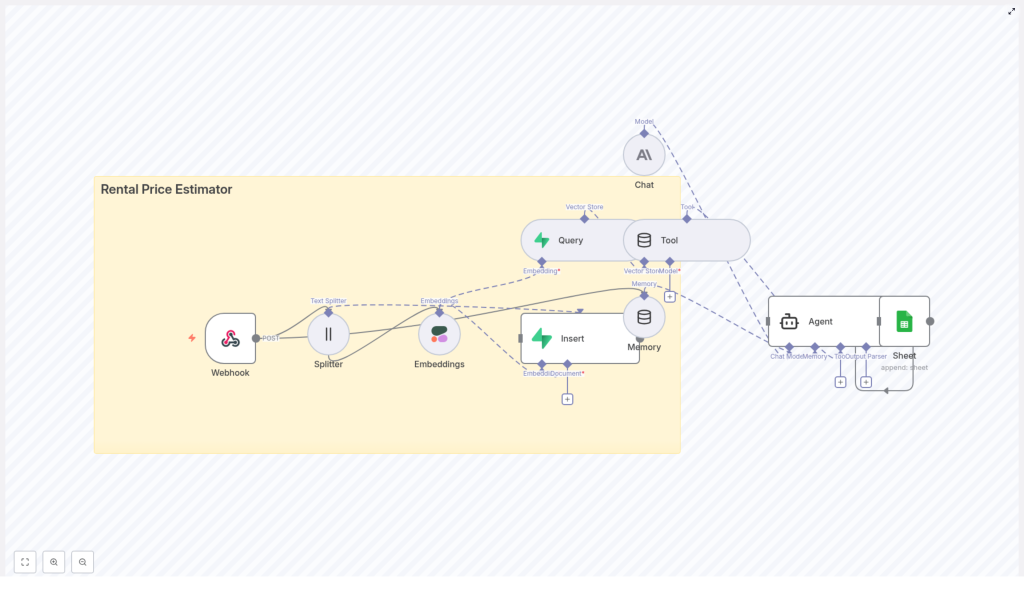
This guide explains how to design and implement a production-grade rental price estimator using an n8n workflow combined with LangChain components. The solution uses a webhook entry point, text splitting, Cohere embeddings, a Supabase vector store, an Anthropic chat model, conversational memory, and Google Sheets logging.
The architecture is intended for automation professionals and data teams who want a low-code, explainable pipeline for ingesting property listings, enriching them with semantic embeddings, retrieving comparable rentals, and generating defensible pricing recommendations.
Why use this architecture for rental pricing?
Rental pricing is fundamentally a similarity problem. Estimating a fair rent requires:
- Historical listings and recent market data
- Semantic understanding of property descriptions
- Structured comparison of features such as bedrooms, bathrooms, and amenities
Embedding-based similarity search gives the estimator a memory of comparable properties, while structured metadata ensures that results are locally relevant and comparable in size and configuration. n8n acts as the orchestrator that ties together LangChain components, external APIs, and logging in a visual, maintainable workflow.
Core concepts and components
- n8n workflow as the automation backbone
- LangChain embeddings for semantic representation of property descriptions
- Supabase vector store for scalable similarity search
- Cohere & Anthropic integration for embeddings and LLM-based reasoning
- Google Sheets as an auditable log and analytics surface
End-to-end workflow overview
The rental price estimator follows a clear sequence from data ingestion to final logging:
- Webhook (POST) receives new property data from your frontend or ingestion service.
- Text Splitter divides long descriptions into overlapping chunks.
- Cohere Embeddings convert each chunk into a numeric vector.
- Supabase vector store stores vectors with property metadata under an index such as
rental_price_estimator. - Vector Store Query retrieves top-k similar listings when a new estimate is requested.
- Tool node exposes the vector store retrieval as a callable tool for the Agent.
- Memory node maintains short-term conversational and query context.
- Anthropic Chat model synthesizes comparable listings, applies adjustments, and generates a recommended price range.
- Google Sheets logging records each estimate for auditability and performance monitoring.
Detailed node-by-node implementation
1. Webhook (POST) – Entry point for property data
The workflow starts with an n8n Webhook node configured to accept POST requests. This node receives the raw property payload from your application or data ingestion pipeline.
Typical fields include:
- Address and neighborhood or region
- Number of bedrooms and bathrooms
- Square footage or floor area
- Amenities (parking, laundry, outdoor space, etc.)
- Free-text description of the property
- Optional fields such as images, building age, or property type
Standardizing these fields at ingestion time simplifies downstream retrieval and reasoning.
2. Text Splitter – Preparing descriptions for embeddings
Long property descriptions need to be broken into smaller segments to work effectively with embedding models. The Text Splitter node handles this step.
Recommended configuration:
- Chunk size: around 400 characters
- Chunk overlap: around 40 characters
This configuration keeps each chunk within token limits while preserving important context across chunk boundaries. The result is a list of text segments ready for embedding.
3. Cohere Embeddings – Semantic representation
The Cohere node converts each text chunk into an embedding vector. These vectors capture the semantic meaning of the property description, including style, quality, and amenities, not just keywords.
Key considerations:
- Select an embeddings model that balances cost and performance for your scale.
- Ensure consistent dimensionality across all stored vectors.
- Batch embedding requests when possible to manage API limits and costs.
4. Supabase Vector Store – Ingestion and indexing
Once embeddings are generated, they are inserted into a Supabase vector store table. Each row typically includes:
- The embedding vector
- Property ID or unique key
- Location or neighborhood
- Current or historical rental price
- Date listed or time window
- Structured features such as beds, baths, square footage, and amenities
Use a dedicated index name such as rental_price_estimator so that downstream query nodes can reliably target the correct vector collection.
5. Vector Store Query & Tool Node – Retrieving comparables
When an estimate is requested for a new property, the workflow:
- Embeds the new property description using the same Cohere model.
- Uses a Vector Store Query node to search the Supabase index for the top-k similar listings.
- Wraps this retrieval logic in a Tool node so the Agent can call it as needed.
The Tool node effectively exposes the vector store as a retrieval function inside the LangChain Agent, allowing the LLM to pull in comparable listings dynamically during reasoning.
For best results, combine the similarity search with metadata filters. For example, restrict or boost results by:
- Neighborhood or micro-market
- Bedroom count and bathroom count
- Property type (apartment, townhouse, single-family)
6. Memory (Buffer Window) – Short-term conversational context
The Memory node, typically a buffer window, maintains recent conversation turns and query results. This is useful when:
- The user asks follow-up questions about the same property.
- There are clarifications or adjustments requested after the initial estimate.
- Multiple related properties are being discussed in one session.
By retaining this local context, the Agent can avoid redundant vector store queries and produce more coherent multi-step interactions.
7. Anthropic Chat – Estimation logic and response generation
The Anthropic Chat node hosts the LLM that performs the actual reasoning. It receives:
- Structured property metadata
- Tool results containing comparable listings with prices and similarity scores
- Recent conversation context from the Memory node
You should configure a robust prompt template that instructs the model to:
- Analyze comparable listings from the vector store.
- Apply adjustments for size, amenities, building age, and location quality.
- Produce a recommended monthly rental price range, not a single point estimate.
- Explain the reasoning and highlight key comparables used in the decision.
8. Agent & Google Sheets – Coordination and logging
The LangChain Agent orchestrates the Tool node (vector store retrieval), Memory node, and Anthropic Chat node. After the Agent produces the final estimate and explanation, n8n appends a log entry to Google Sheets.
Each log entry should include:
- Timestamp of the request
- Input property details
- Suggested rental price or price range
- Top comparable listings and their prices
- Model-generated notes or confidence score
This logging layer is essential for audits, error analysis, and iterative tuning of prompts, embeddings, and retrieval strategy.
Practical tips for accurate rental estimates
Data quality and feature engineering
- Standardize metadata for beds, baths, square footage, and neighborhood tags to ensure consistent retrieval and filtering.
- Include structured features such as building age, amenity flags (in-unit laundry, parking, outdoor space), and pet policies as metadata fields.
- Engineer simple heuristics that the Agent can apply, for example, a percentage premium for in-unit laundry or covered parking.
Embedding and retrieval tuning
- Experiment with chunk size and overlap in the Text Splitter to capture both concise and verbose descriptions.
- Use metadata boosting to prioritize comparables from the same neighborhood or with similar bedroom count.
- Adjust top-k and similarity thresholds in the vector store query to balance precision and recall.
Fallback strategies
- Define thresholds for what constitutes a low-similarity result.
- When similarity is low, fallback to a rules-based baseline or request additional information from the user.
- Flag edge cases such as luxury properties or very new builds for manual review or a specialized model.
Security, compliance, and cost management
Production workflows must address security, privacy, and operational costs from the start.
- API key management: Store Cohere, Anthropic, and Supabase credentials in n8n’s secure credential store. Avoid plaintext, and rotate keys periodically.
- Rate limits and batching: Batch embedding inserts and vector queries where feasible to reduce per-call overhead and handle rate limits gracefully.
- Privacy controls: Obfuscate or hash personally identifiable information before persistence to comply with privacy regulations and internal policies.
- Log retention: Keep only the necessary duration of logs in Google Sheets and archive older entries to secure storage for long-term compliance.
Monitoring and continuous optimization
Once deployed, treat the estimator as a living system that needs measurement and iteration.
- Accuracy metrics: Track indicators such as mean absolute error (MAE) between estimated and actual achieved rents when ground-truth data is available.
- Retrieval quality: Monitor similarity scores from the vector store and adjust thresholds or filters when irrelevant comparables appear.
- Model and embedding costs: Evaluate lower-cost embedding variants or reduce embedding frequency for listings that rarely change.
- Alerting: Configure n8n error notifications and monitor Cohere and Anthropic API usage to prevent unexpected cost spikes.
Example Agent prompt template
System: You are a rental price estimator. Use the provided comparable listings and property metadata to recommend a rent range.

User: Property: {address}, {beds} beds, {baths} baths, {sqft} sqft, description: {text}.

Tool results: [List of top-k comparables with price and similarity score].

Task: Synthesize a recommended monthly rent range, explain adjustments, and list the top 3 comparables with reasons.
Use this as a baseline, then refine it based on your market, regulatory constraints, and business rules.
Common pitfalls to avoid
- Relying only on semantic similarity: Always combine embeddings with structured filters such as neighborhood and bedroom count to ensure truly comparable properties.
- Using stale data: Implement a freshness window so very old listings do not distort current pricing estimates.
- Ignoring special cases: New developments, ultra-luxury units, or highly unique properties may require separate handling or human review.
Recommended rollout approach
For a controlled deployment, build and validate the pipeline incrementally:
- Implement the ingestion path: Webhook → Text Splitter → Embeddings → Supabase insert.
- Add the retrieval and reasoning layer: Vector Store Query → Tool → Memory → Anthropic Chat.
- Integrate Google Sheets logging for observability and offline analysis.
- Run A/B tests comparing automated estimates to human pricing decisions and refine prompts, metadata, and heuristics based on real outcomes.
Next steps and call to action
If you are ready to operationalize a rental price estimator, you can:
- Deploy this workflow in n8n.
- Connect your Cohere and Anthropic credentials.
- Provision a Supabase project with a vector-enabled table for your listings.
If you would like a detailed n8n workflow export (JSON) or prompt templates tailored to your market, you can request a customized configuration for your target city, sample property, and specific business rules such as pet policies or parking adjustments.
Want the JSON export or a tailored prompt? Reply with your target city, a sample property, and any specialized rules you use for pricing (for example, pet policy premiums or parking adjustments).
