


Build a Telegram AI Chatbot with n8n & OpenAI
Imagine opening Telegram and having an assistant ready to listen, think, and respond in seconds, whether you send a quick text or a rushed voice note on the go. No context switching, no manual copy-paste into other tools, just a smooth flow between you and an AI that understands your message and remembers what you said a moment ago.
That is exactly what this n8n workflow template helps you create. By combining the low-code power of n8n with OpenAI models, you can build a Telegram AI chatbot that:
- Handles both text and voice messages
- Automatically transcribes audio to text
- Preserves short-term chat memory across turns
- Replies in Telegram-safe HTML formatting
This article reframes the template as more than a technical setup. Think of it as a first step toward a more automated, focused workday. You will see how the workflow is structured, how each node contributes, and how you can adapt it to your own needs as you grow your automation skills.
The problem: Constant context switching and manual work
Most of us already use Telegram for quick communication, brainstorming, or capturing ideas. Yet when we want AI help, we often jump between apps, retype messages, or upload audio files manually. It breaks focus and steals time that could be spent on deeper work, creative thinking, or serving customers.
Voice messages are especially underused. They are fast to record, but slow to process if you have to transcribe, clean up, and then feed them into an AI model yourself. Multiply that by dozens of messages a day and you quickly feel the friction.
The opportunity is clear: if you can connect Telegram directly to OpenAI through an automation platform, you can turn your everyday chat into a powerful AI interface that works the way you already communicate.
The mindset shift: Let automation carry the routine
Building this Telegram AI chatbot with n8n is not just about creating a bot. It is about shifting your mindset from manual handling of messages to delegating repeatable steps to automation. Instead of:
- Checking every message and deciding what to do
- Downloading audio files and transcribing them yourself
- Copying content into OpenAI-compatible tools
you can design a system that:
- Listens for messages automatically
- Detects whether they are text or voice
- Transcribes audio in the background
- Feeds clean, normalized input into an AI agent
- Returns formatted answers directly in Telegram
Once this is in place, you free your attention for higher-value work. You can then iterate, refine prompts, adjust memory, and extend the bot with new tools. The template becomes a foundation for ongoing improvement, not a one-off experiment.
Why n8n + OpenAI is a powerful combination for Telegram bots
n8n shines when you want to integrate multiple services without building a full backend from scratch. Its visual workflow builder makes it easy to connect Telegram, OpenAI, file storage, and more, while keeping each responsibility clear and maintainable.
Paired with OpenAI models, and optionally LangChain-style agents, you gain:
- Rapid prototyping with reusable nodes instead of custom code
- Voice-to-text transcription through OpenAI audio endpoints
- Simple webhook handling for Telegram updates
- Clean separation of concerns between ingest, transform, AI, and respond steps
This structure means you can start small, get value quickly, and then scale or customize as your use cases grow.
The journey: From incoming message to AI-powered reply
The workflow follows a clear, repeatable journey every time a user sends a message:
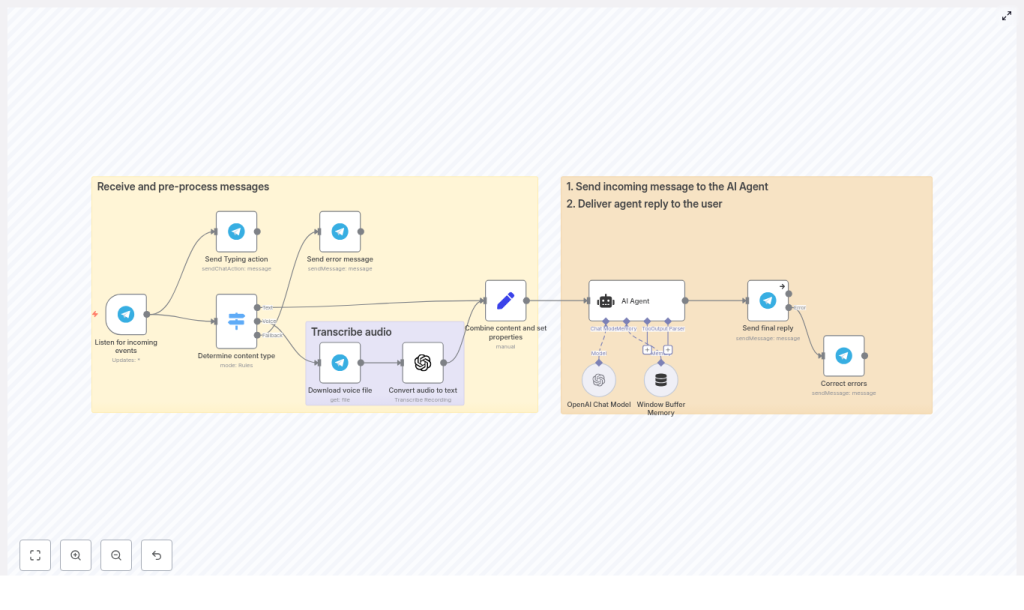
- Listen for incoming Telegram updates
- Detect whether the content is text, voice, or unsupported
- Download and transcribe voice messages when needed
- Normalize everything into a single message field
- Send a typing indicator to reassure the user
- Call your AI agent with short-term memory
- Return a Telegram-safe HTML reply
- Gracefully handle any formatting errors
Let us walk through each part so you understand not just what to configure, but how it contributes to a smoother, more automated workflow.
Phase 1: Receiving and preparing messages
Listening for Telegram updates with telegramTrigger
The journey starts with the telegramTrigger node. This node listens for all Telegram updates via webhook so your bot can react in real time.
Configuration steps:
- Set up a persistent webhook URL, using either a hosted n8n instance or a tunneling tool such as ngrok during development.
- In Telegram, use
setWebhookto point your bot to that URL. - Connect the trigger to the rest of your workflow so every new update flows into your logic.
Once this is in place, you no longer have to poll or manually check messages. The workflow is always listening, ready to process the next request.
Detecting message type with a Switch node
Not every Telegram update is the same. Some are text, some are voice messages, and some might be attachments you do not want to handle yet. To keep the workflow flexible and maintainable, use a Switch node to classify the incoming content.
Typical routing rules:
- Text messages go directly to the AI agent after normalization.
- Voice messages are routed to a download and transcription chain.
- Unsupported types are sent to a friendly error message node that asks the user to send text or voice instead.
This decision point is powerful. It lets you add new branches later, for example, handling photos or documents, without disrupting the rest of your automation.
Downloading and transcribing voice messages
For voice messages, the workflow takes an extra step before talking to the AI. It first downloads the audio file from Telegram, then sends it to OpenAI for transcription.
Key steps:
- Use the Telegram node with the get file operation to retrieve the voice file.
- Pass the resulting binary file into an OpenAI audio transcription node.
- Optionally set language or temperature parameters depending on your needs.
// Example: pseudo-request to OpenAI audio transcription
// (n8n's OpenAI node handles this; shown for clarity)
{  model: 'whisper-1',  file: '<binary audio file>',  language: 'auto'
}
Once this step is done, you have clean text that you can treat just like a regular typed message. The user speaks, the workflow listens, and the AI responds, all without manual transcription.
Combining content and setting properties
Whether the message started as text or voice, the next step is to normalize it. Use a node to combine the content into a single property, for example CombinedMessage, and attach useful metadata.
Common metadata includes:
- Message type (text or voice)
- Whether the message was forwarded
- Any flags you want to use later in prompts or routing
This normalization step simplifies everything downstream. Your AI agent can always expect input in the same format, and you can adjust the behavior based on metadata without rewriting prompts every time.
Improving user experience with typing indicators
While the workflow is transcribing or generating a reply, you want the user to feel that the bot is engaged. That is where the Send Typing action comes in.
Using the sendChatAction operation with the typing action right after receiving an update:
- Makes the bot feel responsive and human-like
- Prevents users from assuming the bot is stuck or offline
- Creates a smoother experience, especially for longer audio or complex AI responses
This is a small detail that significantly improves perceived performance and trust in your automation.
Phase 2: AI reasoning, memory, and response
Using an AI agent with short-term memory
The heart of the workflow is the AI Agent node. Here you pass the normalized user message along with recent conversation history so the model can respond with context.
Typical setup:
- Use a LangChain-style agent node or n8n’s native OpenAI nodes.
- Attach a Window Buffer Memory node that stores recent messages.
- Configure the memory window to a manageable size, for example the last 8 to 10 messages, to control token usage and cost.
This short-term memory lets the chatbot maintain coherent conversations across turns. It can remember what the user just asked, refer back to earlier parts of the dialogue, and feel more like a real assistant instead of a one-shot responder.
Behind the scenes, the agent uses an OpenAI Chat Model to generate completions. You can adjust the model choice, temperature, and other parameters as you refine the bot’s personality and tone.
Designing prompts and safe HTML formatting
Prompt design is where you shape the character and behavior of your Telegram AI chatbot. Since Telegram only supports a limited set of HTML tags, your system prompt should clearly instruct the model to respect those constraints.
For example, you can include a system prompt excerpt like this:
System prompt excerpt:
"You are a helpful assistant. Reply in Telegram-supported HTML only. Allowed tags: <b>, <i>, <u>, <s>, <a href=...>, <code>, <pre>. Escape all other <, >, & characters that are not part of these tags."
If you use tools within an agent, also define how it should format tool calls versus final messages. Clear instructions here reduce errors and make your bot’s output predictable and safe.
Sending the final reply back to Telegram
Once the AI agent has generated a response, the workflow needs to deliver it to the user in a way Telegram accepts.
Key configuration points in the Telegram sendMessage operation:
- Set
parse_modeto HTML. - Ensure any raw
<,>, and&characters that are not part of allowed tags are escaped.
The sample workflow includes a Correct errors node that acts as a safety net. If Telegram rejects a message because of invalid HTML, this node escapes the problematic characters and resends the reply.
The result is a polished, formatted response that feels native to Telegram, whether it is a short answer, a structured explanation, or a code snippet.
Production-ready mindset: Reliability, cost, and privacy
As you move from experimentation to regular use, it helps to think like a system designer. A few careful decisions will keep your Telegram AI chatbot reliable and sustainable.
- Rate limits and costs:
- Transcription and large model calls incur costs.
- Batch or limit transcription where possible.
- Apply token caps and sensible defaults on completion requests.
- Security:
- Store API keys securely in n8n credentials.
- Restrict access to your webhook endpoint.
- Validate incoming Telegram updates to ensure they are genuine.
- Error handling:
- Use fallback nodes for unsupported attachments.
- Return human-readable error messages when something cannot be processed.
- Log failed API calls for easier debugging.
- Privacy:
- Decide how long to retain conversation history.
- Define data deletion policies that align with your privacy and compliance requirements.
By addressing these points early, you set yourself up for a bot that can grow with your team or business without unpleasant surprises.
Debugging and continuous improvement
Every automation improves with testing and iteration. n8n gives you the visibility you need to understand what is happening at each step.
- Turn on verbose logging and inspect node input and output to trace where a workflow fails.
- Use the “Send Typing action” early so users stay confident while audio is being transcribed or the model is generating a long reply.
- Test with both short and long voice messages, since transcription quality and cost scale with duration.
- Limit message length or summarize long inputs before sending them to the model to reduce token usage and cost.
Each tweak you make, whether in prompts, memory window size, or branching logic, is another step toward a chatbot that fits your exact workflow and style.
Extending your Telegram AI chatbot as you grow
Once the core pipeline is working reliably, you can start turning this chatbot into a richer assistant tailored to your world. The same n8n workflow can be extended with new capabilities, such as:
- Multilingual support by passing language hints to the transcription node.
- Contextual tools such as weather lookup, calendar access, or internal APIs using agent tools.
- Persistent user profiles stored in a database node for personalized replies and preferences.
- Rich media responses using Telegram’s photo, document, and inline keyboard nodes.
This is where the mindset shift really pays off. You are no longer just “using a bot.” You are designing a system that helps you and your users think, decide, and act faster.
From template to transformation: Your next steps
The n8n + OpenAI approach gives you a flexible, maintainable Telegram chatbot that:
- Accepts both text and voice inputs
- Automatically transcribes audio
- Keeps short-term conversational memory
- Responds in Telegram-friendly HTML
Use the provided workflow template as your starting point. First, replicate it in a development environment, for example with ngrok or a hosted n8n instance. Then:
- Test with your own text and voice messages.
- Adjust prompts to match your tone and use cases.
- Fine-tune memory settings and cost controls.
- Add new branches or tools as your ideas grow.
Every improvement you make is an investment in your future workflows. You are building not just a Telegram AI chatbot, but a foundation for more automation, more focus, and more time for the work that truly matters.
Call to action: Try this workflow today, experiment with it, and make it your own. If you want a ready-made starter or support refining prompts and memory, reach out or leave a comment with your requirements.
Happy building, and keep an eye on cost and privacy as you scale your automation journey.
