


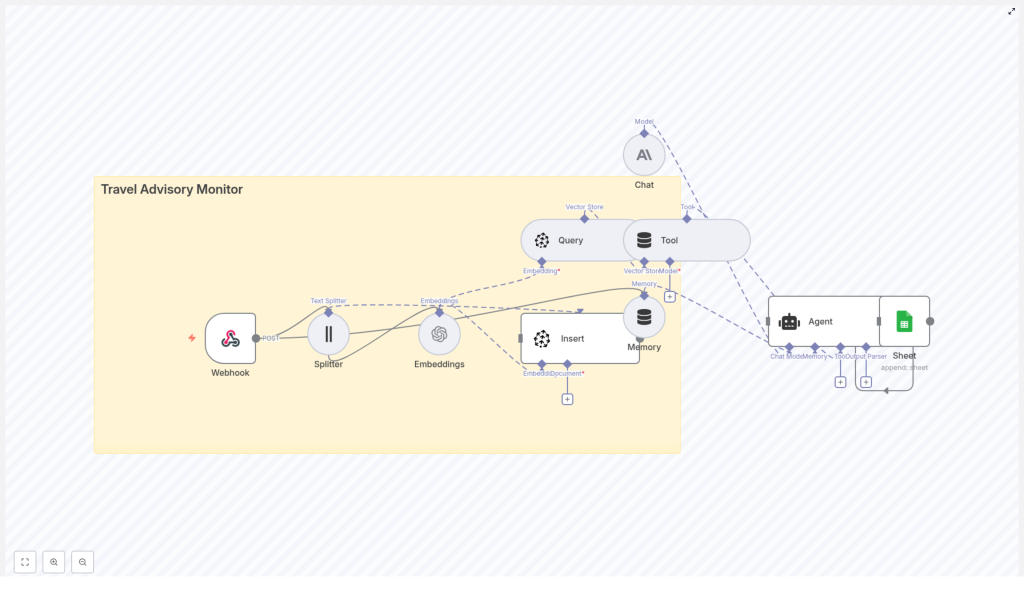
Build a Travel Advisory Monitor with n8n & Pinecone
Managing travel advisories at scale requires a repeatable pipeline for ingesting, enriching, storing, and acting on new information in near real-time. This reference-style guide explains a production-ready n8n workflow template that:
- Accepts advisory payloads via a webhook
- Splits long advisories into smaller text chunks
- Generates vector embeddings using OpenAI or a compatible model
- Persists vectors and metadata in a Pinecone index
- Queries Pinecone for contextual advisories
- Uses an LLM-based agent (for example Anthropic or OpenAI) to decide on actions
- Appends structured outputs to Google Sheets for audit and reporting
The result is an automated Travel Advisory Monitor that centralizes intelligence, accelerates response times, and produces an auditable trail of decisions.
1. Use case overview
1.1 Why automate travel advisories?
Organizations such as government agencies, corporate travel teams, and security operations centers rely on timely information about safety, weather, strikes, and political instability. Manual monitoring of multiple advisory sources is slow, hard to standardize, and prone to missed updates.
This n8n workflow automates the lifecycle of a travel advisory:
- Ingest advisories from scrapers, RSS feeds, or third-party APIs
- Normalize and vectorize the content for semantic search
- Enrich and classify with an LLM-based agent
- Log recommended actions into Google Sheets for downstream tools and audits
2. Workflow architecture
2.1 High-level data flow
The template implements the following logical stages:
- Webhook ingestion A public POST endpoint receives advisory JSON payloads.
- Text splitting Long advisory texts are segmented into overlapping chunks to improve embedding and retrieval quality.
- Embedding generation Each chunk is embedded using OpenAI or another embedding provider. Metadata such as region and severity is attached.
- Vector storage in Pinecone The resulting vectors and metadata are inserted into a Pinecone index named
travel_advisory_monitor. - Semantic query Pinecone is queried to retrieve similar advisories or relevant context for a given advisory or question.
- Agent reasoning An LLM-based chat/agent node evaluates the context and produces structured recommendations (for example severity classification, alerts, or restrictions).
- Logging to Google Sheets The final structured output is appended to a Google Sheet for later review, reporting, or integration with alerting systems.
2.2 Core components
- Trigger: Webhook node (HTTP POST)
- Processing: Text splitter, Embeddings node
- Storage: Pinecone Insert and Query nodes
- Reasoning: Tool + Memory, Chat, and Agent nodes
- Sink: Google Sheets Append node
3. Node-by-node breakdown
3.1 Webhook node (HTTP POST endpoint)
The Webhook node acts as the external entry point for the workflow.
- Method: Typically configured as
POST - Payload format: JSON body containing advisory text and relevant fields (for example ID, source, country, region, severity, timestamps)
- Security:
- Use an API key in headers or query parameters, or
- Use HMAC signatures validated in the Webhook node or a subsequent Function node
Only authenticated sources such as scrapers, RSS processors, or third-party APIs should be allowed to post data. Rejecting unauthorized requests at this layer prevents polluting your vector store or logs.
3.2 Text splitter node
Advisory text can be lengthy and exceed optimal embedding input sizes. The text splitter node segments the content into smaller, overlapping chunks.
- Typical configuration:
- Chunk size: around 400 characters
- Overlap: around 40 characters
- Rationale:
- Improves semantic embedding quality by focusing on coherent fragments
- Respects model input constraints
- Maintains context continuity through overlap
The node outputs multiple items, one per chunk, which downstream nodes process in a loop-like fashion.
3.3 Embeddings node (OpenAI or similar provider)
The Embeddings node converts each text chunk into a numerical vector representation suitable for similarity search.
- Provider: OpenAI or another supported embedding model
- Key parameters:
- Embedding model name (must match Pinecone index dimensionality)
- Text input field (the chunked advisory text)
- Metadata:
- Source URL
- Timestamp or
published_at - Country and region tags
- Severity level
- Original advisory ID
- Original text snippet
Storing rich metadata with each vector enables efficient filtering at query time, for example by country, severity threshold, or source system.
3.4 Pinecone Insert node (vector store write)
The Insert node writes vectors and their metadata into a Pinecone index.
- Index name:
travel_advisory_monitor - Configuration:
- Vector dimensionality must match the selected embedding model
- Optional use of namespaces or metadata filters to partition data (for example by region or client)
- Responsibilities:
- Persist advisory vectors for long-term semantic search
- Associate each vector with the advisory metadata
This node is responsible only for write operations. Query operations are handled separately by the Pinecone Query node.
3.5 Pinecone Query node (vector store read)
The Query node retrieves vectors similar to a given advisory or search query.
- Typical query inputs:
- Embedding of the current advisory, or
- Embedding of a natural language question, such as
"Which advisories mention port closures in Costa Rica?"
- Filtering:
- Metadata filter examples:
country = "Costa Rica"severity >= 3
- Combining semantic similarity with filters yields highly targeted context
- Metadata filter examples:
The results from this node are passed to the agent so it can reason over both the new advisory and relevant historical context.
3.6 Tool + Memory nodes
The Tool and Memory nodes integrate the vector store and recent conversation context into the agent workflow.
- Tool node:
- Exposes Pinecone query capabilities as a tool the agent can call
- Allows the LLM to fetch relevant advisories on demand
- Memory node:
- Maintains a short-term buffer of recent advisories and agent interactions
- Prevents prompt overload by limiting the memory window
- Ensures the agent is aware of prior actions and decisions during a session
3.7 Chat & Agent nodes
The Chat and Agent nodes handle reasoning, classification, and decisioning.
- Chat node:
- Uses an LLM/chat model such as Anthropics models or OpenAI Chat
- Consumes advisory text and retrieved context as input
- Agent node:
- Defines system-level instructions and policies
- Example tasks:
- Classify advisory severity
- Recommend travel restrictions or precautions
- Identify whether to trigger alerts
- Draft an email or notification summary
- Configured to return structured JSON, which is critical for downstream parsing
Ensuring predictable JSON output is important so that the Google Sheets node can map fields to specific columns reliably.
3.8 Google Sheets node (Append)
The Google Sheets node serves as a simple, human-readable sink for the final results.
- Operation: Append row
- Typical columns:
- Timestamp
- Advisory ID
- Summary
- Recommended action or classification
- Distribution list or target recipients
Because Sheets integrates with many tools, this log can drive further automation such as Slack alerts, email campaigns, or BI dashboards.
4. Step-by-step setup guide
4.1 Prerequisites and credentials
- Provision accounts Ensure you have valid credentials for:
- OpenAI or another embeddings provider
- Pinecone
- Anthropic or other LLM/chat provider (if used)
- Google Sheets (OAuth credentials)
- Create the Pinecone index In Pinecone, create an index named
travel_advisory_monitor:- Set vector dimensionality to match your chosen embedding model
- Choose an appropriate metric (for example cosine similarity) if required by your setup
- Import the n8n workflow Load the provided template JSON into n8n and:
- Connect your Embeddings credentials
- Configure Pinecone credentials
- Set Chat/LLM credentials
- Authorize Google Sheets access
- Secure the webhook Implement an API key check or HMAC verification either:
- Directly in the Webhook node configuration, or
- In a Function node immediately after the Webhook
- Run test advisories POST sample advisory payloads to the webhook and verify:
- Vectors are inserted into the
travel_advisory_monitorindex - Rows are appended to the designated Google Sheet
- Vectors are inserted into the
- Refine agent prompts Update the Agent node instructions to encode your organization’s policies and escalation rules, such as:
- Severity thresholds for alerting
- Region-specific rules
- Required output fields and JSON schema
5. Configuration notes & tuning
5.1 Chunking strategy
- Recommended starting range:
- Chunk size: 300 to 500 characters
- Overlap: 10 to 50 characters
- Considerations:
- Shorter chunks provide more granular retrieval but can lose context
- Larger chunks preserve context but may reduce precision
5.2 Metadata hygiene
Consistent metadata is critical for reliable filtering and analytics.
- Always include structured fields such as:
countryregionseveritysourcepublished_at
- Use consistent naming conventions and value formats
5.3 Rate limits and batching
- Batch embedding requests where possible to:
- Reduce API calls and costs
- Stay within provider rate limits
- Use n8n’s built-in batching or queuing logic for high-volume workloads
5.4 Vector retention and lifecycle
- Define a strategy for older advisories:
- Archive or delete low-relevance or outdated vectors
- Keep the Pinecone index size manageable for performance
5.5 Prompt and agent design
- Provide the agent with:
- A concise but clear system prompt
- Explicit reasoning steps such as:
- Classify severity
- Recommend actions
- Return structured JSON
- Limit the context window to essential information to keep responses consistent and auditable
6. Example use cases
- Corporate travel teams Automatically generate alerts when a traveler’s destination shows increased severity or new restrictions.
- Travel agencies Maintain a centralized advisory feed to inform booking decisions and trigger proactive customer notifications.
- Risk operations Detect early signals of strikes, natural disasters, or political unrest and receive triage recommendations.
- Media and editorial teams Enrich coverage with historical advisory context to support more informed editorial decisions.
7. Monitoring, scaling, and security
7.1 Observability
Track key metrics across the workflow:
- Webhook traffic volume and error rates
- Embedding API failures or timeouts
- Pinecone index size, query latency, and insert errors
- Google Sheets write failures or rate limits
7.2 Scaling strategies
- Partition Pinecone indexes by region or use namespaces per client
- Apply batching and throttling in n8n to smooth ingestion spikes
7.3 Security considerations
- Store all API keys and secrets in environment variables or n8n’s credential store
- Restrict webhook access using:
- IP allowlists
- API keys or tokens
