


Build a Vehicle Telematics Analyzer with n8n
On a rainy Tuesday morning, Maya, an operations lead at a mid-size logistics company, watched yet another delivery van roll into the yard with its check-engine light on. The dashboard showed a cryptic diagnostic code. The driver shrugged. The maintenance team sighed. And Maya opened yet another spreadsheet, trying to piece together what had happened from scattered logs and vague trip notes.
Her fleet had hundreds of vehicles on the road. Each one streamed telematics data, but the information was scattered across tools and systems. She had logs, but not insight. She could see events, but not patterns. Every time a vehicle failed unexpectedly, it felt like a problem she should have seen coming.
One afternoon, while searching for a better way to make sense of all this data, Maya stumbled across an n8n workflow template that promised to turn raw telematics into actionable analysis. It combined webhook ingestion, OpenAI embeddings, a Redis vector store, LangChain-style tools, a Hugging Face chat model, and Google Sheets logging. The idea sounded ambitious, but exactly like what she needed.
The problem Maya needed to solve
Maya’s pain was not a lack of data. It was the inability to interrogate that data quickly and intelligently. She needed to answer questions like:
- Why did a specific vehicle trigger a diagnostic trouble code yesterday?
- Which vehicles showed similar hard-braking events in the past month?
- Are there recurring patterns in catalytic converter faults across the fleet?
Her current tools could not perform semantic search or conversational analysis. Logs were long, messy, and often stored in different places. Whenever leadership asked for a quick explanation, Maya had to dig through JSON payloads, copy-paste diagnostics into documents, and manually correlate events across trips. It was slow, error-prone, and definitely not scalable.
The architecture that changed everything
The n8n-based Vehicle Telematics Analyzer template offered a different approach. Instead of treating telematics data as flat logs, it turned each piece of information into searchable, semantically rich vectors. It blended real-time ingestion with powerful retrieval and conversation-style analysis.
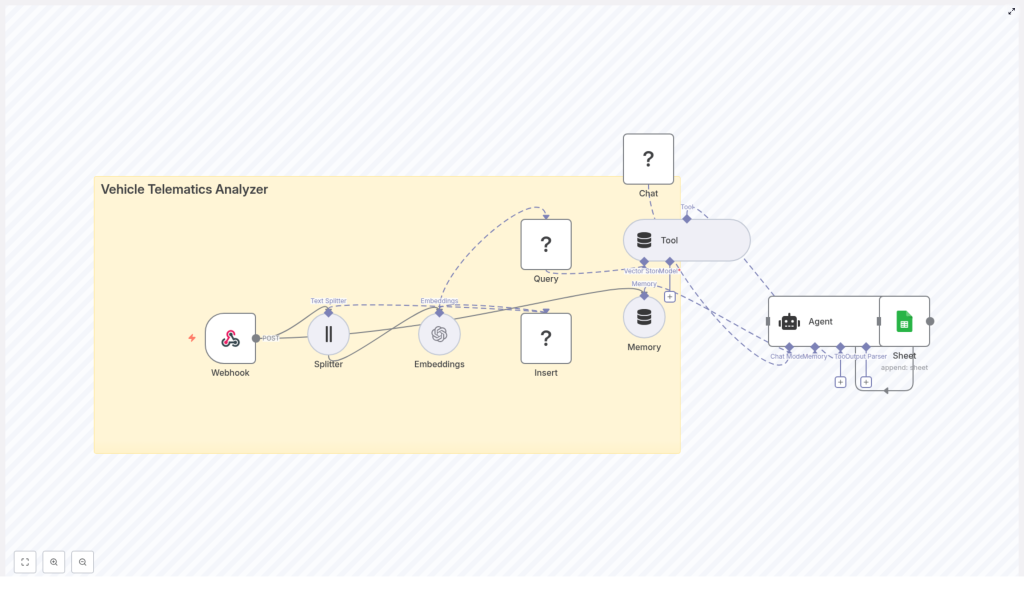
As Maya read through the template, a clear picture formed in her mind. The architecture was built around a simple but powerful flow:
- A Webhook node received telematics POST requests from vehicles or gateways.
- A Splitter node broke long logs or notes into smaller chunks.
- An OpenAI Embeddings node converted text into vector embeddings.
- An Insert node stored those vectors in a Redis Vector Store.
- A Query node let an Agent fetch similar historical data.
- LangChain-style tools and Memory helped the Agent reason over that context.
- A Hugging Face chat model generated human-friendly explanations.
- Finally, a Google Sheets node appended the results for audit trails and reporting.
This architecture balanced three things Maya cared deeply about: low-latency ingestion, deep semantic search, and clear, conversational summaries that non-technical stakeholders could read.
Why this workflow made sense to Maya
As she mapped the template to her daily challenges, the motivations behind this design became obvious:
- Webhook-driven ingestion meant her vehicles could push data in real time without complex polling setups.
- Text splitting and embeddings allowed long diagnostics and trip logs to be searched semantically, not just with exact keyword matches.
- Redis as a vector store gave her fast, cost-effective similarity lookups, which mattered for hundreds of vehicles generating constant data.
- LangChain-style tools and memory allowed an Agent to reason over past context and not answer every question in isolation.
- Google Sheets logging gave her an easy audit trail that the ops team already knew how to use.
It was not just another dashboard. It was a workflow that could think with her data.
The day she wired her first telematics webhook
Maya decided to test the template with a subset of ten vehicles. Her first task in n8n was to create the entry point for all incoming data.
Configuring the Webhook
She opened n8n, added a Webhook node, and set it to accept POST requests. She gave it a clear endpoint path, something like:
/vehicle_telematics_analyzer
This endpoint would receive JSON payloads from her telematics gateway. A typical message looked like this:
{  "vehicle_id": "VEH123",  "timestamp": "2025-09-29T12:34:56Z",  "odometer": 12345.6,  "speed": 52.3,  "engine_rpm": 2200,  "diagnostics": "P0420 catalytic converter efficiency below threshold",  "trip_notes": "Hard braking event near exit 12"
}
For the first time, she had a single, structured entry point for all her telematics data inside n8n.
Breaking the noise into meaningful chunks
The next challenge was obvious. Some of her diagnostics and trip notes were long. Very long. If she tried to embed entire logs as single vectors, the context would blur and search quality would suffer.
Splitting long fields for better embeddings
Following the template, Maya connected a Splitter node right after the webhook. She configured it to process fields like diagnostics, trip_notes, or any combined log text.
She used these recommended settings:
- chunkSize = 400 characters
- chunkOverlap = 40 characters
This way, each chunk contained enough context to be meaningful, but not so much that important details got lost. The overlap helped preserve continuity across chunk boundaries.
Teaching the workflow to understand telematics
Once the text was split, it was time to make it searchable in a deeper way than simple keywords. Maya wanted to ask questions like a human and have the system find relevant events across the fleet.
Creating embeddings with OpenAI
She added an OpenAI Embeddings node that received each chunk from the splitter. For her use case, she chose a model from the text-embedding-3 family, such as text-embedding-3-small or text-embedding-3-large, depending on cost and accuracy needs.
Along with each embedding, she stored useful metadata, including:
vehicle_idtimestamp- the original text (diagnostic or note)
Now her telematics data was no longer just strings. It was a vectorized knowledge base that could power semantic search.
Building a memory for the fleet
Embeddings alone were not enough. Maya needed a place to store them that allowed fast similarity search. That is where Redis came in.
Inserting vectors into Redis
She connected a Redis Vector Store node and configured it to insert the embeddings into a dedicated index, for example:
vehicle_telematics_analyzer
She set the mode to insert so that each new payload from the webhook was appended in near real time. Over time, this index would become a rich, searchable memory of the fleet’s behavior.
Preparing semantic queries
To actually use that memory, Maya needed a way to query it. She added a Query node that could send query embeddings to Redis and retrieve the most similar chunks.
Then she wrapped this query capability as a Tool for the LangChain-style Agent. That meant the Agent could, on its own, decide when to call the vector store, pull relevant historical context, and use it while forming an answer.
Questions like “Why did vehicle VEH123 flag a DTC yesterday?” would no longer be blind guesses. The Agent could look up similar past events, related diagnostics, and trip notes before responding.
Giving the workflow a voice
Now Maya had ingestion, storage, and retrieval. The next step was turning that into explanations her team could actually read and act on.
Adding memory and a chat model
She introduced two more pieces into the workflow:
- A Memory node that kept a short window of recent interaction history.
- A Chat node powered by a Hugging Face chat model.
The Memory node ensured that if a fleet manager asked a follow-up question, the Agent would remember the context of the previous answer. The Hugging Face chat model transformed raw retrieval results into clear, conversational explanations. For production use, Maya chose a lightweight model to keep response times fast and costs under control.
The turning point: orchestrating the Agent
All the pieces were in place, but they needed a conductor. That role belonged to the Agent node.
Configuring the Agent and logging to Google Sheets
Maya configured the Agent node to:
- Accept a query or analysis request.
- Call the vector store Tool to retrieve relevant chunks from Redis.
- Use Memory to keep track of recent interactions.
- Pass the retrieved context to the Hugging Face chat model to generate a human-readable answer.
Finally, she connected a Google Sheets node at the end of the chain. Each time the Agent produced an analysis or alert, the workflow appended a row to a tracking sheet with fields like:
vehicle_idtimestampissuerecommended action
That sheet became her lightweight reporting and audit log. Anyone on the team could open it and see what the system had analyzed, why, and what it recommended.
How Maya started using it day to day
Within a week, Maya had the template running in a sandbox. She began feeding real telematics payloads and asking questions through the Agent.
Example use cases that emerged
- Automatically generating root-cause suggestions for new diagnostic trouble codes (DTCs), based on similar past events.
- Running semantic search over historical trip logs to find previous hard-braking events and correlating them with maintenance outcomes.
- Letting fleet managers ask conversational questions, such as “Which vehicles showed recurring catalytic converter faults in the last 30 days?”
- Sending on-call alerts with context-rich explanations, then logging those explanations in Google Sheets for later review.
It was no longer just data in, data out. It was data in, explanation out.
What she learned about tuning the workflow
As the pilot expanded, Maya refined the setup using a few best practices that made the analyzer more accurate and easier to operate.
Optimizing chunking and embeddings
- She adjusted chunk size depending on the typical length of her diagnostics and logs. Smaller chunks improved recall but created more vectors to store and search.
- She ensured each vector carried useful metadata like
vehicle_id,timestamp, and GPS data where available. This let her filter retrieval results server-side before the Agent performed RAG-style reasoning.
Managing the vector store and retention
- She partitioned her Redis indices, using a dedicated index such as
vehicle_telematics_analyzerand considering per-fleet or per-customer namespaces for multi-tenant scenarios. - She set up retention and TTL rules for older vectors when storage and regulatory limits required it, keeping the most relevant time window hot while archiving older data.
Addressing security and privacy
- She protected the webhook endpoint with tokens and validated payload signatures from her device gateways.
- She encrypted Redis at rest and tightened network access so that only approved services could reach the vector store.
- She reviewed payloads for sensitive information and avoided storing raw driver-identifying text unless absolutely necessary and permitted.
Scaling from ten vehicles to the entire fleet
As the pilot showed results, leadership asked Maya to roll the analyzer out across the full fleet. That meant thinking about scale and monitoring.
Planning for growth and reliability
- She explored running Redis Cluster or moving to a managed vector database such as Pinecone or Weaviate for higher throughput.
- She batched embedding calls and used asynchronous workers where needed to prevent webhook timeouts during peak load.
- She added monitoring for queue lengths, embedding errors, and Agent latency, and set alerts on failed inserts to keep the search corpus complete.
The system moved from experiment to infrastructure. It was now part of how the fleet operated every day.
Where Maya wants to take it next
Once the core analyzer was stable, Maya began planning enhancements to make it even more proactive.
Next steps and enhancements on her roadmap
- Integrating anomaly detection models that pre-score events so the workflow can prioritize high-risk telemetry.
- Pushing critical alerts directly to Slack, PagerDuty, or SMS using n8n so on-call staff can respond in real time.
- Building a dashboard that queries the vector store for patterns, such as recurring faults by vehicle or region, and visualizes them for leadership.
- Experimenting with fine-tuned or domain-specialist LLMs to improve the quality and specificity of diagnostic explanations.
The outcome: from raw logs to reliable insight
Within a few months, the story in Maya’s fleet had changed. The check-engine light still came on sometimes, but now the maintenance team had a context-rich explanation waiting in their Google Sheet. Patterns that used to take days to uncover were visible in minutes.
The n8n-based Vehicle Telematics Analyzer had become a lightweight, extensible layer of intelligence on top of her existing telematics infrastructure. By combining webhook ingestion, smart chunking, OpenAI embeddings, a Redis vector store, and an Agent-driven analysis pipeline, she gained fast retrieval and conversational explanations, all backed by a simple audit trail.
If you are facing the same kind of operational fog that Maya did, you can follow the same path. Start small, with a few vehicles and a basic webhook. Then:
- Create the webhook endpoint and connect your telematics gateway.
- Wire in the splitter and embeddings nodes.
- Insert vectors into your Redis index.
- Configure the Agent, Memory, and Hugging Face chat model.
- Log outputs to Google Sheets for visibility and iteration.
From there, you can refine chunk sizes, metadata, retention rules, and alerting until the analyzer feels like a natural extension of your operations team.
Call to action: Try this n8n workflow in a sandbox fleet project, then share your specific telemetry use case. With a solid template and a few targeted optimizations, you can improve cost, accuracy, and scale while turning raw telematics into real operational intelligence.
