


Build a Visa Requirement Checker with n8n
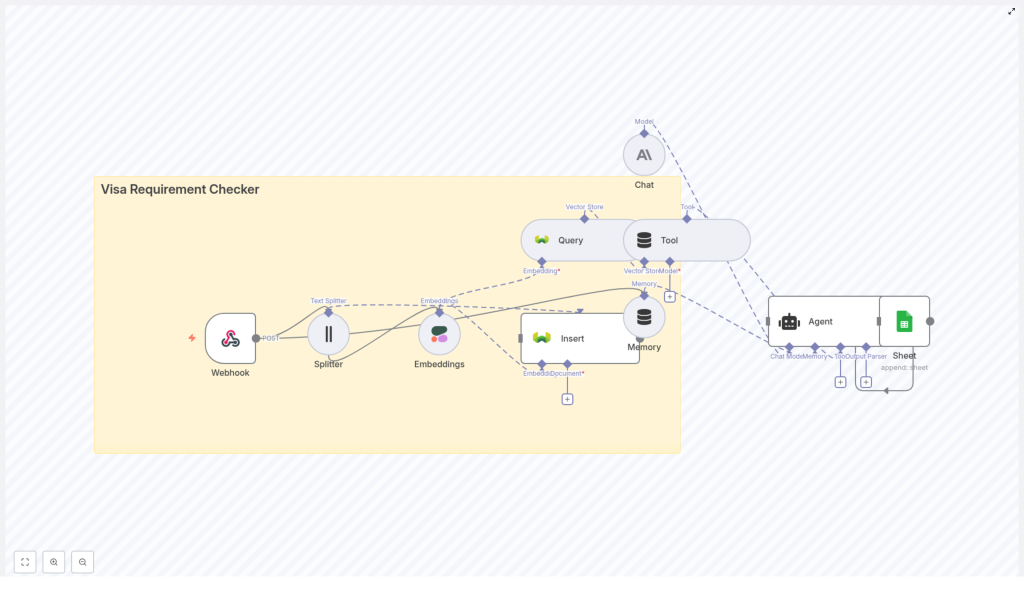
Visa regulations evolve quickly and vary by nationality, passport category, travel purpose, and duration of stay. This guide explains how to implement a production-ready Visa Requirement Checker in n8n that combines automation, embeddings, a vector database, and an AI agent. You will learn how the workflow is structured, how each node contributes to the overall logic, and how to operate the system reliably at scale.
Use case overview: automated visa requirement intelligence
Manual visa research is time-consuming, error-prone, and difficult to keep current. By centralizing authoritative policy documents and enriching them with embeddings, you can automate visa requirement lookups and provide tailored responses to users in real time.
The Visa Requirement Checker workflow in n8n is designed to:
- Ingest and index official immigration and embassy content in a vector store
- Accept structured user queries via a webhook endpoint
- Retrieve the most relevant policy snippets with semantic search
- Use an AI agent to synthesize clear, context-aware answers
- Log all interactions for auditability and analytics
This architecture suits travel platforms, relocation services, corporate mobility teams, and any organization that needs consistent and scalable visa information delivery.
Core architecture and technologies
The template relies on a set of interoperable components orchestrated by n8n:
- Webhook (n8n) – Receives POST requests from a web form, chatbot, or external system.
- Text Splitter – Breaks long policy documents into smaller chunks for embedding and indexing.
- Cohere Embeddings – Converts each text chunk into a dense vector for semantic similarity search.
- Weaviate Vector Store – Stores embeddings and associated metadata, and executes semantic queries.
- Agent (Anthropic or similar LLM) – Interprets user questions, consumes retrieved context, and generates human-readable answers.
- Optional Memory – Persists conversation state for multi-turn interactions and follow-up questions.
- Google Sheets – Captures query and response data for monitoring, reporting, and iterative improvement.
Each of these components is encapsulated in an n8n node or group of nodes, which makes the workflow transparent, maintainable, and easy to extend.
End-to-end workflow: from request to response
The Visa Requirement Checker follows a clear sequence from data ingestion to user response.
1. User request intake
A client application sends a POST request to the n8n Webhook endpoint, for example /visa_requirement_checker. The payload should be standardized to capture the critical parameters that affect visa rules:
{  "origin_country": "India",  "destination_country": "United States",  "passport_type": "regular",  "purpose": "tourism",  "length_of_stay_days": 14,  "user_id": "12345"
}
Normalizing these fields early simplifies downstream logic and makes analytics more consistent.
2. Document ingestion and preparation
Before queries can be answered, the system needs a corpus of authoritative documents, such as:
- Official immigration portals
- Embassy and consulate websites
- Government travel advisories
These documents are processed through a Text Splitter node. A typical configuration is to split content into chunks of about 400 characters with an overlap of around 40 characters. This approach:
- Keeps chunks within model token limits
- Preserves local context across boundaries via overlap
- Improves retrieval quality for dense regulatory text
3. Embedding generation
Each chunk is then passed to a Cohere Embeddings node (or an equivalent embedding provider). The embedding model transforms the text into a numerical vector that captures semantic meaning. For regulatory and legal-style content, Cohere models are well suited to semantic search and similarity tasks.
4. Indexing in Weaviate
Once vectors are generated, the workflow inserts them into a Weaviate vector store. Alongside the embedding, it is good practice to persist rich metadata such as:
- Source URL
- Document identifier
- Jurisdiction or country
- Last updated timestamp
Weaviate uses this information to support semantic queries and to return the top N most relevant chunks for any given question. The metadata also supports traceability, compliance checks, and user-facing citations.
5. Query execution and context assembly
When a user query arrives via the Webhook, the workflow constructs a search prompt that incorporates the structured fields (origin, destination, passport type, purpose, and stay length). A Query node then issues a semantic search against Weaviate using this prompt.
The results are passed into a Tool node, which formats the retrieved chunks into a structured context object. This object is optimized for consumption by the AI Agent, for example by including:
- Relevant excerpts of policy text
- Associated metadata (sources, dates)
- Ranking or similarity scores
6. Agent reasoning and optional memory
The Agent node uses a chat-capable language model such as Anthropic to interpret the user query in light of the retrieved context. Its responsibilities include:
- Reconciling potentially overlapping or conflicting snippets
- Summarizing policy conditions in clear language
- Highlighting key constraints such as maximum stay, visa categories, or exceptions
- Incorporating a standard disclaimer encouraging verification with official authorities
An optional Memory node can be added for multi-turn conversations. This is useful when the user refines their question, changes travel dates, or asks follow-up questions about the same trip. The memory layer retains prior messages and responses so the Agent can maintain continuity.
7. Logging to Google Sheets and response delivery
Before returning the answer, the workflow writes a log entry to Google Sheets. Typical fields include:
- Timestamp
- User origin and destination countries
- Passport type and purpose of travel
- Length of stay
- User query text
- Final response generated by the Agent
This logging step supports auditing, quality review, and analytics such as query volume by route or common edge cases. Finally, the Agent returns the response payload to the caller through the Webhook, ready to be displayed in a UI or passed back to an upstream system.
Node-by-node reference
Webhook (n8n)
Exposes a POST endpoint such as /visa_requirement_checker. Normalize and validate incoming fields (origin_country, destination_country, passport_type, purpose, length_of_stay_days, user_id) to reduce downstream branching and error handling.
Text Splitter
Splits large policy documents into overlapping segments, for example:
- Chunk size: ~400 characters
- Overlap: ~40 characters
This configuration avoids truncation in the embedding model and preserves logical context across adjacent chunks.
Embeddings (Cohere)
Transforms each text chunk into a vector representation. Cohere models are suitable for semantic search across legal, regulatory, and advisory content, which often includes nuanced conditions and exceptions.
Weaviate Vector Store
Stores both embeddings and metadata. The node is configured to:
- Insert new chunks and update existing ones when documents change
- Support queries that return the top N similar chunks for a given question
- Leverage metadata filters if you want to restrict results by country or document type
Query and Tool nodes
The Query node runs semantic searches against Weaviate using the constructed prompt. The Tool node then:
- Normalizes the structure of retrieved results
- Filters or reorders chunks if required
- Prepares a concise context object that can be passed directly to the Agent
Memory and Agent
The Memory node, if used, stores conversation history keyed by user_id or session identifier. The Agent node then receives:
- The latest user query
- Relevant context from the vector store
- Optional prior conversation turns from Memory
It responds with a concise, accurate summary of visa requirements tailored to the query parameters.
Google Sheets logging
Appends each interaction as a row in a Google Sheet. This makes it easy to:
- Audit responses for compliance and correctness
- Identify frequently asked routes and scenarios
- Feed real-world examples back into prompt and retrieval tuning
Best practices for accuracy and compliance
Visa guidance carries legal and financial implications for travelers. To maintain reliability and mitigate risk, follow these practices:
- Use authoritative sources only – Ingest content from official immigration websites, embassy and consulate pages, and government advisories.
- Capture detailed metadata – Store the source URL, last updated date, and jurisdiction with every chunk so answers can reference their origin.
- Regularly refresh the index – Schedule a cron-based workflow in n8n to periodically re-fetch and re-ingest policy pages, then regenerate embeddings as needed.
- Include clear disclaimers – Ensure the Agent always adds a short disclaimer that users must verify final requirements with the relevant embassy or immigration authority.
Security and privacy considerations
Even if the payload seems simple, travel-related data can be sensitive. Design the workflow with security and privacy in mind:
- Transport security – Expose webhook endpoints only over HTTPS and secure all external API calls.
- Access control and least privilege – Use scoped credentials for Weaviate and Google Sheets, and restrict access to only what each component requires.
- Data protection – Encrypt sensitive logs at rest and consider anonymizing or tokenizing user identifiers before storage, especially in Memory or Sheets.
Testing and validation strategy
Before deploying to production, validate the workflow with a diverse set of scenarios:
- Short trips vs extended stays, transit-only visits, tourism, business, and study purposes.
- Different passport categories, such as regular, diplomatic, or official passports.
- Routes involving complex bilateral or multilateral arrangements, for example Schengen states.
- Performance tests to assess vector store query latency under realistic traffic patterns and rate-limit constraints.
Capture test results in your logging sheet and refine prompts, retrieval parameters, and chunking strategy based on observed issues.
Scaling and cost optimization
As query volume and document coverage grow, pay attention to operational costs and scalability:
- Batch embedding generation – Process documents in batches during off-peak ingest windows to minimize API overhead.
- Caching – Cache responses for common origin-destination-purpose combinations and short intervals to reduce repeated vector queries and model calls.
- Monitoring and budget controls – Track usage of Cohere, Weaviate, and Anthropic (or equivalent) and configure budget alerts or rate limits where possible.
Enhancement ideas and roadmap
Once the core workflow is stable, you can extend it with additional capabilities:
- Frontend or chat widget – Build a lightweight UI that submits structured requests to the Webhook and displays responses with source links.
- Fallback mechanisms – When confidence is low or data is incomplete, provide direct links to the relevant embassy or government pages for legal confirmation.
- Reranking – Use the Agent to score retrieved chunks and promote the most authoritative or up-to-date passages before answer generation.
- Multilingual support – Ingest documents in multiple languages and store language metadata in Weaviate, then route queries to language-appropriate content.
Getting started with the template
The n8n Visa Requirement Checker template packages this architecture into a reusable workflow. To implement it in your environment:
- Clone the template in n8n and configure credentials for Cohere, Weaviate, Anthropic (or your chosen LLM provider), and Google Sheets.
- Ingest a curated set of authoritative visa and immigration documents, then run the Text Splitter and Embeddings steps to populate Weaviate.
- Trigger test requests using sample webhook payloads and validate the responses against official sources.
- Iterate on prompt design, chunking parameters, and retrieval settings based on observed accuracy and coverage.
Try it now: Deploy the template, index your first batch of documents, and run a series of test queries that mirror real user journeys. If you need a copy of the template or support with provider configuration, reach out to the team or request a guided walkthrough.
Disclaimer: This workflow provides informational guidance only and does not replace official government advice. Always confirm visa and entry requirements with the relevant embassy, consulate, or immigration authority before travel.
