


Every ambitious project or life change usually starts with a simple question like this:
“Where am I wasting time that could be automated instead?”
If you work with travel, immigration, HR, or global operations, visa requirement lookups are probably high on that list. Rules change, websites differ, and every new query steals a little more of your focus.
This is where automation becomes more than a convenience. It becomes a way to reclaim your time, reduce stress, and build a more scalable, resilient workflow.
In this guide, you will walk through an n8n workflow template that turns scattered visa rules into a smart, searchable Visa Requirement Checker. Along the way, you will see how a single workflow can evolve into a foundation for broader automation across your business or personal projects.
From manual lookups to an automated visa assistant
Manually checking visa requirements can feel like a maze. Government sites, embassy pages, FAQs, news updates – each one may carry a piece of the truth, but it is your job to stitch it together.
That process is:
- Time consuming, especially at scale
- Error prone when rules change or links break
- Hard to track or audit for teams
Now imagine a different reality. A user submits a simple form with their travel details. In the background, n8n receives the request, retrieves the most relevant visa rules from your knowledge base, asks an AI agent to synthesize the answer, and logs everything for future review.
The result is not just one faster lookup. It is a repeatable, auditable system that grows with every query and every new source you add.
Shifting your mindset: automation as a growth engine
Before diving into nodes and settings, it helps to see this template as more than a technical recipe. It is a mindset shift.
With n8n, you are not building a one-off script. You are creating an automation pattern you can reuse everywhere you handle complex information:
- Collect data automatically rather than manually
- Store and organize knowledge so it becomes searchable
- Use AI to summarize, explain, and guide users
- Log every interaction for learning and improvement
This Visa Requirement Checker is one concrete example of that pattern. Once you get it running, you can adapt the same approach to compliance FAQs, internal policies, or customer support knowledge bases.
What this n8n Visa Requirement Checker actually does
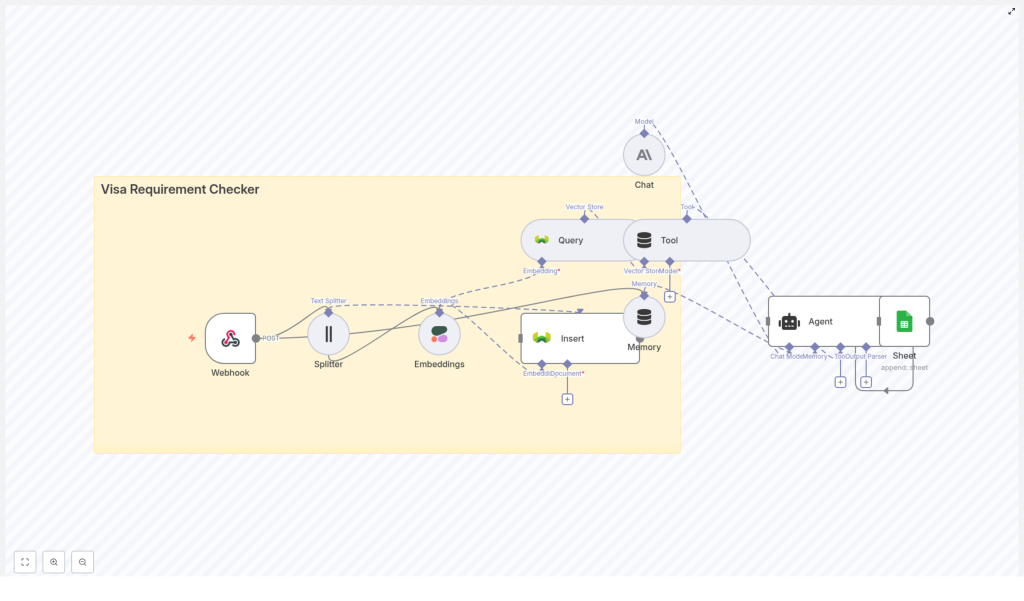
The Visa Requirement Checker is a production-ready n8n workflow that:
- Accepts user questions via an n8n Webhook
- Splits long visa documents into manageable chunks
- Turns those chunks into embeddings using Cohere or a similar provider
- Stores everything in a Weaviate vector database for semantic search
- Retrieves the most relevant passages for each query
- Uses an AI chat agent, such as Anthropic, to create a clear, user-friendly answer
- Logs every query and response to Google Sheets for analytics and auditing
Instead of repeatedly hunting for rules, you invest once in building a knowledge base and a workflow that answers questions for you, day and night.
Why this architecture fits visa requirements so well
Visa regulations are a perfect match for vector search and AI-based automation:
- Information is fragmented across embassy sites, government portals, and PDF documents.
- Language is nuanced, with exceptions, conditions, and frequent updates.
- Users ask natural questions that do not always match exact document wording.
By combining embeddings, a vector database like Weaviate, and an LLM-based agent, you get:
- Semantic retrieval of the most relevant passages
- Concise, human-friendly answers synthesized from multiple sources
- Traceability through logged sources and Google Sheets records
This pattern is not limited to visas. Once you are comfortable with it, you can replicate it for any domain where rules, documents, and user questions intersect.
The journey: building your Visa Requirement Checker in n8n
Let us walk through the workflow step by step. Think of each step as a building block you can reuse in future automations.
Step 1 – Capture user questions with a Webhook
Start by creating a Webhook node in n8n. Configure it to accept POST requests at an endpoint such as:
/visa_requirement_checker
This webhook becomes your gateway. It can receive data from a web form, an internal tool, or another service. A typical payload might look like:
{  "countryFrom": "India",  "countryTo": "Germany",  "travelPurpose": "tourism",  "travelDates": "2025-12-01 to 2025-12-14",  "text": "(optional) additional notes or pasted embassy rules"
}
By standardizing this entry point, you create a single, reliable way for users or systems to ask visa questions.
Step 2 – Split long documents into meaningful chunks
Visa rules often come in long pages or PDFs. To make them searchable, you need to break them into smaller pieces without losing context.
Use the Text Splitter node in n8n with a character-based strategy. A good starting configuration is:
- Chunk size: around 400 characters
- Overlap: about 40 characters
This overlap keeps important context flowing from one chunk to the next, which is essential for accurate embeddings and retrieval.
Step 3 – Turn text into embeddings with Cohere
Next, send each chunk into an Embeddings node using Cohere or another embeddings provider.
For each chunk, store both the embedding and useful metadata, such as:
countryFromcountryTotravelPurposesourceUrlpublishedDate- Timestamp of ingestion
This metadata is what makes your system precise. It allows you to filter results later so that a query about tourism to Germany from India does not get mixed up with business travel to another country.
Step 4 – Store embeddings in Weaviate as your vector database
With embeddings and metadata ready, insert them into a Weaviate index, for example:
visa_requirement_checker
Weaviate lets you perform semantic searches and apply metadata filters, which is exactly what you need for visa logic.
For a robust, production-grade setup:
- Enable backups so you do not lose your indexed documents
- Design a schema that includes fields like
countryFrom,countryTo,sourceUrl, andpublishedDate - Use
publishedDateto favor more recent documents when retrieving
Step 5 – Query Weaviate when a user asks a question
When a new question arrives through the webhook, create an embedding for that question and use it to query Weaviate.
Apply metadata filters to narrow down the search, such as:
- Destination country (
countryTo) - Travel purpose (
travelPurpose) - Optional: origin country (
countryFrom)
Retrieve the top N passages, typically:
- Top-K: 3 to 7 passages
More passages can improve coverage but may increase cost and latency, so start small and adjust as needed.
Step 6 – Use an AI Agent and Memory to craft the answer
Now you have the raw material: relevant passages from Weaviate. It is time to turn them into a clear, helpful answer.
Use an Agent node connected to your chosen LLM, such as Anthropic. Plug in the retrieved context and connect a Memory node (buffer-window) to maintain recent conversation history. This enables smooth follow-up questions without losing context.
A sample system prompt might look like:
System: You are a visa assistant. Use provided passages and metadata to answer the user's question concisely, cite sources, and call out uncertainty where laws are unclear.
User: {user question}
Context: {retrieved passages}
Make sure each passage includes its source URL or document ID so the agent can reference them directly in the response. This builds trust and helps users verify information quickly.
Step 7 – Log everything to Google Sheets for learning and growth
Finally, connect a Google Sheets node and append a new row for each interaction, including:
- User query
- Final answer from the agent
- Top retrieved sources or URLs
- Timestamps
This simple logging step turns your workflow into a learning system. Over time, you can:
- Identify common questions and optimize your prompts
- Spot gaps in your knowledge base and add new documents
- Review cases where the agent expressed uncertainty
Recommended settings and practical tuning tips
To get strong results from day one, start with these guidelines and refine as you learn from your data.
- Chunk size: 300 to 500 characters, with 10 to 15 percent overlap, works well for legislative and embassy text.
- Top-K retrieval: 3 to 7 passages per query is usually enough for high quality answers.
- Metadata filters: Always filter at least by destination country and travel purpose when available.
- Versioning: Use a
publishedDatefield so newer documents are preferred. - Safety: Have the agent include a short disclaimer and recommend double checking with official embassy or government sites for legal or time sensitive decisions.
Security, compliance, and responsible automation
As your automation grows, so does your responsibility to protect data and users.
Follow these practices when deploying your Visa Requirement Checker:
- Store API keys for Cohere, Weaviate, Anthropic, and Google Sheets in n8n credentials and environment variables, not in plain text.
- Avoid saving sensitive personal data into the vector store unless you have a clear retention policy and informed user consent.
- If your service could be interpreted as legal advice, include appropriate terms that limit liability and direct users to official authorities.
Responsible automation builds trust and allows you to scale with confidence.
Testing, monitoring, and continuous improvement
High quality automation is not a one-time build. It is an ongoing cycle of testing, observing, and refining.
To keep your Visa Requirement Checker accurate and reliable:
- Set up automated tests with sample queries and expected answer patterns or citations.
- Monitor logs in Google Sheets or pipe them into an analytics system to track error rates, response times, and top queries.
- Periodically review a sample of responses, update your sources, and re-index documents to stay aligned with current visa rules.
Each iteration makes your workflow smarter, faster, and more valuable to your users.
Ideas to take your workflow even further
Once your core Visa Requirement Checker is running, you can extend it in powerful ways:
- Auto-scraper: Add a scheduled crawler that fetches official embassy or government pages and re-indexes them daily or weekly.
- Multi-language support: Integrate translation before embeddings, or use language specific retrieval models to serve users in different languages.
- Custom user interface: Build a simple front-end form that calls your webhook, then display answers with source links and a confidence indicator.
- Feedback loop: Let users rate answers and capture that feedback in Sheets, then use it to refine prompts, adjust retrieval weights, or prioritize new sources.
These enhancements turn a single workflow into a full-fledged product or internal tool.
Example agent prompt you can adapt
Here is a practical example of a prompt template you can use or customize for your Agent node:
System: You are an expert visa assistant. Use the retrieved passages and metadata to give a short, clear answer. Cite sources.
Instructions:
- If the answer is uncertain, say so and point to the official site.
- Provide a short summary, a step list, and source links.

User question: "Do Indian passport holders need a Schengen visa to visit Germany for tourism for 10 days?"
Context: [list of 3 retrieved passages with source URLs]
Feel free to adapt the wording to match your brand voice, level of detail, or risk tolerance.
Seeing the bigger picture: a reusable automation pattern
When you zoom out, this Visa Requirement Checker is a concrete example of a powerful pattern in n8n:
- Webhook intake
- Text chunking
- Embeddings generation
- Vector database retrieval
- Agent synthesis with context and memory
- Logging and analytics
This pattern is reusable across many domains where users ask questions about complex rules or documentation. By mastering it once, you unlock a new way to build scalable, intelligent workflows for your team or business.
Your next step: start small, then keep building
You do not need to automate everything at once. Start with this template, connect your Cohere and Weaviate accounts, and index the most important embassy pages for your audience.
As you see the time savings and clarity it brings, you will naturally spot new opportunities to automate related tasks, from follow up emails to internal reporting.
Call to action: Launch the template in your n8n instance, experiment with a few real world queries, and keep iterating. If you want a ready to deploy export, tailored configuration, or guidance on agents and prompts, reach out for support or explore our deployment guides and scripts.
Disclaimer: This Visa Requirement Checker provides informational guidance only. Always verify visa requirements with official government or embassy sources before traveling.

Really interesting use of n8n’s modular approach here — I like how the workflow ties together embeddings, vector search, and an AI agent for real-time visa guidance. Logging everything to Google Sheets is a smart move too, especially for auditing and improving responses over time. It’s a great example of how automation can make complex information retrieval both transparent and scalable.