


Build a Weather Impact Report Pipeline with n8n
Automating weather impact reporting is critical for organizations that depend on timely, accurate situational awareness. With n8n and modern language model tooling, you can implement a fully automated pipeline that ingests weather alerts, enriches them with semantic context, generates human-readable impact summaries, and logs everything for later analysis.
This article explains how to build a production-grade Weather Impact Report pipeline using n8n, LangChain-style components (text splitter, embeddings, vector store), Supabase with pgvector, Hugging Face embeddings, Anthropic chat, and Google Sheets. The focus is on architecture, key nodes, and best practices suitable for automation and data engineering professionals.
Business case for automating weather impact reports
Weather conditions directly influence supply chains, field operations, logistics, public events, and customer safety. Many teams still rely on manual workflows to collect alerts, interpret potential impacts, and communicate recommendations. These manual processes are slow, difficult to audit, and prone to inconsistency.
An automated n8n workflow can:
- Ingest weather updates from multiple sources through webhooks or APIs
- Use language models to summarize and interpret operational impact
- Store semantic embeddings for efficient retrieval and context reuse
- Maintain a structured, searchable audit trail in systems like Google Sheets
The result is a repeatable, observable pipeline that converts raw weather data into actionable intelligence with minimal human intervention.
High-level architecture of the n8n workflow
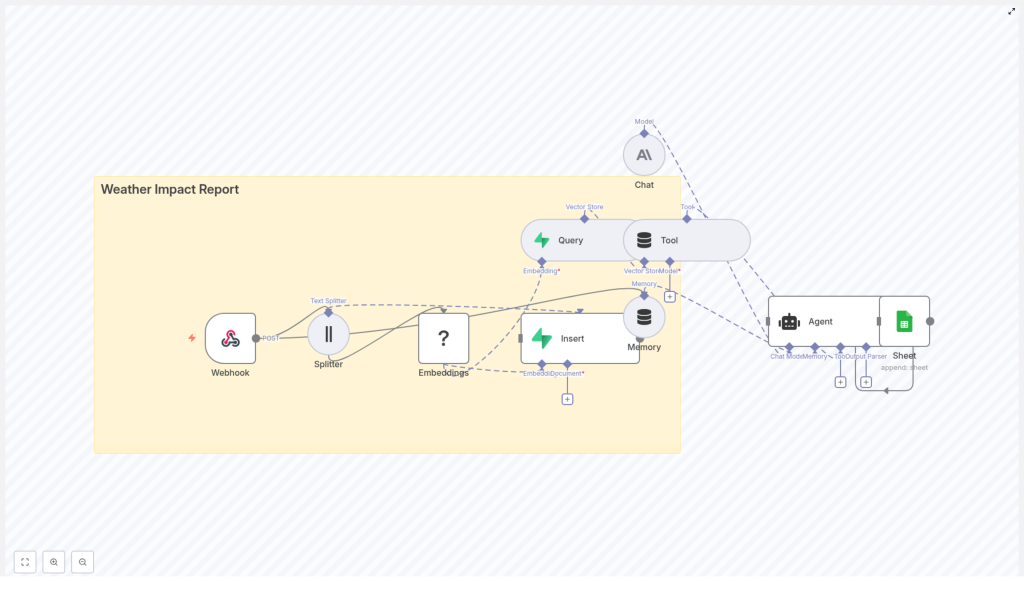
The Weather Impact Report pipeline uses a modular design that separates ingestion, enrichment, retrieval, and reporting. At a high level, the workflow includes:
- Webhook (n8n) – entrypoint for POST events from weather feeds or ingestion services
- Text Splitter – segments long advisories into manageable chunks for embedding
- Embeddings (Hugging Face) – converts each text chunk into a semantic vector
- Vector Store (Supabase + pgvector) – persistent storage and similarity search over embeddings
- Tool / Query node – wraps the vector store as a retriever for LLM-based workflows
- Memory and Chat (Anthropic) – maintains conversational context and generates the final impact summary
- Agent with Google Sheets integration – orchestrates the response and writes a structured log entry
This architecture is extensible. You can plug in additional alerting channels, observability, or downstream systems without changing the core pattern.
Data ingestion: capturing weather events
1. Webhook node configuration
The workflow starts with an n8n Webhook node configured to accept POST requests. This endpoint is typically called by your weather provider, an internal integration service, or a scheduled polling script.
A representative JSON payload might look like:
{  "source": "NOAA",  "event": "Heavy Snow Warning",  "timestamp": "2025-01-28T06:30:00Z",  "text": "Heavy snow expected across County A, travel strongly discouraged..."
}
Security considerations at this layer are essential:
- Protect the webhook with a secret token or signature validation
- Restrict inbound traffic using IP allowlists or a gateway
- Use n8n credentials management for any downstream API secrets
Once the payload is received, it flows into the processing segment for text preparation and embedding.
Preparing text for semantic processing
2. Splitting long advisories into chunks
Operational weather bulletins can be lengthy and often exceed typical token limits for embedding models or chat models. To handle this, the workflow uses a Splitter node that breaks the input text into smaller, overlapping segments.
A typical configuration might be:
chunkSize = 400characters (or tokens, depending on implementation)overlap = 40to preserve context across boundaries
This approach keeps each chunk within model limits while maintaining local continuity, which improves the quality of semantic embeddings and downstream retrieval.
3. Generating embeddings with Hugging Face
Each text chunk is then passed to an Embeddings node configured with a Hugging Face embeddings model. The node converts text into high-dimensional numeric vectors that capture semantic meaning.
Recommendations:
- Select a sentence-transformer style model that balances accuracy, latency, and cost
- Standardize preprocessing (case normalization, whitespace handling) for consistent embeddings
- Consider caching embeddings for identical or repeated texts to reduce cost
The output of this stage is a set of vectors, each associated with its original text chunk and metadata from the incoming payload.
Persisting and retrieving context with Supabase
4. Inserting vectors into a Supabase vector store
To support long-term retrieval and contextualization, the workflow writes embeddings into a Supabase table backed by Postgres and pgvector. Each record typically includes:
- The embedding vector itself
- Source system (for example
NOAA) - Event type (for example
Flood Advisory,Heavy Snow Warning) - Timestamp of the original event
- Optional geospatial or region identifiers
- The raw text snippet for reference
Supabase provides a convenient managed environment for Postgres plus vector search, which keeps operational overhead low while enabling efficient similarity queries.
5. Querying the vector index with a Tool node
When generating a new report or answering a query about current or historical conditions, the workflow needs to retrieve relevant past information. This is handled by:
- A Query node that runs a similarity search against the pgvector index
- A Tool node that exposes this query capability as a retriever to the Agent or Chat node
Key configuration parameters include:
- Similarity threshold to control how close matches must be
- Maximum number of results to return for each query
- Optional filters on metadata (for example source, event type, region, time window)
This retrieval step ensures that the language model has access to relevant historical context and related advisories when composing impact reports.
LLM orchestration: memory, chat, and agent logic
6. Memory and Anthropic Chat nodes
To maintain continuity across multiple interactions and reports, the workflow employs a Memory node. This node stores recent conversations or prior generated reports so that the model can reason over ongoing conditions.
The Chat node, configured with an Anthropic model, receives:
- The current weather payload and key metadata
- Relevant chunks retrieved from the vector store
- Any stored context from the Memory node
From this combined context, the Anthropic model generates a structured, human-readable weather impact summary. Typical outputs include:
- Overall situation summary
- Operational risks and potential disruptions
- Impacted regions or assets
- Recommended mitigation or response actions
Anthropic models are used here to prioritize controlled, high-quality outputs and safer behavior, which is important in risk-sensitive domains like weather-related operations.
7. Agent orchestration and Google Sheets logging
The Agent node coordinates the final stage of the workflow. It parses the Chat node response and maps it to a structured record that can be logged and consumed by downstream systems.
A typical schema for the log entry might include:
- Report headline or title
- Severity level inferred or mapped from the event
- Affected areas or regions
- Summary of expected impact
- Recommended actions
- Source, event type, and timestamp
The Agent then uses a Google Sheets node to append this data as a new row in a designated sheet. This provides:
- An easily accessible dashboard for stakeholders
- A durable audit trail of all generated reports
- A simple dataset for later analytics or quality review
Illustrative payload and end-to-end flow
The following example shows a more detailed JSON payload flowing through the pipeline:
{  "source": "NOAA",  "event": "Flood Advisory",  "severity": "Moderate",  "areas": ["County A", "County B"],  "text": "Heavy rainfall expected - potential flooding on low-lying roads...",  "timestamp": "2025-01-28T06:30:00Z"
}
Processing steps:
- The webhook receives the payload and passes the
textfield to the Splitter. - Chunks are generated, embedded via Hugging Face, and inserted into the Supabase vector table with metadata like
severityandareas. - When the Agent constructs a report, it queries the vector store to retrieve semantically similar events, possibly filtered to the same areas or severity range.
- The Anthropic Chat node uses both the current advisory and retrieved history to generate a nuanced impact report.
- The Agent writes a structured summary into Google Sheets as a new log entry.
Implementation best practices and optimization tips
Metadata and schema design
- Always store rich metadata with vectors, including source, event type, timestamp, geolocation, severity, and region identifiers.
- Design your Supabase table schema with clear indexes on frequently filtered fields such as
timestampandregion. - Use consistent naming and typing for fields so that filters and queries remain predictable.
Chunking and embedding strategy
- Tune
chunkSizeandoverlapbased on your dominant document type:- Short alerts or advisories may require smaller chunks.
- Long technical bulletins or multi-part reports may benefit from larger chunks.
- Normalize text prior to embedding to avoid unnecessary vector duplication.
- Deduplicate identical content before sending it to the embedding model for cost control.
Performance, throttling, and cost control
- Implement rate limiting or backoff strategies in n8n to stay within external API quotas for Hugging Face and Anthropic.
- Batch embeddings and Supabase inserts where possible to improve throughput.
- Use a lower-cost embedding model for broad similarity search and, if needed, a more expensive model for high-precision scenarios.
Security and compliance
- Store all API keys and credentials using n8n’s secure credential management.
- Enable row-level security in Supabase where appropriate, especially if multiple teams or tenants share the same database.
- Secure the webhook endpoint with authentication and network controls.
Testing, validation, and quality assurance
Before promoting the workflow to production, validate each stage individually and then perform end-to-end tests.
Node-level testing
- Simulate webhook payloads using representative JSON samples.
- Verify that the Splitter is producing chunks of the expected size and overlap.
- Inspect embeddings and Supabase inserts to confirm schema correctness and metadata presence.
End-to-end validation
- Send a synthetic or historical weather event to the webhook.
- Confirm that all chunks are embedded and stored in Supabase with correct metadata.
- Run a contextual query and manually inspect the retrieved snippets for relevance.
- Review the Anthropic Chat node output to ensure it is clear, actionable, and aligned with your operational guidelines.
- Check the Google Sheet for the appended row and validate field mappings and data consistency.
Scaling, monitoring, and observability
As event volume grows, you will need to ensure that the pipeline remains performant and observable.
- Batching: Group embeddings and database writes to reduce overhead and improve throughput.
- Partitioning: Partition Supabase vector tables by date or region to narrow the search space for common queries.
- Metrics: Track key metrics such as:
- Ingestion rate (events per minute or hour)
- Average embedding time per chunk
- Vector query latency and result counts
- Agent or Chat node failures and timeouts
- Observability stack: Export metrics and logs to systems such as Prometheus, Grafana, or Datadog for centralized monitoring.
Advanced extensions and enhancements
Once the core pipeline is stable, you can extend it with more advanced capabilities:
- Geospatial filtering: Combine vector similarity with geospatial queries so that retrieval is limited to nearby or jurisdiction-specific impacts.
- Alerting and incident management: Route high-severity or time-critical reports to Slack, SMS, or an incident management platform.
- Feedback loop: Allow operators to rate generated reports as accurate or inaccurate, then store that feedback as additional metadata for future evaluation or fine-tuning workflows.
- Multi-source data fusion: Ingest additional feeds such as radar, satellite imagery summaries, or social media signals to provide richer context to the Chat node.
Conclusion and next steps
Using n8n together with LangChain-style components, Supabase, Hugging Face embeddings, and Anthropic models, you can implement a complete Weather Impact Report pipeline that is flexible, auditable, and ready for production workloads.
A pragmatic rollout approach is:
- Implement the webhook and text splitting stages.
- Add embeddings and Supabase vector storage for retrieval.
- Integrate the Anthropic Chat node and Memory for contextual impact summaries.
- Finalize logging and reporting with the Agent and Google Sheets.
Once the core flow is working, refine chunking, retrieval parameters, and prompts to align with your operational standards.
Call to action: If you would like a tailored n8n workflow JSON that matches your weather data schema, preferred Hugging Face model, and Supabase table design, share your data format and expected traffic volume and I can draft a customized configuration for you.
