


Build a YouTube AI Agent with n8n
Imagine having a YouTube research assistant on autopilot
Imagine this: instead of spending hours digging through YouTube comments, skimming video descriptions, and guessing which thumbnails will perform better, you just ask an AI agent, “What are my viewers asking for?” or “How can I improve this video’s thumbnail?”
That is exactly what this n8n workflow template is designed to do for you.
Using n8n, the YouTube Data API, OpenAI, Apify, and an optional Postgres memory store, this workflow turns raw YouTube data into clear, actionable insights. It can:
- Analyze comments at scale
- Transcribe videos and pull out key ideas
- Review thumbnails and suggest improvements
- Store context so you can have multi-turn chats with your AI assistant
Let’s walk through what it does, when to use it, and how to get everything set up without getting lost in the weeds.
Why you might want a YouTube AI agent in the first place
If you are a creator, marketer, or part of a content team, you already know the pain:
- Comment sections are noisy and hard to summarize
- Long videos are tough to analyze manually
- Thumbnail tweaks often feel like guesswork
This YouTube AI agent helps with all of that. It automatically:
- Transcribes videos so you can search and repurpose content
- Pulls and analyzes comments to surface themes, questions, and sentiment
- Evaluates thumbnails with AI to suggest design changes
- Stores results in a database so you can keep chatting with your agent over time
The result is a more data-driven content strategy without the manual grind.
What the n8n YouTube AI workflow actually does
At a high level, this workflow template acts like a toolbox your AI agent can call on. In a single conversation, it can:
- Find channels and videos by handle, channel ID, or search query
- Fetch video details and filter out unwanted content, like shorts under 1 minute
- Pull comments with pagination and summarize what people are saying
- Send a video for transcription using Apify or another transcription API
- Analyze thumbnail images with OpenAI’s image tools and recommend improvements
- Save chat context in Postgres so your agent remembers previous queries
Think of it as your YouTube research pipeline, all wired together inside n8n.
Tools, APIs, and accounts you will need
Before you import the template, make sure you have these lined up:
- n8n account – either self-hosted or n8n cloud
- Google Cloud project with the YouTube Data API enabled and an API key
- OpenAI API key for both text and image analysis
- Apify account + API token for transcription or scraping actors
- Postgres database for chat memory (optional but highly recommended if you want multi-turn conversations)
Quick setup checklist
Here is the setup flow in a nutshell so you can get to the fun part faster:
- Create a Google Cloud project, enable the YouTube Data API, and generate an API key.
- Generate an OpenAI API key that can access both text and image models.
- Create an Apify API token for your transcription or scraping actors.
- In n8n, configure credentials:
- OpenAI
- Apify (via generic HTTP credentials)
- YouTube (using HTTP query auth with your API key)
- Set up a Postgres instance and configure the Postgres Chat Memory credential in n8n if you want your AI agent to remember previous messages.
How the workflow is structured in n8n
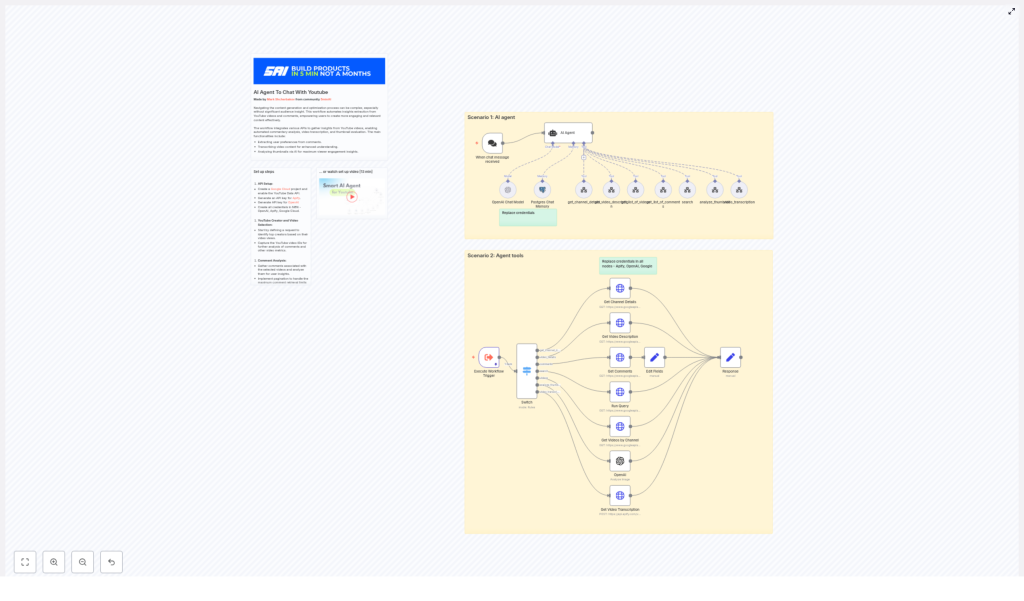
The template is organized into two main scenarios that work together:
- Scenario 1 – AI Agent: A chat trigger receives user messages and passes them to an AI agent node. The agent decides which tool to run based on the request. It can:
- Get channel details
- List videos
- Fetch video descriptions
- Pull and analyze comments
- Transcribe a video
- Analyze a thumbnail
- Scenario 2 – Agent tools: An
Execute Workflow Triggerkicks off the underlying tools. These are mostly HTTP request nodes that:- Call the YouTube Data API
- Send text and images to OpenAI
- Trigger an Apify transcription actor
- Write and read memory from Postgres for multi-turn chats
From your perspective, you just talk to the agent. Behind the scenes, these tool workflows do the heavy lifting.
Key workflow components, step by step
1. Chat trigger and AI agent logic
Everything starts with a chat trigger. A user sends a message such as:
- “Show me the most recent videos from this channel and what people are asking for.”
- “Analyze the thumbnail of this video.”
- “Summarize what viewers are complaining about in the comments.”
The AI agent node reads that request, figures out the intent, and calls the appropriate tool workflow. In a single conversation, the agent can:
- Find a channel
- List videos
- Fetch and analyze comments
- Transcribe a video
- Evaluate a thumbnail
If you have Postgres memory enabled, the agent can also remember previous steps, like which channel you are focused on or which video you just discussed.
2. Channel and video discovery with YouTube Data API
To explore YouTube content, the workflow uses various YouTube Data API endpoints. It can:
- Get channel details by handle or
channel_id - Search for videos based on a text query
- Retrieve recent videos from a channel and order them by:
dateviewCountrelevance
You can also add logic to skip content you do not care about. For example, if you only want long-form videos, filter out YouTube Shorts by checking contentDetails.duration and ignoring anything shorter than 1 minute.
3. Comment extraction and sentiment analysis
Once you know which video you care about, the workflow pulls comments using the commentThreads endpoint. Since YouTube returns comments in pages, the template includes pagination logic so you can fetch up to the maximum allowed, for example 100 per request, and keep going with nextPageToken.
After comments are fetched, the workflow:
- Aggregates top-level comments and replies into a single text corpus
- Sends the combined text to OpenAI for summarization
- Extracts:
- Recurring questions
- Overall sentiment
- Frequently requested features or topics
This is where you start seeing patterns, like “viewers keep asking for a beginner-friendly series” or “people love the pacing but want more examples.”
4. Video transcription for deeper analysis
For long-form videos, comments only tell part of the story. The workflow can also send a video URL to an Apify transcription actor or any speech-to-text API you configure.
Once you have a transcript, you can:
- Search within the spoken content for topics and timestamps
- Pull out highlights to repurpose as shorts or social content
- Feed the transcript to an LLM to:
- Generate chapters
- Create summaries
- Brainstorm new content ideas
One thing to keep in mind: transcribing long videos can get expensive. To control costs, you might:
- Transcribe only the most important videos
- Sample sections instead of full videos
- Prioritize videos that get a lot of comments or views
5. Thumbnail analysis with OpenAI image tools
Thumbnails can make or break click-through rate, but it is not always obvious what to change. This workflow sends the max-resolution thumbnail URL to OpenAI’s image analysis endpoint, or another image evaluation model, with a custom prompt.
The model can look at things like:
- Overall composition
- Color contrast and readability
- Face prominence and expression
- Text clarity and size
- Likely click-through performance
In response, your agent can give practical suggestions such as:
- “Reduce the amount of text and make the main word larger.”
- “Increase contrast between the subject and the background.”
- “Use a more expressive facial reaction to draw attention.”
Practical tips and best practices
To keep your YouTube AI agent running smoothly and cost-effectively, a few guidelines help a lot:
- Respect rate limits and quotas: Cache YouTube API responses where possible and avoid re-fetching data for the same video over and over.
- Use pagination correctly: Handle
nextPageTokenfor both search results and commentThreads so you do not miss data. - Filter out shorts: Check
contentDetails.durationand skip clips shorter than your chosen threshold if you are focusing on long-form content. - Craft targeted prompts: For comment summarization, explicitly ask the model for:
- Frequently requested features or topics
- Sentiment distribution
- Three concrete content ideas based on viewer feedback
- Protect user privacy: Instead of storing raw comments with usernames, store aggregated summaries, themes, and anonymized insights.
- Manage costs: Sample long comment threads instead of sending every single comment to the LLM, and transcribe only the videos that matter most.
Troubleshooting common issues
Authentication problems
If a node starts failing, double-check that:
- Your API keys for Google, OpenAI, and Apify are valid and not expired
- Each HTTP node in n8n is using the correct credential type
- You updated credentials in all nodes after cloning or moving the workflow to a new environment
Empty or missing comments
If you are not seeing any comments in the results:
- Verify that the
video_idyou are using is correct - Make sure comments are enabled and public for that video
- Check that you are requesting the correct parts in
commentThreads, such asid,snippet,replies
Transcription does not look right
If the transcript quality is poor or incomplete:
- Check the audio quality of the video and its language settings
- Try a more robust transcription actor or service if the audio is noisy
- Consider pre-processing audio where possible
How to actually use the insights as a creator
Once your workflow is running and your data is neatly structured, here are a few practical ways to put it to work:
- Weekly content brief: Generate a summary of:
- Top audience questions
- Emerging themes in comments
- Key timestamps for high engagement moments
- Smarter thumbnail experiments: Use AI suggestions to design A/B tests for thumbnails and refine your style over time.
- Content repurposing on autopilot: Turn transcripts and AI summaries into:
- Short clips
- Social media posts
- SEO-focused descriptions and titles
Security and data governance basics
Since you are working with external APIs and user-generated content, it is worth putting some guardrails in place:
- Keep API keys secure and rotate them regularly.
- Limit who can access your n8n instance and credentials.
- Store aggregated insights instead of raw, personally identifiable comment data if privacy or compliance is a concern.
- Use Postgres roles and encryption for production deployments.
Ready to try the YouTube AI agent template?
Once everything is configured, getting started is straightforward:
- Import the workflow template into your n8n instance.
- Plug in your credentials for Apify, OpenAI, and Google (YouTube Data API).
- Run the chat trigger and start with something simple, like a channel handle or a single video URL.
- Optionally, run the
Execute Workflow Triggerdirectly with a sample video to see the tool chain in action.
From there, you can tweak prompts, adjust filters for shorts or specific video lengths, and customize how results are summarized.
Try the template now: import it into n8n, connect your API keys, and run the Execute Workflow Trigger for a test video. Once you see the first insights come back, you can refine prompts and filtering logic to match your channel’s style and goals.
