

Build an Achievement Suggestion Engine with n8n, LangChain and Supabase
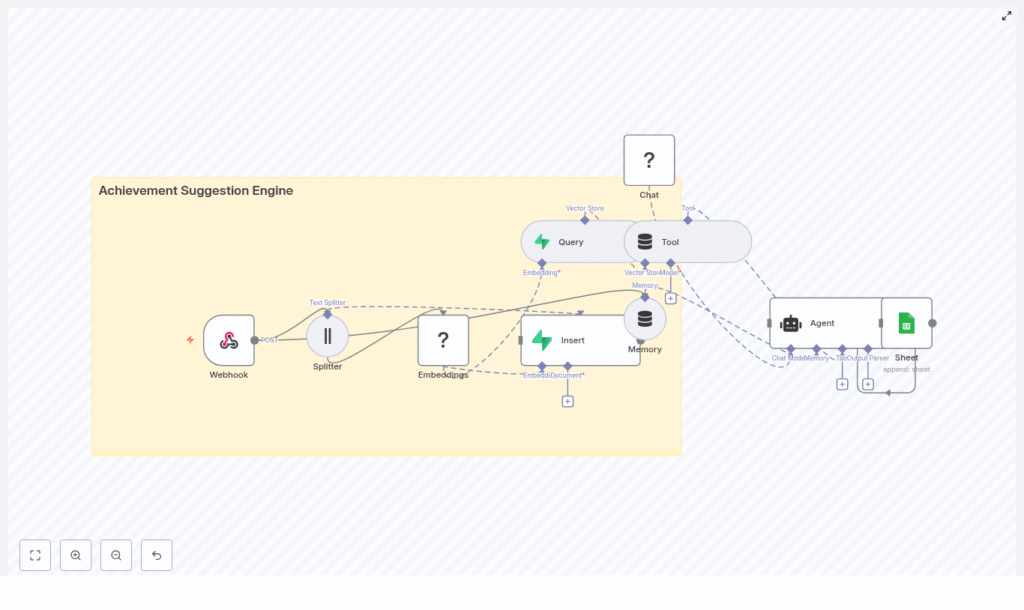
This guide documents an n8n workflow template that implements an Achievement Suggestion Engine using text embeddings, a Supabase vector store, and an agent-style orchestration with LangChain and a Hugging Face model. It explains the workflow architecture, node configuration, data flow, and practical considerations for running the template in production-like environments.
1. Conceptual Overview
The Achievement Suggestion Engine transforms raw user content into personalized achievement recommendations. It combines semantic search with agent logic so that your application can:
- Convert user text (profiles, activity logs, goals) into dense vector embeddings for semantic similarity search
- Persist those vectors in a Supabase-backed vector store for fast nearest-neighbor queries
- Use a LangChain-style agent with a Hugging Face LLM to interpret retrieved context and generate achievement suggestions
- Log outputs to Google Sheets for monitoring, analytics, and auditability
The n8n workflow is structured into two primary flows:
- Ingest (write path) – receives user content, chunks it, embeds it, and stores it in Supabase
- Query (read path) – retrieves relevant content from Supabase, feeds it into an agent, and generates suggestions that are logged and optionally returned to the caller
2. High-level Architecture
At a high level, the template uses the following components:
- Webhook node to accept incoming HTTP POST requests from your application
- Text splitter to perform chunking of long documents
- Embeddings node (Hugging Face) to convert text chunks into vectors
- Supabase vector store to store and query embeddings (index name:
achievement_suggestion_engine) - Vector search + tool node to expose Supabase search as a tool to the agent
- Conversation memory buffer to keep recent interaction context
- Chat / Agent node using a Hugging Face LLM and LangChain agent logic
- Google Sheets node to append suggestion logs for analytics and review
The ingest and query flows can be triggered from the same webhook or separated logically, depending on how you configure routing at the application layer.
3. Data Flow: Ingest vs Query
3.1 Ingest Flow (Write Path)
The ingest flow is responsible for turning user content into searchable vectors.
- The Webhook node receives a POST payload containing user content such as a profile, activity feed, or event description.
- The payload is passed to the Splitter node, which chunks the text into segments suitable for embedding.
- Each chunk is processed by the Embeddings node (Hugging Face) to generate vector representations.
- The Insert operation writes the resulting vectors into the Supabase vector store, using the index
achievement_suggestion_engineand attaching relevant metadata (for example user ID, timestamps, and source identifiers).
3.2 Query Flow (Read Path)
The query flow retrieves the most relevant stored content and uses it to generate achievement suggestions.
- A user request or event triggers a Query operation against Supabase, which performs a semantic similarity search over the stored embeddings.
- The Tool node wraps the vector search capability as a LangChain-compatible tool so it can be invoked by the agent.
- The Agent node uses the tool results, conversation memory, and a configured prompt to generate personalized achievement suggestions.
- The final suggestions are sent to a Google Sheets node, which appends a new row with user identifiers, timestamps, and the generated output. The same response can be returned from n8n to the caller if desired.
4. Node-by-node Breakdown
4.1 Webhook Node (Ingress)
The Webhook node is the entry point for both ingestion and query operations. It listens for HTTP POST requests from your application.
- Trigger type: HTTP Webhook
- Supported method:
POST - Payload: JSON body containing fields such as
user_id,timestamp, andcontent(see sample below)
You can use a single webhook and route based on payload fields (for example, a mode flag), or maintain separate workflows for ingest and query paths. In all cases, validating the payload format and returning appropriate HTTP status codes helps prevent downstream errors.
4.2 Splitter Node (Text Chunking)
The Splitter node receives the raw text content and breaks it into smaller segments for embeddings. This improves retrieval quality and prevents hitting model token limits.
- Key parameters:
chunkSize: 400– maximum characters per chunkchunkOverlap: 40– number of overlapping characters between consecutive chunks
The template uses 400/40 as a balanced default. It preserves enough context for semantic meaning while keeping the number of embeddings manageable. Overlap of around 10 percent helps maintain continuity across chunk boundaries without excessive duplication.
Edge case to consider: very short inputs that are smaller than chunkSize will not be split further and are passed as a single chunk, which is typically acceptable.
4.3 Embeddings Node (Hugging Face)
The Embeddings node converts each text chunk into a dense vector using a Hugging Face model.
- Provider: Hugging Face
- Typical model type: sentence-level embedding models such as
sentence-transformersfamilies (exact model is selected in your credentials/config) - Input: text chunks from the Splitter node
- Output: numeric vectors suitable for insertion into a vector store
When choosing a model, balance accuracy against latency and resource usage. Before promoting to production, evaluate semantic recall and precision on a representative dataset.
4.4 Insert Node (Supabase Vector Store)
The Insert node writes embeddings into Supabase, which acts as the vector store.
- Index name:
achievement_suggestion_engine - Backend: Supabase (Postgres with vector extension)
- Operation: insert embeddings and associated metadata
Alongside the vector itself, you should store structured metadata, such as:
user_idfor tenant-level filteringtimestampto support time-based analysis or cleanupchunk_indexto reconstruct document order if needed- Source identifiers (for example document ID or event type)
This metadata is important for downstream filtering, debugging, and audits. It also enables more granular queries, such as restricting search to a single user or time range.
4.5 Query + Tool Nodes (Vector Search + Agent Tool)
On the read path, the workflow performs a vector search in Supabase and exposes the results as a tool to the agent.
- Query node:
- Accepts a query embedding or text that is converted to an embedding
- Performs nearest-neighbor search against the
achievement_suggestion_engineindex - Returns the most similar chunks along with their metadata
- Tool node:
- Wraps the vector search capability as a LangChain-style tool
- Makes retrieval callable by the agent as needed during reasoning
The agent uses this tool to fetch context dynamically instead of relying solely on the initial prompt. This pattern is particularly useful when the underlying vector store grows large.
4.6 Memory Node (Conversation Buffer)
The Memory node maintains a sliding window of recent conversation turns. This allows the agent to keep track of previous suggestions, user feedback, or clarifications.
- Type: conversation buffer
- Key parameter:
memoryBufferWindowwhich controls how many recent messages are retained
A larger window provides richer context but increases token usage for each agent call. Tune this value based on the typical length of your user interactions and cost constraints.
4.7 Chat / Agent Node (Hugging Face LLM + LangChain Agent)
The Chat / Agent node orchestrates the LLM, tools, and memory to generate achievement suggestions.
- LLM provider: Hugging Face
- Agent framework: LangChain-style agent within n8n
- Inputs:
- Retrieved context from the vector store tool
- Conversation history from the memory buffer
- System and user prompts defining the task and constraints
- Output: structured or formatted achievement suggestions
The prompt typically instructs the agent to:
- Analyze user behavior and goals extracted from context
- Map these to a set of potential achievements
- Prioritize or rank suggestions
- Format the response in a predictable structure such as JSON or CSV
You should also include fallback instructions for cases where the context is weak or no strong matches are found, for example instructing the agent to respond with a default message or an empty list.
4.8 Google Sheets Node (Logging)
The final step logs the agent output to Google Sheets for inspection and analytics.
- Operation:
appendrows to a specified sheet - Typical fields:
- User identifiers
- Timestamp of the request or suggestion generation
- Raw or formatted achievement suggestions
This approach is convenient for early-stage experimentation and manual review. For higher throughput or stricter consistency requirements, you may later replace or complement Sheets with a transactional database.
5. Configuration Notes & Best Practices
5.1 Chunking Strategy
Chunking has a direct impact on retrieval quality and cost.
- Chunk size:
- Larger chunks preserve more context but increase embedding cost and may dilute the signal for specific queries.
- Smaller chunks improve granularity but can lose cross-sentence context.
- Overlap:
- Overlap helps maintain continuity between chunks when sentences span boundaries.
- About 10 percent overlap, as used in the template, is a strong starting point.
Test with your own data to determine whether to adjust chunkSize or chunkOverlap for optimal recall.
5.2 Selecting an Embeddings Model
For best results, use a model designed for semantic similarity:
- Prefer sentence-level encoders such as those in the
sentence-transformersfamily or similar Hugging Face models. - Evaluate performance on a small labeled set of queries and documents to confirm that similar items cluster as expected.
- Consider latency and throughput, especially if your ingest volume or query rate is high.
5.3 Designing the Supabase Vector Store
Supabase provides a managed Postgres instance with a vector extension, which is used as the vector store in this template.
- Use the
achievement_suggestion_engineindex for all embeddings related to the engine. - Include metadata fields such as:
user_idfor multi-tenant isolationsource_idor document ID for traceabilitytimestampto support time-based retention and analysischunk_indexto reconstruct original ordering if needed
This metadata makes it easier to filter search results, enforce access control, and debug unexpected suggestions.
5.4 Agent Prompting and Safety
Well-structured prompts are critical for consistent and safe suggestions.
- Clearly define the task, such as:
Suggest up to 5 achievements based on the context and user goals.
- Specify a strict output format, for example JSON or CSV, so that downstream systems can parse responses reliably.
- Provide guidelines for low-context scenarios, such as:
- Return a minimal default suggestion set.
- Explicitly state when there is insufficient information to make recommendations.
Incorporating these constraints helps reduce hallucinations and ensures that the agent behaves predictably under edge cases.
5.5 Logging & Observability
The template uses Google Sheets as a simple logging backend:
- Append each agent output as a new row, including identifiers and timestamps.
- Use the sheet to monitor suggestion quality, identify anomalies, and iterate on prompts.
For production environments, consider:
- Forwarding logs to a dedicated database or observability platform.
- Storing raw requests, responses, and vector IDs to support traceability and debugging.
- Monitoring error rates and latency for each node in the workflow.
6. Security, Privacy, and Cost Considerations
Handling user content in an AI pipeline requires careful attention to security and cost.
- Security & access control:
- Encrypt data in transit with HTTPS and ensure data at rest is protected.
- Use Supabase row-level security or policies to restrict access to user-specific data.
- Privacy:
- Mask or
- Mask or

