


Build an AI Newsletter Pipeline with n8n
Imagine it is newsletter day again. Your coffee is cold, your tabs are overflowing, and you are copy-pasting tweets and markdown files like it is 2012. You tweak headlines, rephrase intros, triple-check links, and then someone on Slack says, “Can we swap the lead story?”
If that scenario feels a little too real, it is time to let automation do the heavy lifting. With n8n and a few well-behaved LLMs, you can turn your newsletter workflow from “frantic scramble” into “press play and review.”
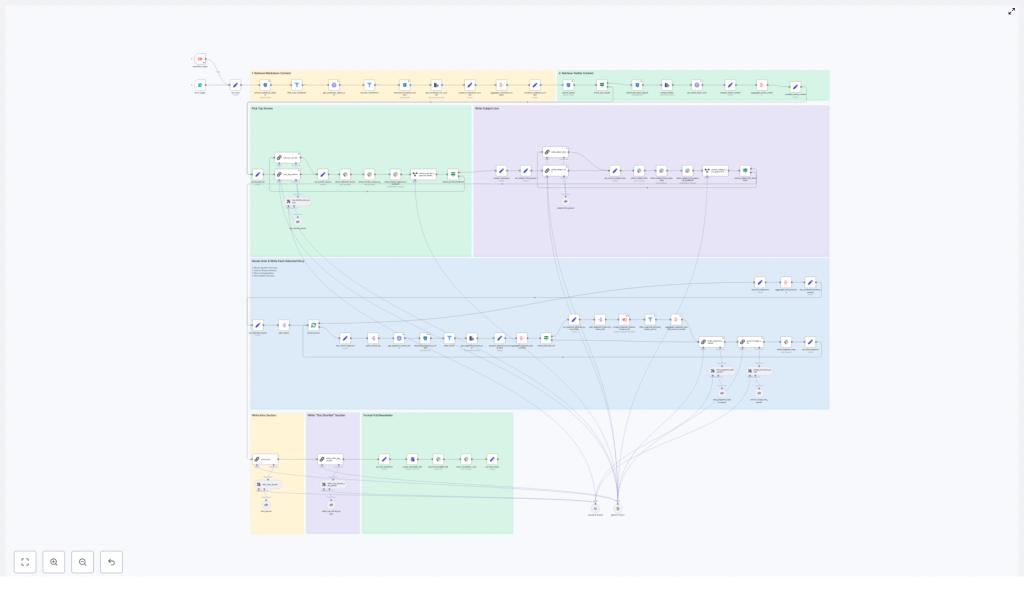
This guide walks you through a production-ready n8n workflow template that builds an AI-powered newsletter pipeline. It ingests content, filters it, lets LLMs pick and write stories, gets human approval in Slack, and then assembles and publishes your newsletter. You keep the editorial judgment, the workflow handles the repetitive chores.
What this n8n newsletter workflow actually does
At a high level, the workflow is an automation pipeline for AI newsletters. It connects your content sources, uses LLMs for selection and writing, and then routes everything through a human-friendly approval loop.
The n8n template (importable as JSON) follows these major stages:
- Input trigger – kick off the pipeline for a specific issue date, either from a form or a schedule.
- Content retrieval – pull markdown articles and tweets from S3, normalize them, and add helpful metadata.
- Filtering and de-duplication – filter out old content, non-markdown files, and previous newsletter issues.
- LLM top story selection – use an LLM (LangChain, Gemini, Anthropic, etc.) to rank candidates and pick the top 4 stories.
- Story expansion – have an LLM write structured newsletter sections for each chosen story.
- Intro, subject line, and shortlist – generate the email intro, subject lines, and an “Other Top Stories” list.
- Approval and collaboration via Slack – send selections and reasoning to Slack for human review and edits.
- Assembly and export – stitch everything into a final markdown file and push it to Slack or other distribution channels.
The result is an AI newsletter pipeline that is repeatable, auditable, and way less soul-crushing than building each issue by hand.
Why bother automating your newsletter?
Manually building a newsletter is like doing data entry with extra steps. It is slow, repetitive, and surprisingly easy to mess up a link or re-feature an old story.
With n8n and modern LLMs, you can:
- Ingest content from multiple sources such as S3 buckets, scraped web pages, and social posts.
- Use LLMs to pick relevant stories that match your audience and avoid random “because the model felt like it” choices.
- Generate consistent copy for headlines, intros, and sections that keep your brand voice intact.
- Keep humans in control by collecting feedback and approvals in Slack before anything ships.
Automation does not replace your editorial brain, it just stops you from spending it on copy-paste duty and link wrangling.
Inside the workflow: how the pipeline is structured
1. Triggering the newsletter run
The workflow starts with a trigger node. You can:
- Use a form trigger if you want to manually kick off an issue.
- Use a schedule trigger if you prefer a weekly or daily cadence.
When the trigger fires, it passes in two key inputs:
- Issue date – tells the workflow which content window to pull from.
- Previous newsletter content – used later to avoid repeating stories you already covered.
Think of this as giving the pipeline its “assignment” for the day.
2. Grabbing content from S3 (markdown and tweets)
Next, the workflow heads to S3 to find candidate stories. This step:
- Runs an S3 search using the issue date as a prefix to list relevant markdown objects.
- For each object, calls a metadata endpoint or reads object metadata, then downloads the file.
- Pulls tweets from a tweet bucket in a similar way and parses them into normalized text.
Every piece of content is wrapped in a small header block that tracks:
- Unique
identifier - Source (for example, S3 markdown or tweet)
- Authors
external-source-urlsfor traceability and later scraping
This gives the rest of the workflow a clean, structured set of candidates to work with instead of a random pile of files.
3. De-duplication and filtering logic
Now that you have a content buffet, the workflow trims it down so you do not accidentally serve leftovers.
Filter nodes:
- Remove non-markdown files that slipped into the bucket.
- Exclude newsletter-type content such as previous issues, so you do not feature your own newsletter in your newsletter.
- Drop items that are older than the allowed time window, keeping coverage fresh and relevant.
The previous newsletter content passed in at the trigger step is used here to avoid re-covering the same stories.
4. LLM-powered top story selection
Once the candidates are filtered, it is time for the LLM to play editor.
A LangChain-powered node receives the combined raw content and runs a detailed prompt. The LLM:
- Evaluates all candidate stories.
- Ranks them and picks the top 4 stories for this issue.
- Outputs a rich “chain of thought” explanation that explains why each item was included or excluded.
The prompt is strict. It forces the LLM to:
- Enumerate every candidate.
- Justify its decisions for editorial review.
This reasoning is then posted to Slack so editors can quickly scan the logic, veto a pick, or suggest changes without digging into raw model output.
5. Writing each selected story section
With the top 4 stories chosen, the workflow now turns them into polished newsletter sections.
For each selected story, the pipeline:
- Resolves the story’s identifier.
- Aggregates content from S3 and any scraped external sources.
- Calls an LLM with a structured writing prompt.
The writing prompt enforces a consistent format:
- The Recap – 1 to 2 sentences that summarize the story.
- Unpacked – 3 bullet points that explain the key details.
- Bottom line – 2 sentences that give the takeaway.
The node returns markdown-ready content for each story, so you can drop it straight into your newsletter layout without extra formatting work.
6. Generating subject lines, pre-header, and intro
Next, the workflow handles the parts everyone sees first: the subject line and intro.
Dedicated LLM nodes:
- Create a subject line and pre-header text with constraints on word count and tone.
- Generate a short, on-brand intro that smoothly leads into the main stories.
- Produce alternative subject lines for A/B testing or editorial choice.
So instead of spending 20 minutes arguing over “Weekly AI Roundup” vs “This Week in AI,” you can let the model suggest options and pick your favorite.
7. Optional external scraping and image collection
When a selected story includes an external-source-url, the workflow can optionally trigger a scraping sub-workflow for extra context.
This sub-workflow can:
- Fetch the source page.
- Extract authoritative quotes or stats to enrich your summary.
- Harvest image URLs for potential hero images.
The image extraction logic:
- Filters for direct image links with file extensions such as
.jpg,.png, and.webp. - Deduplicates the results so you do not get the same image three times.
This gives you a curated list of images to choose from without manual hunting.
8. Slack approvals and human edits
Now comes the part where humans step in and keep everything on brand.
Before finalizing the issue, the workflow:
- Posts the selected stories and the LLM’s chain-of-thought reasoning to a Slack channel.
- Prompts an editor to approve or provide feedback.
Approval controls the next branch of the workflow:
- If everything is approved, the issue proceeds to assembly and publishing.
- If feedback is provided, an edit subflow updates the selected story JSON and can re-run the writer nodes as needed.
This keeps you in the loop without forcing you to manually manage every step in the pipeline.
9. Assembling and publishing the final newsletter
Once the content is approved, the workflow assembles the final issue.
It:
- Concatenates the intro, subject line, shortlist, and all story sections into a single markdown document.
- Converts that markdown to a file asset.
- Uploads it to Slack or pushes it to an email-sending service or CMS.
The workflow also keeps metadata and nightly logs for audit and rollback, so if something goes wrong, you can see exactly what happened and when.
Best practices for running this n8n newsletter template
To keep your AI newsletter pipeline reliable and affordable, a few practices go a long way.
- Use strict prompts and parsers
Structure LLM prompts with explicit schemas and use parser nodes to validate outputs. This keeps the workflow deterministic and reduces hallucinations that might otherwise sneak into your newsletter. - Keep sources canonical
Always preserve originalidentifiervalues andexternal-source-urlsin your JSON. This makes it easy to trace where each story came from and verify links later. - Rate limiting and retries
Add retry logic with exponential backoff for S3 downloads, HTTP scrapes, and LLM calls. Transient errors happen, and this keeps your run from failing just because one request had a moment. - Human-in-the-loop by design
Keep that Slack approval step. Especially early on, you want editorial control so the workflow accelerates your work instead of surprising your audience. - Monitoring and observability
Export run metadata and snapshots, including input identifiers and LLM outputs, to a log store. That way, if something looks off in a published issue, you can trace it back through the pipeline. - Cost controls on LLM usage
Batch LLM calls where possible and use cheaper models for early filtering. Reserve the more powerful (and more expensive) models for final story writing and subject-line generation.
Scaling and keeping things secure
As your newsletter grows, your pipeline needs to keep up without turning into a security risk.
For scaling, you can:
- Run heavy tasks such as scraping external sources and image downloads in separate worker workflows.
- Use a queue backed by a message broker to spread the load and avoid bottlenecks.
For security, make sure to:
- Store API keys and S3 credentials in n8n credential stores.
- Limit permissions to only the required buckets and endpoints.
- Keep outputs with sensitive content in a private artifact store rather than public buckets.
This keeps your automation fast, scalable, and safe as usage ramps up.
Common pitfalls to avoid
Even with a solid template, a few mistakes can trip you up. Watch out for:
- Unconstrained LLM outputs
Free-form outputs are fun until they break your workflow. Use structured output parsers and validators so the rest of the pipeline knows what to expect. - Link drift and accuracy issues
Always keepexternal-source-urlsverbatim from the original metadata. Editing them manually is a shortcut to broken links. - Skipping editorial checks
Full automation is tempting, but newsletters are public and brand-defining. Keep the Slack approval step so humans can catch tone or accuracy issues before they go out.
Putting it all together
This n8n-based AI newsletter pipeline gives you a full production flow: robust content ingestion, LLM-powered curation and writing, and Slack-based editorial approvals. It is modular, so you can:
- Swap storage backends if you move away from S3.
- Change LLM providers as new models appear.
- Extend the publishing step to more email platforms or CMSs.
In other words, your workflow can evolve as your stack and audience grow, without starting from scratch each time.
Ready to retire your copy-paste routine?
Duplicate the workflow, adapt the prompts to match your brand voice, plug in your S3 bucket and LLM credentials, and start automating your weekly issues. For a smooth rollout, import the template JSON into n8n and run it in dry-run mode for a single issue date to validate the outputs.
Need help tailoring this architecture to your stack or content sources? Drop a comment or reach out to a professional automation consultant for a deeper walkthrough.
Call to action: Try this n8n newsletter template in your own instance this week. Run an end-to-end test on a sample date, review the Slack previews, then push a staged issue to a small test list before rolling it out to your full audience.
