


Build an AI-Powered Scraper with n8n & Crawl4AI
This guide will teach you how to build an AI-powered web scraper using an n8n workflow template and the Crawl4AI HTTP API. By the end, you will know how to:
- Set up an automated scraping pipeline in n8n
- Use Crawl4AI to crawl websites and extract data
- Generate clean Markdown, structured JSON, and CSV outputs
- Apply three practical scraping patterns:
- Full-site Markdown export
- LLM-based structured data extraction
- CSS-based product/catalog scraping
The template workflow coordinates all of this for you: n8n handles triggers, waits, polling, and post-processing, while Crawl4AI does the crawling and extraction.
1. Concept overview: n8n + Crawl4AI as a scraping stack
1.1 Why use n8n for web scraping automation?
n8n is a low-code automation platform that lets you visually build workflows. For scraping, it provides:
- Triggers to start crawls (manually, via webhook, or on a schedule)
- Wait and loop logic to poll external APIs until jobs finish
- Transform nodes to clean, map, and format data
- Connectors to send results to databases, storage, or other apps
1.2 What Crawl4AI brings to the workflow
Crawl4AI is a crawler designed to work well with large language models and modern web pages. It can:
- Handle dynamic and JavaScript-heavy pages
- Generate Markdown, JSON, and media artifacts (like PDFs or screenshots)
- Apply different extraction strategies, including:
- Markdown extraction
- CSS / JSON-based extraction
- LLM-driven schema extraction
Combined, n8n and Crawl4AI give you a production-ready scraping pipeline that can:
- Work with authenticated or geo-specific pages
- Use LLMs for complex or messy content
- Export data to CSV, databases, or any downstream system
2. What this n8n template does
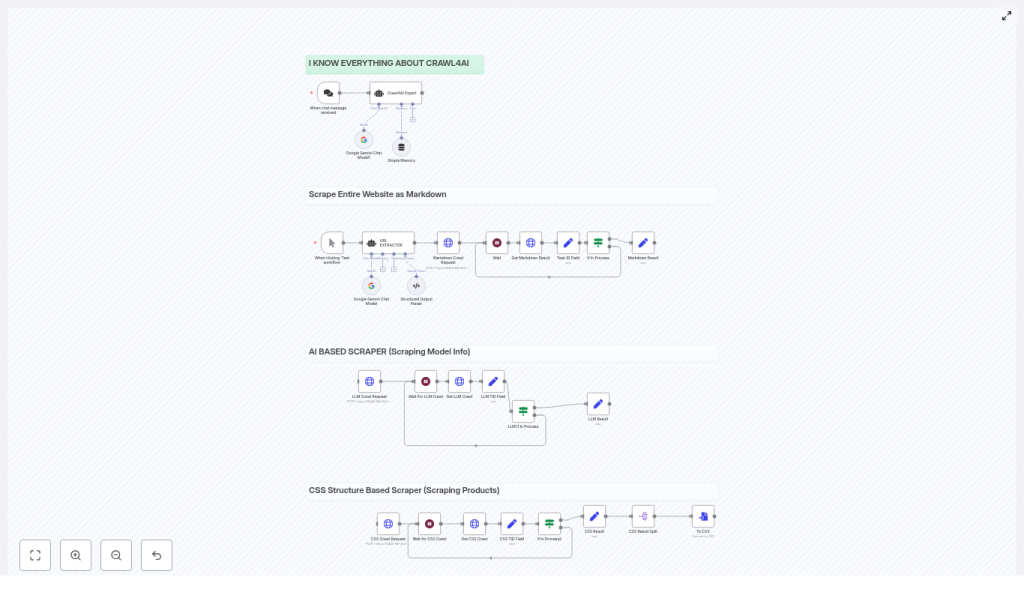
The template is built around a single Crawl4AI HTTP API, but it runs three scraping patterns in parallel inside n8n:
- Markdown Crawl Extracts full pages from a website and converts them to Markdown. Use case: content ingestion, documentation backups, and RAG (Retrieval Augmented Generation) pipelines.
- LLM Crawl Uses an LLM extraction strategy to return structured JSON that follows a schema you define. Use case: extracting pricing tables, specifications, or other structured information.
- CSS / Catalog Crawl Uses a
JsonCssExtractionStrategyto scrape product cards or catalog items based on CSS selectors, then exports results to CSV. Use case: product catalogs, listings, or any regular page layout.
Each flow uses the same Crawl4AI API pattern:
- POST
/crawlto start a crawl job - GET
/task/{task_id}to poll for status and retrieve results
n8n orchestrates:
- Retries and wait times between polls
- Parsing and transforming the response
- Output formatting such as CSV generation
3. Prerequisites and setup
3.1 What you need before starting
- An n8n instance Desktop, self-hosted server, or n8n cloud are all fine.
- A running Crawl4AI server endpoint For example, a Docker-hosted instance or managed API that exposes the
/crawland/taskendpoints. - API credentials for Crawl4AI Configure them as an n8n credential, typically through HTTP header authentication.
- Basic familiarity with:
- JSON objects and arrays
- CSS selectors for targeting elements on a page
3.2 Connecting n8n to Crawl4AI
In n8n, you will typically:
- Create an HTTP Request credential that holds your Crawl4AI API key or token
- Use this credential in all HTTP Request nodes that talk to the Crawl4AI endpoint
- Point the base URL to your Crawl4AI server
4. Understanding the workflow architecture
Although the template runs multiple flows, they share the same core structure. Here are the main n8n nodes and what they do in the scraping pipeline.
4.1 Core nodes and their roles
- Trigger node Starts the workflow. This can be:
- Manual runs via “Test workflow”
- A webhook trigger
- A scheduled trigger (for periodic crawls)
- URL EXTRACTOR An AI assistant node that:
- Parses sitemaps or input text
- Outputs a JSON array of URLs to crawl
- HTTP Request (POST /crawl) Creates a Crawl4AI task. The JSON body usually includes:
urls– a URL or array of URLs to crawlextraction_config– which extraction strategy to use- Additional crawler parameters such as cache mode or concurrency
- Wait node Pauses the workflow while the external crawl runs. Different flows may use different wait durations depending on complexity.
- Get Task (HTTP Request /task/{task_id}) Polls Crawl4AI for the current status of the task and retrieves results when finished.
- If In Process Checks the task status. If it is still pending or processing, the workflow loops back to the Wait node and polls again.
- Set / Transform nodes Used to:
- Extract specific fields from the Crawl4AI response
- Split or join arrays
- Compute derived fields, for example
star_count - Prepare data for CSV or database insertion
- Split / Convert to CSV Breaks arrays of records into individual items and converts them into CSV rows. You can then write these to files or send them to storage or analytics tools.
5. Example Crawl4AI requests used in the template
The template uses three main kinds of payloads to demonstrate different extraction strategies.
5.1 Basic Markdown crawl
This configuration converts pages to Markdown, ideal for content ingestion or RAG pipelines.
{  "urls": ["https://example.com/article1","https://example.com/article2"],  "extraction_config": { "type": "basic" }
}
5.2 LLM-driven schema extraction
This payload shows how to ask an LLM to extract structured JSON that follows a schema. In this example, it targets a pricing page.
{  "urls": "https://ai.google.dev/gemini-api/docs/pricing",  "extraction_config": {  "type": "llm",  "params": {  "llm_config": { "provider": "openai/gpt4o-mini" },  "schema": { /* JSON Schema describing fields */ },  "extraction_type": "schema",  "instruction": "Extract models and input/output fees"  }  },  "cache_mode": "bypass"
}
5.3 CSS-based product or catalog crawl
Here, a json_css strategy is used to scrape product cards using CSS selectors and then export to CSV.
{  "urls": ["https://sandbox.oxylabs.io/products?page=1", "..."],  "extraction_config": {  "type": "json_css",  "params": {  "schema": {  "name": "Oxylabs Products",  "baseSelector": "div.product-card",  "fields": [  {"name":"product_link","selector":".card-header","type":"attribute","attribute":"href"},  {"name":"title","selector":".title","type":"text"},  {"name":"price","selector":".price-wrapper","type":"text"}  ]  },  "verbose": true  }  },  "cache_mode": "bypass",  "semaphore_count": 2
}
Key ideas from this example:
baseSelectortargets each product cardfieldsdefine what to extract from each cardsemaphore_countcontrols concurrency to avoid overloading the target site
6. Step-by-step walkthrough of a typical run
In this section, we will walk through how a single crawl flow behaves inside n8n. The three flows (Markdown, LLM, CSS) follow the same pattern with different payloads and post-processing.
6.1 Step 1 – Generate or provide the URL list
- The workflow starts from the Trigger node.
- The URL EXTRACTOR node receives either:
- A sitemap URL that it parses into individual links, or
- A list of URLs that you pass directly as input
- The node outputs a JSON array of URLs that will be used in the
urlsfield of the POST/crawlbody.
6.2 Step 2 – Start the Crawl4AI task
- An HTTP Request node sends POST
/crawlto your Crawl4AI endpoint. - The body includes:
urlsfrom the URL EXTRACTORextraction_configfor Markdown, LLM, or JSON CSS- Any additional parameters like
cache_modeorsemaphore_count
- Crawl4AI responds with a
task_idthat identifies this crawl job.
6.3 Step 3 – Wait and poll for completion
- The workflow moves to a Wait node, pausing for a configured duration.
- After the wait, an HTTP Request node calls GET
/task/{task_id}to fetch the task status and any partial or final results. - An If In Process node checks the status field:
- If the status is
pendingorprocessing, the workflow loops back to the Wait node. - If the status is finished or another terminal state, the workflow continues to the processing steps.
- If the status is
6.4 Step 4 – Process and transform the results
Once the crawl is complete, the response from Crawl4AI may include fields like:
result.markdownfor Markdown crawlsresult.extracted_contentfor LLM or JSON CSS strategies
n8n then uses Set and Transform nodes to:
- Parse the JSON output
- Split arrays into individual records
- Compute derived metrics, for example
star_countor other summary fields - Prepare the final structure for CSV or database insertion
Finally, the Split / Convert to CSV portion of the workflow:
- Turns each record into a CSV row
- Writes the CSV to a file or forwards it to storage, analytics, or other automation steps
7. Best practices for production scraping with n8n and Crawl4AI
7.1 Respect robots.txt and rate limits
- Enable
check_robots_txt=truein Crawl4AI if you want to respect site rules. - Use
semaphore_countor dispatcher settings to limit concurrency and avoid overloading target servers.
7.2 Use proxies and manage identity
- For large-scale or geo-specific crawls, configure proxies in Crawl4AI’s BrowserConfig or use proxy rotation.
- For authenticated pages, use:
user_data_dirto maintain a persistent browser profile, orstorage_stateto reuse logged-in sessions across crawls
7.3 Pick the right extraction strategy
- JsonCss / JsonXPath Best for regular, structured pages where you can clearly define selectors. Fast and cost effective.
- LLMExtractionStrategy Ideal when pages are messy, inconsistent, or semantically complex. Tips:
- Define a clear JSON schema
- Write precise instructions
- Chunk long content and monitor token usage
- Markdown extraction Good for content ingestion into RAG or documentation systems. You can apply markdown filters like pruning or BM25 later to keep text concise.
7.4 Handle large pages and lazy-loaded content
- Enable
scan_full_pagefor long or scrollable pages. - Use
wait_for_imageswhen you need images to fully load. - Provide custom
js_codeto trigger infinite scroll or load lazy content. - Set
delay_before_return_htmlto give the page a short buffer after JavaScript execution before capturing HTML.
7.5 Monitor, retry, and persist your data
- Implement retry logic in n8n for transient network or server errors.
- Log errors and raw responses to persistent storage, such as S3 or a database.
- Export final results as CSV or push them directly into your analytics or BI database.
8. Extending the template for advanced use cases
Once the basic scraping flows are working, you can extend the workflow to cover more advanced automation patterns.
