


Build an AI Trading Agent with n8n for Technical Analysis
This guide explains how to implement a production-ready AI trading assistant in n8n that:
- Accepts text or voice requests over Telegram
- Generates TradingView-style charts through a chart-rendering API
- Runs automated technical analysis with OpenAI, including image-based analysis
- Returns structured insights directly in Telegram
The focus is on a clear, reference-style breakdown of the workflow template, including node configuration, data flow, and integration details, so you can adapt or extend the automation for your own trading or analysis workflows.
1. Solution Overview
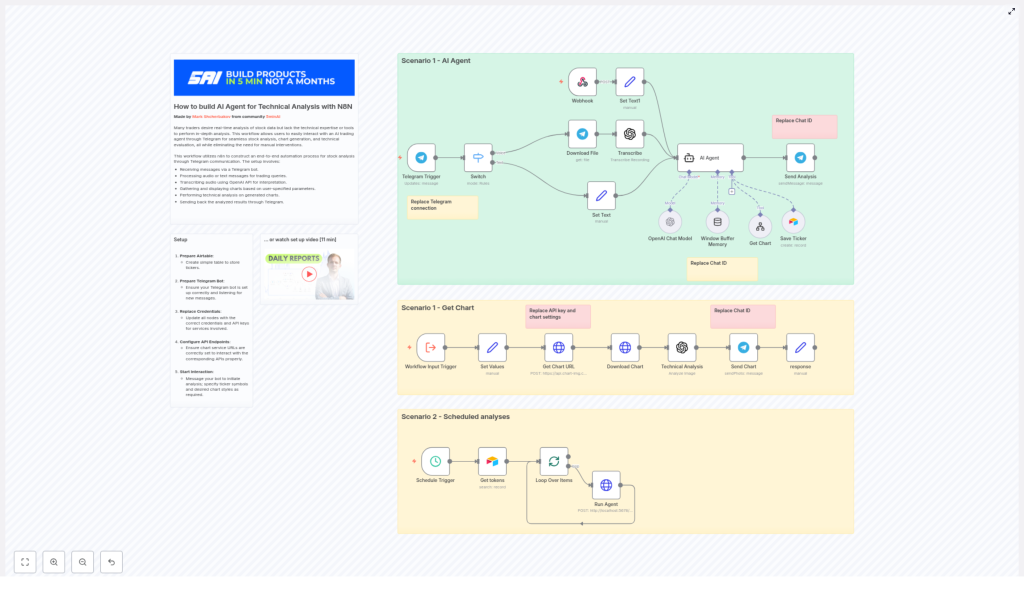
The n8n workflow acts as an AI trading agent that performs end-to-end technical analysis on demand. A Telegram user sends a ticker symbol and an optional chart style, the system generates a chart using a TradingView-style API, then an image-capable OpenAI model analyzes the chart and returns a technical summary.
The workflow supports:
- On-demand analysis triggered from Telegram (text or voice)
- Optional scheduled analysis for stored tickers using Airtable and a Schedule Trigger
- Strict separation between chart generation, analysis, and messaging for better maintainability
2. Architecture and Data Flow
2.1 High-level process
- The user sends a message to a Telegram bot with:
- A ticker symbol (for example,
TSLA,AAPL), and - An optional chart style (for example,
candle,bar,line,heikinAshi).
If the style is omitted, the workflow defaults to
candle. - A ticker symbol (for example,
- The Telegram Trigger node activates the workflow and passes the message payload into n8n.
- A Switch node determines whether the incoming message is text or voice:
- For text, the raw text is used directly.
- For voice, the audio file is downloaded and then transcribed to text using OpenAI.
- An OpenAI Chat Model node acts as the AI agent. It:
- Parses the user request
- Extracts the ticker and chart style
- Ensures only the ticker is passed to the chart-generation tool
- The Get Chart (HTTP Request) node calls a TradingView-style chart image API with:
symbol(for example,NASDAQ:TSLA)style(for example,candle)- Additional parameters such as theme, interval, and technical studies (RSI, Stoch RSI, Volume)
The API responds with a JSON payload that includes a URL to the generated chart image.
- The Download Chart node fetches the chart image URL and exposes the image as binary data within n8n.
- The Technical Analysis (OpenAI Image Analyze) node sends the chart image to an image-capable LLM. The model:
- Extracts candlestick patterns
- Identifies RSI and Stochastic RSI values
- Evaluates volume and trend context
- Describes divergences and key technical signals
- Outputs a structured, conversational analysis without buy/sell recommendations
- Telegram Send nodes return:
- The chart image
- The textual analysis
directly to the user in Telegram.
- Optional: Tickers can be stored in Airtable and processed on a schedule to generate recurring reports via a Schedule Trigger and loop.
2.2 Core components
- Telegram Trigger – entry point for user messages
- Switch – branching logic for text vs voice
- OpenAI (Transcription + Chat) – transcription of voice and intent parsing
- HTTP Request (Get Chart) – chart image generation
- Download Chart – binary image retrieval
- OpenAI Image Analyze (Technical Analysis) – chart interpretation
- Telegram Send nodes – return chart and analysis
- Airtable + Schedule Trigger (optional) – recurring analyses for saved tickers
3. Prerequisites and External Services
3.1 Required accounts and credentials
- Telegram
- Create a Telegram bot using
@BotFather. - Obtain the bot token.
- Create a Telegram bot using
- Chart image API
- Sign up for a TradingView-style chart image service (for example, Chart-Img or a similar endpoint).
- Acquire the
x-api-keyor equivalent API key.
- OpenAI
- Get an OpenAI API key.
- Ensure access to:
- A model that supports speech-to-text for voice transcription.
- An image-capable model for chart analysis.
- A chat model for parsing user intent and orchestrating tool usage.
- Airtable (optional)
- Create an Airtable base and table to store tickers for scheduled reports.
- Obtain an Airtable API key or personal access token.
3.2 n8n environment
Ensure that your n8n instance:
- Is reachable from Telegram (for webhooks)
- Can access external HTTP APIs (chart service, OpenAI, Airtable)
- Has credentials stored securely in the n8n Credentials section, not hard-coded in nodes
4. Node-by-node Breakdown
4.1 Telegram Trigger
Purpose: Start the workflow when a user interacts with the Telegram bot.
- Configuration:
- Set the Webhook URL to your n8n endpoint.
- Provide the Bot Token obtained from
@BotFather. - Optionally restrict by Chat ID if you want to limit usage to specific chats or groups.
- Input: Telegram message payload (text or voice).
- Output: Standardized message object containing:
- Message type (text or voice)
- Text content, if present
- File metadata for voice messages
- User and chat identifiers
4.2 Switch (Text vs Voice)
Purpose: Route execution depending on whether the Telegram message is text or voice.
- Configuration:
- Use the message type or presence of a
voiceproperty as the condition. - Branch A: direct text handling.
- Branch B: voice handling with download and transcription.
- Use the message type or presence of a
- Edge case handling:
- If the message does not contain recognizable text or voice, you can route to an error handler that sends a friendly response asking the user to resend their request.
4.3 Voice branch: Download File + OpenAI Transcribe
Download File node
- Purpose: Download the Telegram voice file referenced in the message.
- Input: File identifier from the Telegram Trigger node.
- Output: Binary audio data accessible to subsequent nodes.
OpenAI Transcription node
- Purpose: Convert voice input into text.
- Configuration:
- Select the OpenAI transcription model.
- Map the binary audio data from the Download File node.
- Output: Text transcript of the user’s spoken request.
- Notes:
- If transcription fails or returns empty text, you can detect this and prompt the user to type their ticker instead.
4.4 Text branch: Direct message handling
For text messages, the workflow bypasses transcription and passes the raw text directly to the AI agent (OpenAI Chat Model node). Both branches should converge into a common path that feeds a clean text prompt into the agent.
4.5 OpenAI Chat Model – AI Agent
Purpose: Interpret the user request, extract structured parameters, and orchestrate chart generation.
- Key responsibilities:
- Identify the ticker symbol from the user’s message.
- Identify the requested chart style, if specified.
- Default the chart style to
candlewhen omitted. - Ensure that only the ticker is passed to the Get Chart tool (no extraneous text).
- Respect a strict prohibition on financial advice.
- System prompt best practices:
- Include a greeting and brief explanation of the agent’s capabilities.
- Define clear parsing rules:
- Extract
tickerandstylefrom free-form text. - Normalize style values to supported options (for example,
candle,bar,line,heikinAshi). - Use
candleas the default style when unspecified.
- Extract
- Explicitly state:
- Only the ticker should be sent to the Get Chart tool.
- The agent must not provide explicit buy, sell, or hold recommendations.
4.6 HTTP Request – Get Chart
Purpose: Request a TradingView-style chart image for the specified symbol and configuration.
- Method:
POST - Endpoint: Chart image API URL (for example, Chart-Img endpoint).
- Headers:
x-api-key: your chart API key- Any additional headers required by the provider
- Body parameters (typical):
symbol: full symbol with exchange prefix (for example,NASDAQ:TSLA,NYSE:AAPL)style: chart style (for example,candleas default)theme: visual theme (for example, light or dark)interval: timeframe (for example, 1D, 4H, etc., depending on the API)studies: array or list of indicators, such as RSI, Stoch RSI, Volume
- Expected response:
- JSON object that includes a predictable property containing the chart URL (for example,
url).
- JSON object that includes a predictable property containing the chart URL (for example,
- Best practices:
- Always include the exchange prefix (for example,
NASDAQ:orNYSE:) to reduce ambiguity. - Validate that the response contains a non-empty
urlfield before continuing.
- Always include the exchange prefix (for example,
4.7 Download Chart node
Purpose: Retrieve the chart image from the URL returned by the chart API and expose it as binary data to the analysis node.
- Configuration:
- Use the URL field from the previous HTTP Request node as the target URL.
- Enable binary data output.
- Output: Binary image data (for example, PNG or JPG) that can be passed into the OpenAI image analysis node.
4.8 OpenAI Image Analyze – Technical Analysis
Purpose: Perform technical analysis on the chart image using an image-capable LLM.
- Input:
- Binary chart image from the Download Chart node.
- System prompt recommendations:
- Instruct the model to:
- Extract numerical RSI values.
- Extract Stochastic RSI values, including K and D if visible.
- Identify common candlestick patterns.
- Describe volume behavior and trend context.
- Highlight divergences between price and indicators when visible.
- Require numeric outputs where possible (for example, “RSI approximately 68”).
- Explain the significance of the values (overbought, oversold, crossovers, divergences) in descriptive terms.
- Explicitly state:
- No buy, sell, or hold recommendations.
- Analysis is informational and educational only.
- Instruct the model to:
- Output:
- A structured text summary suitable for sending directly to the user via Telegram.
4.9 Telegram Send Chart / Send Analysis
Purpose: Deliver the generated chart image and technical analysis back to the user.
- Send Chart node:
- Type: Telegram Send (Photo or Document, depending on your preference).
- Input: Binary chart image from Download Chart.
- Optional caption: A short text (for example, “Here is your chart for NASDAQ:TSLA”).
- Send Analysis node:
- Type: Telegram Send (Message).
- Input: Text from the OpenAI Image Analyze node.
- Include a compliance note that the information is not financial advice.
4.10 Airtable (Save Ticker) and Schedule Trigger (Optional)
Purpose: Support recurring technical analysis for a predefined list of tickers.
- Airtable node:
- Stores tickers and any metadata required for scheduling (for example
- Stores tickers and any metadata required for scheduling (for example
