


Build an Automated AI Newsletter Pipeline with n8n
Imagine publishing a thoughtful, AI-focused newsletter every week without scrambling for links, wrestling with drafts, or staying up late to hit send. With the right automation mindset and a practical n8n workflow, that vision becomes very real.
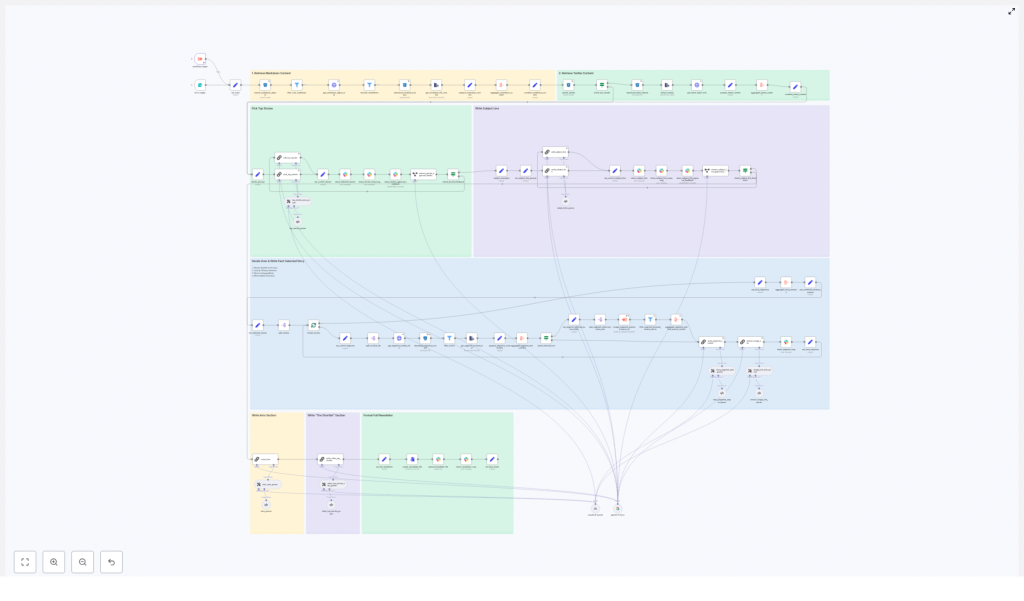
The template described here is an n8n workflow that connects markdown and tweet ingestion, LangChain and LLM-based writing, Slack approvals, and S3 or R2 storage. It guides your content from raw sources to a polished newsletter with very little manual work. In this article, you will walk through the journey from problem to possibility, then into a concrete, step-by-step pipeline you can adapt to your own needs.
The starting point: why manual newsletters hold you back
AI news moves fast. If you are trying to keep your audience informed, you already know how much time it takes to:
- Collect links and markdown notes scattered across tools
- Summarize complex stories into clear, engaging sections
- Draft subject lines, intros, and pre-headers that people actually open
- Coordinate feedback and approvals across a team
- Store and track what you sent, when, and why
Doing all of this by hand is possible, but it is slow, error-prone, and mentally draining. The more often you publish, the more fragile your process becomes. That is exactly where automation with n8n shines.
Shifting the mindset: from busywork to leverage
Automation is not about removing humans from the loop. It is about freeing your attention so you can focus on the parts of your work that truly require judgment, taste, and experience. For AI newsletters in particular, that means:
- Spending more time on story selection and narrative
- Maintaining a consistent voice and editorial bar
- Experimenting with new formats and ideas instead of fighting with logistics
With an n8n-based AI newsletter workflow, you can turn a messy, ad hoc process into a repeatable system. The workflow becomes your assistant: it gathers inputs, drafts content, routes everything for review, and archives the final result. You stay in control of what ships, but you are no longer stuck doing all the repetitive work yourself.
From idea to system: what this n8n template actually does
The workflow template uses a modular, stage-based architecture that you can extend over time. At a high level, it:
- Ingests markdown and tweet content from S3 or R2
- Aggregates and deduplicates stories
- Uses LangChain and LLM nodes to select the top stories
- Drafts structured sections with recaps, bullets, and bottom lines
- Generates subject lines and pre-headers
- Pushes everything into Slack for feedback and approvals
- Assembles the final markdown newsletter and stores it in S3 or R2
Think of this template as a foundation. Once you have it running, you can tweak prompts, add new data sources, or hook it into your email service provider. You do not have to build the whole system at once. You can start small and grow your automation as your confidence increases.
Key n8n components that power the workflow
Under the hood, the template uses familiar n8n nodes in a focused way. Here is how the main building blocks map to your newsletter pipeline:
- Form trigger or workflow trigger – kicks off the workflow on a schedule or manually for a specific newsletter date.
- S3 / R2 file search and download nodes – locate and retrieve markdown files and tweet JSON exports for that date.
- HTTP Request nodes – fetch metadata about stored content, such as source types or external-source-urls.
- Aggregate, Set, and Split In Batches nodes – group and transform content, then split stories into individual items for per-story processing.
- LangChain / LLM nodes – select top stories, write story sections, generate intros, and craft subject lines using models like Gemini or Claude.
- External scraping workflow (optional) – follows external URLs to pull in extra context or validate deep links.
- Slack integration – sends stories and drafts for review, collects feedback, and manages approval loops.
- File creation and Slack upload nodes – assemble the final markdown newsletter, export it as a file, and share or publish it.
Each of these components is configurable. As you iterate, you can adjust prompts, filters, or integration settings without redesigning the whole system.
The journey through the workflow: step-by-step
1. Ingest and organize your content
The process begins by pulling in everything you might want to consider for this edition of your AI newsletter. n8n nodes search your S3 or R2 bucket for:
- Markdown notes and articles
- Tweet exports in JSON format
The workflow downloads these files, extracts the text, and attaches metadata such as identifiers, external URLs, and image URLs. This metadata is essential for traceability, so you always know where a story came from and can link back to original sources.
2. Deduplicate and filter out noise
Next, the workflow cleans up your inputs so you are not overwhelmed by duplicates or irrelevant content. It:
- Filters out previous newsletters and unwanted file types
- Normalizes identifiers so related documents can be grouped
- Clusters items that describe the same story into a single news item
This step creates a clean, structured pool of candidate stories that your LLM can reason about effectively.
3. Let the LLM choose the top stories
Now the automation starts to feel powerful. Using a LangChain prompt, the workflow feeds the aggregated content into an LLM and asks it to select the top four stories. The prompt enforces clear constraints, such as:
- Only include stories for the current date
- Avoid political topics
- Return results as structured JSON with identifiers and source links
The LLM also generates an internal chain of thought that explains why each story was chosen. This reasoning is not sent to subscribers, but it is extremely useful when you review content in Slack and want to understand how decisions were made.
4. Draft focused segments for each story
For each selected story, the workflow resolves its identifiers, pulls in full content and any external URLs, and sends that bundle to the LLM. The model then drafts a concise newsletter section with three key parts:
- The Recap – a short summary of what happened
- Unpacked bullets – key details broken into clear bullet points
- Bottom line – a closing sentence that explains why it matters
Your prompts should enforce editorial rules such as:
- Use short sentences and active voice
- Only rely on facts from the provided source material
- Limit bolding and links to keep the layout clean
Because this is all defined in prompts, you can tune tone and structure over time without changing the surrounding workflow.
5. Generate subject lines, headlines, and pre-headers
Next, the workflow uses a specialized LLM prompt to generate subject lines and pre-headers. To keep your emails effective and on brand, you can instruct the model to:
- Tease the lead story instead of summarizing everything
- Respect strict word-count limits, for example 7 to 9 words
- Produce multiple variants so you can choose or A/B test
The workflow also generates a pre-header that complements the subject line and follows your team’s preferred format, such as a leading “PLUS:” teaser. These details help boost open rates while keeping your style consistent.
6. Keep humans in the loop with Slack review
Automation should support your editorial judgment, not override it. That is why this template deeply integrates Slack into the review cycle. Once the LLM has selected stories and drafted sections, the workflow:
- Sends the selected stories, chain-of-thought notes, and draft sections to a dedicated Slack channel
- Uses interactive messages so reviewers can approve, comment, or request specific edits
- Relies on edit-only agents to implement feedback without touching identifiers or links
This edit-only approach is important. It ensures that content IDs and external-source-urls remain intact, which keeps your pipeline auditable and safe for downstream processing.
7. Assemble, publish, and archive
Once the content is approved, the workflow assembles everything into a final markdown newsletter. n8n then:
- Converts the markdown into a file
- Uploads it to Slack or your CMS for distribution
- Stores an archived copy in S3 or R2 along with relevant metadata
You can also connect this final step to your email platform so that, after approval, the workflow can trigger the send automatically. Over time, this archive becomes a searchable record of what you published, when, and with which sources.
Best practices to keep your automation reliable
As you refine this workflow, a few practices will help you get consistent, trustworthy results.
- Invest in prompt engineering Use strict, prescriptive prompts that require the LLM to rely only on provided sources. Explicitly forbid hallucinated facts.
- Keep outputs machine friendly Ask for structured JSON when selecting stories or generating final content. This makes downstream parsing and assembly much more robust.
- Limit and control links Restrict deep links to 0-1 per bullet or paragraph, and require that all links come from the supplied source URLs. This prevents broken or incorrect links.
- Preserve identifiers at all costs Treat content IDs as immutable. Any edit step should be designed to modify only text fields, not the identifiers or external-source-urls.
- Maintain a human-in-the-loop checkpoint Automatic drafting is powerful, but always include at least one human sign-off before sending to subscribers.
- Manage LLM costs and rate limits Batch story drafting where possible or use smaller models for less critical tasks like variant subject lines.
Common pitfalls to watch out for
As you experiment and expand your automation, keep an eye out for these issues:
- Letting the LLM invent facts or URLs Always require it to use only the supplied metadata and links.
- Overly loose prompts Vague instructions lead to long, rambling paragraphs. Be explicit about tone, sentence length, and bullet counts.
- Accidentally breaking identifiers during edits Make sure your edit workflows never touch identifiers or external-source-url fields. Use dedicated edit-only transforms.
Security, compliance, and reliability in your n8n setup
As this workflow becomes part of your regular publishing process, treat it as production infrastructure:
- Store API keys and secrets in n8n credentials, not inline in nodes
- Use S3 or R2 policies and encryption for archived newsletters
- Add retries and error handling around network calls and external scrapes
- Log LLM responses and Slack approvals for audit trails and debugging
These safeguards help you scale with confidence and keep your newsletter pipeline stable as your audience grows.
Turning inspiration into action: how to get started
You do not need to perfect everything on day one. Start with a simple version of the template, then iterate. A practical path looks like this:
- Clone or rebuild the template in n8n Import or recreate the nodes, then connect your S3 or R2 storage and Slack credentials.
- Refine your LLM prompts Start with strict constraints. Feed sample content, inspect the outputs, and tweak until the tone and structure feel right.
- Run safe dry-runs Generate newsletters without sending them. Review drafts in Slack, test the edit loop, and confirm that identifiers and links remain intact.
- Measure and improve Track opens, clicks, and editorial cycle time. Use those insights to refine subject lines, story selection logic, and prompt wording.
As you gain confidence, you can extend the workflow with more sources, richer analytics, or deeper integrations. Each improvement compounds your leverage, giving you back more time to think, create, and lead.
Using this template as a stepping stone
This n8n AI newsletter workflow is more than a productivity hack. It is a concrete example of how you can turn recurring work into a system that scales with you. Once you see what is possible here, you can apply the same pattern to other parts of your business: reports, digests, summaries, or internal updates.
Automation should not replace your editorial judgment. When designed intentionally, it multiplies your ability to publish reliable, timely AI content without burning out.
Want the template to start your journey?
If you would like a head start, you can get a ready-to-import n8n workflow JSON that mirrors this pipeline, along with example prompts tuned for your preferred LLM. I can adapt it to:
- Your chosen model (OpenAI, Gemini, or Claude)
- Your file hosting (S3 or Cloudflare R2)
From there, you can customize, experiment, and grow the system as your newsletter evolves.
Call to action: Ready to automate your AI newsletter and reclaim your focus? Ask for the template or a one-hour walkthrough and get support setting it up end to end.
