

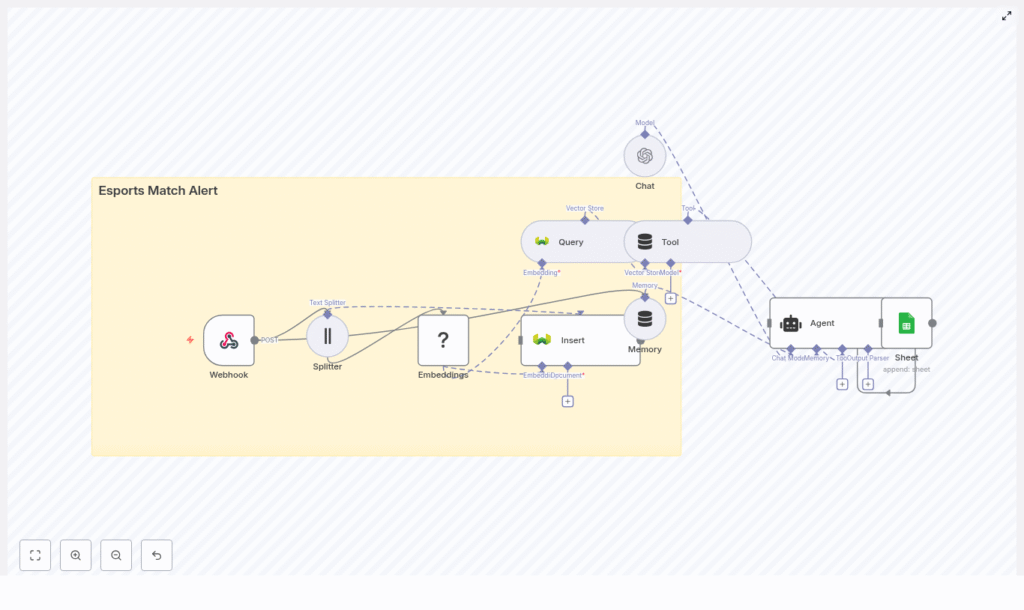
Build an Esports Match Alert Pipeline with n8n, LangChain & Weaviate
High frequency esports events generate a continuous flow of structured and unstructured data. Automating how this information is captured, enriched, and distributed is essential for operations teams, broadcast talent, and analytics stakeholders. This guide explains how to implement a production-ready Esports Match Alert pipeline in n8n that combines LangChain, Hugging Face embeddings, Weaviate as a vector store, and Google Sheets for logging and auditing.
The workflow template processes webhook events, transforms raw payloads into embeddings, persists them in a vector database, runs semantic queries, uses an LLM-driven agent for enrichment, and finally records each event in a Google Sheet. The result is a scalable, context-aware alert system that minimizes custom code while remaining highly configurable.
Why automate esports match alerts?
Modern esports operations generate a wide range of events such as lobby creation, roster updates, score changes, and match conclusions. Manually tracking and broadcasting these updates is error prone and does not scale. An automated alert pipeline built with n8n and a vector database can:
- Deliver real-time match notifications to Slack, Discord, or internal dashboards
- Enrich alerts with historical context via vector search, for example prior matchups or comeback patterns
- Maintain a structured audit trail in Google Sheets or downstream analytics systems
- Scale horizontally by orchestrating managed services instead of maintaining monolithic custom applications
For automation engineers and operations architects, this approach provides a reusable pattern for combining event ingestion, semantic search, and LLM-based reasoning in a single workflow.
Solution architecture overview
The n8n template implements an end-to-end pipeline with the following high-level stages:
- Event ingestion via an n8n Webhook node
- Preprocessing and chunking of text for efficient embedding
- Embedding generation using Hugging Face or a compatible provider
- Vector storage in a Weaviate index with rich metadata
- Semantic querying exposed as a Tool for a LangChain Agent
- Agent reasoning with short-term memory to generate enriched alerts
- Logging of each processed event to Google Sheets for audit and analytics
Although the example focuses on esports matches, the architecture is generic and can be repurposed for any event-driven notification system that benefits from semantic context.
Prerequisites and required services
Before deploying the template, ensure you have access to the following components:
- n8n – Self-hosted or n8n Cloud instance to run and manage workflows
- Hugging Face – API key for generating text embeddings (or an equivalent embedding provider)
- Weaviate – Managed or self-hosted vector database for storing embeddings and metadata
- OpenAI (optional) – Or another LLM provider for advanced language model enrichment
- Google account – Google Sheets API credentials for logging and audit trails
API keys and credentials should be stored using n8n credentials and environment variables to maintain security and operational hygiene.
Key workflow components in n8n
Webhook-based event ingestion
The entry point for the pipeline is an n8n Webhook node configured with method POST. For example, you might expose the path /esports_match_alert. Your match producer (game server, tournament API, or scheduling system) sends JSON payloads to this endpoint.
// Example match payload
{  "match_id": "12345",  "event": "match_start",  "team_a": "Blue Raptors",  "team_b": "Crimson Wolves",  "start_time": "2025-09-01T17:00:00Z",  "metadata": { "tournament": "Summer Cup" }
}
Typical event types include match_start, match_end, score_update, roster_change, and match_cancelled. The webhook node ensures each event is reliably captured and passed into the processing pipeline.
Text preprocessing and chunking
To prepare data for embedding, the workflow uses a Text Splitter (or equivalent text processing logic) to break long descriptions, commentary, or metadata into smaller segments. A common configuration is:
- Chunk size:
400tokens or characters - Chunk overlap:
40
This strategy helps preserve context across chunks while keeping each segment within the optimal length for embedding models. Adjusting these parameters is a key tuning lever for both quality and cost.
Embedding generation with Hugging Face
Each text chunk is passed to a Hugging Face embeddings node (or another embedding provider). The node produces vector representations that capture semantic meaning. Alongside the vector, you should attach structured metadata such as:
match_id- Team names
- Tournament identifier
- Event type (for example
match_start,score_update) - Timestamps and region
Persisting this metadata enables powerful hybrid queries that combine vector similarity with filters on match attributes.
Vector storage in Weaviate
Embeddings and metadata are then written to Weaviate using an Insert node. A typical class or index name might be esports_match_alert. Once stored, Weaviate supports efficient semantic queries such as:
- “Recent matches involving Blue Raptors”
- “Matches with late-game comebacks in the Summer Cup”
Configuring the schema with appropriate properties for teams, tournaments, event types, and timestamps is recommended to facilitate advanced filtering and analytics.
Semantic queries as LangChain tools
When a new event arrives, the workflow can query historical context from Weaviate. An n8n Query node is used to perform vector search against the esports_match_alert index. In the template, this query capability is exposed to the LangChain Agent as a Tool.
The agent can invoke this Tool on demand, for example to retrieve prior meetings between the same teams or similar match scenarios. This pattern keeps the agent stateless with respect to storage while still giving it on-demand access to rich, semantically indexed history.
LangChain Agent and short-term memory
The enrichment layer is handled by a LangChain Agent configured with a chat-based LLM such as OpenAI’s models. A buffer window or short-term memory component is attached to retain recent conversation context and reduce repetitive prompts.
The agent receives:
- The current match payload
- Any relevant vector search results from Weaviate
- System and developer prompts that define tone, structure, and output format
Based on this context, the agent can generate:
- Human readable alert messages suitable for Discord or Slack
- Recommendations on which channels or roles to notify
- Structured metadata for logging, such as sentiment, predicted match intensity, or notable historical references
An example agent output that could be posted to a messaging platform:
Blue Raptors vs Crimson Wolves starting now! Scheduled: 2025-09-01T17:00Z
Previous meeting: Blue Raptors won 2-1 (2025-08-15). Predicted outcome based on form: Close match. #SummerCup
Audit logging in Google Sheets
As a final step, the workflow appends a row to a designated Google Sheet using the Google Sheets node. Typical columns include:
match_ideventtype- Generated alert text
- Embedding or vector record identifiers
- Timestamp of processing
- Delivery status or target channels
This provides a lightweight, accessible log for debugging, reporting, and downstream analytics. It also allows non-technical stakeholders to review the system behavior without accessing infrastructure dashboards.
End-to-end setup guide in n8n
1. Configure the Webhook node
- Create a new workflow in n8n.
- Add a Webhook node with method
POST. - Set a path such as
/esports_match_alert. - Secure the endpoint with a secret token or signature verification mechanism.
2. Implement text splitting
- Feed relevant fields from the incoming payload (for example descriptions, match summaries, notes) into a Text Splitter node.
- Start with chunk size
400and overlap40, then adjust based on payload length and embedding cost.
3. Generate embeddings
- Add a Hugging Face Embeddings node.
- Configure the desired model and connect credentials.
- Map each text chunk as input and attach metadata fields such as
match_id, teams, tournament, event type, and timestamp.
4. Insert vectors into Weaviate
- Set up a Weaviate Insert node.
- Define a class or index name, for example
esports_match_alert. - Map the vectors and metadata from the embedding node into the Weaviate schema.
5. Configure semantic queries
- Add a Weaviate Query node to perform similarity searches.
- Use the current match payload (for example team names or event description) as the query text.
- Optionally filter by tournament, region, or time window using metadata filters.
6. Set up the LangChain Agent and memory
- Add a LangChain Agent node configured with a Chat model (OpenAI or another provider).
- Attach a short-term memory component (buffer window) so the agent can reference recent exchanges.
- Expose the Weaviate Query node as a Tool, enabling the agent to call it when it needs historical context.
- Design prompts that instruct the agent to produce concise, broadcast-ready alerts and structured metadata.
7. Append logs to Google Sheets
- Connect a Google Sheets node at the end of the workflow.
- Use OAuth credentials with restricted access, ideally a service account.
- Append a row with key fields such as
match_id, event type, generated message, vector IDs, timestamp, and delivery status.
Best practices for a robust alert pipeline
Designing metadata for precision queries
Effective use of Weaviate depends on high quality metadata. At minimum, consider storing:
match_idand tournament identifiers- Team names and player rosters
- Event type and phase (group stage, playoffs, finals)
- Region, league, and organizer
- Match and processing timestamps
This enables hybrid queries that combine semantic similarity with strict filters, for example “similar matches but only in the same tournament and region, within the last 30 days.”
Optimizing chunking and embedding cost
Chunk size and overlap directly affect both embedding quality and API costs. Larger chunks capture more context but increase token usage. Use the template defaults (400 / 40) as a baseline, then:
- Increase chunk size for long narrative descriptions or full match reports.
- Decrease chunk size if payloads are short or if you need to reduce cost.
- Monitor retrieval quality by sampling query results and adjusting accordingly.
Handling rate limits and batching
To keep the system resilient under load:
- Batch embedding requests where supported by the provider.
- Use n8n’s error handling to implement retry and backoff strategies.
- Configure concurrency limits in n8n to respect provider rate limits.
Security and access control
- Protect the webhook using a secret token and, where possible, signature verification of incoming requests.
- Store Hugging Face, Weaviate, and LLM provider keys in n8n credentials or environment variables, not in workflow code.
- Use OAuth for Google Sheets, with a dedicated service account and restricted sheet permissions.
- Restrict network access to self-hosted Weaviate instances and n8n where applicable.
Troubleshooting and performance tuning
- Irrelevant or noisy embeddings Validate the embedding model choice and review your chunking strategy. Overly large or small chunks can degrade semantic quality.
- Missing or incomplete Google Sheets entries Confirm that OAuth scopes allow append operations and that the configured account has write permissions to the target sheet.
- Slow semantic queries Check Weaviate indexing status and resource allocation. Consider enabling approximate nearest neighbor search and scaling memory/CPU for high traffic scenarios.
- Unreliable webhook delivery Implement signature checks, and optionally queue incoming events in a temporary store (for example Redis or a database) before processing to support retries.
Scaling and extending the workflow
As event volume and stakeholder requirements grow, you can extend the pipeline in several ways:
- Move Weaviate to a managed cluster or dedicated nodes to handle increased query and write throughput.
- Adopt faster or quantized embedding models to reduce latency and cost at scale.
- Integrate additional delivery channels such as Discord, Slack, SMS, or email directly from n8n.
- Export logs from Google Sheets to systems like BigQuery, Grafana, or a data warehouse for deeper analytics.
The template provides a strong foundation that can be adapted to different game titles, tournament formats, and organizational requirements without rewriting core logic.
Pre-launch checklist
Before pushing the Esports Match Alert system into production, verify:
- Webhook is secured with token and signature validation where supported.
- All API keys and credentials are stored in n8n credentials, not hard coded.
- The Weaviate index (
esports_match_alertor equivalent) is created, populated with test data, and queryable. - The embedding provider meets your latency and cost requirements under expected load.
- Google Sheets logging works end to end with sample events and correct column mappings.
- LangChain Agent outputs are reviewed for accuracy, tone, and consistency with your brand or broadcast style.
Conclusion
This n8n-based Esports Match Alert pipeline demonstrates how to orchestrate LLMs, vector search, and traditional automation tools into a cohesive system. By combining n8n for workflow automation, Hugging Face for embeddings, Weaviate for semantic storage, and LangChain or OpenAI for reasoning, you can deliver context-rich, real-time alerts with minimal custom code.
The same architecture can be reused for other domains that require timely, context-aware notifications, such as sports analytics, incident management, or customer support. For esports operations, it provides a practical path from raw match events to intelligent, audit-ready communications.
If you would like a starter export of the n8n workflow or a detailed video walkthrough, use the link below.

