


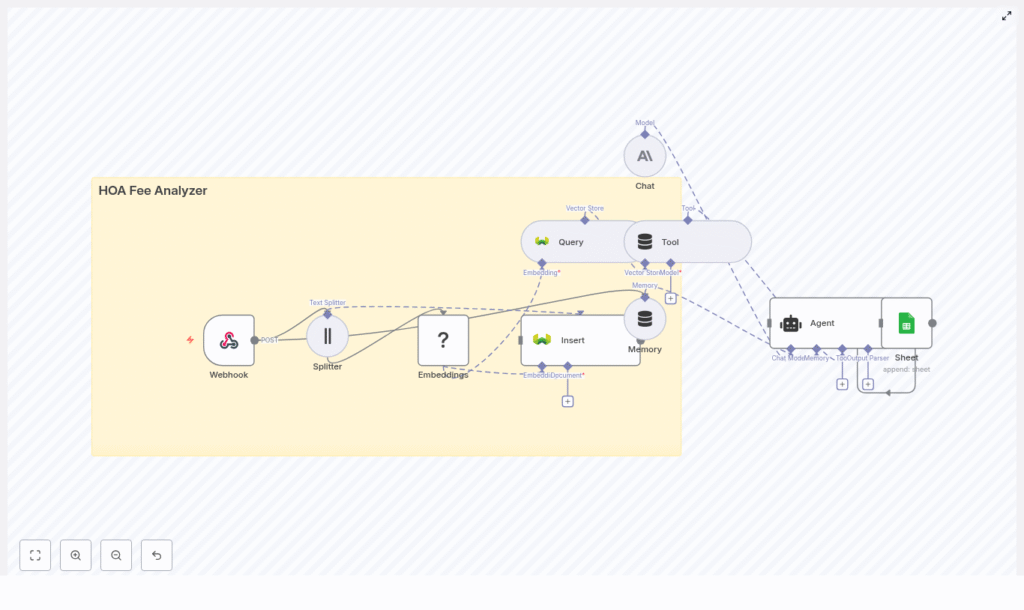
Build an HOA Fee Analyzer with n8n & Weaviate
This guide walks you through how to build an automated HOA fee analyzer using n8n, Hugging Face embeddings, a Weaviate vector store, Anthropic chat agents, and Google Sheets.
The goal is to help you turn dense HOA documents into searchable, structured knowledge, then use that knowledge to answer questions, calculate fees, and log results automatically.
What You Will Learn
By the end of this tutorial, you will be able to:
- Explain the core concepts behind an HOA Fee Analyzer built in n8n
- Set up an n8n workflow that ingests HOA documents through a Webhook
- Split long documents into chunks and generate embeddings with Hugging Face
- Store and query vectors in Weaviate for semantic search
- Use an Anthropic chat agent to answer HOA fee questions using a vector tool
- Log query results and insights into Google Sheets for reporting and audits
- Apply basic security, testing, and optimization practices to your workflow
Why Build an HOA Fee Analyzer?
HOA documents are packed with details: fee schedules, special assessments, reserve guidelines, and maintenance responsibilities. Reading them manually for every property or client is slow and error prone.
An HOA Fee Analyzer helps you:
- Automate document ingestion so PDFs or text can be processed as soon as they arrive
- Convert text into embeddings so you can use semantic search instead of keyword matching
- Expose a conversational interface where users can ask natural language questions
- Log results to Google Sheets for audits, compliance, and downstream workflows
This is valuable for homeowners, real estate professionals, and property managers who need quick, reliable answers about HOA fees and rules.
Concepts & Architecture
How the n8n HOA Analyzer Fits Together
At a high level, the workflow looks like this:
- A Webhook in n8n receives HOA documents or extracted text.
- A Text Splitter breaks long documents into smaller chunks.
- Hugging Face Embeddings convert each chunk into a numeric vector.
- Weaviate stores these vectors and associated metadata.
- An Anthropic chat agent uses a vector Tool to query Weaviate.
- Google Sheets records results for tracking and reporting.
Core Components in the Workflow
- n8n Webhook – Receives POST requests with HOA text, PDF-extracted content, or URLs, along with metadata like property ID and HOA name.
- Text Splitter – Splits long text into chunks (with overlap) to keep context while avoiding very long passages.
- Hugging Face Embeddings – Transforms each text chunk into a vector representation suitable for semantic search.
- Weaviate vector store – Stores embeddings and metadata, and supports similarity search queries.
- Anthropic chat agent – Receives user questions, calls the Weaviate query tool, and synthesizes clear answers.
- Google Sheets – Logs queries, computed fee insights, and document references for auditing and analytics.
Step-by-Step: Building the HOA Fee Analyzer in n8n
This section walks through the workflow in the order you would typically build it in n8n.
Step 1 – Configure the Webhook in n8n
Start by creating a Webhook node in n8n that will receive your HOA data.
What the Webhook should accept:
- Raw text from an HOA document
- Text extracted from a PDF
- A URL that your pipeline will use to fetch the document content
Recommended metadata fields:
- Property ID
- HOA name
- Upload or ingestion date
This metadata ensures that every document and every answer can be traced back to its source.
Step 2 – Split Long HOA Documents into Chunks
Most HOA documents are long and cover many topics. Before generating embeddings, you should split them into smaller sections.
Use n8n’s Text Splitter node and configure it as follows:
- Choose a strategy:
- Character-based splitting, or
- Sentence-based splitting
- Set a chunk size, for example 400 characters
- Set an overlap, for example 40 characters, to preserve context between chunks
Splitting prevents the embedding model from handling overly long passages, which can reduce retrieval quality. Smaller chunks with slight overlap usually lead to more precise answers.
Step 3 – Generate Embeddings with Hugging Face
Next, add a Hugging Face embeddings node (or another embeddings provider) to your n8n workflow.
For each text chunk:
- Send the chunk to the embedding model.
- Receive a numeric vector representation of that chunk.
Model selection tips:
- Choose a compact transformer-based model if you need a balance of speed and semantic quality.
- Consider cost if you plan to embed large volumes of documents.
These embeddings are what Weaviate will use later for semantic similarity search.
Step 4 – Store Text & Vectors in Weaviate
Once you have embeddings, you can store them in a Weaviate collection (index).
For each chunk, insert:
- The original chunk text
- Metadata such as:
- Document ID
- Page number (if available)
- HOA name
- Property ID
- The embedding vector
Good metadata design is critical. It allows you to:
- Filter by specific HOAs or properties
- Limit results to documents within certain dates
- Support faceted search across multiple HOAs
Step 5 – Add a Weaviate Query Tool for Retrieval
Now that your data is in Weaviate, you need a way to retrieve relevant chunks for each question.
In the same n8n workflow, add a query node that:
- Accepts a user query or question from the agent.
- Uses Weaviate to perform a top-K nearest neighbor search based on embeddings.
- Returns:
- The matching chunk text
- The associated metadata
These results are then passed to the Anthropic agent so that it can construct an answer and reference specific parts of the HOA document.
Step 6 – Integrate an Anthropic Chat Agent
Next, add an Anthropic chat model node to act as the agent that interacts with users and the vector store.
Configure the agent with two main capabilities:
- Tool calling: The agent should be able to call your Weaviate query node as a Tool whenever it needs information from the HOA documents.
- Short-term memory: Maintain context within a session so the agent can handle follow-up questions.
Prompt template suggestions:
- Instruct the agent to cite sources by including document IDs, page numbers, or HOA names in its answers.
- Ask it to compute fee totals when requested, such as:
- Monthly versus annual fee breakdowns
- Average monthly HOA fees across documents
- Tell it to request clarification if the question is ambiguous or the documents appear inconsistent.
The result is a conversational interface that can answer questions like “What are the recurring HOA fees for this property?” using the indexed document content.
Step 7 – Log Outcomes to Google Sheets
Finally, add a Google Sheets node to log the results of each interaction or analysis.
When the agent finishes a task, such as calculating HOA fees or identifying a special assessment, append a new row that includes:
- The original user query
- The agent’s parsed result or summary
- The related document ID or HOA name
- A timestamp of when the analysis was performed
This creates an auditable trail that you can use for:
- Compliance and audits
- Reporting for clients or internal teams
- Triggering downstream workflows like billing, notifications, or escalations
Security, Data Privacy, and Governance
Because HOA documents may contain sensitive or personal information, you should design your n8n workflow with security in mind.
- Encrypt data in transit and at rest:
- Use TLS for webhooks and API calls.
- Ensure storage solutions encrypt data at rest where possible.
- Limit data retention:
- Define how long you keep documents and embeddings.
- Periodically purge expired entries from Weaviate.
- Harden integrations:
- Use dedicated service accounts and scoped API keys for Google Sheets.
- Rotate credentials regularly.
- Sanitize inputs:
- Validate and sanitize user input to avoid injection attacks.
- Restrict the file types and sources accepted by your Webhook.
Testing & Validation
Before you rely on your HOA Fee Analyzer in production, you should test it with realistic documents.
Build a Test Dataset
Include a variety of HOA materials, for example:
- Fee schedules and dues tables
- Meeting minutes that mention assessments
- Reserve studies and financial summaries
Example Validation Questions
Use your agent to answer questions such as:
- “List all recurring HOA fees and their frequency (monthly, quarterly, annual).”
- “Are there any special assessments between [DATE1] and [DATE2]? If yes, what are the amounts and what do they cover?”
- “Summarize maintenance responsibilities for owners versus the HOA in plain language.”
Measure and Tune Performance
Check both the retrieval and the final answers:
- Evaluate precision and recall of the retrieved chunks from Weaviate.
- Adjust:
- Chunk size and overlap in the Text Splitter
- The embedding model used
- The K value, which controls how many neighbors are returned for each query
Iterate until the analyzer consistently returns accurate and complete information.
Optimization Tips for n8n & Weaviate
Once your workflow is working, consider these optimizations for performance and cost.
- Cache common answers:
- Use an n8n memory node to store frequently asked questions and computed results.
- This reduces repeated calls to Weaviate and the language model.
- Use metadata filters:
- In Weaviate queries, filter by HOA name, property ID, or document date.
- This narrows the search space and can improve both speed and relevance.
- Batch inserts:
- When ingesting many documents, batch embeddings into bulk insert operations.
- This reduces API overhead and speeds up indexing.
- Monitor costs:
- Track embedding and language model usage.
- Use smaller, cheaper models for embeddings and reserve more capable models for the agent when necessary.
Example Prompts for Your Anthropic Agent
Here are some starting prompts you can provide to users or bake into your UI. Customize them for your own HOA datasets.
- “Find and list recurring HOA fees for [HOA_NAME]. Include frequency and any conditional triggers.”
- “Does this HOA document include any special assessments between [DATE1] and [DATE2]? If yes, provide amounts and scope.”
- “Summarize maintenance responsibilities for owners versus the HOA in plain language.”
These prompts guide the agent toward structured, actionable outputs that are easy to log in Google Sheets and share with stakeholders.
Deployment & Next Steps
Move from Prototype to Production
After testing and tuning, deploy your n8n workflow to a production environment.
Typical next steps include:
- Connecting the Webhook to frontend forms where users upload HOA documents
- Integrating with an ingestion pipeline for bulk document uploads
- Scheduling regular ingestion for newly updated HOA documents
Add Notifications and Alerts
To make the analyzer more proactive, consider adding notification steps in n8n, for example:
- Send an email or Slack message when:
- A large special assessment is detected
- There are amendments to fee structures
- Reserve requirements are missing or appear insufficient
Recap & FAQ
Quick Recap
- You built an HOA Fee Analyzer using:
- n8n for orchestration
- Hugging Face embeddings for vectorization
- Weaviate as a vector store for semantic search
- An Anthropic agent for conversational reasoning
- Google Sheets for logging and reporting
- The workflow:
- Ingests HOA documents via Webhook
- Splits and embeds text
- Stores and queries vectors in Weaviate
- Uses an agent to answer questions and compute fees
- Logs outcomes in Google Sheets for auditability
Frequently Asked Questions
Can I use a different embeddings provider instead of Hugging Face?
Yes. While this guide uses Hugging Face embeddings, you can replace that node with another provider as long as it outputs vectors that are compatible with your Weaviate configuration.
What if my HOA documents are PDFs?
You can extract text from PDFs using a separate step or service,
