


Build an MQTT Topic Monitor with n8n & Vector DB
Every MQTT message that flows through your systems carries a story: a sensor reading, an early warning, a quiet signal that something is about to go wrong or incredibly right. When your IoT fleet grows, those stories quickly turn into noise. Manually scanning logs or wiring together ad hoc scripts is not just tiring, it steals time from the work that actually grows your product or business.
This is where thoughtful automation changes everything. In this guide, you will walk through an n8n workflow template that transforms raw MQTT messages into structured, searchable, and AI-enriched insights. You will see how a simple webhook, a vector database, and an AI agent can help you reclaim time, reduce stress, and build a foundation for a more automated, focused way of working.
By the end, you will have a complete MQTT topic monitor that:
- Ingests MQTT messages via a webhook
- Splits and embeds text for semantic understanding
- Stores vectors in a Redis vector index
- Uses an AI agent with memory and vector search for context-aware analysis
- Logs structured results into Google Sheets for easy tracking and reporting
From overwhelming MQTT streams to meaningful insight
As IoT deployments expand, MQTT topics multiply. Payloads become more complex, formats drift over time, and dashboards fill with alerts that are hard to interpret. You might recognize some of these challenges:
- Semi-structured or noisy payloads that are hard to search
- Repeated alerts that need explanation, not just another notification
- Pressure to ship a proof of concept quickly, without building a full data platform
Trying to manually interpret every message is not sustainable. The real opportunity is to design a workflow that can understand messages at scale, remember context, and surface what actually matters. That is exactly what this n8n template is designed to do.
Adopting an automation-first mindset
Before diving into nodes and configuration, it helps to shift how you think about MQTT monitoring. Instead of asking, “How do I keep up with all this?”, ask:
- “Which parts of this can a workflow reliably handle for me?”
- “Where can AI summarize, categorize, and highlight issues so I do not have to?”
- “How can I structure this now so I can build more advanced automations later?”
This template is not just a one-off solution. It is a reusable pattern: a streaming ingestion path combined with modern vector search and an AI agent. Once you see it working for MQTT, you can adapt the same pattern to other event streams, logs, and alerts.
Why this particular architecture works
The workflow uses a lightweight but powerful combination of tools: n8n for orchestration, embeddings for semantic understanding, Redis as a vector database, and an AI agent for contextual analysis. Together, they unlock capabilities that are hard to achieve with traditional keyword search or simple rule-based alerts.
This architecture is ideal for:
- IoT fleets with noisy or semi-structured messages where you want semantic search over topics and payloads
- Alert dashboards that need explanation, enrichment, or summarization instead of raw data dumps
- Teams building fast proofs of concept who want to validate AI-driven monitoring before investing in heavy infrastructure
Think of it as a flexible foundation. You can start small, then extend it with more actions, routing logic, or additional tools as your needs grow.
The workflow at a glance
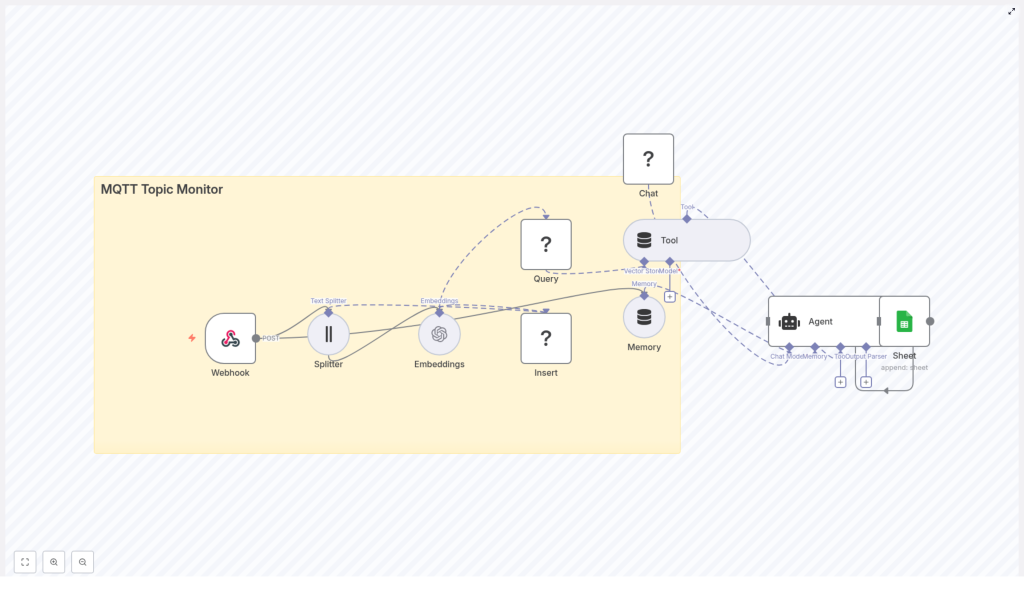
Here is the high-level flow of the n8n template you will be working with:
- Webhook – receives MQTT messages forwarded via HTTP
- Splitter – breaks long text into manageable chunks
- Embeddings – converts text into vectors using an embeddings model
- Insert – stores vectors in a Redis vector index (
mqtt_topic_monitor) - Query + Tool – performs vector search and exposes it as a tool to the AI agent
- Memory – keeps a buffer of recent conversational context
- Chat / Agent – uses an LLM to analyze messages and create structured output
- Sheet – appends structured results to Google Sheets
Next, you will walk through each part in order, so you can understand not only how to configure it, but also why it matters for your long-term automation strategy.
Step 1: Capture MQTT messages with a webhook
Your journey starts with a simple but powerful idea: treat every MQTT message as an HTTP payload that can trigger a workflow.
In n8n, configure a Webhook node. This node will accept POST requests from your MQTT broker or a bridge service such as mosquitto or any MQTT-to-webhook integration. The webhook expects a JSON body containing at least:
{  "topic": "sensors/temperature/device123",  "payload": "{ \"temp\": 23.4, \"status\": \"ok\" }",  "timestamp": "2025-01-01T12:00:00Z"
}
Adjust the structure to match your broker’s forwarding format, then:
- Point your MQTT broker or bridge to the n8n webhook URL
- Use authentication or IP restrictions in production to secure the endpoint
Once this is in place, every relevant MQTT message becomes an opportunity for automated analysis and logging, not just another line in a log file.
Step 2: Split long payloads into meaningful chunks
IoT payloads can be short and simple, or they can be large JSON objects, stack traces, or combined logs from multiple sensors. Large blocks of text are hard to embed effectively, and they can exceed token limits for models.
To handle this, the template uses a Splitter node with a character-based strategy:
chunkSize = 400chunkOverlap = 40
This approach:
- Breaks long text into smaller, coherent segments
- Maintains a bit of overlap so context is not lost between chunks
- Improves embedding quality for semantic search
You can tune these values based on your data shape and the token limits of your chosen embeddings model. If you notice that important context is being cut off, slightly increasing the overlap can help.
Step 3: Generate embeddings for semantic understanding
Next, you convert text into vectors that a machine can understand semantically. This is where your MQTT monitor becomes more than a simple log collector.
In the Embeddings node:
- Configure your OpenAI API credentials or another embeddings provider
- Choose a model optimized for semantic search, such as
text-embedding-3-smallor a similar option
Along with the vector itself, store useful metadata with each embedding, for example:
topicdevice_id(if present in the payload)timestamp- Any severity or status fields you rely on
This metadata becomes incredibly valuable later for filtered queries, troubleshooting, and dashboards.
Step 4: Store vectors in a Redis index
With embeddings ready, you need a place to store and search them efficiently. The template uses Redis (RedisStack/RedisAI) as a fast vector database.
In the Insert node:
- Connect to your Redis instance using n8n’s Redis credentials
- Use the vector index name
mqtt_topic_monitor
Redis gives you high performance similarity search, which lets you quickly find messages that are semantically similar to new ones. For production use, keep these points in mind:
- Ensure your Redis instance has sufficient memory
- Define a TTL policy or schedule a cleanup workflow to manage retention
- Consider sharding or partitioning indices if you have very large datasets
This step turns your MQTT stream into a living knowledge base that your AI agent can tap into whenever it needs context.
Step 5: Enable vector queries and agent tooling
Storing vectors is only half the story. To make them useful, your agent must be able to search and retrieve relevant entries when analyzing new messages.
The workflow uses:
- A Query node to perform nearest neighbor searches in the Redis index
- A Tool node that wraps this vector search as a retriever the AI agent can call
When a new MQTT message arrives, the agent can query the vector store to:
- Find similar past messages
- Identify recurring patterns or repeated errors
- Use historical context to produce better explanations and suggested actions
This is where the workflow starts to feel like a smart assistant for your MQTT topics, not just a passive log collector.
Step 6: Add memory and an AI agent for rich analysis
To support more natural, evolving analysis, the workflow includes a Memory node and a Chat / Agent node.
The Memory node:
- Maintains a chat memory buffer of recent interactions
- Helps the agent remember what it has already seen and summarized
The Chat / Agent node then ties everything together. It:
- Receives the parsed MQTT message
- Optionally calls the Tool to search for similar vectors in Redis
- Uses a configured language model (such as a Hugging Face chat model or another LLM) to produce structured output
The template uses an agent prompt that defines the expected output format, for example including fields like summary, tags, or recommended actions. You are encouraged to iterate on this prompt. Small refinements can dramatically improve the quality of the insights you get back.
Step 7: Log structured results to Google Sheets
Automation is most powerful when its results are easy to share, track, and analyze. To achieve that, the final step of this workflow appends a new row to a Google Sheet using the Sheet node.
Typical columns might include:
timestamptopicdevice_idsummarytagsaction
With this structure in place, you can:
- Build dashboards on top of Google Sheets
- Trigger additional workflows in tools like Zapier or n8n itself
- Keep a simple but powerful audit trail of how your MQTT topics evolve over time
Practical guidance for reliable, scalable automation
Security and credentials
- Protect your webhook with API keys, IP allowlists, or a VPN
- Rotate credentials regularly for OpenAI, Hugging Face, Redis, and Google Sheets
- Limit access to the n8n instance to trusted users and networks
Cost awareness
- Embeddings and LLM calls incur usage-based costs
- Start by sampling or batching messages before scaling to full volume
- Monitor usage to understand which topics generate the most traffic and cost
Indexing and retention strategy
- Always persist meaningful metadata such as
topic,device_id, and severity - Use TTLs or scheduled roll-up processes to avoid unbounded vector growth
- Partition indices by topic or device family if you expect very high scale
Model selection and performance
- Choose embeddings models built for semantic search
- Pick chat models that balance latency, cost, and safety for your use case
- Monitor n8n execution logs and Redis metrics to catch latency or error spikes early
Troubleshooting along the way
Webhook not receiving messages
- Double-check the webhook URL in your MQTT bridge configuration
- Verify authentication and any IP restrictions
- Use a request inspector such as ngrok or RequestBin to confirm the payload format
Poor embedding quality or irrelevant search results
- Review your chunking strategy; ensure each chunk carries meaningful context
- Adjust
chunkSizeandchunkOverlapif important information is split apart - Use metadata filters in your queries to reduce noise and increase precision
Slow or memory-heavy Redis vector queries
- Increase available memory or optimize Redis index settings
- Shard or partition indices by topic or device group
- If scale requirements grow significantly, consider an alternative vector database such as Milvus or Pinecone
Real-world ways to use this template
Once you have the workflow running, you can start applying it to concrete use cases that directly support your operations and growth.
- Alert summarization: Detect anomalous sensor patterns and have the agent generate human-readable summaries that you log to a spreadsheet or ticketing system.
- Device troubleshooting: When a device reports an error, retrieve similar historical payloads and let the agent suggest probable root causes.
- Semantic search over device logs: Search for relevant events even when different devices use slightly different schemas or field names.
As you gain confidence, you can extend the workflow to trigger notifications, create incident tickets, or call external APIs based on the agent’s output.
Scaling your MQTT automation
When you are ready to move from prototype to production, consider the following scaling strategies:
- Batch embeddings where possible to reduce the number of API calls
- Run multiple n8n workers to increase ingestion throughput
- Partition vector indices by topic, device family, or region to keep nearest neighbor searches fast
Scaling does not have to be all or nothing. You can gradually expand coverage, starting with the topics that matter most to your team.
Configuration checklist for quick setup
Use this checklist to confirm your template is ready to run:
- n8n Webhook: secure URL, accepts JSON payloads
- Splitter:
chunkSize = 400,chunkOverlap = 40(adjust as needed) - Embeddings: OpenAI (or other) API key, model such as
text-embedding-3-small - Redis: index name
mqtt_topic_monitor, configured via n8n Redis credentials - Agent: Hugging Face or OpenAI model credential, prompt that defines structured output
- Google Sheets: OAuth2 connector with append permissions to your chosen sheet
From template to transformation
Combining n8n with embeddings and a Redis vector store gives you far more than a basic MQTT topic monitor. It gives you a flexible, AI-powered pipeline that can semantically index, search, and summarize IoT data with minimal engineering overhead.
This template is a starting point, not a finished destination. As you work with it, you can:
- Refine prompts to improve summaries and recommendations
- Add new fields and metadata to support richer analysis
