

Build an n8n AI Agent with LangChain & MCP
What if every repetitive question, every manual lookup, and every tiny calculation could be handled for you, in the background, by an AI Agent that you control? The “MCP Learning” n8n template is designed to be that turning point. It connects a chat trigger, an AI Agent powered by LangChain and OpenAI, and a set of reliable tools (Calculator, HTTP requests, and an MCP client) so you can move from doing tasks yourself to orchestrating them with automation.
This guide walks you through that journey. You will start with the problem of scattered, manual work, shift into what becomes possible when you adopt an automation mindset, then learn how this n8n template gives you a practical, ready-to-use pattern you can adapt and grow over time.
The problem: manual tasks stealing your focus
Most teams face the same bottlenecks. A customer asks a question, and you jump into a system to check an order. A colleague wants a quick calculation, and you reach for a spreadsheet. An internal request appears, and you manually trigger an API call or microservice. Each action seems small, but together they drain time and attention that could be spent on strategy, creativity, or growth.
AI and automation can help, but only if they are connected in a safe and structured way. You need something that can:
- Listen to real chat messages and act on them
- Use a powerful LLM like OpenAI to understand intent
- Call tools in a controlled, auditable way
- Keep side effects isolated and traceable
This is exactly where the “MCP Learning” n8n workflow template comes in. It is not just a demo, it is a reusable pattern that you can apply to customer support, internal operations, and any workflow that benefits from an AI agent with real tools at its disposal.
Mindset shift: from doing the work to designing the system
Adopting automation is not only about technology, it is about mindset. Instead of asking, “How do I respond to this request?” you start asking, “How can I design a system that responds for me, safely and reliably?”
With n8n, LangChain, and MCP, you are not building a one-off chatbot. You are building an AI Agent that:
- Understands natural language through an OpenAI Chat Model
- Plans actions using LangChain agent logic
- Calls well-defined tools like a Calculator, HTTP Request, or MCP Client
- Executes side effects in a separate, controlled flow using an MCP Server Trigger
This template encourages you to think like an architect of your own workflows. You define which tools are available, you set the rules, and you decide how far the agent can go. Every improvement you make compounds over time, freeing more hours and mental energy for the work that actually moves you or your business forward.
The n8n AI Agent template: your starting point
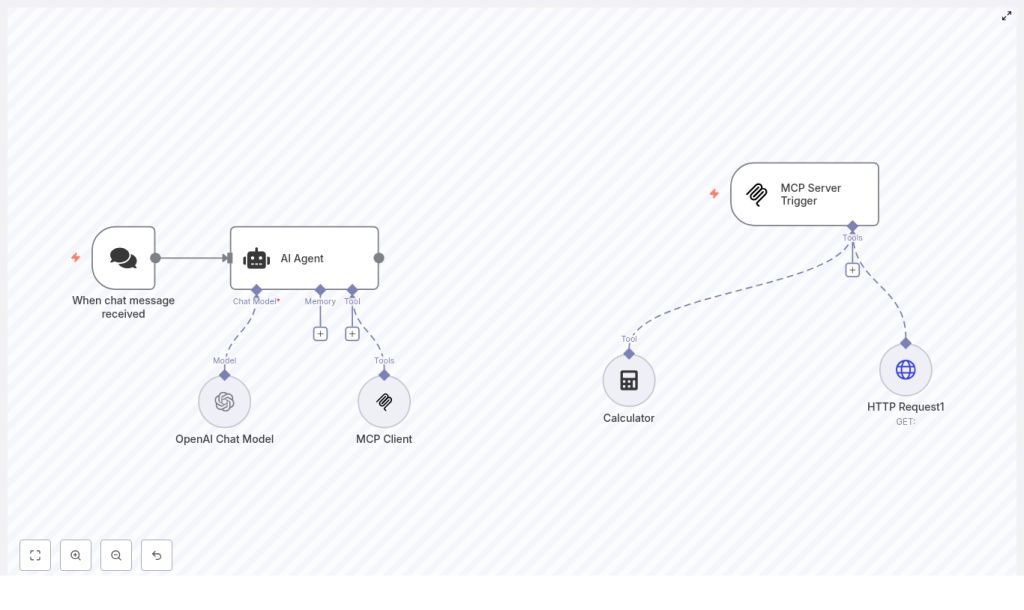
The “MCP Learning” template shows a modern way to orchestrate AI inside n8n. It connects:
- A chat trigger that starts the workflow when a message is received
- An AI Agent node powered by LangChain logic
- An OpenAI Chat Model for language understanding and generation
- Tools like a Calculator, HTTP Request, and MCP Client that the agent can call
- An MCP Server Trigger that handles those MCP tool calls on a separate flow
Once set up, you can send a message to your chat entry point, watch the agent interpret it, decide whether it needs to call a tool, and then respond with a clear, verifiable answer. It is a powerful pattern that you can adapt to fit your specific use cases.
How the workflow behaves: from message to meaningful action
To understand the transformation this template enables, it helps to walk through the full journey of a single message:
- A user sends a chat message. This could be from a webhook or any supported platform integration.
- The message lands in the When chat message received node, which triggers the workflow and passes the content onward.
- The AI Agent node receives the message. Using LangChain logic and the configured OpenAI Chat Model, it interprets the user’s intent and plans its next steps.
- If the agent decides it needs extra information or a precise operation, it calls one of the tools available to it, such as:
- Calculator for deterministic numeric calculations
- HTTP Request (Tool) to reach external APIs or microservices
- MCP Client to interact with tools managed via MCP
- Tools run in isolation. When the MCP Client is used, the request is handled by a separate flow that starts from the MCP Server Trigger. This trigger receives the tool call, executes the required action, and returns the result.
- The AI Agent gathers the tool outputs, composes a final response, and sends it back to your chat platform or any downstream system you connect.
The result is a loop where your AI Agent not only talks, but acts. It can compute, fetch data, and perform side effects in a controlled, observable way.
Node-by-node: what powers this template
When chat message received
This node is the entry point. It listens for incoming chat events, either via webhook or a platform-specific trigger. Every user message that reaches this node becomes a potential automated interaction handled by your AI Agent.
AI Agent
The AI Agent node is the coordinator of the entire experience. It:
- Receives the incoming chat message
- Runs your LangChain agent logic for planning and tool selection
- Decides when to call tools and how to combine their outputs
- Generates a final response for the user
In n8n, this node integrates directly with LangChain, connecting the chat model and your tool set into one cohesive agent behavior.
OpenAI Chat Model
The OpenAI Chat Model node provides the language intelligence. In the template, it is configured with a modern model such as gpt-4.1-nano, but you can choose the model that fits your needs and budget.
Before you enable this node, make sure your OpenAI credentials are correctly configured in n8n under Credentials → OpenAI API Key. This step unlocks the LLM that powers understanding, reasoning, and natural language responses.
MCP Client & MCP Server Trigger
The MCP pair is what makes structured tool orchestration possible. They work together as a client-server pattern inside your automations:
- MCP Client appears to the AI Agent as a tool it can call. When chosen, the agent sends its request through this client.
- MCP Server Trigger runs in a separate n8n flow. It listens for incoming MCP tool calls, executes the desired action, and returns the result.
This separation lets you run tools in isolation, keep side effects under control, and centralize how tool calls are logged and monitored. It is a scalable pattern for safe, auditable AI-driven actions.
Calculator
The Calculator node is a simple but powerful example of a deterministic tool. Instead of asking the LLM to approximate a calculation, the agent calls this node to perform exact numeric operations. This keeps results auditable and reduces the risk of hallucinated numbers.
HTTP Request (Tool)
The HTTP Request node, configured as a tool, lets your agent talk to the outside world. It can:
- Send GET or POST requests
- Call internal microservices or external APIs
- Trigger background jobs or workflows in other systems
In the template, it serves as a hook for richer automations, like checking order statuses, updating records, or kicking off internal processes.
Getting started: bring the template into your n8n space
To turn this pattern into something you can test and customize, follow these steps in your own n8n instance:
- Import the template JSON Go to Workflow → Import from JSON and paste or upload the template file.
- Configure OpenAI credentials In Credentials, add or update your OpenAI API Key, then link it to the OpenAI Chat Model node.
- Set up the chat trigger Configure the webhook URL or connect the trigger to your chat platform integration so that incoming messages can reach the workflow.
- Align MCP settings Double check the MCP Server Trigger
webhookIdand the MCP ClientsseEndpoint. Update them so they match your MCP deployment or local test instance. - Adjust HTTP Request parameters If you plan to call specific APIs, customize the HTTP Request node body, headers, and endpoints to match your services.
- Activate and test Turn the workflow on, send a few sample messages, and watch how the agent calls tools and responds.
Within a few minutes, you will have a working AI Agent in n8n that you can observe, refine, and extend.
Best practices to keep your AI Agent safe and reliable
Security and credentials
Security is part of building mature automation. To keep your workflows safe:
- Never hard-code API keys or tokens in workflow JSON
- Use n8n Credentials to store secrets securely
- Restrict the HTTP Request tool to trusted endpoints
- Implement authentication and authorization where possible
Tool design
The more deterministic your tools are, the more predictable your agent becomes. Ideal tools include:
- Calculators and numeric operations
- Lookups against internal databases or APIs
- Authenticated HTTP calls with clear input and output formats
This approach minimizes hallucinations and makes debugging far easier.
Agent prompts and safety
Strong system prompts are your guardrails. Use them to define:
- The scope of what the agent should and should not do
- Which tools it may call and in what situations
- How it should refuse or escalate unsafe or unclear requests
For tools with side effects, consider adding a verification step. For example, you can require explicit confirmation from the user or a structured request format before the agent calls a tool that changes data or triggers external actions.
Observability and auditing
To grow your automation confidently, you need visibility into what the agent is doing. Combine:
- Logs of all tool calls and agent plans
- Model responses captured in n8n
- The MCP Server Trigger pattern, which centralizes tool execution logs
- n8n’s execution history for a full audit trail
This makes it much easier to troubleshoot, improve prompts, and demonstrate that your AI workflows are behaving as intended.
Real-world use cases: where this template can take you
Once you understand the pattern, you can apply it to many scenarios. A few common examples include:
- Customer support assistants that compute refunds, check order statuses, or call backend APIs for account information
- Automated data enrichment that uses HTTP tools to fetch external records and update your internal systems
- Internal automation for scheduling tasks, running computations, or handling form submissions without manual intervention
Each new use case builds on the same foundation: a chat trigger, an AI Agent, and a set of well-designed tools.
Troubleshooting common issues
Agent not responding
If the agent seems silent, check:
- That the chat trigger webhook or platform integration is correctly configured
- That your OpenAI credential is valid and linked to the Chat Model node
- That the AI Agent node is pointing to the correct model configuration
Tool calls failing
When tools fail, start with visibility:
- Inspect node execution logs in n8n for errors
- Verify that endpoints, authentication headers, and payloads in the HTTP Request node are correct
- For MCP-related issues, confirm that SSE and server endpoints are reachable and that
webhookIdvalues match between the MCP Client and MCP Server Trigger
Extending the template into your own automation system
This template is intentionally designed as a foundation. Once it is running, you can expand it step by step:
- Add new tools for database queries, calendar APIs, or internal microservices
- Extend the LangChain configuration with memory, multi-step planning, or custom tool logic
- Introduce persistent memory nodes to support longer, context-aware conversations
- Implement rate limiting and retry logic for external APIs
- Include validation and sanitization steps for user inputs before they reach critical tools
Each enhancement brings you closer to an automation ecosystem where your AI Agent becomes a trusted collaborator, not just a novelty.
Demo prompts to explore and experiment
Once the template is active, try messages like these to see the tools in action:
- “Calculate the monthly payment for a $20,000 loan at 5% over 60 months.” This should invoke the Calculator tool for a precise result.
- “Check status of order 12345 and notify me if it’s delayed.” This can trigger an HTTP Request to your order API and return a status.
- “Please schedule a follow-up email in three days if the client doesn’t respond.” This can be wired to an internal scheduling API or microservice.
Use these as a starting point, then adapt them to your own data, systems, and workflows.
From template to transformation
The “MCP Learning” n8n template is more than a sample workflow. It is a practical, extensible pattern for building safe, auditable AI-assisted automations with LangChain and OpenAI. By separating language understanding in the LLM and Agent from deterministic tool execution through Calculator, HTTP, and MCP, you gain both flexibility and control.
As you refine prompts, design better tools, and add new integrations, this pattern can grow with you. It can support customer-facing bots, internal automations, and hybrid human-AI workflows that save time, reduce errors, and free your team to focus on what matters most.
Take the next step
If you are ready to move from manual tasks to designed systems, now is the moment to experiment. Import the template into your n8n instance, connect your OpenAI credentials, and try the demo prompts. Watch how the agent behaves, then iterate.
Use this template as a stepping stone toward a more automated, focused workflow. With each improvement, you will build an AI-powered automation layer that supports your goals instead of distracting from them.
If you want help adapting the template to your

