


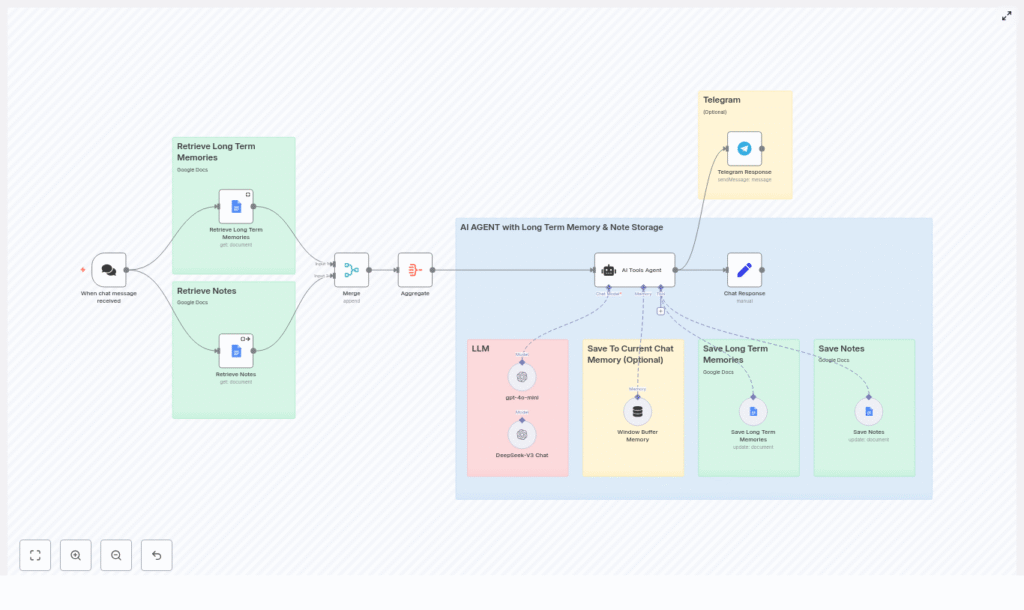
Build an n8n AI Agent with Long-Term Memory
Conversational AI becomes significantly more useful when it can remember user details, store notes, and reuse that information across sessions. This guide describes a production-style n8n workflow template that implements an AI agent with:
- LangChain-style tool-using agent behavior
- Windowed short-term conversation memory
- Google Docs as long-term memory and note storage
- Optional Telegram integration for real user interactions
The focus is on a detailed, technical walkthrough of the workflow structure, node configuration, and data flow, so you can adapt the template to your own n8n instance.
1. Conceptual Overview
1.1 Why long-term memory in an AI agent?
Short-term context (recent turns in the conversation) is essential for coherent replies, but it is limited to the current session. Long-term memory enables:
- Persistence of user preferences, constraints, and goals
- Recall of recurring reminders or habits
- Re-use of user-provided notes and instructions across sessions
In this workflow, long-term memory is implemented using Google Docs as a simple, low-friction storage backend. One document stores semantic “memories” such as preferences or important facts, and another stores user notes and reminders. This separation keeps personal memory distinct from general note-taking content.
1.2 High-level workflow behavior
At a high level, the n8n workflow performs the following steps for each incoming chat message:
- A chat trigger receives a new user message.
- The workflow fetches long-term memories and notes from two Google Docs.
- All context (incoming message, retrieved memories, retrieved notes) is merged into a single payload.
- An AI Tools Agent node processes the request, using:
- A system prompt that defines rules and behavior
- One or more LLM nodes (for example, gpt-4o-mini and DeepSeek-V3 Chat)
- A window buffer memory for short-term session context
- Tools for saving long-term memories and notes back to Google Docs
- The agent generates a reply and optionally writes new memory or notes.
- The response is returned through a Chat Response node and can optionally be forwarded to Telegram.
2. Architecture & Components
2.1 Core nodes and roles
- When chat message received – Entry-point trigger (webhook/chat trigger) that receives user messages and session metadata.
- Google Docs nodes:
- Retrieve Long Term Memories – Reads a dedicated document containing stored memories.
- Retrieve Notes – Reads another document containing user notes and reminders.
- Merge + Aggregate – Combines the incoming message with retrieved documents into a single context object.
- AI Tools Agent – Orchestrator node that:
- Invokes LLM nodes
- Uses a window buffer memory
- Calls tools for saving memories and notes
- LLM nodes:
- gpt-4o-mini and/or DeepSeek-V3 Chat (or any compatible model)
- Window Buffer Memory – Maintains short-term conversational context keyed by session.
- Save Long Term Memories / Save Notes – Google Docs update operations used by the agent to persist data.
- Chat Response – Formats and outputs the final response for the chat channel.
- Telegram Response (optional) – Sends the response to a Telegram chat via a bot.
2.2 Data flow summary
Data flows through the workflow in a predictable pattern:
- Input: Chat trigger receives
message,sessionId, and any channel-specific metadata. - Retrieval: Google Docs nodes fetch the current memory and notes documents.
- Context assembly: Merge/Aggregate node constructs a single JSON structure containing:
- The current user message
- Long-term memory entries
- Note entries
- Reasoning: AI Tools Agent node:
- Loads the window buffer memory for the current session
- Applies the system prompt and available tools
- Chooses whether to write new memory or notes
- Returns a reply text
- Output: Chat Response node outputs the reply, and Telegram Response can forward it if configured.
3. Node-by-Node Breakdown
3.1 Trigger: When chat message received
Type: Webhook/chat trigger node
This node starts the workflow whenever a new message is received from the chat interface. It typically exposes fields such as:
item.json.message– The raw user message text.item.json.sessionId– A session or user identifier used to scope the short-term memory.- Optional channel-specific metadata (chat ID, user ID, etc.).
The sessionId is critical for isolating conversations between different users and preventing memory collisions.
3.2 Retrieval: Google Docs for memories and notes
3.2.1 Retrieve Long Term Memories
Type: Google Docs node (Get Document)
This node reads a specific Google Doc that stores long-term memories. Typical configuration:
- Operation: Get
- Document ID: ID of the memory document
- Credentials: Google Docs OAuth credentials configured in n8n
The node returns the document content, which is later parsed or passed as text into the agent context.
3.2.2 Retrieve Notes
Type: Google Docs node (Get Document)
This node is configured similarly to the memory retrieval node, but points to a different document dedicated to notes and reminders. Separating these documents allows the agent to apply different logic to each type of information.
3.3 Merge & Aggregate context
Type: Merge/Aggregate node
The Merge + Aggregate node combines:
- The incoming user message from the trigger
- The long-term memory document output
- The notes document output
The result is a single structured context payload that is passed to the AI Tools Agent node. This ensures the agent receives all relevant information in one place, simplifying prompt construction and tool usage.
3.4 AI Tools Agent and system prompt
Type: AI Tools Agent node
The AI Tools Agent is the central orchestration component. It uses a system prompt plus available tools and memory to decide how to respond and what to store. The system prompt typically encodes rules such as:
- How to interpret user messages and when to store new memories
- When to call the “Save Note” tool instead of “Save Memory”
- Privacy rules and constraints on what should not be stored
- Fallback behavior when information is missing or ambiguous
- Instructions to always reply naturally and to avoid mentioning that memory was stored
Representative responsibilities defined in the prompt:
- Identify and extract noteworthy information, such as user preferences, long-term goals, or important events, and store them via the Save Long Term Memories tool.
- Detect explicit notes or reminders and route them to the Save Notes tool.
- Generate a conversational reply that incorporates both short-term and long-term context.
3.5 LLM nodes
Type: LLM / Chat Model nodes
The workflow can use multiple LLM providers, for example:
- gpt-4o-mini via an OpenAI-compatible node
- DeepSeek-V3 Chat via a compatible chat model node
The AI Tools Agent selects and calls these models as part of its tool-chain. You can substitute or add other models that are supported by n8n’s LangChain/OpenAI wrapper, as long as credentials are configured correctly.
3.6 Window Buffer Memory
Type: Window Buffer Memory node
This node manages short-term conversational context. It stores a sliding window of recent messages for each session, keyed by a session identifier. The key expression usually looks like:
= {{ $('When chat message received').item.json.sessionId }}This expression ensures that each user or session has its own isolated memory buffer. The buffer is then attached to the agent so the LLM can reference recent conversation history without re-sending the entire chat log.
Configuration typically includes:
- Session key: Expression referencing
sessionId - Window size: Number of messages to keep (to control token usage)
3.7 Long-term storage: Save Long Term Memories / Save Notes
3.7.1 Save Long Term Memories
Type: Google Docs node (Update / Append)
When the agent decides that a message contains memory-worthy information, it calls this tool. The node appends a structured JSON entry to the memory document. A typical JSON template used in the update operation looks like:
{  "memory": "...",  "date": "{{ $now }}"
}
This structure keeps entries compact and timestamped, which is helpful for later parsing or pruning.
3.7.2 Save Notes
Type: Google Docs node (Update / Append)
For explicit notes or reminders, the agent uses a separate tool that writes to the notes document. The template can follow the same JSON pattern as memories, but the semantics are different: notes are usually one-off instructions or reference items, not enduring personal facts.
3.8 Response & delivery
3.8.1 Chat Response
Type: Chat Response node
This node takes the agent’s generated reply and formats it for the chat channel. In the example workflow, an assignment is used so that the reply content is cleanly passed to downstream nodes. You can also map additional metadata if needed.
3.8.2 Telegram Response (optional)
Type: Telegram node
If you configure a Telegram bot token, this node can send the agent’s reply directly to a Telegram chat. This is useful for:
- Testing and debugging with a real messaging interface
- Deploying the agent for real users on Telegram
4. Configuration & Prerequisites
4.1 Required services
- n8n instance – Self-hosted or n8n cloud, with webhook access enabled.
- Google account – With Google Docs API enabled and OAuth credentials configured in n8n.
- LLM provider – Credentials for OpenAI-compatible or other supported LLMs (for example, gpt-4o-mini, DeepSeek-V3, etc.).
- Optional: Telegram bot – Bot token configured in n8n for sending chat messages to Telegram.
4.2 Key expressions and parameters
- Session key for Window Buffer Memory:
= {{ $('When chat message received').item.json.sessionId }}This ensures each user or conversation has its own short-term memory buffer.
- Google Docs update templates:
Use a compact JSON structure when appending entries, for example:
{  "memory": "...",  "date": "{{ $now }}"
}
You can adapt the key names for notes, but keep them consistent to simplify downstream parsing.
- System prompt design:
- Describe the agent’s role and tone of voice.
- Define clear criteria for when to save a memory vs. a note.
- Explain how to use each tool (Save Long Term Memories, Save Notes).
- Include recent memories and notes snippets in the prompt context when needed.
- Explicitly instruct the agent not to reveal that it is storing memory.
5. Best Practices & Operational Guidance
5.1 Memory design best practices
- Keep entries concise and structured: Avoid storing large unstructured blobs of text. Use short JSON objects with clear fields.
- Separate data types: Use distinct documents (or collections) for long-term memories vs. notes to keep semantics clear.
- Control short-term window size: Limit the window buffer memory length to avoid excessive token usage and stale context.
- Sanitize sensitive data: Do not store passwords, tokens, or highly sensitive identifiers. Add explicit instructions in the system prompt to avoid this.
- Audit tool usage: Log and monitor “Save Memory” and “Save Note” calls to understand what is being written to Google Docs.
5.2 Security & privacy considerations
When using long-term memory, treat stored data as potentially sensitive:
- Inform users about what information is stored and why.
- Restrict access to the Google Docs used as storage using appropriate sharing settings.
- Rotate Google credentials periodically and follow your organization’s security policies.
- Consider encrypting particularly sensitive data before writing it to Google Docs.
- If applicable, comply with GDPR, CCPA, or other regional data protection regulations.
6. Troubleshooting & Edge Cases
6.1 Common issues
- Google Docs nodes fail to read or update:
- Verify the Document ID is correct and matches the intended file.
- Check that Google Docs credentials are valid and have permission to access the document.
- Inconsistent or low-quality model responses:
- Refine the system prompt with more explicit instructions and examples.
- Ensure that the context you pass (memories/notes) is concise and relevant.
- Increase the context window size if important information is being truncated.
- Too many memory writes:
- Tighten the rules in the system prompt for what qualifies as a memory.
- Require explicit user signals or stronger conditions before saving.
- Session collisions or mixed conversations:
- Ensure
sessionIdis truly unique per user or conversation (for example, use chat ID or user ID). - Confirm that the Window Buffer Memory node uses the correct session key expression.
- Ensure
7. Example Use Cases
- Personal assistant: Remembers recurring preferences such as coffee orders, scheduling constraints, or favorite tools.
- Customer support bot: Recalls non-sensitive account context or past interactions across visits, improving continuity.
