


Build an n8n Developer Agent: Setup & Guide
Imagine describing an idea for an automation in plain language, then watching a complete, import-ready n8n workflow appear in front of you. No wiring every node by hand, no endless copy-paste. Just a clear request and a working workflow.
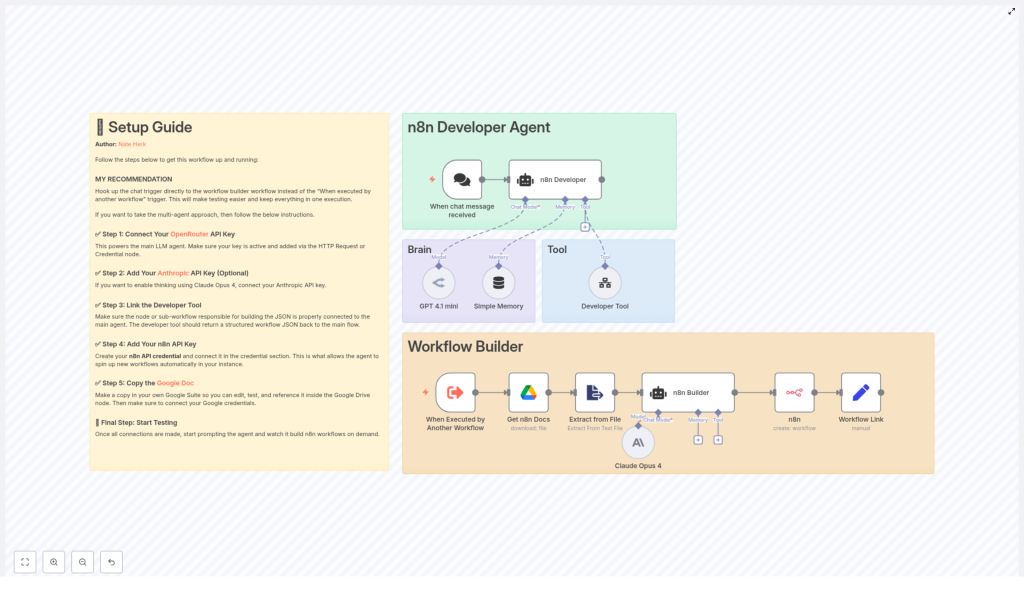
The n8n Developer Agent template is designed to get you there. It combines multiple language models, memory, and a dedicated Developer Tool into a single, reusable pattern that can turn your ideas into n8n workflow JSON. In this guide, you will walk through the journey from manual workflow building to a more automated, focused way of working, and then learn how to set up this template in your own n8n instance.
From manual busywork to automated creation
Most builders reach a point where the bottleneck is no longer ideas, but time. You know what you want to automate, yet you spend precious hours:
- Rebuilding similar workflows from scratch
- Recreating standard patterns like triggers, error handling, and logging
- Enforcing naming conventions and structure manually
That repetitive work slows down your progress and keeps you from the higher-value thinking that actually grows your projects or business.
The n8n Developer Agent is a way to break through that ceiling. Instead of handcrafting every workflow, you can describe what you need in natural language and let the agent generate a structured, import-ready workflow for you. You stay in control, but you do not have to do all the heavy lifting yourself.
Adopting an automation-first mindset
Before you dive into the template, it helps to shift how you think about building in n8n. With an automation-first mindset, you:
- See repetitive workflow patterns as candidates for automation, not just tasks to tolerate
- Use AI and templates to handle boilerplate, so you can focus on design, logic, and strategy
- Continuously refine prompts, constraints, and tools to improve your “automation factory” over time
This template is not a one-off trick. It is a foundation you can extend, improve, and adapt as you grow more ambitious with automation. Start small, then gradually let the agent handle more of the workflow creation process as your confidence builds.
What the n8n Developer Agent actually is
At its core, the n8n Developer Agent is an automation blueprint that:
- Listens for chat messages and natural language requests
- Uses large language models to interpret what you want
- Leverages memory and a Developer Tool to assemble complete workflow JSON
- Optionally creates the workflow directly in your n8n instance through the n8n API
The template integrates:
- Chat triggers to capture your prompts
- OpenRouter GPT 4.1 mini as the primary reasoning and formatting model
- Anthropic Claude Opus 4 (optional) for deeper, complex reasoning
- Simple Memory to keep context across multi-step conversations
- Developer Tool logic to assemble valid n8n workflow JSON
- n8n API integration to create workflows and return direct links
- Optional Google Drive docs to inject your internal standards and templates
Think of it as a “developer assistant” that understands your language, respects your conventions, and outputs workflows you can import and run.
How the workflow is structured
The template is organized into two big pieces that work together:
- The n8n Developer Agent (the brain) – interprets your request, uses LLMs, memory, and tools to plan and generate workflow JSON.
- The Workflow Builder (the executor) – validates the output and creates the workflow in your n8n instance, then returns a link.
Core components in your journey from prompt to workflow
1. Chat Trigger – your starting point
The workflow begins when a chat message is received. This node listens for your natural language request, which could be something as simple as:
“Create a workflow that sends me a Slack message whenever a new file is added to this Google Drive folder.”
This trigger is your main entry point into the system.
2. n8n Developer (Agent) – the orchestrator
The n8n Developer node is a multi-tool agent that coordinates everything. It:
- Receives your prompt from the chat trigger
- Chooses which language model or tool to use
- Passes context into memory and the Developer Tool
- Ensures the final result is a structured workflow JSON, not just free-form text
3. GPT 4.1 mini via OpenRouter – primary reasoning engine
GPT 4.1 mini (through OpenRouter) is used for general reasoning and understanding what you want. It is ideal for:
- Interpreting your natural language instructions
- Planning workflow structure
- Formatting and cleaning up the output
4. Claude Opus 4 (Anthropic) – optional deep thinking
For more complex workflows, the template can optionally call Anthropic Claude Opus 4. This model is well suited for:
- Complex reasoning and multi-step logic
- Chain-of-thought style planning when needed
You can keep this disabled at first and enable it once you are ready for more advanced scenarios.
5. Simple Memory – keeping the conversation alive
The Simple Memory node stores temporary context between prompts. This allows the agent to:
- Remember previous steps in a multi-part request
- Iterate on a workflow with refinement prompts
- Maintain continuity across a short conversation
6. Developer Tool – assembling the workflow JSON
The Developer Tool is where the ideas become real. It is a specialized tool or sub-workflow that:
- Receives structured instructions from the agent
- Builds a complete n8n workflow JSON object
- Ensures the output matches n8n’s import schema
The JSON must include top-level fields such as name, nodes, connections, settings, and optionally staticData. The rest of the workflow expects this exact structure to create your workflow successfully.
7. Get n8n Docs & Extract from File – bringing in your standards
These optional nodes let you pull documentation or templates from Google Drive, then extract the relevant content and provide it to the agent. This is powerful if you want:
- Generated workflows to follow your internal style guide
- Standard node patterns or snippets reused automatically
- Consistent documentation embedded in your workflows
8. n8n (Create Workflow) & Workflow Link – closing the loop
Finally, the Workflow Builder section uses the n8n API to:
- Create a new workflow from the generated JSON
- Return a clickable link so you can open and review it immediately
This is where your idea becomes a concrete, editable workflow in your n8n instance.
Step-by-step setup: turning potential into practice
Now let us turn this from a concept into a working asset in your stack. Follow these steps to configure the template and start experimenting.
Step 1 – Connect the required APIs
Before running the agent, configure these credentials in n8n:
- OpenRouter API key for GPT 4.1 mini using either an HTTP Request node or the OpenRouter credential.
- Anthropic API key for Claude Opus 4 (optional, but recommended for advanced reasoning).
- Google Drive OAuth credential so the workflow can fetch documentation or templates from your Drive.
- n8n API credential that allows the workflow to create new workflows programmatically.
Take a moment to verify each credential by running a quick test node. Solid foundations here will save you time later.
Step 2 – Configure the Developer Tool for valid JSON
The Developer Tool is the heart of the workflow assembly process. It must:
- Return a complete top-level JSON object
- Include
name,nodes,connections,settings, and optionallystaticData - Follow n8n’s import schema so the workflow can be created without errors
Review the Developer Tool configuration in the template and confirm that the output format matches what the downstream n8n node expects. This is what turns “good ideas” into “importable workflows.”
Step 3 – Add your documentation templates (optional but powerful)
To align the agent with your internal standards:
- Copy your n8n style guides, naming conventions, or node templates into a Google Doc.
- Grab the file ID of that document.
- Update the Google Drive node in the template with this file ID.
The agent can now reference your material so that generated workflows feel like they were crafted by your own team, not a generic tool.
Step 4 – Test with simple, safe prompts
Start small to build trust in the system. Use prompts like:
“Create a workflow that watches a folder on Google Drive and posts new file names to Slack.”
At this stage:
- Inspect the generated JSON carefully
- Import it manually if needed, or let the template create the workflow and then review it
- Confirm node types, connections, and settings match your expectations
Use these early tests to refine your prompts and adjust any constraints in the Developer Tool or system messages.
Best practices to keep your automation safe and scalable
As you give more responsibility to the n8n Developer Agent, you will want guardrails that protect your environment while still giving you leverage and speed.
- Start with manual approval
Instead of auto-creating workflows from day one, send generated JSON to a review channel or a manual step. Only create workflows after a human has approved the output. This helps you build confidence in the system. - Use scoped credentials
Provide the agent and any auto-created workflows with limited API keys. For example, restrict them from deleting resources or accessing sensitive data. This keeps experimentation safe. - Enable logging and auditing
Turn on n8n’s execution logging and save execution progress. This gives you an audit trail of:- Which prompts were used
- What workflows were created
- How the agent reached its decisions
- Invest in prompt engineering
Add clear system messages and templates to the agent so it:- Follows your naming conventions
- Uses only approved node types
- Respects security and data handling rules
Troubleshooting: turning friction into refinement
As you experiment, you might hit a few bumps. Each one is an opportunity to improve the template and your prompts.
Problem: Generated JSON fails to import
Solution:
- Confirm the Developer Tool returns a top-level JSON object with the fields
name,nodes,connections, andsettings. - Validate the JSON using a linter to catch syntax issues.
- Check that node types, credential references, and IDs are valid or use stable placeholders that n8n can accept on import.
Problem: Agent returns incomplete workflows
Solution:
- Strengthen the system prompt with explicit requirements, such as “always include error handling” or “always connect trigger to all main branches.”
- Add a post-validation step that checks for minimal structural requirements and returns a clear error if something is missing.
Problem: Models hallucinate node names or actions
Solution:
- Define an explicit mapping of allowed node types and options inside the Developer Tool.
- Where necessary, shift to a template-based approach where the model fills in parameters within known node structures, instead of composing nodes entirely from scratch.
Prompt ideas to unlock more automation
Well-crafted prompts can dramatically improve the quality of your generated workflows. Use consistent templates so the agent knows exactly what you expect.
- Simple task prompt:
“Create a workflow that uploads new CSV files from Google Drive to BigQuery. Include error handling and retry logic.” - Complex request prompt:
“Create a workflow with schedule trigger (daily), download attachments from Gmail matching specific subject keywords, parse CSV attachments, and save parsed rows into a PostgreSQL table with idempotency checks.”
As you gain confidence, create your own internal library of prompts for your most common patterns. This becomes a powerful asset for your team.
Extending the template as your needs grow
This n8n Developer Agent template is a starting point, not a ceiling. As your automation practice matures, you can extend it with:
- Role-based approval gates using Slack or email review steps
- Pre-built node libraries for common ETL or integration tasks
- A UI dashboard to list, review, and roll back auto-created workflows
- Integrations with private model endpoints or enterprise-grade vector stores for knowledge-driven generation
Each improvement turns your n8n instance into more of an “automation platform” than a collection of individual workflows.
Final checklist before you go to production
Before you fully rely on the n8n Developer Agent in a production environment, walk through this quick checklist:
- All credentials are connected and verified:
- OpenRouter
- Anthropic (if used)
- Google Drive
- n8n API
- Initial mode is set to manual creation and review, not fully automatic.
- Developer Tool templates and constraints are clearly defined and tested.
- Logging, audit, and approval workflows are configured and working.
Conclusion: your next step toward a more automated workflow life
The n8n Developer Agent gives you a practical way to translate ideas into working automations faster and more consistently. By turning natural language requests into import-ready workflow JSON, it frees you from repetitive setup work so you can focus on higher-level design, strategy, and experimentation.
Start with small, safe prompts. Validate thoroughly. Iterate on your prompts, constraints, and Developer Tool logic. As your confidence grows, you can gradually allow the agent to create more workflows automatically and accelerate your automation roadmap.
Ready to try it? Import the template into your n8n instance, connect the credentials listed above, and run your first simple prompt. Treat it as the first step in building your own automation assistant. If you would like a curated checklist or a starter library of node templates, sign up for our newsletter or contact our team for professional setup support.
