


Build an n8n Research Agent with LangChain
Imagine turning hours of scattered research into a focused, automated flow that works for you in the background. With n8n and LangChain, you can move from tab-hopping and copy-pasting to a streamlined research engine that gathers insights while you focus on strategy, creativity, and growth.
This guide walks you through a reusable n8n workflow template that acts like a research partner. It routes your questions to three specialized tools – Social media, Company research, and Market research – then returns clear, actionable answers. Along the way, you will see how this template can be a powerful first step toward a more automated, calm, and scalable workflow.
The problem: research that drains your time and focus
Modern research rarely lives in one place. You might be:
- Scrolling social channels to understand sentiment and conversations
- Digging through company profiles, press releases, and databases
- Scanning reports and articles to gauge market size and trends
Each task uses a different skill set and a different set of tools. Switching contexts like this is exhausting and slow. Important decisions end up waiting on manual work, and results vary depending on who did the research and how much time they had.
Automation with n8n and LangChain offers a different path. Instead of juggling everything yourself, you can design a research agent that:
- Collects data from multiple sources consistently
- Summarizes and structures findings in a repeatable way
- Frees you and your team to focus on interpretation and action
Shifting your mindset: from manual researcher to research architect
Before diving into the template, it helps to adopt a new mindset. You are not just doing research anymore. You are designing how research happens in your business.
With n8n and LangChain, you can:
- Capture your research process once, then let the workflow repeat it for every new question
- Scale your efforts without scaling your workload
- Continuously improve the system as you learn what works best
Think of this template as a starting point, not a finished product. You can launch it quickly, see immediate time savings, then refine and extend it as your needs grow.
The vision: a unified research agent in n8n
The template combines n8n workflows with a LangChain-powered agent to create a single entry point for your research questions. You ask a question once, and the agent decides which specialized tool workflows to call:
- Social media research for sentiment and conversations
- Company research for profiles, offerings, and recent updates
- Market research for trends, competitors, and opportunity sizing
Instead of manually deciding where to look each time, you let the agent orchestrate the process. This is where the real leverage begins.
Template architecture: how your research engine is structured
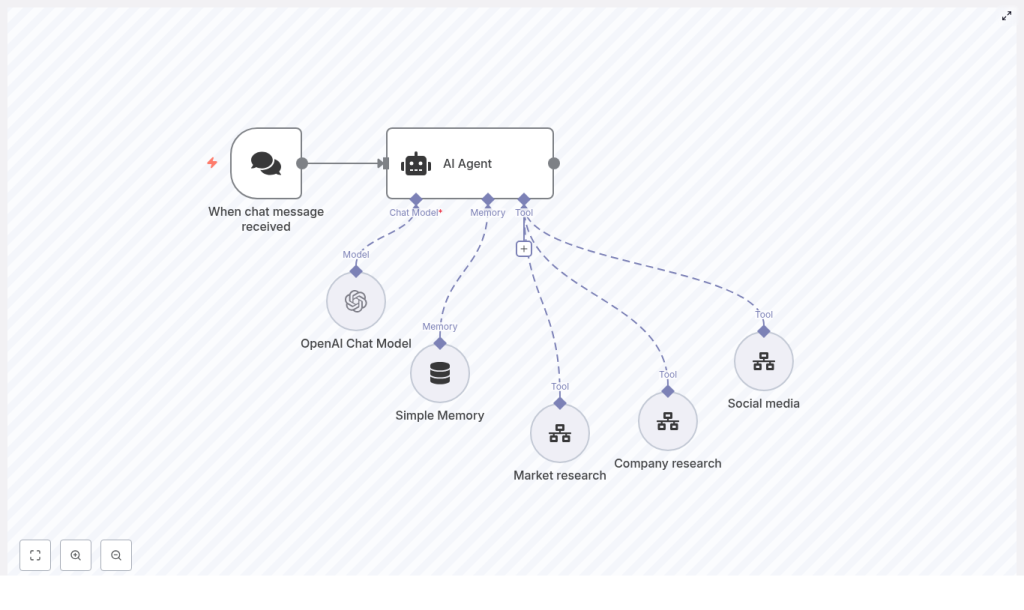
Inside n8n, the template follows a modular architecture that is easy to understand and extend:
- Trigger – When chat message received starts the workflow whenever a user sends a research request.
- AI Agent – A LangChain agent that chooses which research tools to use and how to combine them.
- OpenAI Chat Model – The language model (for example GPT-4o-mini) that powers reasoning and text generation.
- Simple Memory – Short-term memory that keeps context across follow-up messages.
- Tool Workflows – Three separate n8n workflows: Social media, Company research, and Market research.
This modular approach means you can start small, then plug in additional tools as your research needs evolve.
Walking through the core components
1. Trigger: When chat message received
The journey begins when a user sends a message. The When chat message received node captures that input and can be connected to different channels, such as:
- A chatbot interface
- Slack or other team chat tools
- Email or custom forms
Whatever the source, the trigger passes the raw user message to the AI Agent node so the agent can interpret the request.
2. AI Agent: the decision-making brain with LangChain
The AI Agent is where the intelligence lives. Guided by a system prompt, it knows that it has three tools available and understands when and how to use each one. The agent will:
- Detect the intent behind the query, such as social monitoring, competitive analysis, or market sizing
- Decide which tool workflows to call and how to map the inputs
- Combine all returned data into a clear, structured response
- Ask clarifying questions when the original request is ambiguous
This is what transforms your workflow from a static script into a flexible research partner that adapts to each new question.
3. OpenAI Chat Model: the reasoning engine
The AI Agent relies on an OpenAI Chat Model, such as GPT-4o-mini, to handle natural language understanding and generation. In n8n, you configure:
- Your chosen OpenAI model
- Secure credentials stored as n8n credentials (never in node metadata)
This model parses user intent, builds prompts for your tools, and composes final answers that are easy to act on.
4. Simple Memory: keeping conversations coherent
The Simple Memory node provides short-term context. It allows the agent to remember previous messages within a conversation, so users can say things like:
“Drill into competitor pricing”
without repeating the company name or market. Memory helps the agent respond naturally while keeping your workflow structured and predictable.
5. Tool Workflows: Social media, Company research, Market research
Each tool is its own n8n workflow that focuses on a specific research domain. These workflows can use:
- HTTP Request nodes
- Scrapers
- Database queries
- External APIs and data providers
The AI Agent calls these tool workflows when needed and receives structured data in return. It then synthesizes that data into a single, coherent answer for the user. This separation of concerns makes it easy to improve each tool independently over time.
How the decision flow unfolds
To understand how everything works together, follow this step-by-step flow:
- The user submits a query to the When chat message received trigger node.
- The AI Agent uses the OpenAI Chat Model to interpret the intent behind the query.
- Based on its system instructions and the detected intent, the agent selects one or more tool workflows to call.
- Each selected tool workflow runs, collects or analyzes data, and returns structured results.
- The agent aggregates these results, composes a final response with summaries, findings, and next steps, then sends it back to the user.
This flow turns a single question into a coordinated research effort, without you needing to orchestrate every step by hand.
Real-world scenarios: what your agent can handle
Competitive profile
User request: “Gather key details on Acme Inc – product lines, pricing, and recent news.”
Agent behavior: The agent may trigger the Company research workflow to fetch core company data, use the Market research workflow for pricing context and positioning, and optionally call the Social media workflow to surface recent mentions or sentiment.
Social listening
User request: “What are people saying about our new feature on Twitter and LinkedIn?”
Agent behavior: The agent calls the Social media workflow to gather mentions, perform sentiment analysis, and highlight recurring themes, examples, and potential risks or opportunities.
Market opportunity brief
User request: “Summarize the current market opportunity for subscription-based fitness apps in EMEA.”
Agent behavior: The agent uses the Market research workflow to pull TAM/SAM/SOM approximations, competitor lists, pricing models, and trend indicators from social and news sources, then presents a concise brief.
These examples are not limits. They are starting points that show how a single workflow can support product strategy, marketing, sales, and leadership decisions.
Designing your agent: configuration and best practices
Crafting a powerful system prompt
The system prompt is how you teach your agent to think. A clear prompt explains:
- Which tools exist
- What inputs and outputs each tool expects
- When to use each tool and when to ask follow-up questions
For example, you might tell the agent:
“You have three tools: Social media, Company research, Market research. Use the minimal set of tools needed and ask clarifying questions if the request is ambiguous.”
As you test the workflow, refine this prompt. Small improvements here can significantly boost accuracy and reliability.
Mapping inputs and outputs for consistency
To keep your tools predictable, define a clear schema for each workflow. Common fields include:
- Query
- StartDate
- EndDate
- Region
- Sources
Consistent schemas make it easier for the AI Agent to build prompts and map data correctly. This structure is key if you plan to scale your tooling beyond the initial three workflows.
Handling rate limits and errors gracefully
As you rely more on automation, resilience becomes critical. Protect your setup by:
- Storing API keys securely in n8n credentials
- Adding retry logic where external services might fail
- Designing the agent to return partial results and explain any errors if a tool fails
This way, your research engine stays helpful even when one data source is temporarily unavailable.
Privacy and compliance considerations
Automation should respect user privacy and legal requirements. As you design your workflows:
- Mask or redact personal data when storing memory or logs
- Follow platform terms of service when scraping social content
- Comply with regulations like GDPR and CCPA when handling personal information
Building with privacy in mind from the start will make your system more sustainable and trustworthy.
Testing, learning, and iterating
To turn this template into a high-performing research engine, treat it as an ongoing experiment. Create a small test suite of queries that reflect your real-world needs, such as:
- Short, simple questions
- Ambiguous or underspecified requests
- Multi-part research tasks
Track how often the agent:
- Selects the right tools
- Provides the depth of insight you expect
- Needs clarifying questions
Then refine your system prompt, tool descriptions, and schemas. Each iteration makes your workflow more reliable and more valuable to your team.
Growing with your needs: scaling and extension ideas
Once the core template is running smoothly, you can expand your research capabilities step by step. Some ideas:
- Add more specialized tools, such as:
- Financials
- Patent search
- External databases like Crunchbase or Glassdoor
- Introduce vector search to enhance company and market knowledge retrieval
- Build a UI dashboard to visualize aggregated results and export reports
Because the architecture is modular, you can plug in these enhancements without rewriting the entire system.
Security checklist: protecting your automation
As your workflow becomes central to your research process, security should be non-negotiable. Use this quick checklist:
- Store all API keys in n8n credentials, not directly in node metadata
- Limit how long memory retains sensitive information and purge it regularly
- Log tool calls and errors so you can audit behavior and troubleshoot issues
Sample prompts to get you started
Clear prompts help your agent perform better. Here are some examples you can try immediately:
1) "Find recent funding announcements and press coverage for Acme Inc (last 12 months)."
2) "Analyze social sentiment for Product X launch on Twitter and Reddit (past 30 days)."
3) "Estimate market size for subscription meal kits in the US. Include top 5 competitors and pricing tiers."
Use these as a base, then adapt them to your own products, markets, and questions.
Measuring success: proving the value of automation
To see the impact of your n8n research agent, track a few key metrics over time:
- Accuracy of tool selection – How often queries are routed to the correct tools
- User satisfaction – Feedback scores from people who rely on the agent
- Average completion time – How long a typical research task takes before and after automation
- Rate of follow-up clarifying questions – Lower is better if your initial prompts and workflows are clear
These numbers help you demonstrate the return on investment and identify where to improve next.
From template to transformation: your next steps
This n8n + LangChain research agent template gives you a practical, modular foundation for automating multi-source research. It is not just a workflow. It is a stepping stone toward a more focused, less reactive way of working.
You can start small:
- Launch with a single tool workflow, such as Company research
- Validate the quality of results on a handful of core use cases
- Gradually add Social media and Market research as your confidence grows
With thoughtful prompt design, consistent schemas, and secure credentials, you can dramatically reduce manual research time and unlock faster, better-informed decisions across your team.
Ready to take the next step? Import the template into n8n, connect your OpenAI credential, wire up the three tool workflows, and run a few test queries. Treat each run as feedback, then refine and extend your agent until it feels like a natural part of how you work.
If you want support refining the system prompt, designing tool schemas, or tailoring the workflow to your data sources, our team can help you accelerate that journey.
