


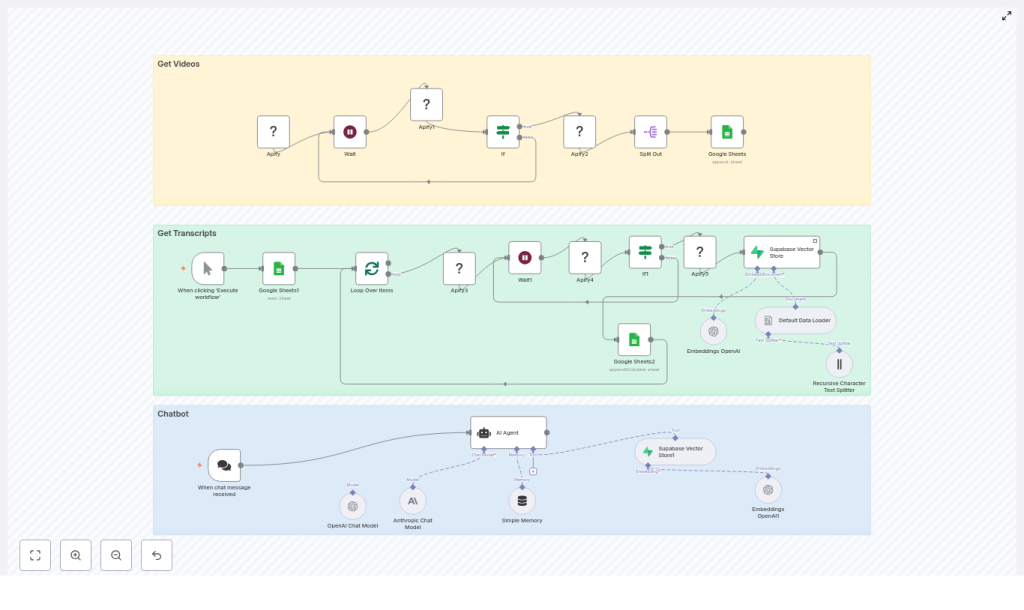
Transform long-form YouTube content into a structured, searchable knowledge base and conversational chatbot using n8n. This guide presents a production-ready workflow that orchestrates Apify actors, Google Sheets, Supabase vector storage, and OpenAI embeddings to automatically collect videos, extract transcripts, generate embeddings, and serve responses through a chat interface.
Overview: From YouTube Channel to AI Chatbot
For brands, content creators, and product teams, video libraries often contain high-value information that is difficult to search and reuse. Manually transcribing, indexing, and maintaining this content does not scale. An automated n8n pipeline solves this by:
- Scraping a YouTube channel for new or updated videos
- Fetching accurate transcripts for each video
- Splitting and embedding transcript text into a Supabase vector database
- Powering a chatbot that answers user questions using relevant video snippets
The result is a repeatable, maintainable workflow that turns unstructured video into a queryable knowledge system, suitable for internal enablement, customer education, or public-facing assistants.
Solution Architecture
The n8n workflow is organized into three logical stages that together form an end-to-end YouTube-to-chatbot pipeline:
- Ingestion layer (Get Videos) – Uses an Apify YouTube channel scraper actor to enumerate channel videos and track them in Google Sheets.
- Enrichment and indexing (Get Transcripts & Embeddings) – Retrieves transcripts with a second Apify actor, splits text into chunks, generates embeddings, and writes them into Supabase.
- Serving layer (Chatbot) – Exposes a LangChain-style agent via n8n that performs vector search in Supabase and uses an LLM such as OpenAI or Anthropic to generate grounded answers.
Prerequisites and Required Services
Before building the workflow, ensure the following components are provisioned and accessible from n8n:
- n8n (self-hosted or cloud) with credentials configured for all external services
- Apify account with access to:
- YouTube channel scraper actor
- YouTube transcript scraper actor
- Google Sheets with OAuth credentials for:
- Queueing video processing
- Tracking completion status
- Supabase project with:
- Postgres database
- Vector extension and table for embeddings and metadata
- OpenAI (or compatible provider) for:
- Text embeddings
- LLM responses in the chatbot
Stage 1: Collecting YouTube Videos
Configuring the Apify YouTube Channel Scraper
The workflow begins by discovering videos on a target YouTube channel. In n8n, configure an Apify node that triggers the YouTube channel scraper actor. Provide a JSON input payload that includes:
channelUrl– The URL of the YouTube channel you want to indexmaxResults– Maximum number of videos to retrieve per run
Use a Wait node in n8n to poll Apify for the actor run status. Once the run is complete, read the resulting dataset and map each video to a row in a Google Sheet. At minimum, the sheet should contain:
- Video Title
- Video URL
- Done (a status flag used for idempotency)
Operational Tips for the Ingestion Layer
- Store the channel URL and
maxResultsas environment variables or n8n variables if you plan to reuse the template across multiple channels or environments. - Initialize the Done column with a default value such as
Noso you can easily filter unprocessed rows. - Use the Google Sheet as a simple work queue that provides transparency into which videos are pending, in progress, or completed.
Stage 2: Transcript Retrieval and Embedding
Looping Through Pending Videos
Once videos are listed in the sheet, the next stage processes only those that are not yet ingested. In n8n:
- Use a Google Sheets node to read rows where
Done != "Yes". - Feed the result into a Split In Batches node to limit how many videos are processed per run. This helps control concurrency and external API usage.
Fetching Transcripts via Apify
For each video URL in the batch, invoke the Apify YouTube transcript scraper actor. Configure the input so that the startUrl parameter receives the specific video URL from the sheet. As in the previous stage, use a Wait node combined with a status check to ensure the actor run completes successfully before proceeding.
Transcript Configuration Considerations
- Timestamps: Decide whether to include timestamps in the transcript output. If your chatbot needs to reference exact moments in a video or support deep-linking, timestamps are valuable metadata.
- Language handling: For multilingual channels, ensure the Apify actor is configured to request the correct language or to handle multiple language tracks as needed.
Creating Embeddings and Writing to Supabase
After the transcript data is available, the workflow prepares documents for vector storage:
- Concatenate the video title and transcript text into a single document payload. Include any additional metadata you may need later, such as channel name or publication date.
- Use a text splitter, such as a recursive character splitter, to break long transcripts into smaller, semantically coherent chunks. Chunk sizes around 500 to 1,000 tokens typically provide a good balance between recall and precision.
- For each chunk, call the OpenAI embeddings API (or another embeddings provider) to generate a vector representation.
- Insert each embedding into your Supabase vector table, storing at least:
- Embedding vector
- Video URL
- Video title
- Chunk index
- Timestamps or segment boundaries if available
Why Transcript Chunking Matters
Using a single vector for an entire video transcript typically leads to diluted semantic signals and less relevant retrieval. Splitting transcripts into smaller, contextually consistent chunks improves:
- Similarity search quality – The vector store can target specific segments instead of the entire video.
- LLM grounding – The language model receives focused context for each answer, which reduces hallucinations and improves factual accuracy.
Marking Videos as Processed
After all chunks for a given video have been embedded and stored in Supabase, update the corresponding row in Google Sheets to set Done = "Yes". This step is critical to keep the pipeline idempotent and to avoid duplicate ingestion when the workflow runs on a schedule.
Stage 3: Building the Chatbot with n8n and LangChain
Retrieval-Augmented Generation Flow
The final stage exposes the indexed content through a conversational agent. A typical LangChain-style agent in n8n operates as follows:
- The user submits a question through a chat interface or an n8n webhook.
- The workflow converts the user query into an embedding or directly uses it to perform a vector similarity search in Supabase.
- Supabase returns the top matching transcript chunks along with their metadata.
- The workflow passes:
- The original user prompt
- The retrieved transcript segments
to the LLM (e.g., OpenAI or Anthropic) as context.
- The LLM generates an answer that is grounded in the retrieved video content.
Prompting and Answer Formatting
Configure the system prompt for the LLM to enforce behavior that aligns with your use case. Common instructions include:
- Answer concisely and avoid speculation outside the provided context.
- Reference the source video title and URL in the response.
- Include timestamp references when available, so users can jump directly to the relevant segment.
Security, Reliability, and Operational Best Practices
Credential and Data Security
- Store all API keys, database credentials, and tokens in n8n’s credential manager or environment variables. Avoid hardcoding secrets directly inside workflow nodes.
- Configure Supabase Row Level Security (RLS) policies appropriately. Use a service-role key only where necessary and prefer a restricted key with minimal permissions for embedding inserts and retrievals.
Scaling, Performance, and Cost Management
- Batch processing: Use the Split In Batches node to control how many videos and transcript chunks are processed in parallel. This prevents hitting rate limits for Apify and OpenAI.
- Chunk sizing: Monitor embedding costs and adjust chunk sizes to balance precision with budget. Smaller chunks increase the number of embeddings but may improve retrieval quality.
- Caching strategies: If your chatbot frequently receives similar queries, consider caching popular retrievals or introducing a secondary index to reduce repeated vector searches.
Error Handling and Observability
- Use If nodes and conditional logic to detect failed Apify runs or API calls. For robustness, implement retries with backoff where appropriate.
- Route failed items to a dedicated Google Sheet or error table for manual inspection and replay.
- Log Apify actor run IDs and dataset IDs so you can easily correlate workflow runs with external executions for debugging.
Extending the Workflow
Once the core pipeline is operational, several common extensions can further enhance its value:
- Automated content repurposing: Add media processing and summarization steps to publish short clips or text summaries to social channels.
- Multi-channel support: Parameterize the initial Apify call to rotate between multiple YouTube channels, using environment variables or inputs to control which channel is processed.
- Advanced retrieval: Integrate a cross-encoder or reranking model to refine search results when you need even higher precision in the returned segments.
Preflight Checklist
Before running the workflow in a production or scheduled environment, confirm the following:
- Apify actors are provisioned, tested manually, and you know their IDs and input schemas.
- Google Sheets OAuth is configured and a sheet exists with at least:
- Video Title
- Video URL
- Done
- A Supabase project is created with a vector-enabled table for embeddings and associated metadata.
- An OpenAI (or alternative LLM/embedding) API key is configured and connected within n8n.
Conclusion
This n8n template provides a robust, repeatable way to convert YouTube channels into a searchable knowledge base and an AI-powered chatbot with minimal manual effort. It is well suited for:
- Creators who want audiences to query their content by topic rather than browsing playlists
- Companies converting training or webinar libraries into interactive knowledge assistants
- Teams building domain-specific conversational agents grounded in video material
To get started, clone the workflow, plug in your credentials, and run a small batch of videos to validate transcript ingestion, embedding, and retrieval behavior. From there, you can iterate on prompts, metadata, and chunking strategies to fine-tune answer quality.
Call to action: Connect your Apify, Google Sheets, Supabase, and OpenAI credentials in n8n, then execute the template on a limited set of videos to verify the end-to-end flow. If you need help adapting the pipeline for specific channels, additional languages, or a custom chatbot frontend, share your use case and constraints and we can refine the design together.
