Automate Idea to IG Carousel with n8n & RAG
On a Tuesday evening, long after her team had logged off, Maya was still staring at a blank Figma canvas.
As the head of marketing for a fast-growing SaaS startup, she had a problem that never seemed to shrink. The founders wanted more Instagram carousels. The sales team wanted more content tailored to specific audiences. The design team wanted better briefs. And Maya just wanted to stop turning every half-baked idea in a Notion doc into a 7-slide carousel by hand.
She had a backlog of “great ideas” and no realistic way to turn them into consistent, on-brand carousels without sacrificing her evenings.
The pain behind every “simple” carousel
For Maya, each carousel followed the same exhausting pattern:
- Someone dropped a vague idea like “5 productivity hacks” into Slack.
- She turned it into a proper outline, slide by slide.
- She hunted through old docs to reuse good phrases and proof points.
- She wrote headlines, captions, CTAs, and image notes for the design team.
- She logged everything in a spreadsheet so they could track what had shipped.
None of this work was bad, but it was slow and repetitive. What bothered her most was that she already had the context. The team had written blog posts, newsletters, and playbooks on all these topics. Yet every carousel started from scratch.
One night, while researching automation tools, she stumbled on an n8n template promising exactly what she needed: turn a single content idea into a ready-to-publish Instagram carousel using retrieval-augmented generation (RAG) and a vector database.
“If this works,” she thought, “I could ship 10 carousels a week without losing my mind.”
The discovery: an n8n workflow that thinks like a marketer
The template description sounded almost too on point. It combined:
- n8n as the automation backbone
- OpenAI embeddings for turning text into vectors
- Weaviate as a vector store and retrieval engine
- An Anthropic chat model acting as a RAG-powered carousel writer
- Google Sheets logging and Slack alerts for reliability
The promise was simple: feed the workflow a single idea with a bit of context, and it would return structured carousel slides, captions, hashtags, and even image hints. All of it would be grounded in existing content using RAG, not random hallucinations.
Maya decided to try it with one of the ideas that had been sitting in her backlog for weeks.
Rising action: from idea JSON to real slides
The first step was understanding how data would flow through the n8n workflow. The template centered on a Webhook Trigger that accepted a JSON payload like this:
{  "title": "5 Productivity Hacks",  "description": "Quick tips to manage time, batch tasks, and improve focus across remote teams.",  "tone": "concise",  "audience": "founders",  "tags": ["productivity","remote"]
}
“So I just send that to a URL,” Maya thought, “and it gives me a full carousel back?” Almost.
The hidden machinery behind the magic
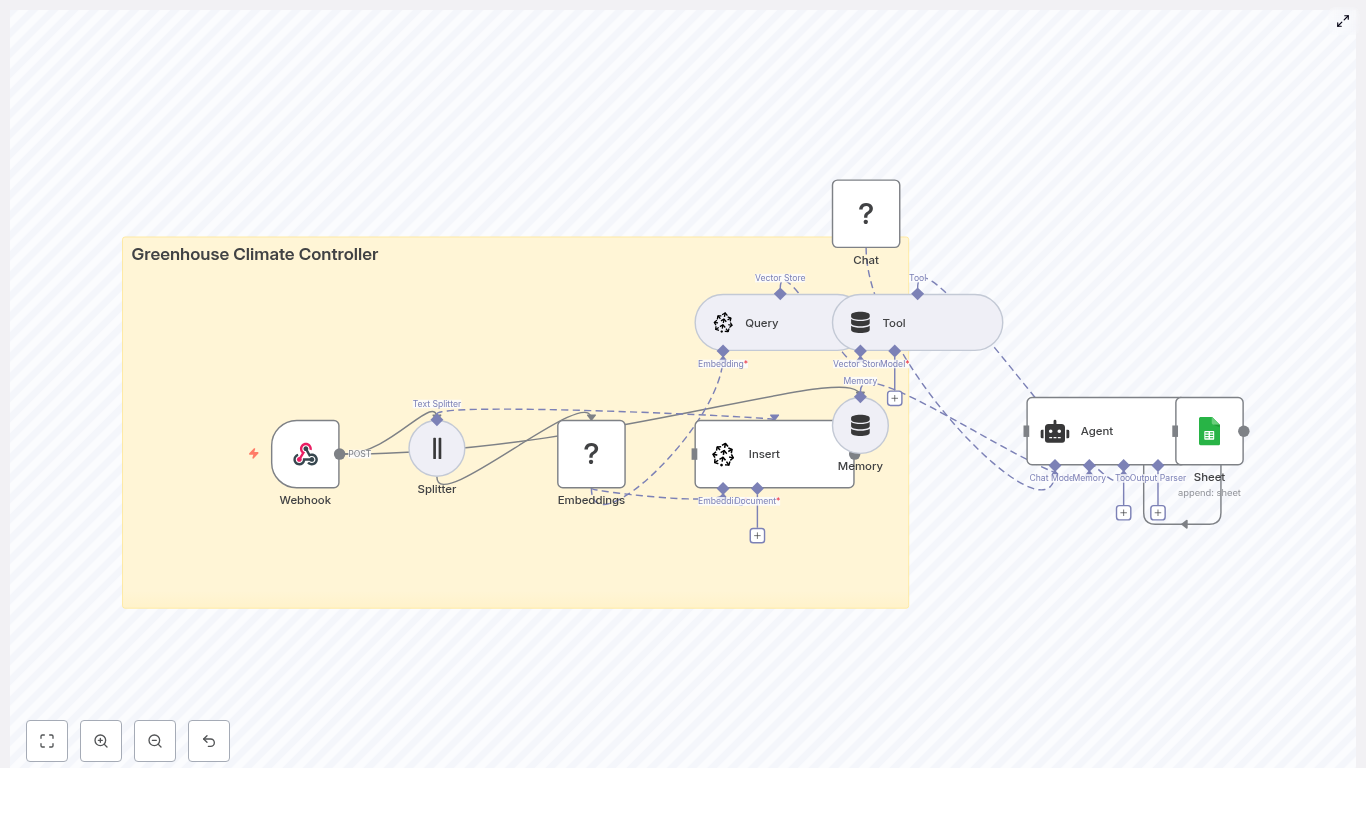
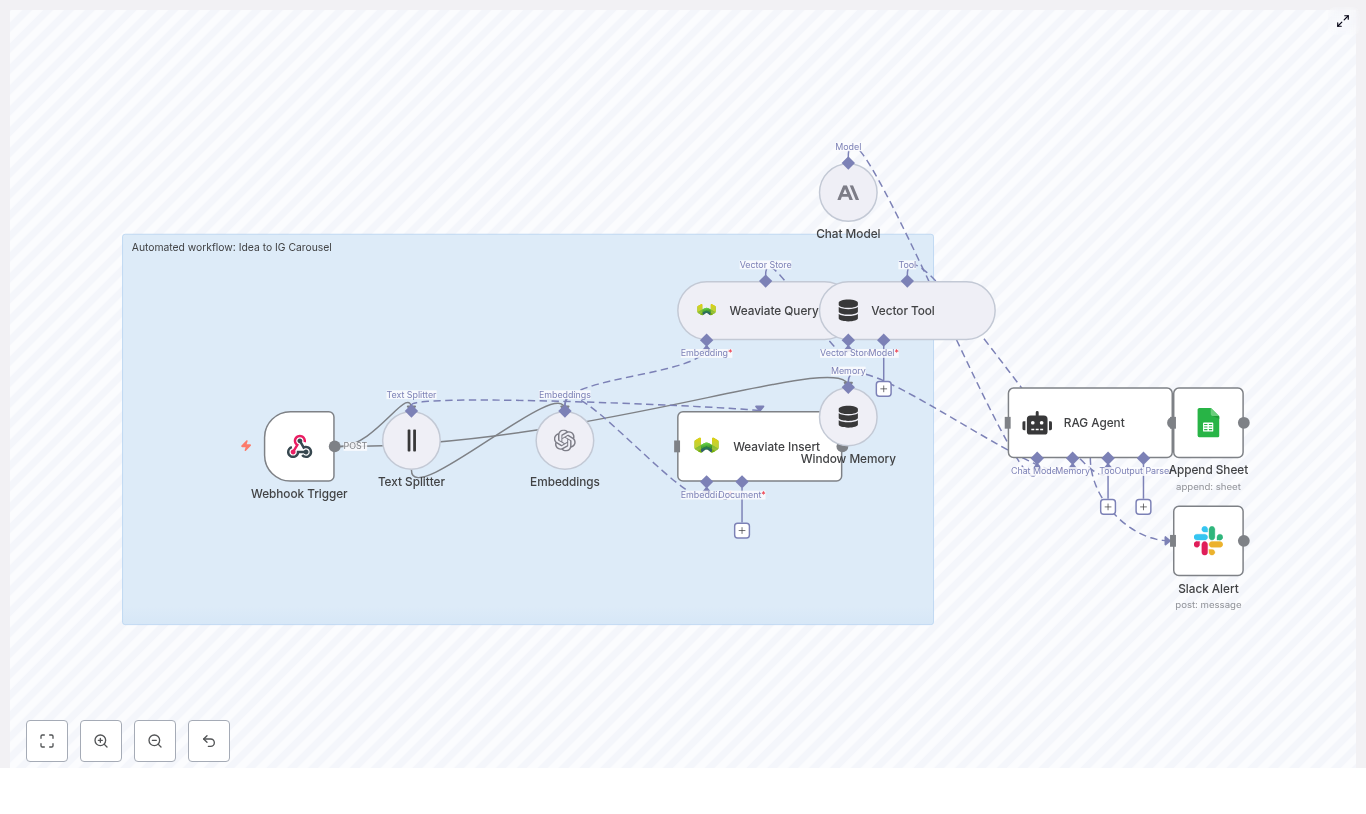
As she dug into the n8n template, she realized how much thought had gone into each node. The story of the workflow looked something like this:
1. Webhook Trigger – the gateway for ideas
The workflow exposes a POST endpoint, for example /idea-to-ig-carousel, that accepts incoming ideas. Each payload includes:
- Title of the carousel
- Description or notes about the content
- Audience (for example founders, marketers, developers)
- Tone (for example concise, friendly, expert)
- Optional imagery hints and hashtags
For Maya, this meant the idea could come from anywhere: a form, a Notion integration, or even a Slack command, as long as it ended up as JSON hitting that webhook.
2. Text Splitter – breaking big ideas into useful chunks
Her team’s ideas were rarely short. Some descriptions read like mini blog posts. The template handled this with a Text Splitter node that broke the description into overlapping chunks.
The default setting used:
- Chunk size: 400 characters
- Overlap: 40 characters
This chunking step made it easier to create embeddings that captured local context, while keeping vector search efficient inside Weaviate.
3. OpenAI Embeddings – turning text into vectors
Each chunk passed into an OpenAI Embeddings node. The template used the text-embedding-3-small model, a good balance between cost and performance for marketing content.
Behind the scenes, this step transformed her text into dense numerical vectors that could be stored and searched in a vector database. Maya did not need to understand every math detail, only that this was what made “smart” retrieval possible later.
4. Weaviate Insert & Query – the memory of past ideas
Those embedding vectors were then inserted into a Weaviate index, configured with:
- indexName:
idea_to_ig_carousel
Over time, this index would become a growing library of past ideas, snippets, and context. When the workflow needed to generate a carousel, it would query this same Weaviate index to retrieve the most relevant chunks for the current idea.
Weaviate acted as the vector database that made retrieval-augmented generation possible. It meant the model would not just “guess” but would pull in related context from previous content.
5. Window Memory – short-term context for the AI
To handle multi-step reasoning, the template used a Window Memory node. This gave the RAG agent a short history of recent interactions, without drowning it in irrelevant older context.
The recommended approach was to keep this memory window small, usually the last 3 to 5 interactions, so the model remained focused.
6. Vector Tool & RAG Agent – the carousel writer
Next came the heart of the workflow: the combination of a Vector Tool and a RAG Agent.
- The Vector Tool wrapped the Weaviate query results and made them available as context.
- The RAG Agent, powered by an Anthropic chat model, used that context plus the prompt instructions to generate structured carousel content.
The RAG Agent was configured with a system message like:
You are an assistant for Idea to IG Carousel.
On top of that, Maya could define a clear output format. A typical prompt structure looked like this:
- System: “You are an assistant for Idea to IG Carousel. Output 6 slides in JSON with keys: slide_number, headline, body, image_hint, hashtags, post_caption.”
- User: Included the idea title, description, audience, tone, and retrieved context from Weaviate.
Clear prompts meant fewer hallucinations and more predictable, designer-friendly output.
7. Logging & Alerts – the safety net
Finally, the workflow ended with two crucial reliability pieces:
- Append Sheet (Google Sheets) to log every output, idea, and timestamp for audit and review.
- Slack Alert to notify the team if the RAG Agent failed, including the error message so someone could jump in quickly.
Maya realized this was more than a clever script. It was a production-ready content pipeline.
The turning point: watching the first carousel appear
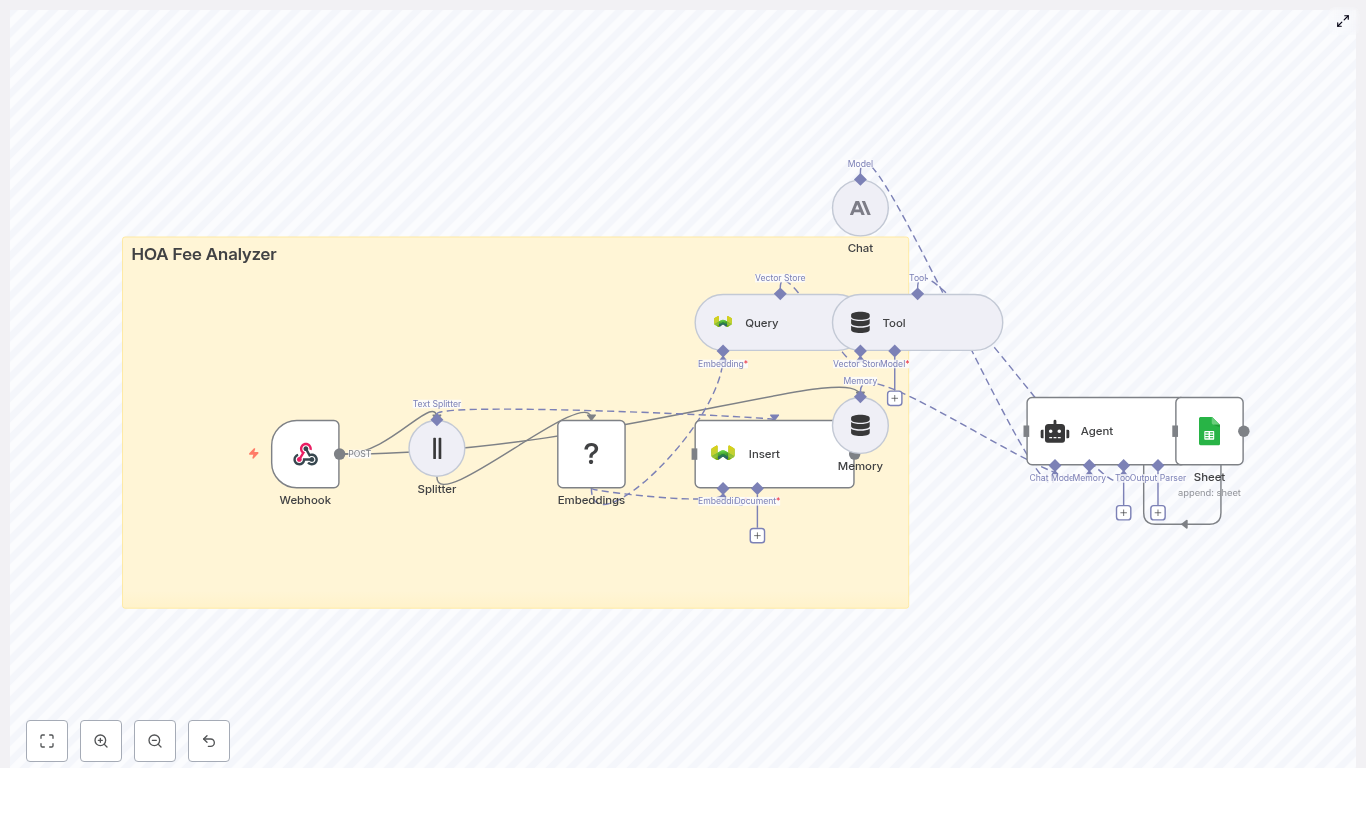
With the pieces understood, she followed the data flow end to end:
- Her client app POSTed JSON to the webhook with title, description, tone, audience, and tags.
- The Text Splitter chunked the description and sent those chunks to the OpenAI Embeddings node.
- The Embeddings node produced vectors, which were inserted into the Weaviate index for later retrieval.
- When it was time to write the carousel, the RAG Agent used the Vector Tool to query Weaviate and pull back the most relevant chunks.
- Window Memory plus the retrieved context were passed to the Anthropic chat model, which generated slide copy: headlines, body text, CTAs, caption suggestions, and image hints.
- The final outputs were appended to Google Sheets, and if anything broke, a Slack alert would fire.
Her first real test used the sample payload:
{  "title": "5 Productivity Hacks",  "description": "Quick tips to manage time, batch tasks, and improve focus across remote teams.",  "tone": "concise",  "audience": "founders",  "tags": ["productivity","remote"]
}
Within seconds, the workflow returned a JSON structure like this:
{  "slides": [  {"slide_number":1, "headline":"Batch your mornings","body":"Group similar tasks to reduce context switching...","image_hint":"clock and checklist minimal"},  {"slide_number":2, "headline":"Use time blocks","body":"Protect focus by scheduling email-free slots..."}  ],  "caption":"5 Productivity Hacks for remote founders. Save this post!",  "hashtags":["#productivity","#remote"]
}
For the first time, Maya was not staring at a blank canvas. She had a complete, structured carousel outline she could hand to a designer or pipe into an image-generation tool.
Refining the workflow: prompts, tuning, and best practices
Once the basic flow worked, Maya started tuning the system so it fit her brand and content library.
Prompt design and RAG strategy
She learned that small changes in prompt design had big effects on output quality. To keep the RAG Agent reliable, she followed a few guidelines:
- Be explicit about format: Always specify JSON keys like
slide_number,headline,body,image_hint,hashtags, andpost_caption. - Include audience and tone: Remind the model who it is writing for and how it should sound.
- Feed retrieved context: Pass in the chunks from Weaviate so the model grounds its writing in existing content.
This combination reduced hallucinations and made the slides more consistent with the rest of her brand voice.
Configuration and tuning tips she adopted
- Chunk size and overlap: She stayed within the recommended 300 to 500 characters with 20 to 50 overlap. Smaller chunks improved recall but increased storage and query costs, so she tested a few values and settled near the default.
- Embedding model:
text-embedding-3-smallworked well for her use case. She kept an eye on accuracy and considered testing alternatives only if retrieval started to feel off. - Weaviate index strategy: Since her agency handled multiple brands, she namespaced indexes by client to avoid mixing content from different companies.
- Memory window: She kept the memory short, roughly the last 3 to 5 interactions, to prevent the chat model from drifting.
- Error handling: Slack alerts included the webhook id, input title, and any stack trace available so debugging was fast.
Keeping it safe, compliant, and affordable
As the workflow got closer to production, her CTO jumped in with concerns about security and cost. Fortunately, the template already pointed to best practices.
Security and compliance
- All webhooks used HTTPS, and payload signatures were validated to prevent unauthorized submissions.
- Any potentially sensitive personal data was tokenized or redacted before being sent to embeddings or LLMs, in line with policy.
- Weaviate indexes were separated by environment (dev, staging, prod), and API keys were scoped with least privilege.
Cost control
- Where possible, they batched embedding requests and reused embeddings for similar or duplicated ideas.
- They monitored API usage and set quotas for both embeddings and LLM calls to avoid surprise bills.
Monitoring, resilience, and scaling up
Once the first few carousels shipped successfully, the team started trusting the system. That is when volume picked up and reliability became critical.
Monitoring and resilience practices
- Logging: Every run appended outputs and errors to Google Sheets. Later, they mirrored this into a proper logging database, but Sheets was enough to start.
- Retries: They added exponential backoff for transient failures like temporary embedding API issues, Weaviate write or read problems, or LLM timeouts.
- Alerting: High severity failures triggered Slack alerts and, for key campaigns, an on-call notification.
- Testing: A small test harness regularly sent sample ideas to the webhook and validated that the output still matched the expected schema.
Scaling and future enhancements
As the number of ideas grew, Maya started planning the next phase:
- Sharding Weaviate indexes by client or topic to keep retrieval focused.
- Streaming generation for faster, slide-by-slide output if the LLM supported it.
- Image generation integration using the
image_hintfield, plugging into tools like Midjourney or Stable Diffusion to auto-create visuals. - Human-in-the-loop review before publishing, so a content lead could approve or tweak slides.
What started as a simple time saver was turning into a flexible, end-to-end content engine.
The resolution: from bottleneck to content engine
A few weeks later, Maya looked at her content calendar and realized something had changed. Her team was shipping more carousels in less time, with more consistent structure and better tracking.
Her workflow now looked like this:
- Ideas came in through forms, Slack, or internal tools.
- They hit the n8n webhook and flowed through embeddings, Weaviate, and the RAG Agent.
- Within seconds, they had structured carousel slides, captions, hashtags, and image hints.
- Designers and automation tools picked up the JSON and turned it into finished creatives.
- Everything was logged, monitored, and easy to audit.
Instead of being the bottleneck, Maya had built a system that scaled her expertise across the whole team.
Put the n8n template to work for your own ideas
If you are buried under a backlog of content ideas, this workflow is a way out. Automating the “Idea to IG Carousel” pipeline with n8n, RAG, Weaviate, and modern LLMs gives you:
- Faster content creation without sacrificing quality
- Consistent, structured output that designers and tools can use immediately
- Context-aware slides that reuse your best existing content
- A flexible architecture you can extend with new models, image generation, or publishing APIs
You can