


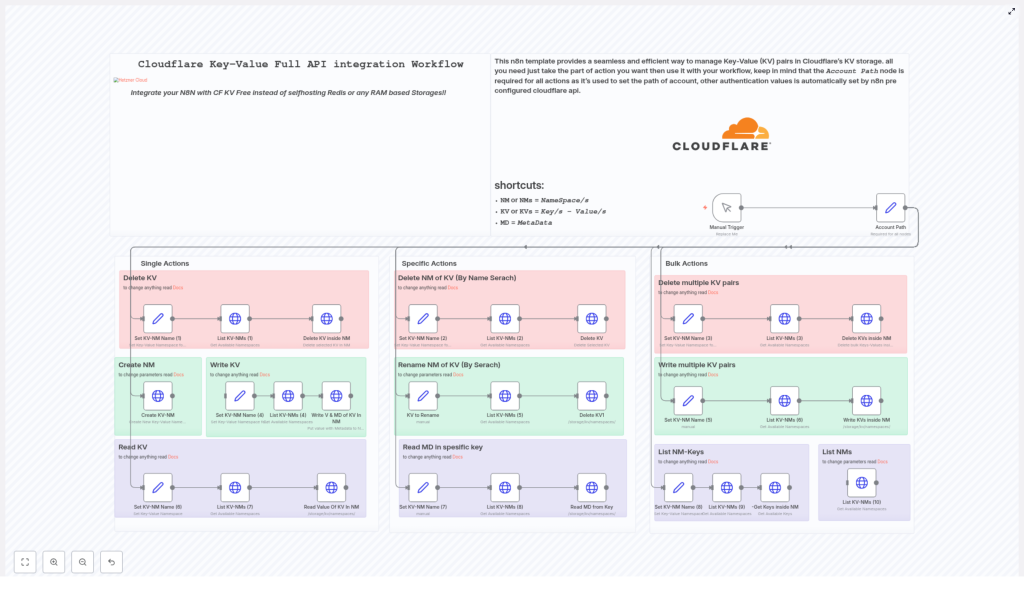
Complete Cloudflare KV API Integration Workflow
Learn How To Automate Cloudflare KV With n8n
This guide walks you through a ready-made n8n workflow template that fully integrates with the Cloudflare KV API. By the end, you will know how to:
- Connect n8n to your Cloudflare account using the Account Path node
- Run single key actions like creating, reading, or deleting a KV pair
- Manage namespaces, including renaming and deleting them
- Perform bulk operations on multiple keys at once
- Work with metadata stored alongside your KV values
The goal is to replace manual dashboard clicks and hand-written API requests with a clean, reusable automation inside n8n.
Why Automate Cloudflare KV With n8n?
Editing Cloudflare KV by hand can feel tedious. You log in to change one key, and suddenly you are deep in namespaces, keys, and metadata. This is exactly the kind of repetitive work that n8n is built to handle for you.
Cloudflare KV itself is a fast, globally distributed key-value store, ideal for:
- Feature flags and configuration values
- Session or token storage
- Content and settings that must be available worldwide
When you connect Cloudflare KV to n8n, you gain:
- Automation – no more manually crafting API calls or clicking through the Cloudflare dashboard for every change
- Scalability – bulk operations let you manage many keys in a single run
- Extensibility – you can plug this template into other systems, such as CRMs, databases, or webhooks, to build complete end-to-end workflows
What This n8n Workflow Template Includes
This template is a complete Cloudflare KV API integration for n8n. Once configured, you can manage both individual keys and entire namespaces without touching the Cloudflare UI.
Main Capabilities
- Single Actions for everyday tasks:
- Create, read, and delete individual KV pairs
- Create KV entries with optional metadata
- Specific Namespace Actions:
- Rename a KV namespace
- Delete a KV namespace by searching it by name
- Read metadata for a specific key
- Bulk Actions for larger operations:
- Write multiple KV pairs in a single request
- Delete multiple KV pairs at once
- List all keys in a namespace
- List all namespaces in your Cloudflare account
- Metadata Support:
- Attach metadata when writing keys
- Read metadata separately from the key value
The only required piece you must configure is the Account Path node. It sets the Cloudflare account context so that all API requests know which account they belong to. After that, n8n uses your Cloudflare credentials to authenticate each operation.
How The Workflow Is Structured Inside n8n
To keep things clear and safe, the template is organized into three main groups of actions:
- Single Actions – small, focused operations on one key at a time
- Specific Actions – targeted changes to namespaces and key metadata
- Bulk Actions – powerful operations that affect many keys at once
In practice, you can choose which group to use based on your current task. Below is a detailed look at each category.
Single Actions: Simple, One-Key Operations
Use these when you want to change or inspect a single KV entry without touching anything else. They are ideal for testing your setup or making small adjustments.
Delete a Single KV Pair
This path lets you remove one key from a specific namespace.
- Select the namespace where the key lives.
- Specify the key you want to delete.
- (Optional) List namespaces first if you want to confirm you are working in the correct namespace.
- Execute the delete operation to remove that key from the namespace.
Create a KV Pair With Metadata
Use this when you want to store a value and also attach additional context.
- Choose the target namespace.
- Provide the key name and value.
- Optionally add metadata such as tags, version information, or flags that your application can later read.
- Run the node to write the new key-value pair plus metadata into Cloudflare KV.
Read a KV Value
This action retrieves the stored value for a specific key.
- Specify the namespace that contains the key.
- Enter the key name.
- Execute the read operation to fetch the value from Cloudflare KV.
Specific Actions: Namespace Management And Metadata
These actions operate at a slightly higher level. They help you manage entire namespaces and inspect metadata for individual keys.
Delete a Namespace (NM)
This is a powerful operation, so test carefully.
- Search for the namespace by name. The workflow helps you find the namespace you want to remove.
- Confirm the selection to avoid deleting the wrong namespace.
- Run the delete operation to remove the entire KV namespace from your Cloudflare account.
Rename a Namespace
Renaming namespaces can help keep your KV structure organized and readable.
- Locate the existing namespace you want to rename.
- Provide the new title that should replace the old one.
- Execute the rename operation so the namespace appears under the new name.
Read Metadata for a Key
Sometimes you only need the metadata and not the full value.
- Specify the namespace where the key is stored.
- Enter the key name.
- Run the metadata read to retrieve only the metadata associated with that key.
Bulk Actions: Work With Many Keys At Once
Bulk tools are where this template becomes a serious time saver. Use them when you want to apply the same type of operation to multiple keys in a single workflow run.
Delete Multiple KV Pairs
This action is useful when you need to clean up several keys at the same time.
- Select the namespace that contains the keys you want to remove.
- Prepare a list of keys to delete. This can be generated inside n8n or passed in from another part of your workflow.
- Execute the bulk delete to remove all listed keys in one operation.
Write Multiple KV Pairs
Use this to upload a batch of key-value pairs in a single request.
- Prepare a collection of key-value pairs that you want to store in a namespace.
- (Optional) Include expiration settings for each key if you want them to expire automatically after a certain time.
- Run the bulk write to upload the entire batch to Cloudflare KV.
List Keys in a Namespace
This helps you understand what is currently stored in a specific namespace.
- Choose the namespace you want to inspect.
- Run the list operation to retrieve all keys stored in that namespace.
List All Namespaces
Use this when you need an overview of your KV structure across the entire account.
- Execute the list namespaces action to fetch all KV namespaces associated with your Cloudflare account.
Step-by-Step: Setting Up The Workflow In n8n
Follow these steps to get the Complete Cloudflare KV API Integration workflow running from scratch.
Step 1: Import The Template
- Open your n8n instance.
- Import the Cloudflare KV workflow template.
- Have your Cloudflare credentials ready for configuration.
Step 2: Configure The Account Path Node
- Locate the
Account Pathnode in the workflow. - Enter your Cloudflare account identifier. This tells all subsequent API calls which account to use.
- Ensure that n8n is using the correct Cloudflare credentials for authentication.
Step 3: Choose The Type Of Action You Want To Run
Decide which group of operations fits your current task:
- Single Actions if you are working with one key at a time
- Specific Actions if you need to rename or delete a namespace, or read metadata
- Bulk Actions if you want to write or delete multiple keys, or list keys and namespaces
Step 4: Fill In The Required Parameters
Depending on the chosen action, you will need to provide different details:
- Namespace identifiers or names for where the keys live
- Key names for reads, writes, and deletes
- Values and optional metadata for write operations
- Lists of keys for bulk delete or bulk write actions
Step 5: Run And Integrate The Workflow
- Trigger the manual node in n8n to test the workflow with a small set of data.
- Once confirmed, connect this template into larger automations, for example:
- Syncing configuration data from a database or API
- Updating feature flags when your CI pipeline deploys
- Managing session-like or cache-like values from other systems
Best Practices And Next Steps
To get the most value from this Cloudflare KV n8n template, keep these tips in mind:
- Start small Begin with a single namespace and a few test keys. Confirm that reads, writes, and deletes behave as expected before running bulk operations on production data.
- Use metadata strategically Store extra information like version numbers, tags, or feature flags as metadata so your application logic can make smarter decisions without changing the main value.
- Automate with triggers Attach this workflow to scheduled triggers or webhooks so KV updates happen automatically whenever something changes in your app or infrastructure.
- Consult official documentation For detailed information on each API endpoint and parameter, review the Cloudflare KV API documentation and the operation guides referenced inside the workflow nodes.
FAQ: Cloudflare KV n8n Workflow Template
Do I have to configure anything besides the Account Path node?
The Account Path node is the only mandatory configuration for the account context. You also need valid Cloudflare credentials set up in n8n. After that, each action node only requires the specific parameters for the operation you want to perform, such as namespaces, keys, values, or metadata.
Is it safe to run bulk operations?
Bulk operations are powerful and can delete or overwrite many keys at once. Always:
- Test in a staging or non-production environment first
- Start with a small subset of keys
- Log or store the keys you are modifying so you can review changes
Can I combine this template with other workflows?
Yes. This template is designed to be part of larger n8n setups. You can connect it to CRMs, databases, CI pipelines, monitoring tools, or any other n8n-supported integration to trigger KV updates automatically.
What are some common use cases?
- Automatically updating feature flags when a new release is deployed
- Syncing application configuration from a central database into Cloudflare KV
- Cleaning up old session keys or cache entries on a schedule
Ready To Stop Editing Cloudflare KV By Hand?
If you are done with repetitive Cloudflare KV tasks, this n8n workflow template gives you a structured, automated alternative. Import it into your n8n instance, connect your Cloudflare credentials, configure the Account Path, and adapt the actions to match your own KV management style.
Once it is in place, bulk edits, namespace changes, and routine key updates become a quick workflow run instead of 20 manual clicks.
Note: Always secure your API credentials, and test this workflow in a staging or non-production environment before using it with live data.
