


Connect Retell Voice Agents to Custom Functions with n8n
Retell voice agents become significantly more powerful when they can trigger live automations in your backend systems. By integrating Retell with n8n through a webhook-based Custom Function, you can orchestrate complex workflows in real time while the conversation is in progress.
This article walks through a reusable hotel-booking workflow template that accepts a POST request from a Retell Custom Function, executes logic in n8n, and returns a dynamic response to the voice agent. The same pattern can be adapted to a wide range of voice automation use cases.
Why integrate Retell with n8n?
Connecting Retell and n8n using HTTP webhooks and Custom Functions creates a flexible bridge between conversational AI and your operational systems. This architecture enables you to:
- Execute custom business logic when a Retell voice agent invokes a function during a call
- Invoke external APIs such as CRMs, booking engines, calendar systems, or internal services
- Generate context-aware, dynamic responses and return them to the agent in real time
- Trigger parallel automations like email notifications, Slack alerts, and database updates
For automation professionals, this pattern provides a clean, maintainable way to keep conversational flows decoupled from backend implementation details while still enabling rich, real-time behavior.
Template overview: hotel booking with Retell and n8n
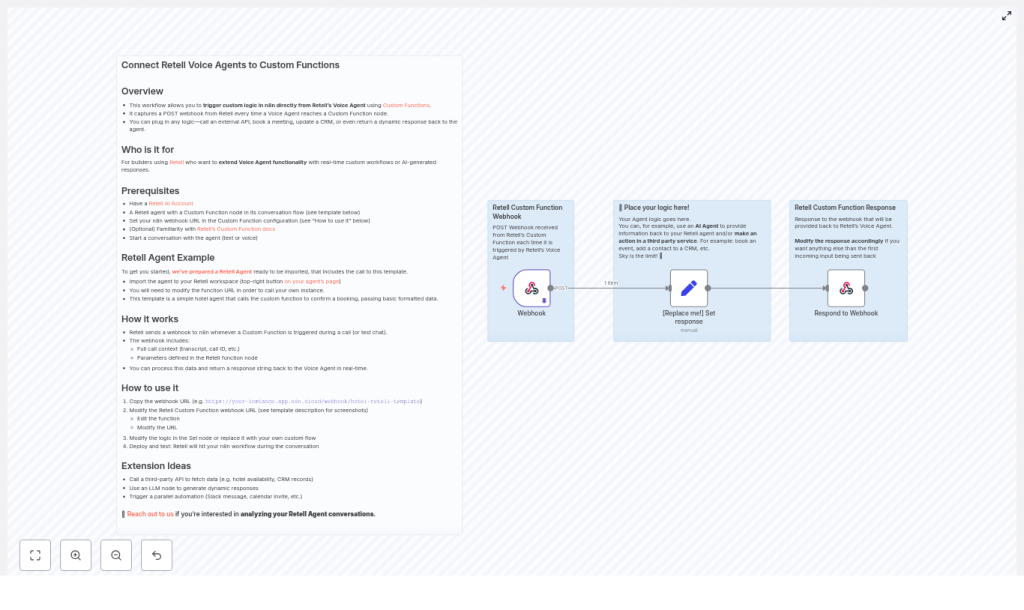
The provided n8n workflow template is intentionally minimal so it can serve as a starting point for more complex implementations. At a conceptual level, the template:
- Exposes an n8n Webhook node that accepts POST requests from a Retell Custom Function.
- Uses a Set node to define the response payload and to serve as a placeholder for custom logic, such as external API calls or LLM prompts.
- Returns a string response to Retell using a Respond to Webhook node so the agent can immediately speak or display the result.
The example workflow includes a sample hotel booking payload containing details such as guest name, dates, room type, and total cost. This allows you to test a realistic booking scenario quickly and then adapt it to your own domain.
Core use case and data model
Sample payload fields
The template expects a payload that includes keys such as:
guest-namehotel-nametotal-costcheck-in-dateandcheck-out-dateroom-type-bookedandnumber-of-nights
In addition to these booking-specific fields, Retell provides a rich call context in the POST body, which typically includes:
- Call ID and session metadata
- Transcript or partial transcript of the conversation
- Tool or function invocation details
This context can be leveraged in n8n to implement more advanced automations, such as personalized responses, conditional flows, or post-call analytics.
Architecture and technical flow
High-level interaction
When a Retell voice agent reaches a Custom Function node in its flow, the following sequence occurs:
- The Custom Function sends an HTTP POST request to the configured n8n webhook URL.
- The request body contains the full call context and any function parameters you defined in Retell, for example booking details captured during the conversation.
- n8n receives the payload in the Webhook node and passes it into downstream nodes for processing.
- Your workflow can parse and transform the data, call external APIs, store records, or run other business logic.
- The Respond to Webhook node sends a response back to Retell, typically as a string that the agent uses as its next spoken output.
This request-response cycle occurs in real time, so the user experiences a seamless conversational flow while your automation layer performs the necessary operations behind the scenes.
Key n8n nodes in the template
- Webhook node: Exposes an HTTP endpoint that Retell can call. Configured to accept POST requests and capture the incoming payload.
- Set node: Used as a simple response builder in the template. In production, this node is often replaced or augmented with additional nodes for API calls, data transformations, or LLM interactions.
- Respond to Webhook node: Sends the final response back to Retell. Typically returns a single string, but can also provide structured data if your function design requires it.
Prerequisites
Before deploying the template, ensure you have:
- An active Retell AI account and a Voice Agent that includes a Custom Function node in its conversation flow
- An n8n instance, either cloud-hosted or self-hosted, that is reachable from the public internet
- Basic familiarity with n8n nodes, HTTP webhooks, and handling JSON payloads
Implementation guide: connecting Retell to n8n
1. Import the template and obtain the webhook URL
Start by importing the hotel booking confirmation workflow template into your n8n instance. Once imported:
- Open the workflow in the n8n editor.
- Select the Webhook node.
- Copy the webhook URL generated by n8n, which will look similar to:
https://your-instance.app.n8n.cloud/webhook/hotel-retell-templateThis URL is what your Retell Custom Function will call during the conversation.
2. Configure the Retell Custom Function
Next, connect your Retell agent to this webhook:
- Open the Retell agent editor and navigate to the Custom Function node in your flow.
- Replace the example or placeholder URL with the n8n webhook URL you copied.
- Ensure the function is configured to send the required parameters, such as booking details and call context.
- Save and publish the updated agent configuration.
3. Customize workflow logic in n8n
The default template uses a Set node to return a static response. For production-grade automations, you will typically expand this section of the workflow. Common enhancements include:
- Calling a hotel booking or reservation API to create or modify bookings
- Sending email confirmations via SMTP, SendGrid, or other email providers
- Using an LLM node to generate personalized or contextually rich responses
- Writing booking details to a CRM, database, or Google Sheets for reporting
You can insert additional nodes between the Webhook and Respond to Webhook nodes to perform these actions, while still ensuring that a timely response is returned to Retell.
4. Deploy and test the integration
Once your logic is in place:
- Activate or deploy the n8n workflow.
- Initiate a test conversation with your Retell agent via voice or text.
- Progress through the flow until the Custom Function node is triggered.
- Verify that Retell sends a POST request to your webhook and that n8n executes the workflow successfully.
- Confirm that the response returned by n8n is spoken or displayed by the agent in real time.
Use this test cycle to validate both the payload structure and the correctness of your business logic.
Security and signature verification
For production environments, validating request authenticity is essential. Retell includes an x-retell-signature header in each webhook request. This header can be used to verify that the call originated from Retell and that the payload has not been tampered with.
In n8n, you can implement signature verification by:
- Adding a Function node that computes an HMAC signature using your shared secret and compares it to the
x-retell-signatureheader. - Conditionally continuing the workflow only if the signature matches, otherwise returning an error or ignoring the request.
If you prefer to centralize security, you can also place middleware or an API gateway in front of n8n to perform signature validation before forwarding requests to the webhook.
Example customization pattern
A typical enhancement to the template involves replacing the Set node with a sequence of operational steps. For example:
- Parse the incoming payload to extract guest details, dates, and room preferences.
- Call your hotel booking API to create or update a reservation.
- Send a confirmation email that includes booking details and terms.
- Return a concise response string to Retell, such as: “Booking confirmed for Mike Smith – Deluxe Suite on March 29th. A confirmation email has been sent to mike@yahoo.com.”
This pattern keeps the conversational experience focused and responsive while still executing all necessary backend processes in a structured manner.
Extension ideas for advanced automations
Once the basic integration is working, you can extend the workflow to support more sophisticated scenarios:
- Automatically create calendar reservations and send meeting or stay invites after a booking is confirmed.
- Use LLM providers such as OpenAI or Anthropic to generate more natural, context-aware agent replies.
- Sync bookings or call outcomes to a CRM or Google Sheets for reporting and reconciliation.
- Trigger downstream notifications via Slack, SMS, or other channels when a booking is created, updated, or canceled.
- Implement conditional branching that adjusts responses based on availability, budget constraints, or loyalty program status.
Troubleshooting and operational tips
- If the webhook is not being triggered, confirm that your n8n instance is publicly accessible and that the URL in the Retell Custom Function is correct.
- Use n8n execution logs to inspect incoming requests and validate the payload structure against your expectations.
- Introduce a temporary logging or debug node to persist raw payloads to a file, database, or external logging system for analysis.
- When calling external APIs, configure timeouts and implement robust error handling. If an error occurs, return a clear, user-friendly message to the voice agent rather than exposing internal error details.
Best practices for voice-driven automations
- Keep response times low, as latency is highly noticeable in voice interactions. Offload heavy or long-running work to asynchronous processes whenever possible and return an immediate confirmation message.
- Sanitize and validate all user-supplied data, including emails, dates, names, and payment-related information.
- Log call IDs, key payload fields, and relevant portions of the transcript for observability, auditing, and later analysis.
- Design conversational fallbacks so the agent can gracefully handle scenarios where external services are unavailable or return errors.
Conclusion
Integrating Retell voice agents with n8n using a webhook-powered Custom Function provides a robust pattern for real-time, voice-driven automation. The hotel booking workflow template offers a practical baseline: import it, connect your Retell Custom Function to the n8n webhook, and then expand the workflow with your own APIs, LLM logic, and data integrations.
With a few targeted customizations, every conversational interaction can trigger reliable, traceable business actions across your systems.
Ready to implement? Import the template into your n8n instance, update the webhook URL in your Retell Custom Function, and run a test booking flow. For assistance with advanced integrations or conversation analytics, contact us at hello@agentstudio.io.
Pro tip: For production deployments, always enable signature verification and consider asynchronous processing for longer-running tasks to maintain a fast and consistent voice experience.
Import the n8n template, connect your Retell webhook, and extend the workflow with at least one API integration today. Need strategic guidance or a custom implementation? Email hello@agentstudio.io for consultation.
