


Connected Car Alert Automation in n8n: Expert Implementation Guide
Modern connected vehicles emit a constant flow of telemetry, diagnostic data, and driver behavior signals. Converting this raw stream into actionable, real-time alerts requires a robust automation pipeline that can ingest, enrich, store, reason over, and log events with low latency.
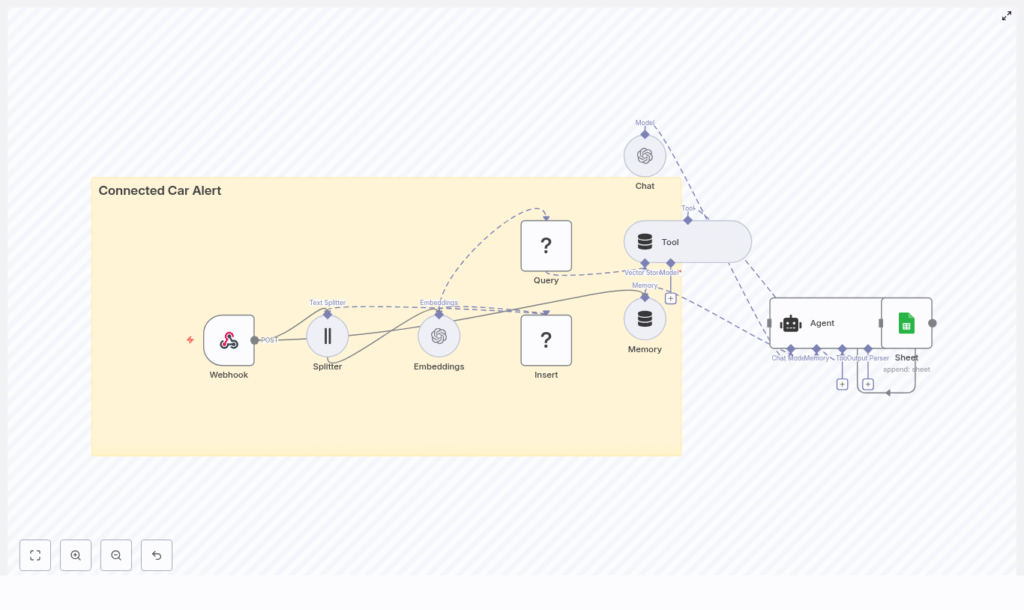
This guide explains how to implement a Connected Car Alert workflow in n8n using LangChain components and common infrastructure services. The reference template combines:
- An n8n Webhook for event ingestion
- A Text Splitter and OpenAI embeddings to vectorize diagnostic content
- Redis as a vector store for semantic search and historical context
- A LangChain Agent and Tool to reason over events
- Google Sheets logging for auditability and downstream operations
The result is a modular, production-ready pattern for connected car alerting that can be extended or adapted to your own fleet, telematics, or IoT scenarios.
Business Rationale: Why Automate Connected Car Alerts
For fleets, OEMs, and mobility providers, timely interpretation of vehicle signals directly affects safety, uptime, and customer experience. A connected car alert system built on n8n delivers:
- Real-time ingestion of vehicle events via webhooks and HTTP gateways
- Context-aware reasoning using vector embeddings and a language model
- Fast retrieval of similar historical events via a vector store
- Operational visibility through structured logging into spreadsheets or other systems
By centralizing this logic in n8n, teams can iterate quickly on alert rules, prompts, and downstream actions without rewriting backend services.
Solution Architecture Overview
The template is organized as a linear but extensible workflow that processes each incoming vehicle event through several stages:
- Ingestion: A Webhook node accepts HTTP POST requests from vehicle gateways or brokers.
- Preprocessing: A Text Splitter breaks long diagnostic notes into smaller, overlapping chunks.
- Vectorization: An Embeddings node converts text chunks into vector representations.
- Persistence: A Redis vector store node inserts vectors for later semantic search.
- Retrieval and reasoning: An Agent and Tool query Redis to retrieve similar events and generate an alert.
- Short-term memory: A Memory component maintains context across related events.
- Logging: A Google Sheets node appends the final alert record for audit and reporting.
This architecture separates concerns clearly: ingestion, enrichment, storage, reasoning, and logging. Each layer can be swapped or scaled independently.
Core n8n Nodes and Components
Webhook: Vehicle Event Ingestion
The Webhook node is the entry point for the workflow. It exposes an HTTP POST endpoint, for example:
Path: connected_car_alert
Method: POST
Your telematics gateway, MQTT bridge, or API integration should send JSON payloads to this endpoint. Typical fields include:
vehicleIdtimestampodometererrorCodeslocationdiagnosticNotesor other free-text fields
Best practice is to standardize the schema and validate payloads early so the downstream nodes can assume consistent structure.
Text Splitter: Preparing Content for Embeddings
Diagnostic notes and event descriptions can be long and unstructured. The workflow uses a character-based Text Splitter to divide this content into manageable segments before vectorization.
Default parameters in the template are:
chunkSize: 400characterschunkOverlap: 40characters
This overlap preserves context between chunks, which improves the semantic quality of the embeddings and avoids fragmenting important information across unrelated vectors.
Embeddings: Vectorizing Vehicle Diagnostics
The Embeddings node uses an OpenAI embeddings model (configured via your n8n OpenAI credentials) to convert each text chunk into a high-dimensional vector.
Configuration considerations:
- Select an embeddings model that balances cost and semantic fidelity for your volume and accuracy requirements.
- Ensure API quotas and rate limits are sufficient for peak ingestion rates.
- Optionally, batch multiple chunks in a single embeddings call to reduce overhead.
The resulting vectors are then ready to be inserted into a Redis-based vector store.
Redis Vector Store: Insert and Query
Insert: Persisting Embeddings
The Insert operation writes embedding vectors and associated metadata to Redis. The template uses an index name such as:
indexName: connected_car_alert
This index acts as a dedicated semantic memory for your connected car events. Metadata can include vehicle identifiers, timestamps, and other attributes that you may want to filter on later.
Query and Tool: Semantic Retrieval for Context
The Query node connects to the same Redis index to perform similarity search over historical vectors. This is exposed to the Agent through a Tool node so that the language model can dynamically retrieve relevant past events when generating an alert.
Typical use cases include questions such as:
- “What similar alerts occurred for this vehicle in the last 30 days?”
- “Have we seen this combination of error codes before?”
By coupling the Tool with the Agent, the workflow enables retrieval-augmented reasoning without hard-coding query logic.
Memory: Short-Window Context Across Events
The Memory component maintains a short history window that the Agent can access. This is particularly useful when:
- Multiple events arrive in quick succession for the same vehicle.
- An incident evolves over time and the alert message must reflect prior context.
- Follow-up diagnostics or driver notes are appended to an existing case.
Short-window memory helps the Agent handle multi-turn reasoning and maintain coherence without overloading the language model with the entire history.
Agent and Chat: Generating the Alert
The Agent node orchestrates the language model (Chat) and the vector store Tool. Its responsibilities are to:
- Receive the current event and any relevant memory.
- Call the Tool to query Redis for similar historical events.
- Combine current and retrieved context to generate an actionable alert message.
The Chat model then produces a human-readable alert that can include:
- Problem summary in natural language
- Recommended actions, for example schedule maintenance, notify driver, or escalate to operations
- References to similar past incidents if available
Tuning the Agent prompt and behavior is critical to ensure consistent formatting and reliable recommendations.
Google Sheets: Logging and Operational Visibility
The final stage is a Google Sheets node configured to append each generated alert as a new row. This provides:
- A low-friction audit trail for all alerts
- An easy integration point for operations teams that already use spreadsheets
- A quick way to export data into BI tools or reporting pipelines
In more advanced deployments, Sheets can be replaced or augmented with databases, ticketing systems, Slack notifications, or incident management platforms.
Step-by-Step Setup in n8n
To deploy the Connected Car Alert workflow template in your environment, follow these steps:
- Prepare credentials
Set up and store in n8n:- OpenAI API credentials for embeddings and chat
- Redis access (host, port, authentication) for the vector store
- Google Sheets OAuth credentials for logging
- Import and review the template
Import the provided n8n template and inspect each node. Confirm that the Webhook pathconnected_car_alertaligns with your vehicle gateway configuration. - Adapt the Text Splitter
AdjustchunkSizeandchunkOverlapbased on typical diagnostic note length and complexity. Larger chunks may capture more context, while smaller chunks can improve specificity and reduce token usage. - Select the embeddings model
In the Embeddings node, choose the OpenAI embeddings model that fits your cost and performance profile. Verify that your rate limits and quotas match expected event throughput. - Configure the Redis vector index
SetindexNameto a project-specific value, for exampleconnected_car_alert. For multi-environment setups, use separate index names per environment. - Tune the Agent prompt and response format
Define the Agent’spromptType, system instructions, and example outputs. Specify:- How severity should be expressed
- What metadata must appear in the alert (vehicleId, timestamp, key codes)
- Preferred structure for recommendations
- Run end-to-end tests
Send representative sample payloads to the Webhook. Validate that:- Text is split correctly
- Embeddings are created and inserted into Redis
- Semantic queries return relevant historical records
- The Agent generates clear and accurate alert messages
- Alerts are appended correctly to Google Sheets
- Implement monitoring and resilience
Configure retries and error handling on the Webhook, Redis, and external API nodes. Add logging and notifications for failures or latency spikes.
Key Use Cases for Connected Car Alert Automation
The template supports a range of operational scenarios for connected vehicles and fleets. Common applications include:
- Fleet safety alerts
Combine harsh braking or acceleration events with error codes to trigger targeted notifications to operations teams. - Predictive maintenance
Correlate recurring diagnostics with past failures, then prioritize maintenance tasks based on similarity to historical incidents. - Driver coaching
Aggregate and summarize risky driving patterns, then feed structured insights into driver coaching workflows. - Incident triage
Automatically generate human-readable recommendations, classify severity, and escalate incidents that meet predefined thresholds.
Automation Best Practices
To operate this workflow reliably at scale, consider the following practices:
- Namespace vector indexes
Separate Redis indexes for development, staging, and production to avoid cross-contamination of embeddings and test data. - Protect sensitive data
Filter or redact personally identifiable information (PII) before sending text to embeddings or LLMs, especially if using public cloud providers. - Manage retention and pruning
Define policies for how long vectors are retained and when old entries are pruned to control storage growth and maintain search performance. - Monitor model usage and cost
Track both embeddings and chat calls. These have different pricing characteristics, so monitor them separately and optimize batch sizes where appropriate. - Control ingestion rates
Rate-limit incoming webhook traffic or buffer events in a queue to prevent sudden spikes from overloading the embeddings API or Redis.
Security and Compliance Considerations
Vehicle telemetry often includes sensitive operational and location data. Secure handling is essential:
- Use HTTPS for all webhook traffic.
- Protect the Webhook with authentication (shared secret, HMAC signatures, or API keys).
- Review data residency and privacy requirements when using cloud LLMs and embeddings.
- For sensitive deployments, evaluate on-premise embeddings or private LLM instances.
- Encrypt vectors at rest in Redis and secure access with strong credentials and network controls.
Scaling Strategy and Cost Management
As the volume of connected vehicle data grows, you will need to scale both storage and compute:
- Redis scaling
Monitor memory usage and performance. Plan for sharding, clustering, or managed Redis services as your vector index grows. - Batching embeddings
Use batching to reduce the number of API calls and lower overhead, while staying within token and payload limits. - Specialized vector databases
For very large-scale similarity search, consider dedicated vector databases such as Milvus or Pinecone, or managed Redis offerings with vector capabilities. - Asynchronous ingestion
If ingestion volume is high, decouple the webhook from the embeddings and storage steps using queues or background workers.
Testing, Validation, and Monitoring
Robust testing and observability are essential before promoting this workflow to production:
- Automated tests
Build test cases with realistic payloads that validate the full path from ingestion to alert logging. - Alert quality checks
Periodically sample generated alerts and verify that:- Historical events retrieved from Redis are relevant.
- Recommendations are accurate and aligned with operational policies.
- Metrics and logging
Track key metrics such as:- End-to-end latency from webhook to alert
- Error rates for external dependencies (OpenAI, Redis, Google Sheets)
- Volume of events and alerts per vehicle or fleet
Conclusion: A Modular Pattern for Real-Time Vehicle Intelligence
This Connected Car Alert template demonstrates how to combine n8n, LangChain components, OpenAI embeddings, and Redis into a cohesive, real-time alerting pipeline. The architecture separates ingestion, vectorization, retrieval, reasoning, and logging, which makes it straightforward to:
- Swap embeddings providers or LLMs
- Persist alerts in databases or ticketing systems instead of spreadsheets
- Extend downstream automation with notifications, workflows, or integrations
By adopting this pattern, automation and data teams can rapidly move from raw vehicle telemetry to actionable, context-aware alerts that improve safety, maintenance planning, and driver experience.
Ready to deploy? Import the n8n template, configure your credentials, and run test payloads with representative vehicle data. If you require support with prompt engineering, scaling vector storage, or integrating with enterprise systems, our team can provide a tailored implementation.
Contact us for a deployment checklist or a guided walkthrough of the workflow.
