


Content Idea Brainstormer with n8n & OpenAI
In this guide, you will learn how to turn a simple webhook into a powerful content idea engine using n8n, OpenAI, and Redis. We will walk through the full workflow so you can understand each component, how they connect, and how to adapt the template for your own content strategy.
What you will learn
By the end of this tutorial-style walkthrough, you will be able to:
- Explain the architecture of a content idea brainstormer built in n8n
- Configure a webhook to receive content briefs and topic seeds
- Use OpenAI embeddings and a Redis vector store for retrieval-augmented generation
- Set up tools, memory, and a conversational agent to generate structured content ideas
- Log results automatically into Google Sheets for review and planning
- Apply best practices for chunking, prompting, and privacy
Why build a Content Idea Brainstormer in n8n?
Content teams, marketers, and product managers often need a steady stream of high quality content ideas. Doing this manually is slow and hard to scale. An n8n workflow that automates idea generation can help you:
- Save time by automating brainstorming for blog posts, videos, and social content
- Standardize idea quality with consistent prompts and formatting
- Reuse and build on past ideas with a searchable knowledge base
- Scale ideation across different topics, audiences, and tones
This template uses AI-powered retrieval and prompting so your ideas are not just random, but grounded in previous inputs and stored context.
Concept overview: How the system works
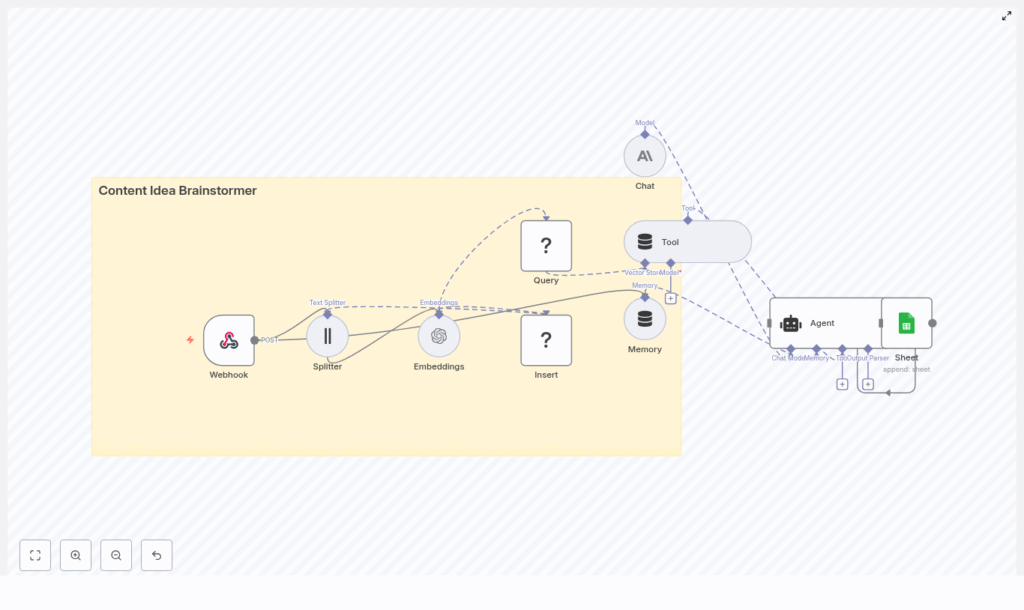
At a high level, this n8n workflow takes an incoming content brief, turns it into embeddings, stores them in Redis, and then uses a conversational agent to generate ideas using both memory and vector search.
Main components in the workflow
- Webhook – Receives new topic seeds or briefs via HTTP POST.
- Text Splitter – Breaks long input text into smaller chunks.
- OpenAI Embeddings – Converts text chunks into vector representations.
- Redis Vector Store (Insert & Query) – Stores and retrieves embeddings for similarity search.
- Tool & Memory – Exposes vector search as a tool and keeps a short-term conversation history.
- Agent / Chat Model – Uses a conversational AI model (OpenAI or Anthropic) to generate ideas.
- Google Sheets – Logs the generated ideas into a shared spreadsheet.
Next, we will walk through each part step by step, in the order you would experience it when a new content brief arrives.
Step-by-step: Building the Content Idea Brainstormer in n8n
Step 1 – Webhook: Receive a content seed
The workflow starts with a Webhook node in n8n. This node waits for incoming HTTP POST requests that contain your content brief or topic seed.
A typical JSON payload might look like this:
{  "seed": "AI for small business: blog post ideas",  "audience": "small business owners",  "tone": "practical"
}
You can send this payload from a web form, Slack command, internal tool, or any other automation that can make a POST request. As soon as the webhook receives the data, the n8n workflow starts running.
Step 2 – Text Splitter: Chunk long input for embeddings
Long briefs or rich descriptions can be too large to embed as a single block. To handle this, the workflow uses a Text Splitter node.
In the template, a character-based splitter is used with:
chunkSize = 400characterschunkOverlap = 40characters
This approach has two goals:
- Improve embedding performance by working with smaller pieces of text
- Maintain context between chunks by overlapping them slightly
The overlap helps avoid losing important information that sits at the boundary between chunks.
Step 3 – Embeddings: Turn text into semantic vectors
Each chunk produced by the splitter is then sent to an OpenAI Embeddings node. This node calls an OpenAI embeddings model to create a vector representation of each text segment.
These embeddings capture the semantic meaning of the text. Instead of matching keywords, the system can later perform similarity search based on meaning. This is what makes retrieval-augmented generation work effectively.
Step 4 – Insert: Store embeddings in a Redis vector index
Next, the workflow uses an Insert node connected to a Redis vector store. The embeddings are written into a Redis index named:
content_idea_brainstormerStoring embeddings in Redis gives you:
- Fast similarity search over previously stored content briefs and ideas
- A scalable solution for medium-sized knowledge bases
- A way to reuse past context when generating new ideas
Step 5 – Query & Tool: Retrieve relevant context from Redis
When the agent is ready to generate new ideas, it needs context. The workflow uses two key nodes here:
- Query node – Searches the same
content_idea_brainstormerRedis index to find the most relevant existing passages for the current seed. - Tool node – Wraps the vector store as a tool that the agent can call during reasoning.
In practice, the Query node performs a similarity search using the new seed or related text. The top matching chunks are then made available as context. By exposing this through a Tool node, the agent can pull in this context when deciding what ideas to generate.
Step 6 – Memory: Keep short-term conversation history
The workflow also includes a Memory component. This maintains a rolling buffer of recent interactions between the user and the agent.
Short-term memory is useful when:
- Multiple seeds are submitted in a single session
- The user corrects or refines a previous brief
- You want consistent style and tone across related idea lists
By remembering what happened earlier in the conversation, the agent can produce more coherent and consistent outputs.
Step 7 – Agent & Chat: Generate structured content ideas
The heart of the system is the Agent node connected to a Chat model (for example, Anthropic or OpenAI). This is where the actual content ideas are generated.
The Agent node:
- Receives the incoming JSON payload (seed, audience, tone, etc.)
- Uses the Tool node to retrieve relevant context from Redis
- Consults the Memory buffer for recent conversation history
- Runs internal reasoning to produce structured content ideas
In this workflow, the promptType = define behavior is used. That means the entire incoming JSON object is treated as the prompt, which ensures all fields (like audience and tone) influence the output.
Step 8 – Google Sheets: Log ideas for tracking and review
Finally, the generated ideas are passed to a Google Sheets node. This node appends each new set of ideas to a designated sheet.
Storing results in Sheets lets you:
- Build a content backlog that your team can review
- Filter, sort, and prioritize ideas before production
- Connect the sheet to your content calendar or project management tools
Configuring the workflow: Practical tips & best practices
Choosing chunk size and overlap
Text splitting is a key part of any embedding-based workflow. As a general guideline:
- Use chunk sizes between 300 and 800 characters
- Set overlap to around 10 to 20 percent of the chunk size
The example configuration of chunkSize = 400 and chunkOverlap = 40 works well in many cases. It provides enough context per chunk without creating too many vectors, which can increase cost and slow down queries.
Selecting an embedding model
When choosing an OpenAI embedding model, aim for a balance between cost and quality. A few points to keep in mind:
- Use a modern, recommended embedding model from your provider
- Monitor for model updates, as providers sometimes deprecate older models
- If you switch models, consider re-running embeddings to keep your Redis index consistent
Tuning the Redis vector store
The quality of retrieval has a big impact on the ideas your agent generates. To tune your Redis vector store:
- Adjust the similarity threshold if your integration supports it
- Experiment with the number of results returned (top-k), for example 3 to 7 matches
- Avoid sending too many passages to the model, which can dilute focus
The goal is to give the agent enough context to be helpful, but not so much that it becomes noisy or confusing.
Prompt engineering for content ideation
A clear, structured prompt is essential for consistent content ideas. In your Agent or Chat node, make sure to:
- Explicitly pass the seed, audience, and tone
- Specify how many ideas you want and in what format
- Include any constraints, such as word counts or specific content types
- Add examples if you need a very particular style or structure
Example agent prompt structure
Here is a sample prompt structure that works well for this kind of workflow:
Prompt:
You are a content strategist. Using the seed, audience, and retrieved context, generate 8 content ideas: titles, short descriptions (1 sentence), and suggested formats (blog, video, social). Prioritize practicality and SEO.

Seed: "AI for small business: blog post ideas"
Audience: "small business owners"
Tone: "practical"

Context: [retrieved passages...]

Output: JSON array of ideas.
You can adapt this template to match your brand voice, content formats, or internal naming conventions.
Privacy and compliance considerations
When working with embeddings and vector stores, be careful with personal and sensitive data:
- Scrub or anonymize any personally identifiable information (PII) before embedding
- Remember that embeddings are not trivial to delete selectively once stored
- Implement a lifecycle or deletion policy for data that must not be kept indefinitely
These steps are important for privacy, compliance, and responsible AI usage.
Extensions and improvements for your brainstormer
Once the basic workflow is running, you can extend it in several useful ways:
- Add a web UI so non-technical team members can submit seeds and adjust parameters.
- Schedule recurring jobs to refresh popular topics with new context or data.
- Collect user feedback on generated ideas and use it to refine prompts or prioritize topics.
- Integrate with your CMS or task manager to automatically create draft entries or tasks from accepted ideas.
Monitoring, maintenance, and reliability
To keep your n8n content brainstormer running smoothly, plan for ongoing monitoring and maintenance:
- Track API usage and latency for OpenAI or Anthropic calls
- Monitor Redis index growth and storage usage
- Reindex embeddings if you change to a new embedding model
- Add error handling in n8n to log failures and retry transient errors
These practices reduce downtime and help you catch issues before they affect your team.
Common pitfalls and how to avoid them
- No overlap in text splitting – If you split text without overlap, important context at the edges can be lost, which reduces retrieval quality.
- Too many retrieved passages – Passing a large number of chunks to the model can overwhelm it and lead to generic or unfocused ideas.
- Embedding sensitive data – Failing to remove PII before embedding can create compliance and privacy risks.
Quick recap
This Content Idea Brainstormer template in n8n:
- Accepts content briefs through a webhook
- Splits and embeds text with OpenAI embeddings
- Stores vectors in a Redis index for fast similarity search
- Uses tools and memory to give a conversational agent rich context
- Generates structured content ideas tailored to your audience and tone
- Logs outputs into Google Sheets for easy review and planning
It is flexible enough for solo creators and scalable for larger content teams, and it can be expanded into a full content production pipeline.
FAQ: Using the n8n Content Idea Brainstormer
Can I use a different chat model or provider?
Yes. The Agent node can be configured with different chat models, such as OpenAI or Anthropic, as long as they are supported by your n8n setup.
Do I have to use Redis as the vector store?
This template uses Redis for speed and simplicity, but in principle you could adapt the workflow to other vector stores if n8n and your infrastructure support them.
How many ideas should I generate per request?
Eight ideas per seed is a practical starting point, as shown in the sample prompt. You can increase or decrease this number depending on your use case and token limits.
Can I change the output format?
Yes. You can adjust the prompt to output markdown, plain text, or more complex JSON structures that match your CMS or planning tools.
Get started with the template
To start using this Content Idea Brainstormer:
- Import the template into your n8n instance.
- Connect your OpenAI (or other provider) credentials.
- Configure your Redis connection and ensure the
content_idea_brainstormerindex is set up. - Link the Google Sheets node to your desired spreadsheet.
- Send a test seed to the webhook and review the ideas in your sheet.
If you want to adapt this workflow for your team, you can extend the prompts, add custom fields to the JSON payload, or connect it directly to your content calendar.
Call to action
Ready to build your own content idea engine with n8n and OpenAI? Use this template, plug in your OpenAI and Redis credentials, and start sending seeds via the webhook. If you need help customizing the workflow for your organization, reach out to us or subscribe for more n8n automation templates and in-depth guides.
