


Convert YouTube Videos into SEO Blog Posts: Turn One Idea into Many
Every time you hit publish on a YouTube video, you create a powerful asset. But if that content lives only on YouTube, you are leaving visibility, traffic, and leads on the table. Imagine taking each video and effortlessly turning it into a polished, SEO-ready article that keeps working for you long after the video goes live.
In this guide, you will walk through a complete journey: from the challenge of doing everything manually, to a new mindset of automation, and finally to a practical, ready-to-use n8n workflow template. Along the way, you will see how a simple automated pipeline, powered by transcripts, AI models, and n8n, can free your time, amplify your reach, and help you focus on higher-value work.
The Problem: Great Content, Limited Reach
You pour effort into planning, recording, and editing your YouTube videos. Yet:
- Search engines cannot fully understand your video content without text.
- Some of your audience prefers reading or skimming, not watching a full video.
- Your team spends hours manually transcribing, outlining, and drafting blog posts.
Manually turning each video into a blog post is possible, but it is slow and hard to scale. As your library grows, the gap between what you have created and what is actually discoverable gets wider.
The Possibility: A New Mindset Around Automation
Instead of seeing repurposing as another task on your to-do list, you can treat it as a system. With the right workflow in place, every new YouTube video can automatically trigger a repeatable process that:
- Pulls the transcript.
- Transforms it into an SEO-focused article.
- Generates a featured image.
- Delivers everything straight to your inbox or CMS.
This is where n8n comes in. By using an n8n workflow template, you turn scattered manual steps into a reliable pipeline. Instead of starting from scratch each time, you simply feed the workflow a YouTube URL and let automation handle the heavy lifting.
This shift is more than a time saver. It is a mindset change. You are not just creating content anymore, you are building a content engine.
The Solution: An Automated n8n Workflow Template
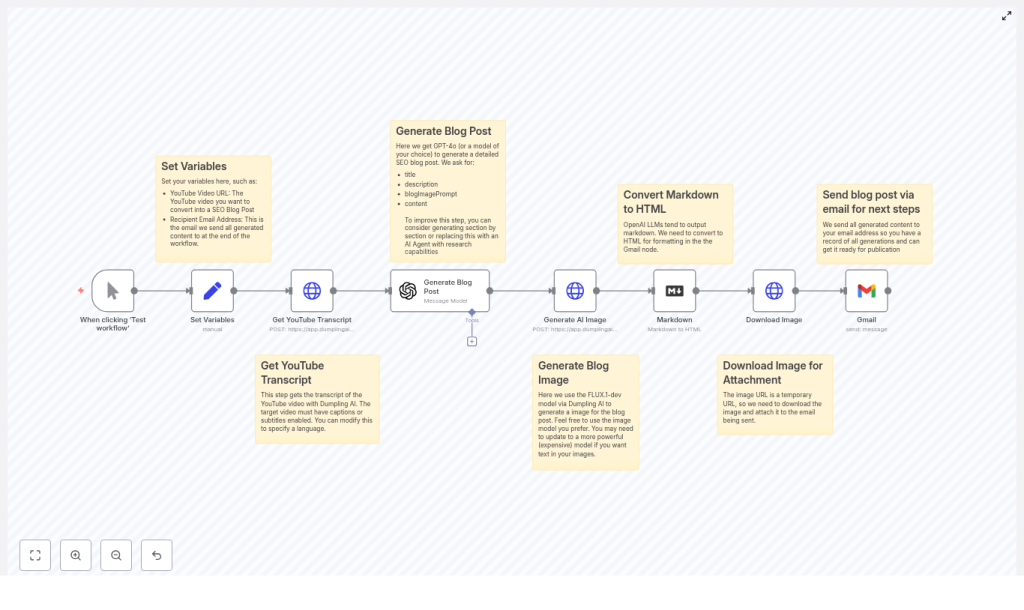
The workflow you will use in this guide is built around n8n, with AI services layered in where they add the most value. At a high level, the workflow:
- Accepts a YouTube video URL and configuration details.
- Fetches the transcript from a transcript API or YouTube captions.
- Sends the transcript to an AI writing model to create an SEO-optimized blog post.
- Generates a featured image using an AI image model.
- Converts the AI output from Markdown to HTML.
- Downloads the image and delivers everything via email or CMS.
The example template uses Dumpling AI for transcripts and images, and an OpenAI model for blog generation. You are free to swap in your preferred providers, but the structure and logic of the workflow remain the same.
What You Need Before You Start
Before you run the template, make sure you have access to the following:
- An n8n instance, either cloud-hosted or self-hosted.
- API access to a transcript service, or rely on YouTube captions. The template references Dumpling AI.
- Access to an AI writing model such as the OpenAI GPT family or an equivalent model.
- An account to generate images (optional). The workflow uses FLUX.1-dev via Dumpling AI.
- A Gmail account or a CMS integration for delivering or publishing the final post.
Once these pieces are in place, you are ready to turn automation into a core part of your content workflow.
The Journey Through the Workflow
Step 1 – Set Your Variables and Make the Workflow Reusable
Begin with a variables node in n8n. This is where you define the inputs that will change from video to video, such as:
- YouTube video URL
- Recipient email address
- Language or locale
- Target keyword or topic focus
By centralizing these variables, you make the workflow easy to reuse, scale, and even batch-process multiple videos. Instead of editing nodes throughout the workflow, you adjust a few variables and run it again.
Step 2 – Pull the YouTube Transcript
Next, the workflow fetches the transcript. You can use:
- A transcript API such as Dumpling AI, or
- YouTube captions when available.
Make sure the video has captions enabled. Auto-generated captions are usually good enough as a starting point, but you may want to review them for accuracy, especially for technical or brand-specific terms. If you plan to create media-rich posts with timestamps and anchors, request timestamps from the transcript endpoint as well.
Step 3 – Turn the Transcript into an SEO Blog Post with AI
Now the transformation begins. The transcript is sent to an AI writing model, such as an OpenAI GPT model, with a clear prompt that guides the structure and SEO focus of the output. Strong prompts are the key to high-quality articles.
Make sure your prompt instructs the model to:
- Identify and organize the main topics and themes from the transcript.
- Create an SEO-friendly title and meta description.
- Write a full article with a clear introduction, structured H2/H3 headings, and a conclusion.
- Include suggested keywords, internal link ideas, and a recommended slug.
- Return the content in Markdown format for easy conversion to HTML.
Here is an example snippet you can adapt in your workflow:
Analyze the transcript and write a 1,000-1,500 word SEO-optimized blog post. Include:
- A compelling SEO title (under 60 characters)
- Meta description (under 160 characters)
- H2/H3 headings, short paragraphs, and bullet lists where helpful
- Target keywords: [insert keywords]
- Suggested slug, featured image prompt, and 3 suggested internal links
Tone: informative and professional. Output in Markdown.
Once this step is in place, every new video can generate a consistent, on-brand blog post with minimal manual input.
Step 4 – Generate a Featured Image with AI
To complete the blog post, the workflow calls an AI image model, such as FLUX.1-dev via Dumpling AI, to create a featured image. You can use the image prompt suggested by the writing model or craft your own.
For best results, keep your prompts specific. For example:
- Describe the scene, such as a YouTube play button transforming into a blog page.
- Specify the style, like modern, minimal, or abstract.
- Mention colors and key visual elements, such as SEO icons or subtle AI motifs.
This step gives each article a visual identity that aligns with your brand and topic, without needing a designer for every post.
Step 5 – Convert Markdown to HTML
Most AI writing models, including OpenAI, return content in Markdown. To make this usable in your CMS or email tool, add a Markdown-to-HTML converter node in your n8n workflow.
This node transforms headings, lists, links, and formatting into clean HTML that you can paste directly into your blog platform or send as part of an email template.
Step 6 – Download the Image and Prepare It for Use
AI image APIs often provide a temporary URL. To avoid broken images later, your workflow should:
- Download the generated image.
- Attach it to an email or upload it to your CMS, CDN, or cloud storage.
As part of this step, you can also standardize:
- File names that include the post slug or main keyword.
- Alt text that describes the image and, where appropriate, includes the target keyword.
- Image sizes that match your website’s layout requirements.
Step 7 – Deliver or Publish the Final Post
Finally, the workflow brings everything together and delivers it to you in a ready-to-use format. Common options include:
- Sending the HTML article, title, meta description, and featured image via Gmail for review.
- Integrating directly with WordPress or a headless CMS to create a draft or publish automatically.
In this step, you can include:
- The generated SEO title.
- Meta description.
- Suggested slug.
- Featured image attachment or URL.
From here, your role shifts from manual creator to editor and strategist. You review, refine where needed, and hit publish.
Why This Workflow Matters for SEO and Growth
By turning YouTube videos into SEO-ready blog posts with n8n, you multiply the impact of each piece of content. Some key benefits include:
- Boosted SEO visibility: Blog posts give search engines structured, crawlable content that can rank for long-tail queries related to your video topics.
- Improved accessibility: Written articles and transcripts support readers who prefer text or are hearing-impaired.
- Extended reach: You reach people who discover content through Google, newsletters, or social feeds instead of YouTube.
- Higher content efficiency: One video can become a blog post, social snippets, email content, and more.
- More leads and backlinks: Articles can include calls to action, gated resources, and internal links that drive conversions and engagement.
Instead of choosing between video or written content, you can have both, powered by one automated workflow.
SEO Best Practices for Your Generated Articles
Automation gives you a strong first draft, but good SEO still depends on smart structure and details. As you review and refine AI-generated posts, keep these guidelines in mind:
- Titles and meta descriptions: Keep titles under 60 characters and meta descriptions under 160. Place your primary keyword near the beginning.
- Clear headings: Use H2 for main sections and H3 for subsections. Integrate keywords naturally into headings without stuffing.
- Keyword placement: Mention your primary keyword in the first 100 words and sprinkle related terms throughout the article.
- Readable formatting: Use short paragraphs of 2 to 4 sentences, bullet lists, and subheadings to make the article easy to scan.
- Image optimization: Give each image descriptive alt text and include your target keyword when it fits naturally.
- Internal links: Add two or three links to related posts on your site to increase time on site and guide readers deeper into your content.
- Schema and canonical tags: Add article schema markup and set canonical URLs if the content appears in multiple places.
With these practices, your automated posts will not only be fast to produce, they will also be positioned to perform well in search.
Prompting Tips to Get Better AI Output
The quality of what you get from the AI model depends heavily on what you put into it. To consistently generate strong blog posts, be specific about:
- Audience: Who you are writing for, such as marketers, founders, or developers.
- Tone: For example, professional, friendly, or in-depth technical.
- Structure: Ask explicitly for an introduction, H2/H3 sections, conclusion, and a call to action.
- SEO details: Provide a short list of target keywords and ask for a meta description, suggested slug, and featured image prompt.
- Extras: Request 2 to 3 suggested internal links and ask for the output in Markdown.
Do not hesitate to iterate. If the first result is not quite right, refine your prompt, run it again, or generate the article section by section.
Troubleshooting and Common Issues
As you scale your automated workflow, you may encounter a few recurring challenges. Here is how to handle them:
- No transcript available: If a video does not have captions, use a transcription service on the audio file or request permission to use an uploaded transcript.
- Unsatisfying AI output: Tighten your prompt with clearer constraints, ask for an outline first, or generate the introduction and key sections separately.
- Expiring image URLs: Always download the image immediately and store it on your own CDN, CMS, or storage bucket to prevent broken images.
- API rate limits: Monitor usage and implement retries, batching, or scheduling to keep high-volume runs stable.
These small adjustments help you turn a good workflow into a robust, production-ready system.
Real-World Use Cases for This Template
This n8n workflow template is flexible enough to support many content strategies. A few practical examples include:
- Podcast episodes on YouTube: Automatically generate show notes and long-form blog posts for each episode.
- Product demos: Turn demo videos into how-to guides, onboarding content, and documentation.
- Webinars: Break long webinars into multiple SEO articles, resource hubs, or downloadable summaries.
Once your workflow is set up, adding a new use case is often just a matter of tweaking prompts and variables.
Your Next Step: Turn This Template Into Your Content Engine
Converting YouTube videos into SEO blog posts with n8n is more than a clever hack. It is a way to scale your impact without scaling your workload. You increase visibility, improve accessibility, and get more value from every piece of content you create.
Instead of spending hours on repetitive tasks, you invest a bit of time up front to set up an automation that keeps paying off. Over time, this becomes a foundation for a more focused, strategic workflow where you spend your energy on ideas, not on copy-pasting.
Ready to start? Use the n8n template, connect your API keys, and run your first video through the workflow. From there, iterate, customize it for your CMS or brand voice, and keep improving it as you learn.
Call to action: Try the template today or download the workflow to automate your content repurposing. If you need a custom integration or want help tailoring the prompts and delivery to your stack, reach out for a consultation.
Pro tip: Always review AI-generated content for factual accuracy, nuance, and brand voice before publishing. Automation gives you leverage, your judgment keeps the quality high.
