


Create Short URLs and Track Stats with n8n + YOURLS
Short links are useful for marketing campaigns, internal tools, and analytics. With n8n and YOURLS you can automate both parts of the job: creating a short URL and then pulling statistics for that link, all inside a single reusable workflow.
This guide walks you through a ready-made n8n workflow template that connects to YOURLS, creates a short URL, then immediately fetches detailed stats for it. You will learn what each node does, how the data flows between them, and how to adapt the template to your own use case.
Learning goals
By the end of this tutorial, you will be able to:
- Import and understand an n8n workflow template that works with YOURLS
- Configure YOURLS API credentials inside n8n
- Create short URLs with the Yourls node
- Use n8n expressions to pass data between nodes
- Fetch and inspect YOURLS statistics (hits, referrers, browsers, countries, and more)
- Identify common use cases and possible enhancements for this workflow
Concept overview: What this n8n + YOURLS workflow does
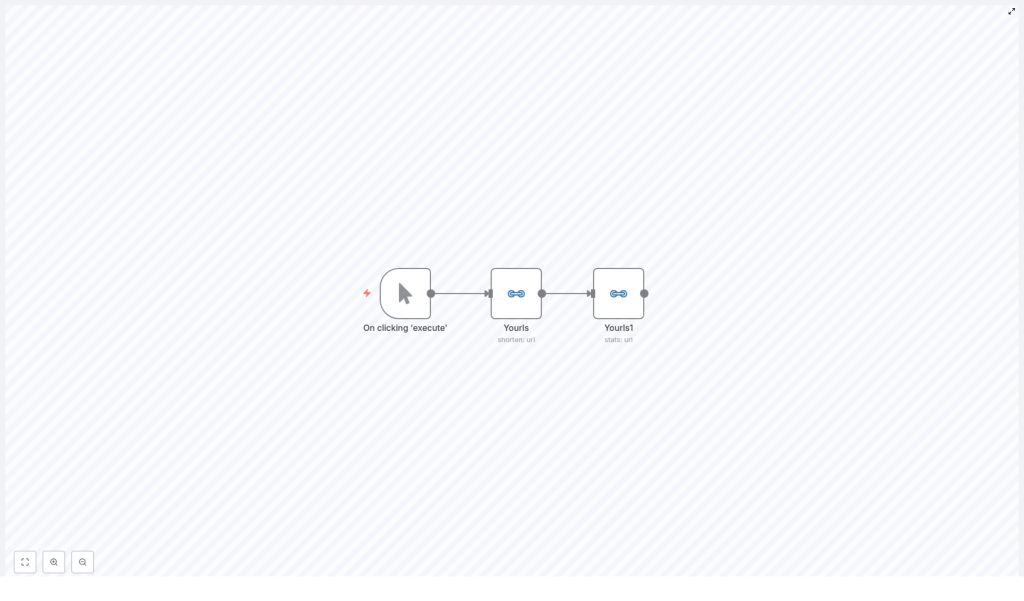
The provided workflow template is intentionally simple so you can understand it quickly, then extend it as needed. It performs three main actions:
- Manual trigger starts the workflow on demand.
- Create short URL in YOURLS for a specific long URL (with an optional title).
- Fetch statistics for the short URL using the YOURLS API.
This pattern is ideal if you want to:
- Generate campaign links for newsletters or ads
- Batch-shorten URLs from a CMS, Airtable, or spreadsheet
- Pull link metrics into analytics tools or a database
- Trigger alerts when a link reaches a certain number of clicks
What you need before you start
Make sure the following prerequisites are in place before you import or run the template:
- An n8n instance, either cloud or self-hosted
- A working YOURLS installation with API access enabled
- Valid YOURLS API credentials, such as:
- Username + signature
- Or an API key, depending on your YOURLS configuration
Inside the template: nodes and data flow
The template contains three nodes connected in a straight line. Understanding this flow will make the configuration steps much easier.
1. Manual Trigger node
This node simply lets you start the workflow manually from the n8n editor. It is perfect for testing and learning. Later you can replace it with other triggers such as:
- A webhook that receives URLs from external systems
- A cron schedule for periodic stats updates
- A trigger from Airtable, Google Sheets, or a CMS
2. Yourls node (create short URL)
The first Yourls node is responsible for creating the short URL. You provide:
- The long URL to shorten
- An optional title to label the link inside YOURLS
When this node runs, it sends a request to the YOURLS API and receives a JSON response. One of the most important fields in that response is:
shorturlThis field contains the new short URL that YOURLS generated. The workflow will pass this value to the next node.
3. Yourls1 node (stats for the short URL)
The second Yourls node, often named Yourls1 in the template, uses the stats operation. Its job is to query YOURLS for analytics about the short URL created in the previous step.
To do this, it needs the short URL value. Instead of hardcoding anything, the node uses an expression to read the shorturl field from the previous node’s JSON output.
Using expressions to pass data between nodes
Here is the example expression used in the template to pass the short URL from the first Yourls node to the stats node:
= {{$node["Yourls"].json["shorturl"]}}In the n8n UI, this expression is set in the shortUrl field of the Yourls1 node. If you rename the first Yourls node, you must update the expression accordingly. For example, if the node is called Yourls - Create, you would use:
= {{$node["Yourls - Create"].json["shorturl"]}}This pattern of referencing previous node data is fundamental in n8n and you will use it often when building more complex automations.
Step-by-step: setting up the workflow in n8n
Now let us walk through the setup process in a structured way, from credentials to testing.
Step 1: Configure YOURLS credentials in n8n
- Open your n8n instance and go to Credentials.
- Create a new credential of type YOURLS API (or the equivalent available in your n8n version).
- Fill in:
- Your YOURLS host URL (for example,
https://yourls.example.com) - Your authentication details, which may be:
- Signature token
- Or username and password
- Your YOURLS host URL (for example,
- Save the credentials.
The exact fields available can vary slightly depending on your YOURLS version and installed plugins, but the idea is always the same: n8n needs the base URL and a secure way to authenticate with the YOURLS API.
Step 2: Configure the Yourls node that creates the short URL
Next, configure the first Yourls node in the imported template.
- Select credentials: Choose the YOURLS credential you just created.
- Set the URL parameter:
- Enter the long URL you want to shorten.
- In the original template, this is set to a Medium article URL, but you can replace it with:
- A static URL for testing
- An expression that reads a URL from a previous node, such as a webhook or Airtable record
- Optional: set a title:
- Use the title field to give the link a friendly label inside YOURLS, for example
"Spring Campaign Landing Page".
- Use the title field to give the link a friendly label inside YOURLS, for example
After configuring these options, run this node by itself in n8n. Check the output panel and confirm that:
- The node executes successfully.
- The JSON response includes a
shorturlfield.
Step 3: Configure the Yourls stats node
Now configure the second Yourls node that retrieves stats for the newly created short link.
- Select credentials: Use the same YOURLS credentials.
- Operation: Choose stats.
- shortUrl field:
- Click into the field and switch to Expression mode.
- Use the expression that reads the
shorturlvalue from the previous node, for example:= {{$node["Yourls"].json["shorturl"]}} - If your first node is named differently, adjust the node name in the expression.
Now run the entire workflow from the Manual Trigger. When it completes, open the Yourls1 node output and inspect the returned statistics. Depending on your YOURLS installation and plugins, you may see:
- Total hits or clicks
- Referrers
- Browsers and platforms
- Top countries or locations
- Dates and time-based metrics
Common ways to use this template
Once you understand the basic pattern, you can plug this workflow into many different systems. Here are a few practical ideas:
- CMS or Airtable integration:
- Automatically create short URLs for new records or posts.
- Write the short URL and stats back to the original record.
- Marketing campaign tracking:
- Generate short links for each campaign or channel.
- Push click metrics to Google Sheets, BigQuery, or a BI tool via extra n8n nodes.
- Notifications and alerts:
- Send a Slack or email notification when a link reaches a specific number of hits.
- Alert the team if a link suddenly gets unusual traffic.
Ideas for enhancements and next steps
The basic template is a starting point. Here are some concrete ways to extend it inside n8n:
- Persist data:
- Add Airtable or Google Sheets nodes to store:
- The original long URL
- The generated short URL
- Key stats like total hits or last access date
- Add Airtable or Google Sheets nodes to store:
- Schedule recurring stats updates:
- Replace the Manual Trigger with a Cron node.
- Run the workflow hourly, daily, or weekly to refresh stats for multiple links.
- Bulk reporting:
- Use SplitInBatches to loop over a list of short URLs and call the stats operation for each one.
- Aggregate the results and send a periodic report.
- Real-time alerts:
- Connect Slack or Microsoft Teams nodes.
- Trigger alerts when a link crosses thresholds or shows suspicious activity.
Making the workflow robust: error handling and troubleshooting
To move from a simple demo to a production-ready automation, it helps to add some error handling and logging.
- Validate credentials early:
- Before building complex flows, run a single create request and a single stats request manually.
- Confirm that your YOURLS API credentials are correct and the host URL is reachable.
- Use IF and Error Trigger nodes:
- Add an IF node to check for unexpected responses or missing fields.
- Use the Error Trigger node to catch workflow failures and:
- Retry operations
- Send notifications to an operator
- Log responses:
- Store YOURLS API responses in a database, file, or spreadsheet.
- This makes it easier to debug issues like malformed URLs or changes in the YOURLS response format.
Security best practices
Because this workflow uses API credentials and may run in production, keep the following security tips in mind:
- Use n8n’s credential manager:
- Store YOURLS credentials in n8n’s built-in manager.
- Avoid hardcoding tokens, signatures, or passwords directly into workflow fields.
- Protect your YOURLS instance:
- Restrict access to your YOURLS installation.
- Ensure HTTPS is enabled so that API traffic is encrypted.
- Secure webhooks:
- If you expose an n8n webhook that accepts URLs and creates short links, add verification.
- Use an API key, HMAC signature, or similar mechanism to prevent abuse.
Testing checklist
Use this quick checklist to confirm that everything is working correctly:
- Check that the long URL you plan to shorten resolves correctly in a browser.
- Run the Yourls create node:
- Verify that it returns a
shorturlfield in the JSON output.
- Verify that it returns a
- Run the Yourls stats node with the expression:
- Confirm that stats are returned for the short URL.
- Inspect fields such as hits, referrers, and dates.
- Test error paths:
- Try an invalid URL or temporarily break the API connection.
- Check that your workflow handles these issues gracefully, especially if you added IF or Error Trigger nodes.
Recap: what you have built
By following this guide, you have:
- Imported and understood a simple n8n workflow template that integrates with YOURLS
- Configured YOURLS credentials securely inside n8n
- Created a short URL via the Yourls node
- Used an n8n expression to pass the generated short URL into a stats node
- Fetched analytics data like hits and referrers from YOURLS
- Explored options for extending the workflow with storage, scheduling, alerts, and bulk reporting
Using n8n with YOURLS gives you flexible, automated control over link shortening and reporting. The template you imported is lightweight but powerful. Once you are comfortable with it, you can swap the manual trigger for a webhook, schedule, or external data source, then send the results to any destination supported by n8n.
FAQ: common questions about n8n + YOURLS
Can I use a different trigger instead of Manual Trigger?
Yes. Replace the Manual Trigger with any n8n trigger node, such as a Webhook, Cron (schedule), or triggers from tools like Airtable or Google Sheets. The rest of the workflow can stay the same, as long as you still provide a long URL to the Yourls create node.
What if my YOURLS response structure is different?
Some YOURLS setups or plugins may slightly change the response format. After running the create node, inspect the JSON output. If the short URL is stored under a different key, update your expression in the stats node to reference the correct field.
Can I fetch stats for multiple URLs at once?
Yes. Use nodes like SplitInBatches or loops in n8n to iterate over a list of short URLs. For each one, call the stats operation and collect the results. This is useful for periodic reports or dashboards.
Is this workflow suitable for production use?
