


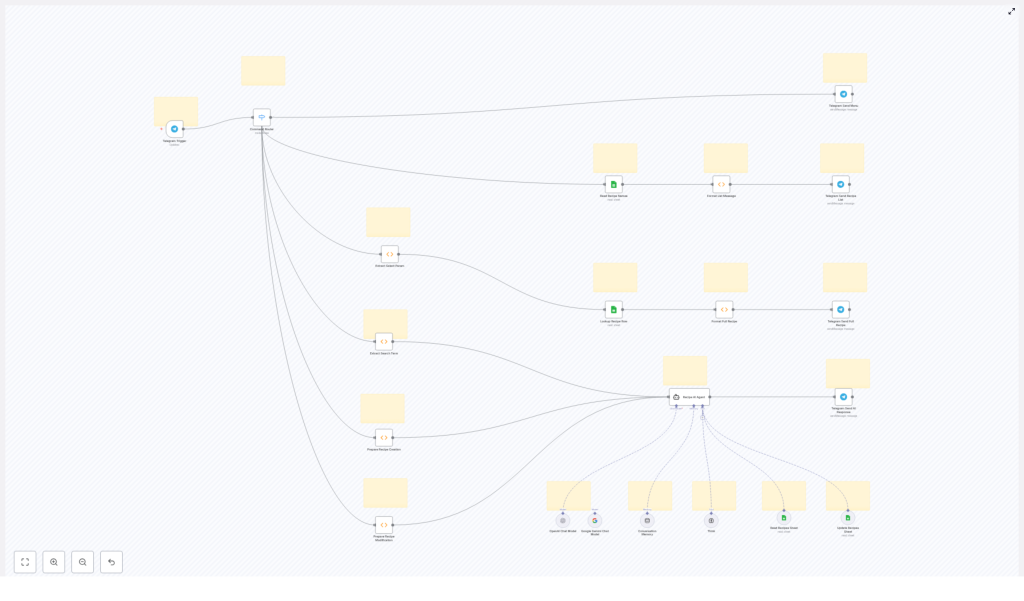
Culinary Companion: 30-Step Telegram & Google Sheets Recipe Workflow
1. Overview
This n8n workflow template implements a 30-step, Telegram-driven recipe assistant that uses Google Sheets as a structured recipe database and Language Learning Models (LLMs) as an AI layer for intelligent assistance. It allows users to list, search, create, and modify recipes directly from Telegram, while the workflow orchestrates data retrieval, formatting, and AI reasoning in the background.
The automation combines:
- Telegram for real-time chat-based interaction
- Google Sheets as the persistent recipe store
- LLM-based agents (OpenAI Chat, Google Gemini Chat) for semantic search, recipe ideation, and guidance
- LangChain-style memory for contextual, multi-turn conversations
This reference-style guide explains the architecture, node responsibilities, configuration details, and how data flows between components, so you can reliably deploy, adapt, and extend the template for advanced culinary automation scenarios.
2. High-Level Architecture
At a high level, the workflow follows a request-response pattern initiated by Telegram messages. Each user message is:
- Captured by a Telegram Trigger node.
- Routed by a Command Router node into one of several functional branches.
- Processed by Google Sheets nodes and function nodes for data operations and formatting.
- Optionally passed to an AI agent for semantic reasoning or recipe generation.
- Returned to the user through a Telegram Send node as a formatted message.
2.1 Core Functional Paths
The Command Router dispatches incoming commands into distinct flows:
- Main menu display – shows available actions to the user.
- Recipe listing – reads recipe names from Google Sheets and sends a formatted list.
- Detailed recipe retrieval – fetches a single recipe based on user selection and returns full details.
- AI-assisted search – extracts search terms and uses an LLM agent to find or suggest recipes.
- Recipe creation / modification – prepares user input and uses AI support to create or adjust recipes before persisting them.
2.2 Technologies and Node Types
- Telegram nodes:
- Telegram Trigger – entry point for user messages and commands.
- Telegram Send – sends formatted responses back to the chat.
- Google Sheets nodes:
- Read – retrieves recipe lists or single rows.
- Write / Update – persists new or modified recipes.
- Tool nodes – used for more advanced spreadsheet manipulations where applicable.
- Function nodes:
- Custom JavaScript logic for parameter extraction, data shaping, and message formatting.
- Control nodes:
- Switch / Router – implements the Command Router to branch based on user input.
- LangChain AI nodes:
- Recipe AI Agent – coordinates LLM calls and tools.
- Language models – OpenAI Chat, Google Gemini Chat for natural language understanding and generation.
- Memory buffers – maintain conversational context across turns.
- Think tool – supports structured reasoning and multi-step AI processing.
3. Data Flow: From Telegram Message to Recipe Response
3.1 User Interaction via Telegram
The workflow begins when a user sends a message or command in Telegram. Typical patterns include:
- Menu commands (for example:
/menu). - List-related commands (for example:
/list). - Selection inputs (for example: a number or ID representing a recipe).
- Free-text search queries (for example: “pasta with mushrooms”).
- Creation or modification instructions (for example: “Create a vegan version of recipe 3”).
The Telegram Trigger node captures the raw message payload, including chat identifiers, message text, and metadata. This payload is then forwarded to the Command Router.
3.2 Command Routing Logic
The Command Router is typically implemented using a Switch or equivalent routing node. It inspects the content of the Telegram message and dispatches execution into one of several branches:
- Main menu branch – when the user requests help or a menu.
- Recipe listing branch – when the user wants to see available recipes.
- Detailed recipe branch – when the user selects a specific recipe from a list.
- AI search branch – when the input is treated as a search query.
- Creation / modification branch – when the user wants to create or update a recipe.
Each branch is responsible for extracting the relevant parameters, interacting with Google Sheets or AI nodes, and then returning a Telegram response.
4. Node-by-Node Breakdown
4.1 Telegram Layer
4.1.1 Telegram Trigger
The Telegram Trigger node:
- Listens for incoming updates from the Telegram Bot API.
- Requires a configured Telegram bot token in n8n credentials.
- Outputs message text, chat ID, and user details used in downstream nodes.
Configuration notes:
- Ensure the bot is set up in Telegram and added to the target chat or group.
- Webhook or polling mode must be correctly configured in n8n for consistent triggering.
4.1.2 Telegram Send Nodes
Multiple Telegram Send nodes are used for different response types:
- Telegram Send Recipe List – sends a formatted list of recipe names.
- Telegram Send Full Recipe – sends the complete recipe details.
- Telegram Send AI Response – returns AI-generated suggestions, search results, or modification proposals.
Each send node:
- Uses the chat ID from the trigger node output.
- Receives a preformatted text payload from function or AI nodes.
4.2 Google Sheets Integration
4.2.1 Read Recipe Names
The Read Recipe Names node queries the Google Sheets document that acts as the recipe database. It:
- Reads a defined range or entire sheet containing recipe metadata.
- Typically retrieves columns such as recipe ID and recipe name.
This node is the primary data source for the recipe listing feature.
4.2.2 Lookup Recipe Row
The Lookup Recipe Row node retrieves detailed information for a single recipe. It:
- Uses a key from the user selection (for example, an ID or row index) extracted by a function node.
- Fetches the corresponding row from Google Sheets.
- Outputs structured fields such as ingredients, steps, and notes.
4.2.3 Write / Update Nodes (for creation / modification)
For recipe creation or modification, Google Sheets Write/Update nodes:
- Receive structured recipe data prepared by the AI agent or function nodes.
- Append a new row for new recipes or update existing rows for modifications.
These nodes rely on consistent column naming and indexing in the sheet to avoid data misalignment.
4.3 Parsing & Formatting Functions
4.3.1 Extract Select Param
The Extract Select Param node is typically a function node that:
- Parses the user message to determine which recipe has been selected from a previously sent list.
- Extracts a parameter such as a numeric index or recipe ID.
- Normalizes this value for use in the Lookup Recipe Row node.
4.3.2 Extract Search Term
The Extract Search Term node:
- Isolates the free-text portion of the user input that represents the search query.
- Prepares this text to be passed into the Recipe AI Agent for semantic search or suggestion generation.
4.3.3 Format List Message
The Format List Message node:
- Takes the raw array of recipe names from Read Recipe Names.
- Builds a user-friendly Telegram message, for example, a numbered list of recipes.
- Ensures the output string is concise and readable within Telegram message length constraints.
4.3.4 Format Full Recipe
The Format Full Recipe node:
- Receives a single recipe row from Lookup Recipe Row.
- Constructs a detailed, human-readable recipe message, including title, ingredients, and steps.
- Applies simple formatting (line breaks, section headings) to optimize readability in Telegram.
4.4 AI Layer: Recipe AI Agent & LLMs
4.4.1 Recipe AI Agent
The Recipe AI Agent node orchestrates calls to LLMs and tools to provide:
- AI-powered recipe search using keywords and natural language queries.
- Assistance in creating new recipes from user prompts.
- Guidance in modifying existing recipes, such as adjusting ingredients or dietary constraints.
It uses:
- OpenAI Chat and Google Gemini Chat nodes as language model backends.
- Memory buffers to maintain conversation context, enabling follow-up questions and iterative refinement.
- A Think tool to support more structured reasoning or analysis steps where configured.
4.4.2 Telegram Send AI Response
After the AI agent processes the query or instruction, the resulting text is passed to the Telegram Send AI Response node. This node:
- Sends AI-generated explanations, recipe ideas, or modification suggestions back to the user.
- Can be combined with additional function nodes if you need to post-process or truncate AI output.
5. Functional Flows in Detail
5.1 Recipe Listing Flow
- User sends a command in Telegram to list recipes.
- Telegram Trigger captures the message.
- Command Router routes to the “list recipes” branch.
- Read Recipe Names node fetches available recipes from Google Sheets.
- Format List Message transforms the raw sheet data into a numbered or otherwise structured list.
- Telegram Send Recipe List sends the formatted list back to the user.
5.2 Detailed Recipe Retrieval Flow
- User selects a recipe from the list (for example, by sending a number or identifier).
- Telegram Trigger receives the selection message.
- Command Router detects that this is a selection input and routes to the detailed recipe branch.
- Extract Select Param parses the user input and extracts the selection parameter.
- Lookup Recipe Row uses this parameter to retrieve the corresponding recipe row from Google Sheets.
- Format Full Recipe converts the row into a readable recipe description.
- Telegram Send Full Recipe delivers the formatted recipe to the user.
5.3 AI-Powered Search & Assistance Flow
- User sends a free-text query or instruction (for example, “Find a spicy chicken recipe” or “Create a gluten-free version of my favorite pasta”).
- Telegram Trigger captures the message.
- Command Router identifies this as an AI-related request.
- Extract Search Term isolates the relevant query text.
- Recipe AI Agent processes the query using:
- LLMs (OpenAI Chat, Google Gemini Chat) for language understanding and generation.
- Conversation memory to keep context across multiple messages.
- Optionally, tools that interface with Google Sheets if the agent is configured to read or reference existing recipes.
- Telegram Send AI Response sends the AI-generated answer, suggestions, or draft recipe back to the user.
5.4 Recipe Creation & Modification Flow
For recipe creation or modification, the workflow uses a similar pattern to the AI search flow, but with the additional step of persisting changes:
- User describes a new recipe or modification request via Telegram.
- Telegram Trigger receives the message.
- Command Router routes it into the creation/modification branch.
- Function nodes prepare or structure the user input where needed.
- Recipe AI Agent helps refine or generate a consistent recipe specification.
- Google Sheets Write/Update nodes store the new or updated recipe in the sheet.
- Telegram Send AI Response confirms the operation and can present the final recipe to the user.
6. Configuration Notes
6.1 Credentials
- Telegram:
- Create a bot via @BotFather and obtain the bot token.
- Configure the token in n8n as Telegram credentials.
- Ensure the bot is added to the relevant chat or group and has permission to read and send messages.
- Google Sheets:
- Set up Google credentials with access to the target spreadsheet.
- Share the sheet with the service account or OAuth user used in n8n, if required.
- Verify the sheet ID and range configuration in each Google Sheets node.
- LLMs (OpenAI, Google Gemini):
- Configure API keys for OpenAI and Google Gemini in n8n credentials.
- Select appropriate models within the AI nodes based on your cost and capability requirements.
6.2 Sheet Structure
To ensure reliable operation:
- Keep column names and order consistent with what the workflow expects.
- Reserve specific columns for ID, name, ingredients, and instructions if referenced by the nodes.
