


Daily Irrigation Alerts With n8n For Small Farms: A Story From The Field
The Morning That Changed Marta’s Farm
Marta used to wake up before sunrise, not to enjoy the quiet of her small vegetable farm, but to check the weather, walk the rows, and guess how long to run irrigation. On hot days she worried about under-watering and stressed plants. On cloudy mornings she feared wasting water just hours before a surprise shower. Most days, irrigation felt like a gamble.
Her crew depended on her call by 7 a.m. If she missed something, they either over-watered and wasted money or under-watered and put yields at risk. She had weather apps, spreadsheets, and sticky notes with “rules of thumb,” but nothing that tied it all together into clear, daily guidance.
One evening, after a long day of chasing leaks and checking forecasts, Marta stumbled on an idea that sounded almost too simple: a weather-driven irrigation advisory that runs automatically with n8n, checks real-time weather, applies a small JavaScript rule set, and sends an SMS with a clear recommendation to her crew.
That was the night she decided to automate her mornings.
Why Marta Needed A Weather-Driven Irrigation Advisory
Marta’s challenges will sound familiar to many small farm managers:
- She often irrigated even when rain was on the way, because she did not trust the forecast or had not checked it in time.
- Her timing rarely matched crop demand, especially on days with unexpected heat spikes or cooler temperatures.
- She had to remember to text or call her team every morning, which pulled her away from planning and operations.
- Her budget was tight, so she needed something that could run on low-cost infrastructure like n8n Cloud or a self-hosted instance.
What she really wanted was a small, reliable “assistant” that would wake up before she did, look at the weather for her fields, make a simple decision, and text her crew with a clear, actionable irrigation recommendation.
Discovering The n8n Irrigation Template
Marta already used n8n for a few basic automations, so when she found an n8n workflow template for daily irrigation alerts, it caught her eye. The promise was exactly what she needed:
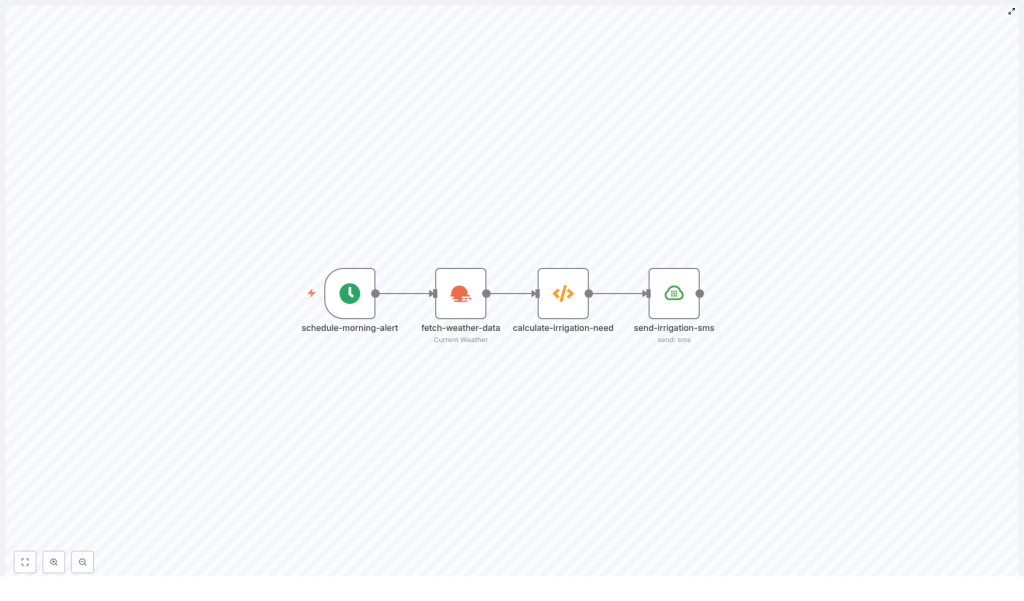
A workflow that runs every morning, pulls current weather from OpenWeatherMap, uses a Function node with simple JavaScript logic to calculate an irrigation recommendation, and then sends a Plivo SMS to her team.
It sounded like a tiny decision engine for her farm, built on four key building blocks:
- Cron trigger – to schedule the workflow every morning at 06:00.
- OpenWeatherMap node – to fetch the current weather for her location.
- Function node – to run custom logic and produce a recommendation.
- Plivo SMS node – to send the final advisory to her crew.
Instead of Marta checking the weather and doing mental math, n8n could do it for her, consistently and on time.
The Logic Behind Marta’s New “Irrigation Brain”
Before she trusted an automation to advise her crew, Marta wanted to understand the logic. The heart of the workflow lived in the Function node, which read three key values from OpenWeatherMap:
- Temperature
- Humidity
- Precipitation description
Based on these, the function returned one of four recommendations: HIGH, MEDIUM, LOW, or NONE. It was intentionally conservative, easy to read, and easy to customize. The JavaScript looked like this:
// Example JavaScript used in the Function node
const temp = $input.first().json.main.temp;
const humidity = $input.first().json.main.humidity;
const precipitation = $input.first().json.weather[0].main;
const description = $input.first().json.weather[0].description;

let irrigationRecommendation = '';

if (temp > 25 && precipitation !== 'Rain') {  irrigationRecommendation = 'HIGH - Irrigate 30-45 min today';
} else if (temp > 20 && precipitation !== 'Rain') {  irrigationRecommendation = 'MEDIUM - Irrigate 15-30 min today';
} else if (precipitation === 'Rain' || description.includes('rain')) {  irrigationRecommendation = 'NONE - Rain expected, skip irrigation';
} else {  irrigationRecommendation = 'LOW - Check soil moisture, irrigate if dry';
}

return {  json: {  ...($input.first().json),  irrigationRecommendation: irrigationRecommendation,  calculatedAt: new Date().toISOString()  }
};
As she walked through it, Marta noticed a few important details and notes that matched how she already thought about irrigation:
- Temperatures above 25°C triggered a HIGH recommendation, which she could adjust for her specific crops.
- If the API reported rain, or if the description included “rain”, the workflow suggested NONE, meaning “skip irrigation today”.
- She could choose Celsius or Fahrenheit, as long as she used the same unit consistently in both OpenWeatherMap and her thresholds.
It was simple, but not simplistic. And most importantly, it was transparent. She could tweak it any time.
Rising Action: Building The Workflow In n8n
On a quiet afternoon, Marta sat down to turn this idea into a real automation. She opened her n8n instance and started to assemble the pieces of the template into a workflow tailored to her farm.
1. Teaching The Workflow When To Wake Up
First, she added a Cron Trigger. This would decide when her irrigation advisor “woke up” each day.
She set it to run once daily at 06:00 and double-checked that the workflow timezone matched her farm’s local timezone in the n8n settings. That way, her crew would receive the SMS before they started their day in the fields.
2. Giving It Eyes On The Weather
Next, Marta configured the OpenWeatherMap node. She chose the Current Weather operation and entered her farm’s coordinates so the data would be as accurate as possible.
She stored her OpenWeatherMap API key in n8n credentials instead of hard-coding it in the node. That small decision kept her workflow secure and easier to maintain.
3. Adding The Decision Logic
With weather data in place, she dropped in a Function node and pasted the JavaScript logic. This was where the real magic happened.
She adjusted the temperature thresholds slightly for her region and crops. She knew that some of her leafy greens did not love extreme heat, so she kept the HIGH recommendation around 25°C, but she made a note that she could refine this later as she collected more data.
She also thought ahead: one day she wanted to add soil moisture sensors. The Function node would be the perfect place to merge sensor readings (via HTTP, MQTT, or a database) with the weather data to make more precise decisions.
4. Finding A Voice: SMS With Plivo
Finally, Marta needed her workflow to “speak” to her team. She connected her Plivo credentials in n8n and added a Plivo SMS node.
Using the data from earlier nodes, she built a message template that looked like this:
Farm: {{ $node["fetch-weather-data"].json["name"] }} - {{ $node["fetch-weather-data"].json["main"]["temp"] }}°C, Rain: {{ $node["fetch-weather-data"].json["weather"][0]["description"] }}. Recommendation: {{ $json["irrigationRecommendation"] }}.She set the “from” number to her Plivo phone number and the “to” number to one of her crew members. Later, she planned to:
- Call the SMS node multiple times for different team members, or
- Use a SplitInBatches node to iterate through a list of recipients.
Within a few clicks, her workflow had a clear voice and a clear audience.
The Turning Point: Testing, Debugging, And First Live Run
Before letting the workflow run on its own, Marta wanted proof that it worked. She treated it like a new hire on the farm: trust, but verify.
Testing The Weather And Logic
- She ran the workflow manually in n8n to check the data coming back from OpenWeatherMap. Temperature, humidity, and precipitation all looked correct.
- Inside the Function node, she used
console.log(...)to log intermediate values while debugging. This helped her see exactly what thresholds were being triggered and which recommendation was returned.
Validating SMS Delivery
- She sent a test SMS to her own phone first, verifying that the message formatting was clear and that the recommendation made sense based on the current weather.
- Once satisfied, she added her crew lead’s number and ran another manual test.
The first time her phone buzzed with an automated advisory, it read something like:
Farm: Salinas - 26°C, light rain unlikely. Recommended irrigation: HIGH - 30-45 min today.It was short, clear, and exactly the kind of guidance she had been trying to provide manually every morning.
Life After Automation: How The Workflow Changed Marta’s Mornings
Within a week, the difference was obvious.
On hot days, her crew received a “HIGH” or “MEDIUM” advisory and set irrigation accordingly, without waiting for Marta to text. On days when OpenWeatherMap reported rain, the message came through as:
NONE - Rain expected, skip irrigationThey stopped watering before storms, saved water, and reduced muddy field conditions that used to slow harvest.
Marta no longer had to open three apps and walk the field at sunrise just to make a call. The workflow did that first pass for her, and she could always override it if needed. Her time shifted from reactive checks to proactive planning.
Customization Ideas Marta Is Already Considering
Once the basic template was running smoothly, Marta started planning the next layer of improvements. The n8n workflow gave her plenty of room to grow:
- Add soil moisture integration: Pull sensor readings via HTTP, MQTT, or a database, then refine irrigation duration based on both soil data and weather.
- Per-field recommendations: Store field information in Airtable or Google Sheets and loop through each entry to calculate specific irrigation plans for each block.
- Use longer-term forecasts: Check 3-day precipitation probability to avoid watering right before a forecasted storm.
- Switch SMS provider: Swap Plivo for Twilio or switch to email alerts if SMS costs become an issue.
For some fields, she also experimented with more detailed alerts that linked to maps or internal tools, such as:
Field A: 26°C, no rain. Irrigation: HIGH (30-45 min). Check map: https://yourfarm.com/fields/AKeeping It Safe And Reliable: Marta’s Best Practices
As her confidence in the workflow grew, Marta made sure it was not only helpful but also safe and robust.
- She stored all API keys and SMS credentials in n8n credentials, not in the workflow JSON.
- She respected OpenWeatherMap usage tiers and rate limits to avoid unexpected charges.
- She added retries and error handling, including an Error Trigger node that notified her via Slack if something failed.
- She logged each advisory in a Google Sheet for future auditing and to improve her rules over time.
When Things Go Wrong: How She Troubleshoots
Not every day is perfect, even with automation. Marta prepared for common issues:
- Empty weather data: She checked the farm coordinates and verified that her OpenWeatherMap API key included access to Current Weather data.
- SMS not sending: She confirmed her Plivo account balance, checked that her numbers were correctly provisioned, and ensured the “from” number included the proper country code.
- Weird timing: When messages arrived at unexpected hours, she double-checked the n8n server timezone and Cron configuration.
Looking Ahead: Advanced Enhancements On The Horizon
As her operation grew, Marta started dreaming bigger. With a bit more infrastructure, she could:
- Incorporate machine learning or evapotranspiration (ET) models to estimate water needs more precisely.
- Integrate satellite soil moisture data or local weather stations for a richer, hyper-local picture.
- Automate valve control, with proper safeguards, so that recommendations could eventually trigger irrigation hardware.
The same n8n template that started as a simple advisory could evolve into a full irrigation decision support system.
From Manual Mornings To Smart Alerts: Your Turn
Marta’s story is not unique. Many small farms face the same tension between water savings, crop protection, and limited time. This n8n workflow template for daily irrigation alerts offers a low-effort way to:
- Reduce water waste by skipping irrigation when rain is expected.
- Align irrigation timing with temperature and crop demand.
- Automate daily reminders so managers can focus on operations instead of weather apps.
- Run on affordable infrastructure, either n8n Cloud or self-hosted.
You can start exactly where Marta did: with a simple rule set, a single SMS, and a morning Cron job.
How To Start With The Template
- Deploy the workflow in your n8n instance.
- Connect your OpenWeatherMap and Plivo credentials in n8n.
- Run a manual test to validate data, logic, and SMS formatting.
- Log results and iterate: adjust temperature thresholds, add soil sensors, or expand to per-field alerts.
If you need a more advanced setup, such as per-field configurations, soil sensor integration, or valve control, you can work with a farm automation specialist or ask for help in the n8n community forums.
Save water, protect your crops, and keep your team informed, one morning SMS at a time.
