


Dynamic n8n Forms for Airtable & Baserow
Every growing business reaches a point where manual form building becomes a bottleneck. You tweak an Airtable or Baserow form, then update the table, then go back and fix the form again. Fields drift out of sync, options change, and you lose more time than you gain.
What if your forms could evolve automatically with your database, stay in sync, and still give you full control over logic and file handling? This is where dynamic n8n forms come in.
In this guide, you will walk through a reusable n8n workflow template that:
- Reads your Airtable or Baserow table schema
- Builds a JSON-driven form dynamically
- Accepts submissions and creates new rows
- Handles file uploads correctly for each backend
Think of this template as a stepping stone into a more automated, focused workflow. Once you set it up, you can reuse it for many tables and projects, then gradually extend it as your automation skills grow.
From manual forms to dynamic automation
Traditional forms tied directly to Airtable or Baserow are convenient at first, but they come with hidden costs. Any time you add a field, rename a column, or adjust options, you have to remember to update the form as well. Over time this leads to:
- Out-of-date fields that confuse users
- Duplicated work across multiple bases and tables
- Limited control over validation and file processing
Shifting your mindset from “build a form” to “generate a form dynamically” is a powerful upgrade. With n8n at the center, your database becomes the single source of truth and your forms simply reflect it.
Why dynamic forms with n8n unlock more focus and freedom
Using n8n to render forms dynamically from your Airtable or Baserow schema gives you tangible benefits that compound over time:
- Single source of truth – The form is generated directly from the live table schema, so labels, options, and required fields stay in sync without manual edits.
- Reusability across projects – The same workflow can support many tables or bases. Change a BaseId or TableId at runtime and instantly get a new form.
- Full control over logic – You own the mapping, typecasting, and conditional rules before anything is written back to Airtable or Baserow.
- Flexible file handling – File uploads are decoupled from row creation, which is ideal when working with different attachment APIs such as Airtable and Baserow.
Instead of rebuilding forms for every new use case, you invest once in a robust template and then iterate. That is the kind of automation that frees you to focus on strategy, not plumbing.
How the template supports your automation journey
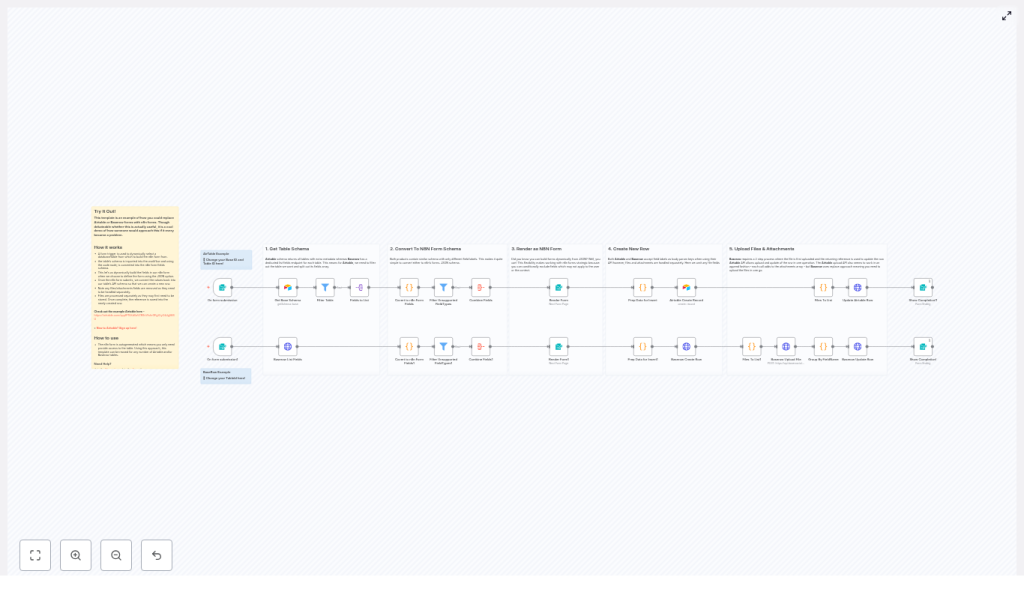
This n8n workflow template implements a five-step flow that works for both Airtable and Baserow. You can treat it as a ready-made foundation that you can understand, trust, and then customize.
Step 1 – Read the table schema
Everything starts when a user opens the form. An n8n Form Trigger (or similar entry point) kicks off the workflow. The first task is to request the table schema:
- Airtable – The workflow reads the base schema, which includes all tables and their metadata.
- Baserow – The workflow calls the dedicated fields endpoint for the selected table.
The returned schema provides field names, types, and select options. In other words, you get all the information needed to build a context-aware form UI automatically.
Step 2 – Convert schema into an n8n form definition
Once the schema is in n8n, Code nodes take over. Their job is to transform each column definition from Airtable or Baserow into n8n form field JSON. This is where the template maps source types to n8n form types, for example:
singleLineText/text→textmultilineText/long_text→textareanumber→numberdateTime/date→datesingleSelect/single_select→dropdownmultipleAttachments/file→file
During this conversion, the workflow also:
- Builds dropdown choices from select fields
- Marks fields as required when needed
- Sets attributes such as
isMultipleSelectormultipleFiles
This step is the “brain” that turns a raw schema into a user-friendly form definition.
Step 3 – Render a dynamic n8n form
After all fields are assembled into a single JSON payload, the workflow uses the n8n Form node in JSON mode to render the actual form. Because you are feeding the form node with JSON built at runtime, you can:
- Hide or modify fields right before rendering
- Provide different experiences for different users or tables
- Support conditional UIs without maintaining separate static forms
At this point you already have a powerful outcome: a fully dynamic form that mirrors your Airtable or Baserow table, without needing to manually configure each field.
Step 4 – Create the new row from form submissions
When a user submits the form, the workflow prepares a clean payload for the target API. This preparation includes:
- Filtering out file or attachment fields that must be handled separately
- Typecasting checkbox and boolean values to true/false
- Structuring the JSON so Airtable or Baserow can accept it for row creation
The template provides slightly different flows for each backend:
- Airtable – First create the record, then append attachments via the upload endpoint.
- Baserow – First create the row, then upload files to the user-files endpoint and finally update the row with file references.
This separation between data fields and file fields keeps your workflow reliable and easier to evolve.
Step 5 – Upload files and update the created row
File handling is processed independently because Airtable and Baserow treat attachments differently. The workflow:
- Collects file inputs from the form submission’s binary data
- Uploads each file to the correct endpoint
- Groups the returned file references by field name
- Updates the newly created row with those file references
This gives you a robust pattern for handling uploads in a way that respects each platform’s API behavior.
Inside the template – key implementation details
To adapt and extend this workflow, it helps to understand the core logic inside the Code nodes. This is where your future customizations will likely live.
Mapping rules and helper functions
The heart of the template is a set of mapping rules that translate between Airtable/Baserow schemas and n8n form fields. Typical logic includes:
createFieldhelper – Builds the JSON structure expected by the n8n Form node, including:fieldLabelfieldTypeformatDatefieldOptionsrequiredFieldplaceholdermultiselectmultipleFilesacceptFileTypes
- Switch-by-type logic – Maps each source field type to the correct n8n type and builds choice lists for select fields.
- File field filtering – Excludes file fields from the initial create-row payload so they can be uploaded first or processed separately.
- Boolean typecasting – Converts checkbox or boolean values into true/false before sending them to the API.
These pieces are all visible and editable, which makes the workflow a great learning tool as well as a production asset.
File handling differences between Airtable and Baserow
Understanding how each backend treats attachments will help you avoid subtle bugs and design better automations:
- Airtable – Accepts attachment uploads when updating a record using a multipart POST. Uploaded files are appended to the attachments array, and you can call the upload API multiple times to add more files.
- Baserow – Uses a two-step process:
- Upload files to the
user-filesendpoint and receive file references such as IDs or URLs. - Patch the row to set the file fields using those references.
Baserow often replaces the existing value instead of appending, so you need to upload all desired files before updating the row.
- Upload files to the
The template already accounts for these differences, so you can rely on it as a safe baseline and then refine it for your own edge cases.
How to start using this n8n template
Getting this workflow running in your own n8n instance is straightforward. Treat these steps as your first experiment in a more automated setup:
- Install or recreate the workflow
Import the template into your n8n instance or manually recreate the nodes using the shared configuration. - Provide credentials
Add an Airtable personal access token for Airtable nodes and an HTTP header credential for Baserow. - Configure BaseId and TableId
Set the BaseId/TableId input fields in the initial form trigger nodes. You can also send them as values from a webhook to dynamically select which table to build the form from. - Test in a safe environment
Use a non-production table to verify that field mapping, required fields, and attachments behave as expected. - Review and iterate
Open the generated form, submit a test entry, and confirm that rows and files appear correctly in Airtable or Baserow. Adjust labels, mapping, or filters as needed.
Once this is working, you have a reusable system you can point at any compatible table.
Avoiding common pitfalls while you build
As you experiment and extend the template, a few common issues are worth watching for. Addressing them early will save you time later.
- Missing or incorrect schema keys
Make sure the Code nodes expect the same field key names that your Airtable or Baserow API returns. Use logs and n8n node execution output to quickly debug mismatches. - Binary field name mismatches
The logic that pulls files from the form submission’s binary data relies on consistent naming. Verify that binary keys match the form field labels you expect. - File size and MIME restrictions
Some APIs enforce file size or type limits. Handle upload errors gracefully and provide clear messages if a file is too large or unsupported. - Replace vs append behavior
Remember that Baserow typically replaces file fields, while Airtable can append new attachments. Adjust your grouping and update logic to reflect that difference.
Each challenge you solve here will deepen your understanding of n8n and make future automations smoother.
Use cases that benefit from dynamic n8n forms
Once you see this pattern in action, you will notice many places where it can simplify your work. Some common scenarios include:
- Internal intake forms that must map directly to structured databases for operations, support, or onboarding.
- White-labeled front-ends where you want a consistent UX across many tables or clients without rebuilding forms each time.
- Conditional forms where certain fields appear only for specific tables, user roles, or business rules.
From here, you can expand the template in ways that match your goals:
- Add validation rules for stricter data quality
- Send email or Slack notifications on new submissions
- Control field visibility based on user role or table configuration
- Layer in authentication, rate limiting, and logging for production use
Each improvement turns this template from a simple helper into a central hub for your form-based workflows.
Next steps – grow your automation, one template at a time
Using n8n to dynamically generate forms from Airtable or Baserow schema is more than a technical trick. It is a mindset shift toward reusable, maintainable automation. You reduce duplication, keep logic in one place, and free yourself from constantly rebuilding forms.
This template is a strong starting point. You can:
- Plug in your BaseId/TableId
- Connect your Airtable and Baserow credentials
- Run a test submission and watch the row and files appear
From there, copy the workflow, explore the conversion code, and extend it with additional types or custom constraints that match your exact needs.
If you ever feel stuck, you are not alone. Join the n8n Discord or Forum, share your table schema, and ask for mapping suggestions. The community and ecosystem are there to support your automation journey.
Ready to take the next step? Import the template into your n8n instance, run a test, and see how much time you can reclaim by letting n8n build your forms for you.
Try the template now and start simplifying your Airtable and Baserow workflows with dynamic n8n forms.
