


Effective Workflow for Creating Blog Posts from YouTube Transcripts
Turning YouTube videos into written blog posts is one of the most efficient ways to repurpose content, improve SEO, and reach a wider audience. With n8n, you can automate this entire process, from grabbing the video URL to publishing a polished article.
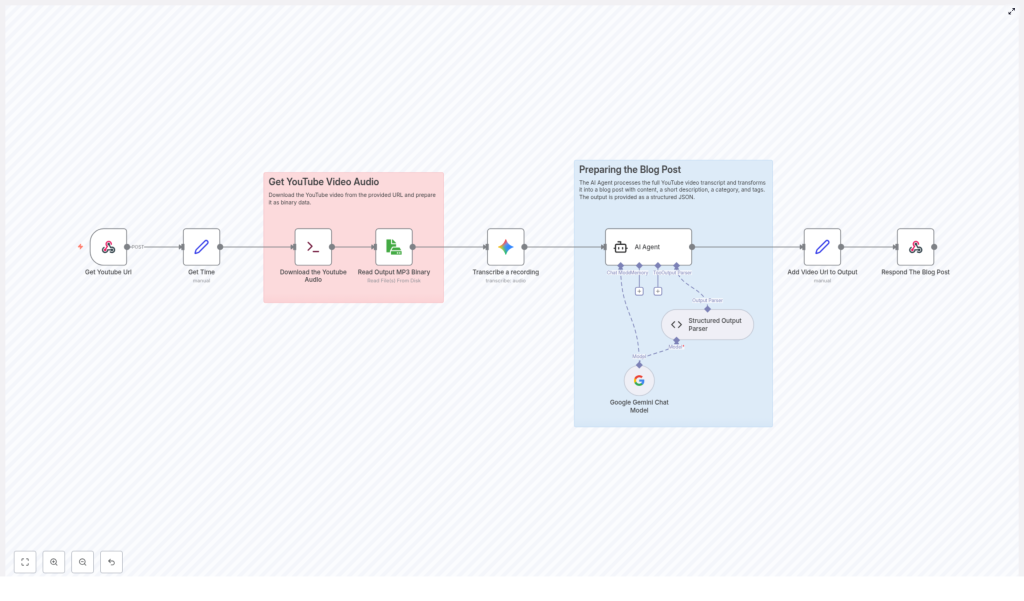
This guide explains how an n8n workflow template can automatically extract audio from a YouTube video, transcribe it, and generate a structured blog post using AI. The goal is to help you understand each part of the workflow so you can use, customize, and trust it in your own content strategy.
What You Will Learn
By the end of this tutorial-style walkthrough, you will understand:
- How an n8n workflow takes a YouTube video URL and prepares it for processing
- How the workflow downloads and reads the audio track from the video
- How transcription works within the automation
- How AI turns the raw transcript into a clear, SEO-friendly blog post
- How the final output is assembled, including the original video link
- Why automating video-to-blog conversion is valuable for content and SEO
Core Concept: Automating Video-to-Blog Conversion in n8n
At a high level, this n8n template follows a simple but powerful idea:
- Take a YouTube video URL as input
- Extract only the audio from the video
- Transcribe the spoken words into text
- Use AI to transform that transcript into a structured blog post
- Attach the original YouTube URL and return the final content
Each of these steps is handled by a specific part of the workflow. Understanding these parts will make it easier to adapt the template to your own tools, formats, or publishing process.
Step-by-Step: How the n8n Workflow Template Works
Step 1 – Capture the YouTube Video URL
Every run of the workflow starts with a YouTube video URL. In n8n, this can come from several possible triggers or inputs, for example:
- A manual input when you execute the workflow
- A form submission where someone pastes a YouTube link
- An automated trigger from another system or integration
This step is simple but essential. The URL is the unique identifier that tells the workflow exactly which video to process. If the URL is wrong or missing, all later steps will fail, so the workflow is typically designed to accept and store this URL as the first piece of data.
Step 2 – Download the YouTube Audio Track
Once the workflow has the correct YouTube URL, the next goal is to extract the audio track from the video. In the template, this is handled using tools or services that can:
- Connect to YouTube using the provided URL
- Download only the audio portion, not the full video file
- Save the audio in a common format, most often MP3
Focusing on audio instead of the full video has two key benefits:
- Lower data usage – Audio files are smaller than video, so they download and upload faster.
- Faster processing – Transcription services work directly on audio, so there is no need to handle large video files.
By the end of this step, the workflow has a downloadable audio file associated with the original YouTube link.
Step 3 – Read and Prepare the Audio File for Transcription
After the audio file is downloaded, the workflow needs to prepare it for the transcription service. In n8n, this generally means:
- Reading the audio file from where it was stored or downloaded
- Ensuring the file format is compatible with the transcription tool (typically MP3)
- Making the file accessible to the next node in the workflow
This preparation step is mostly about proper file handling. The workflow keeps track of where the file lives and passes a reference to it forward so the transcription node can access it without issues.
Step 4 – Transcribe the Audio into Text
This is the central transformation in the workflow. The audio file is sent to a transcription service, often powered by AI and modern speech recognition technology. The transcription component will:
- Process the MP3 audio file
- Detect spoken language and convert speech to text
- Return a full transcript of the video’s audio
Thanks to advances in AI, transcription is usually both fast and reasonably accurate, even for longer videos. The result is a raw text transcript that includes everything said in the video, but not yet organized like a blog post.
Step 5 – Use AI to Generate a Structured Blog Post
With the transcript ready, the workflow passes this text to an AI-based content generation step. Here, a language model analyzes the transcript and turns it into a readable article. In this part of the n8n workflow, the AI typically:
- Identifies the main topics and themes in the transcript
- Reorganizes content into logical sections and paragraphs
- Improves clarity, flow, and readability
- Generates a compelling blog title
- Suggests categories and tags that fit the topic
The goal is to move from a raw, unstructured transcript to a polished, engaging blog post that feels like it was written for readers, not just copied from spoken language.
This step is also where SEO considerations can be added. The AI can be guided to use descriptive headings, clear keyword phrases related to the topic, and a structure that search engines can easily understand.
Step 6 – Append the Original Video URL and Prepare the Final Output
To make the blog post complete and transparent, the workflow attaches the original YouTube video URL to the final content. This is useful because:
- Readers can watch the original video if they want more context
- You maintain a clear link between the source material and the written article
- It encourages cross-traffic between your video channel and your blog
In the final step of the workflow, n8n prepares the finished blog post for delivery. Depending on how you configure the template, this might involve:
- Returning the content as a response in n8n for manual review
- Sending it to a CMS or publishing platform via an integration
- Storing it in a database or document system for later use
At this point, you have a complete article with:
- A structured blog body based on the transcript
- An AI-generated title, categories, and tags
- The original YouTube video URL included for reference
Why Automate Blog Creation from YouTube Videos?
Automating this process with an n8n workflow template provides several practical benefits for creators, marketers, and teams.
Time Efficiency
Manual transcription and writing can be slow. Automation reduces repetitive work so you can focus on strategy, editing, and higher value tasks instead of copying content by hand.
Consistent Tone and Style
Using the same AI-driven process for each video helps maintain a standardized voice across all your blog posts. This consistency strengthens your brand and makes your content feel more cohesive.
SEO Optimization
Every video you publish can also become an SEO-friendly article. The AI can help generate relevant titles and tags, and the structured blog format makes it easier for search engines to index your content.
Improved Accessibility
Not everyone prefers or can access video content. Providing a written version makes your ideas available to a wider audience, including people who:
- Have hearing impairments
- Prefer reading over watching
- Need to quickly scan content instead of viewing a full video
Quick Recap
Here is a short summary of how the n8n workflow template turns a YouTube video into a blog post:
- You provide a YouTube video URL.
- The workflow downloads the audio track from that video.
- The audio file is read and prepared for transcription.
- An AI transcription service converts the audio into text.
- A language model analyzes the transcript and generates a structured blog post with headings, title, categories, and tags.
- The original YouTube URL is added to the final article, which is then returned or sent to your chosen destination.
This end-to-end automation lets you repurpose your video content into written articles with minimal manual effort while keeping quality and structure high.
FAQ: Using an n8n Workflow for YouTube-to-Blog Automation
Do I need to download the full video file?
No. The workflow is designed to download only the audio track. This saves bandwidth and speeds up both download and transcription.
What format is the audio file?
The downloaded audio is typically stored as an MP3 file. This format is widely supported and works well with most transcription services.
Can I edit the AI-generated blog post?
Yes. The workflow produces a complete draft, but you can always review, refine, and adjust the content before publishing to match your style or add extra details.
Will the workflow always include the original YouTube link?
Yes. A dedicated step appends the video URL to the final output so readers can trace the content back to its source.
Start Using the n8n Template
Automating the conversion of YouTube videos into blog posts can transform your content strategy. With this n8n workflow template, you can quickly:
- Scale your content production
- Improve accessibility and SEO
- Keep your brand voice consistent across formats
Ready to put this workflow into action and grow your audience with less manual work?
